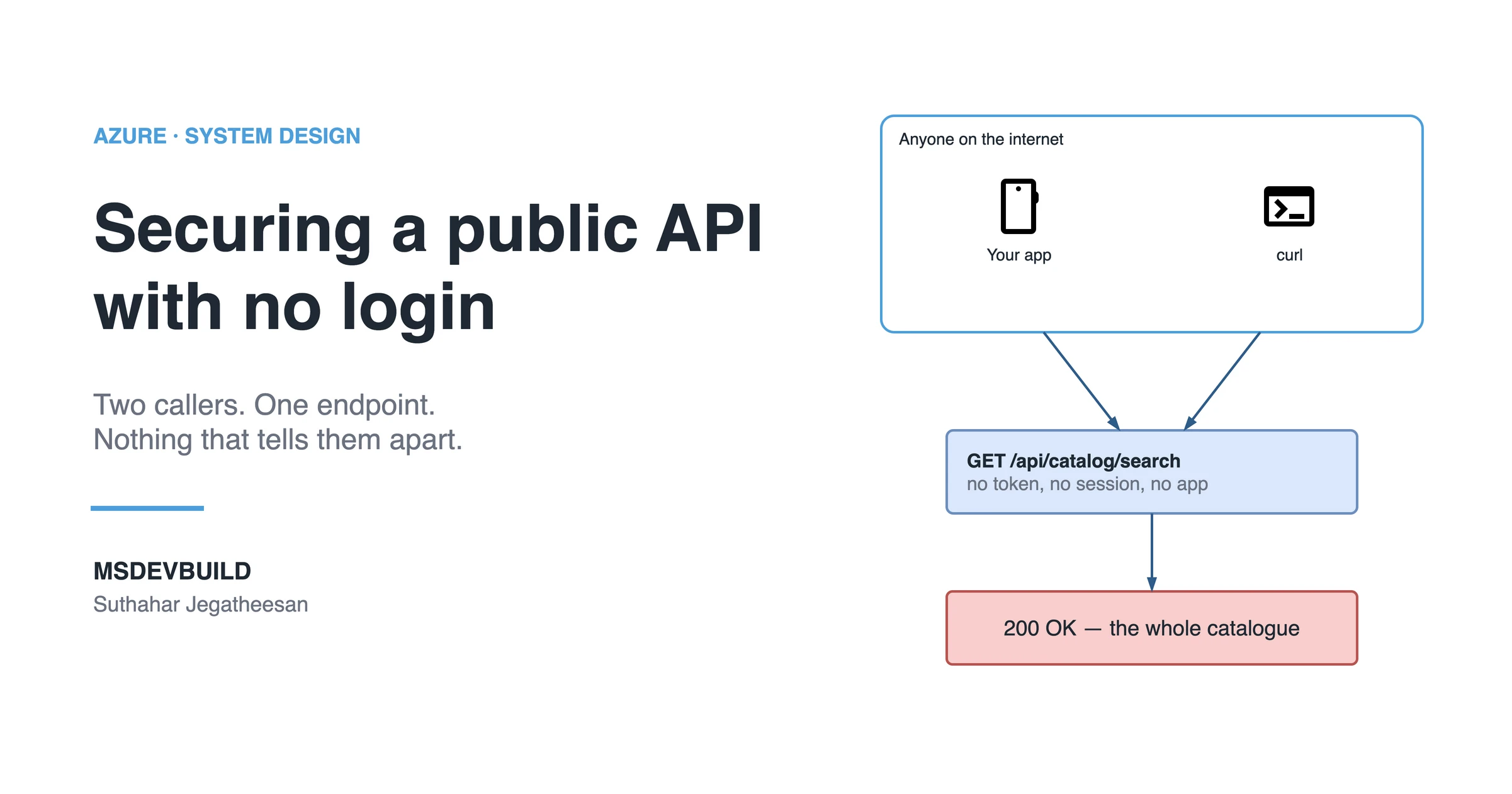
Have you ever asked yourself how Amazon, eBay, and Shopee manage their products, prices, seller information, and APIs so securely?
Open any of them right now, without signing in. You can search the whole catalogue. You can read product names, flick through the images, compare prices, check the star rating, and see which seller is behind the listing. Nobody asked who you are. Nothing stopped you.
Now try to buy something. A login screen appears. Same if you open your addresses, your order history, or the payment step. The moment a request touches money or a person, the door closes.
That split is not a UI decision, and it is not an accident. It is an architecture decision, made on the server, about which requests deserve an answer and which ones do not.
Which raises the question this article is about: how does a platform publish an API that anyone on the internet may call, while everything behind it stays shut?
It sounds like a small distinction. It is one of the harder problems in a public-facing system, because “open to everyone” and “open to everything” sit one careless line of code apart. Answering it properly pulls in public versus protected endpoints, authentication and authorization (two different questions that get treated as one), access tokens, the API key you should never ship, rate limiting, how much data a public response is allowed to carry, where validation actually has to run, and how you keep business logic out of reach of somebody holding a terminal.
I learned the shape of this the expensive way.
A restaurant partner in Coimbatore rang me on a Tuesday to ask why his new biryani was listed on a price comparison site. The item was not live yet. It existed in our catalogue with a launch date two days out, and the app knew not to show it.
The comparison site knew anyway. Nobody had leaked anything. Our own search API had told them, politely, several thousand times an hour, for about three weeks.
The requirement was correct. The trust was not.
Customers could browse restaurants and search dishes without signing in. That was deliberate. I still think it was right, because asking someone to create an account before they have seen a single menu makes most of them leave.
The bug was not the open browsing. It was what the backend accepted as proof that a request deserved an answer.
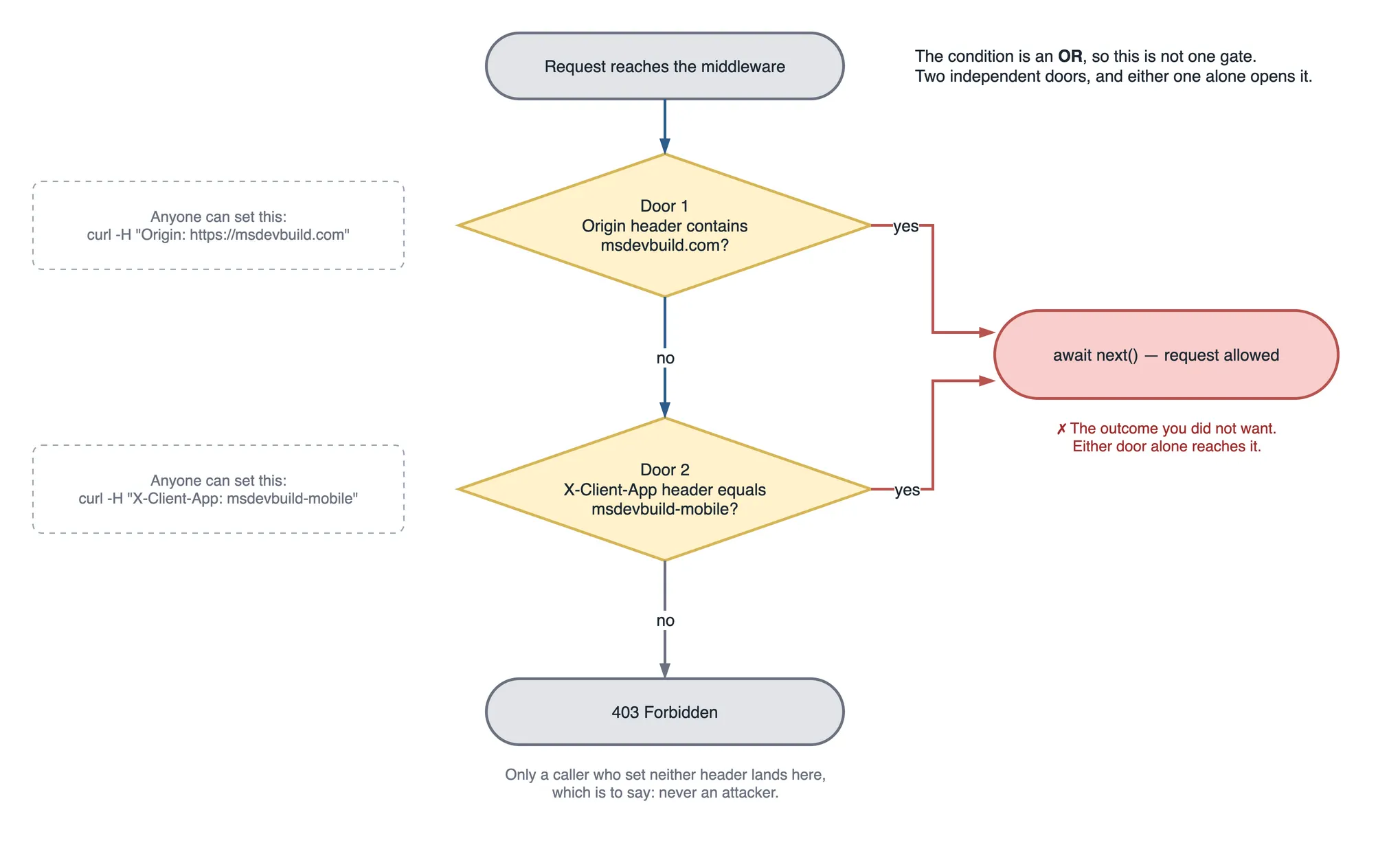
// The middleware we thought was protecting the catalogue.
app.Use(async (ctx, next) =>
{
    var origin = ctx.Request.Headers.Origin.ToString();
    var client = ctx.Request.Headers["X-Client-App"].ToString();

    if (origin.Contains("msdevbuild.com") || client == "msdevbuild-mobile")
    {
        await next();   // "it came from our app, so it is fine"
        return;
    }

    ctx.Response.StatusCode = StatusCodes.Status403Forbidden;
});
Read that if again. It authenticates a channel, not a caller. Both values are strings the client chooses, and the client is not our app. The client is whoever is sending the bytes.
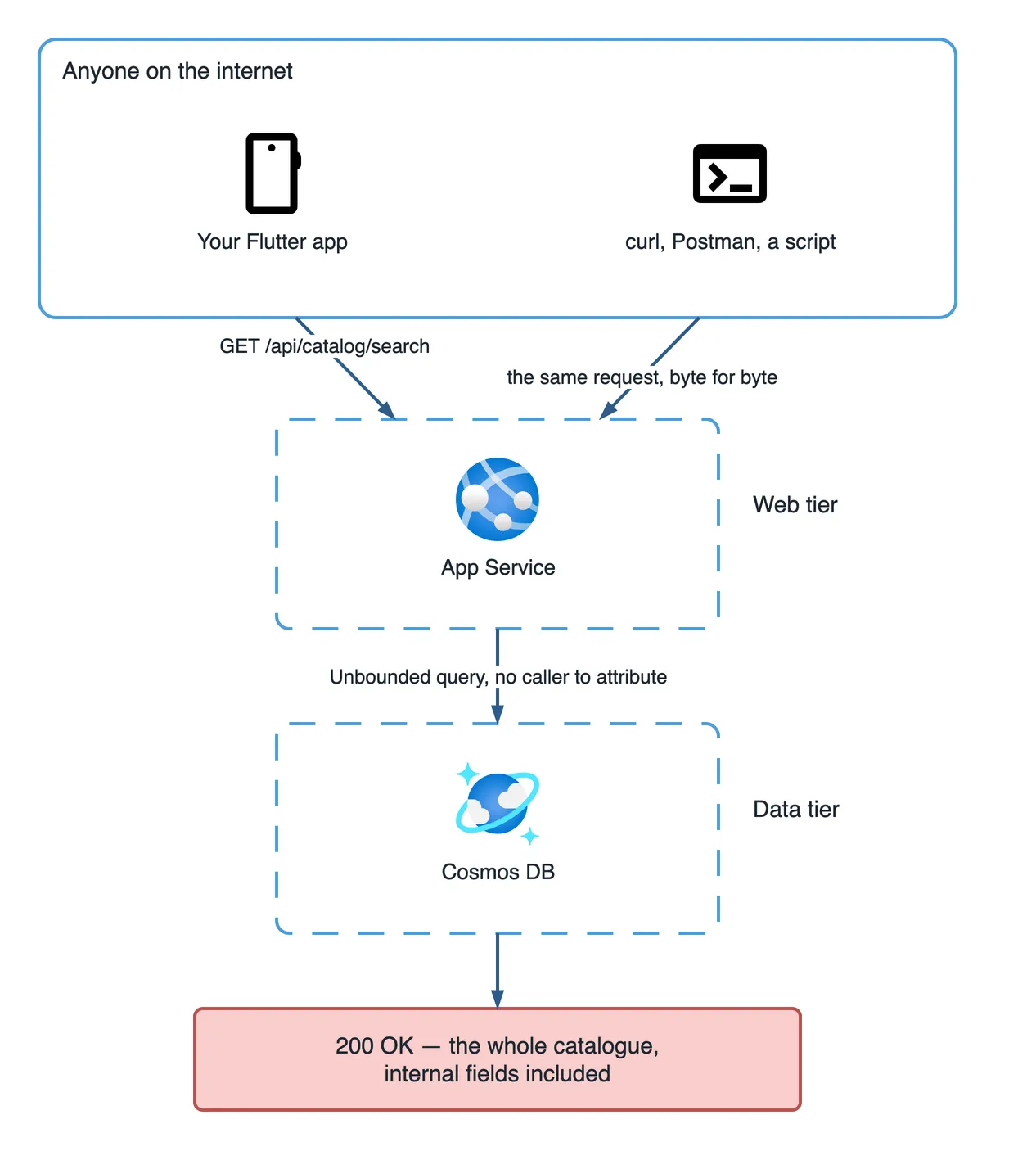
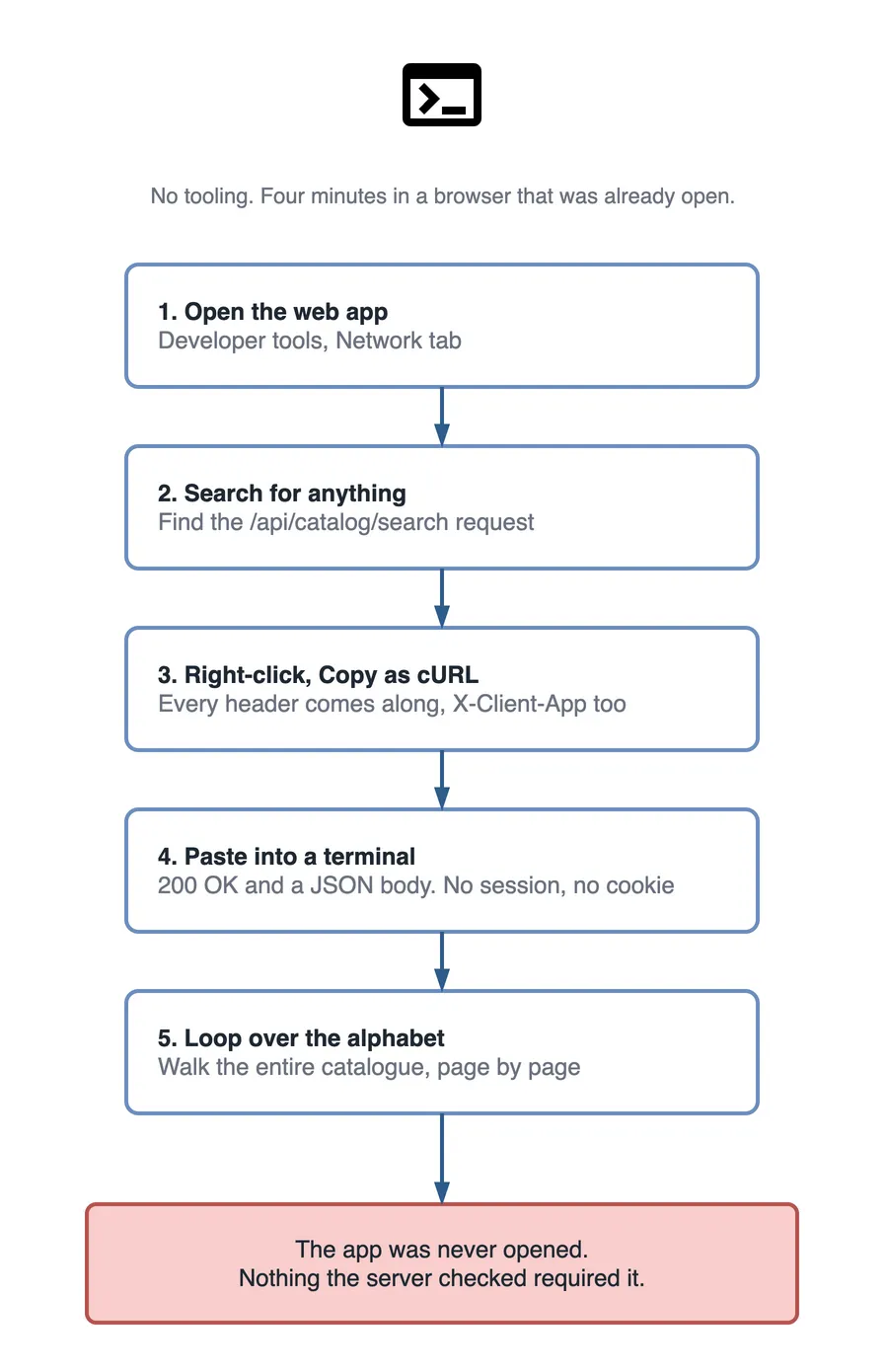
How an attacker calls your API without opening your app
No tooling is needed for this. That is the part that stings. Four minutes in the browser I already had open was enough to reproduce exactly what the scraper had been doing for three weeks.
The mobile path is barely longer. An APK is a zip file, so anything baked inside it is readable, which I wrote about at length in why a hardcoded key in a mobile app is already public. Point the device at mitmproxy for ten minutes and you have the request shape, the headers and the token, if any.
Every check we had, and several we considered adding, costs an attacker about this much:
| The check that felt like security | How it gets bypassed | Effort |
|---|---|---|
Origin or Referer header | Set the header in curl | Seconds |
| CORS allow-list | CORS is enforced by browsers, not by servers | Seconds |
Custom header like X-Client-App | Copy it out of the Network tab | Seconds |
User-Agent match | One flag on curl | Seconds |
| API key shipped inside the app | Unzip the APK, or read the JS bundle | Minutes |
| TLS certificate pinning | Frida on a rooted device, or a patched build | Hours |
| Play Integrity or App Attest attestation | Needs a genuine device and an unmodified build | Expensive, and it shows up in your logs |
Only the last row matters. Everything above it is theatre. The gap between “seconds” and “expensive, and it shows up in your logs” is the whole engineering problem, and closing that gap is the only work here worth paying for.
What the abuse actually cost us
The security story was the smaller half. The bill and the outage arrived first, and we misread both.
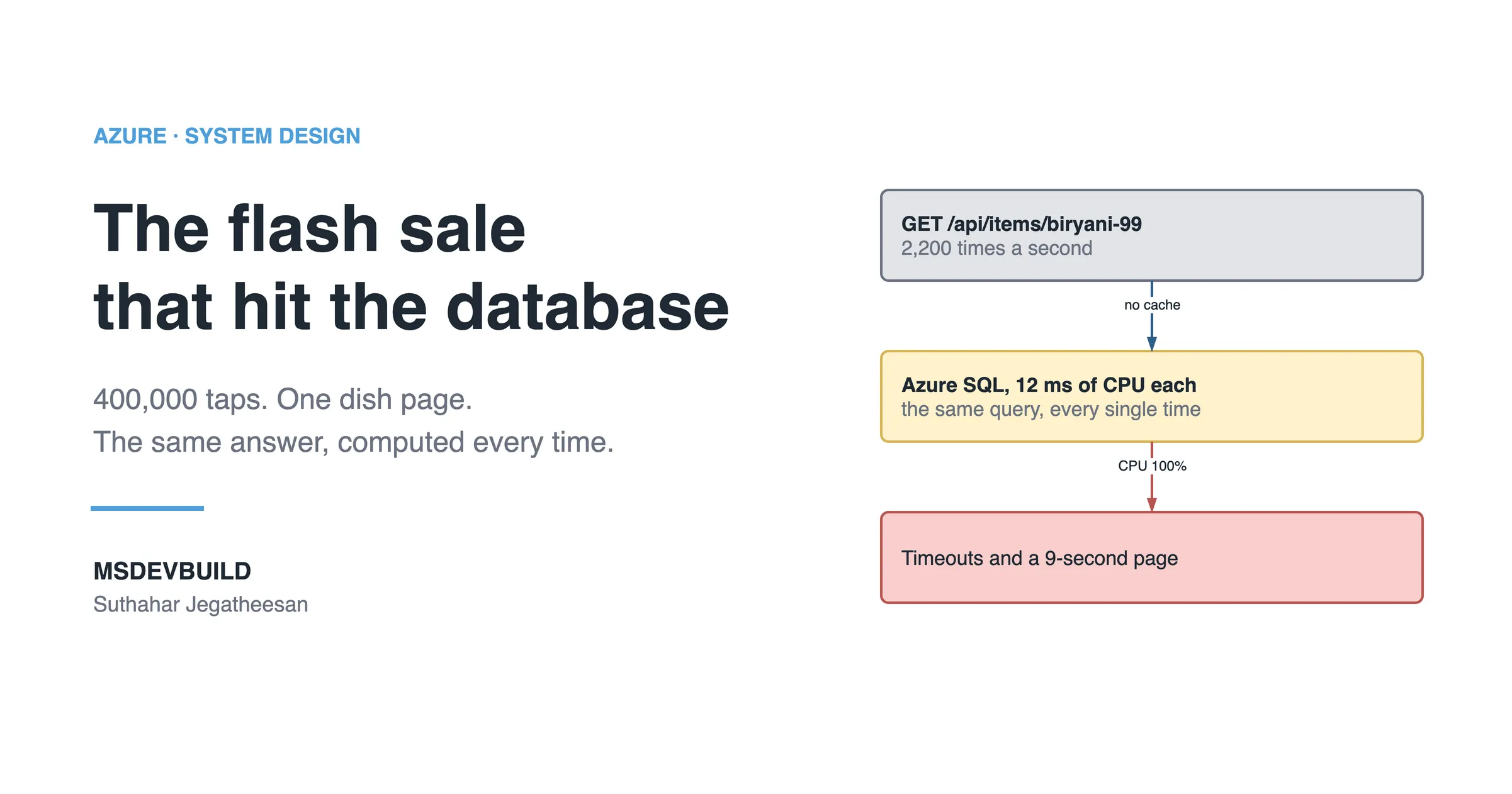
Search was the expensive endpoint. A normal query from the app was a partition-scoped read of around 4 request units in Cosmos DB, because the app always sent a restaurant or a category along with the term. The scraper sent single letters. Those fanned out across every partition at upward of 60 RU each, roughly 180,000 times a day, from nine IP addresses.
Then came a Friday evening promotion, and real customers started seeing empty search results. We had hit provisioned throughput on the container. Cosmos returned 429 to everyone, without any opinion about who was worth serving.
How can a mobile app call an API without a login?
The app asks your API for a token of its own, before the user touches anything. The user stays anonymous. The call does not.
This is the sentence that unlocked the design for me: anonymous and unauthenticated are different states. Anonymous means I do not know who you are. Unauthenticated means I do not know anything at all, including how many times you have called me today.
| Approach | What the API gets | Good for |
|---|---|---|
| Guest JWT your own API signs | A sub you invented, a scope, a 15-minute expiry | Full control, no extra dependency, web and mobile alike |
| Firebase Anonymous Auth | A real Firebase uid, upgradeable to an account on sign-up | Apps already on Firebase, and carrying a cart across sign-up |
| Entra External ID guest flow | A CIAM token from Microsoft’s identity platform | Tenants that want one identity provider for everything |
An API Management subscription key is not on that list on purpose. It identifies a subscription, not a caller, and once it ships inside a client every caller shares it.
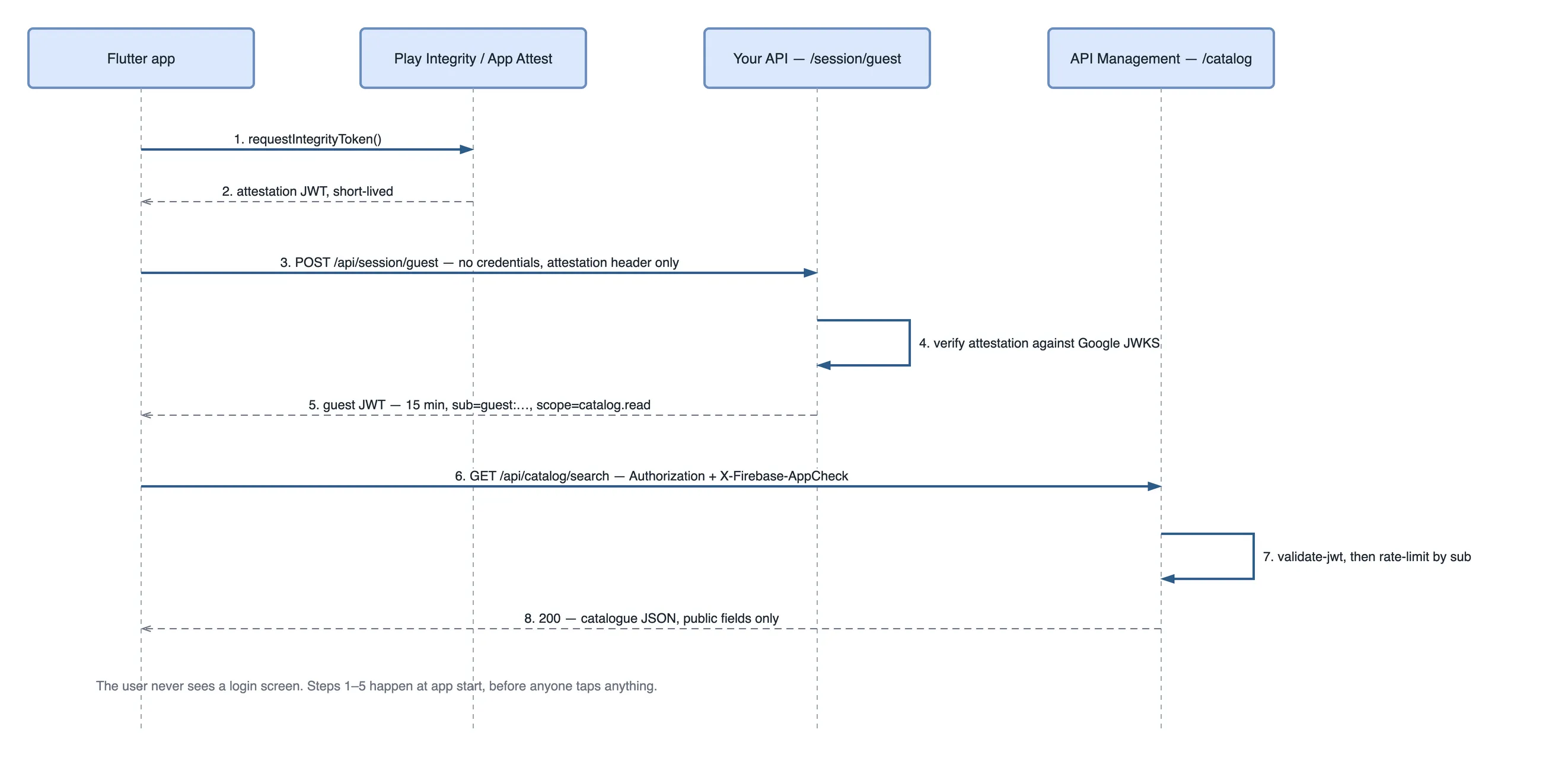
app.MapPost("/api/session/guest", (IGuestTokens tokens, HttpContext ctx) =>
{
    // No credentials are presented. The caller receives an identity,
    // not a user account.
    var token = tokens.Issue(clientType: ctx.Request.Headers["X-Client-Type"]);
    return Results.Ok(new { access_token = token, expires_in = 900 });
})
.RequireAppCheck()                      // attestation, covered below
.RequireRateLimiting("guest-issue");    // 5 per minute per IP

public sealed class GuestTokens(IOptions<GuestTokenOptions> opts) : IGuestTokens
{
    public string Issue(string clientType)
    {
        var o = opts.Value;
        var descriptor = new SecurityTokenDescriptor
        {
            Issuer = o.Issuer,
            Audience = "msdevbuild-catalog",
            Expires = DateTime.UtcNow.AddMinutes(15),
            SigningCredentials = new SigningCredentials(
                new SymmetricSecurityKey(Convert.FromBase64String(o.SigningKey)),
                SecurityAlgorithms.HmacSha256),
            Claims = new Dictionary<string, object>
            {
                ["sub"] = $"guest:{Guid.NewGuid():n}",
                ["scope"] = "catalog.read",   // the only thing a guest may do
                ["client"] = clientType,
            },
        };

        return new JsonWebTokenHandler().CreateToken(descriptor);
    }
}
Three details in there are load-bearing. The expiry is fifteen minutes, so a token copied out of a proxy is worthless by the time anyone builds a script around it. The scope claim names read-only catalogue access and nothing else, so the same token cannot place an order even if the routing changes next year. And o.SigningKey comes from Key Vault through a managed identity, never from appsettings.json, because a signing key in the repo lets anyone mint guests.
The client side is an interceptor that refreshes the token when it is close to expiry and attaches both headers:
class GuestSessionInterceptor extends Interceptor {
  GuestSessionInterceptor(this._session, this._appCheck);

  final GuestSession _session;
  final AppCheckService _appCheck;

  @override
  Future<void> onRequest(RequestOptions options, RequestInterceptorHandler h) async {
    options.headers['Authorization'] = 'Bearer ${await _session.token()}';
    options.headers['X-Firebase-AppCheck'] = await _appCheck.token();
    h.next(options);
  }
}What attestation adds
A guest token proves somebody asked you for a token. Nothing more. It does not prove the asking happened inside your app, and attestation is the only piece that speaks to that question at all.
Firebase App Check wraps Play Integrity on Android, App Attest on iOS, and reCAPTCHA Enterprise on the web, then hands your app a short-lived JWT you verify server-side against Google’s public keys. The verification itself is dull. Ordinary JWT validation, with a specific issuer and audience:
// Audience is "projects/<your project number>"; issuer is
// https://firebaseappcheck.googleapis.com/<project number>.
// Keys: https://firebaseappcheck.googleapis.com/v1/jwks
var result = await new JsonWebTokenHandler().ValidateTokenAsync(appCheckJwt,
    new TokenValidationParameters
    {
        ValidIssuer = $"https://firebaseappcheck.googleapis.com/{projectNumber}",
        ValidAudience = $"projects/{projectNumber}",
        IssuerSigningKeys = await _jwks.GetKeysAsync(ct),
    });

if (!result.IsValid) return Results.Unauthorized();
Run it in monitoring mode for a fortnight before you enforce it. We found 6% of live traffic failing attestation on day one. Almost none of it was attackers: old app versions mostly, plus a handful of rooted devices belonging to developers. Enforce on day one and the outage is yours, not theirs.
How does the API server authenticate a request with no user?
It authenticates the client rather than the person, and it keeps that separate from the question of what the request may do. Three questions, answered by three different things, none of which needs a username.
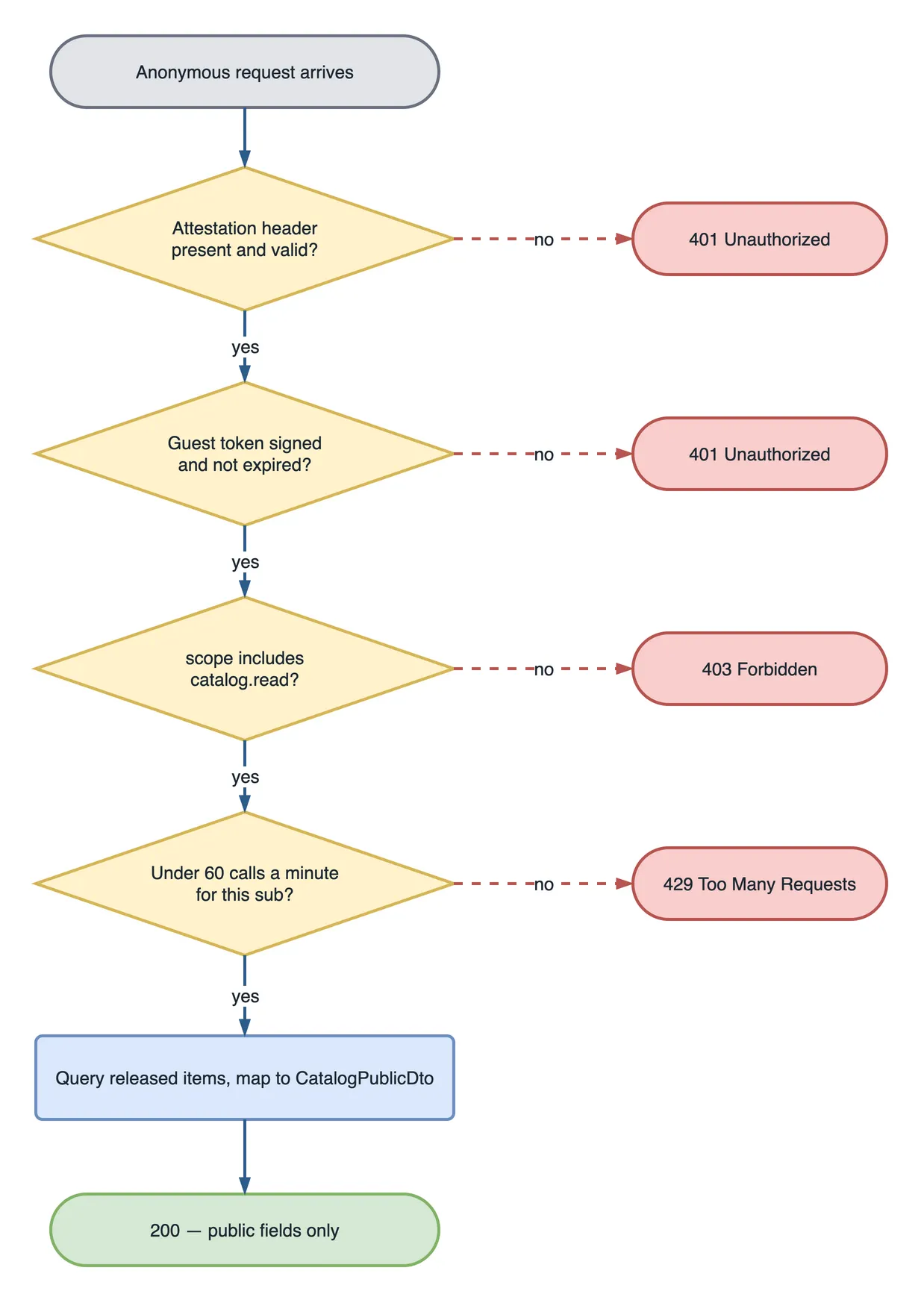
Deny by default
This is the change I would make first if I could only make one. The old configuration opened endpoints one at a time with AllowAnonymous, which means every endpoint written afterwards inherited whatever the default happened to be. Invert it:
builder.Services.AddAuthorizationBuilder()
    // Nothing is reachable unless a policy says so. An endpoint added next
    // year by someone who has never read this file is closed, not open.
    .SetFallbackPolicy(new AuthorizationPolicyBuilder()
        .RequireAuthenticatedUser()
        .Build())

    .AddPolicy("CatalogRead", p => p
        .RequireAuthenticatedUser()
        .RequireClaim("scope", "catalog.read"))

    // A guest is authenticated. A guest is still not allowed to buy anything.
    .AddPolicy("PlaceOrder", p => p
        .RequireAuthenticatedUser()
        .RequireClaim("scope", "orders.write")
        .RequireAssertion(c =>
            !(c.User.FindFirst("sub")?.Value ?? "").StartsWith("guest:")));
The PlaceOrder assertion is the line that proves the model works. A guest token authenticates its caller perfectly well. It still cannot reach checkout. If you have wired JWT bearer validation into a Minimal API before, this is the same handler doing the same job, and I walked through that setup in securing a .NET Minimal API with JWT bearer authentication.
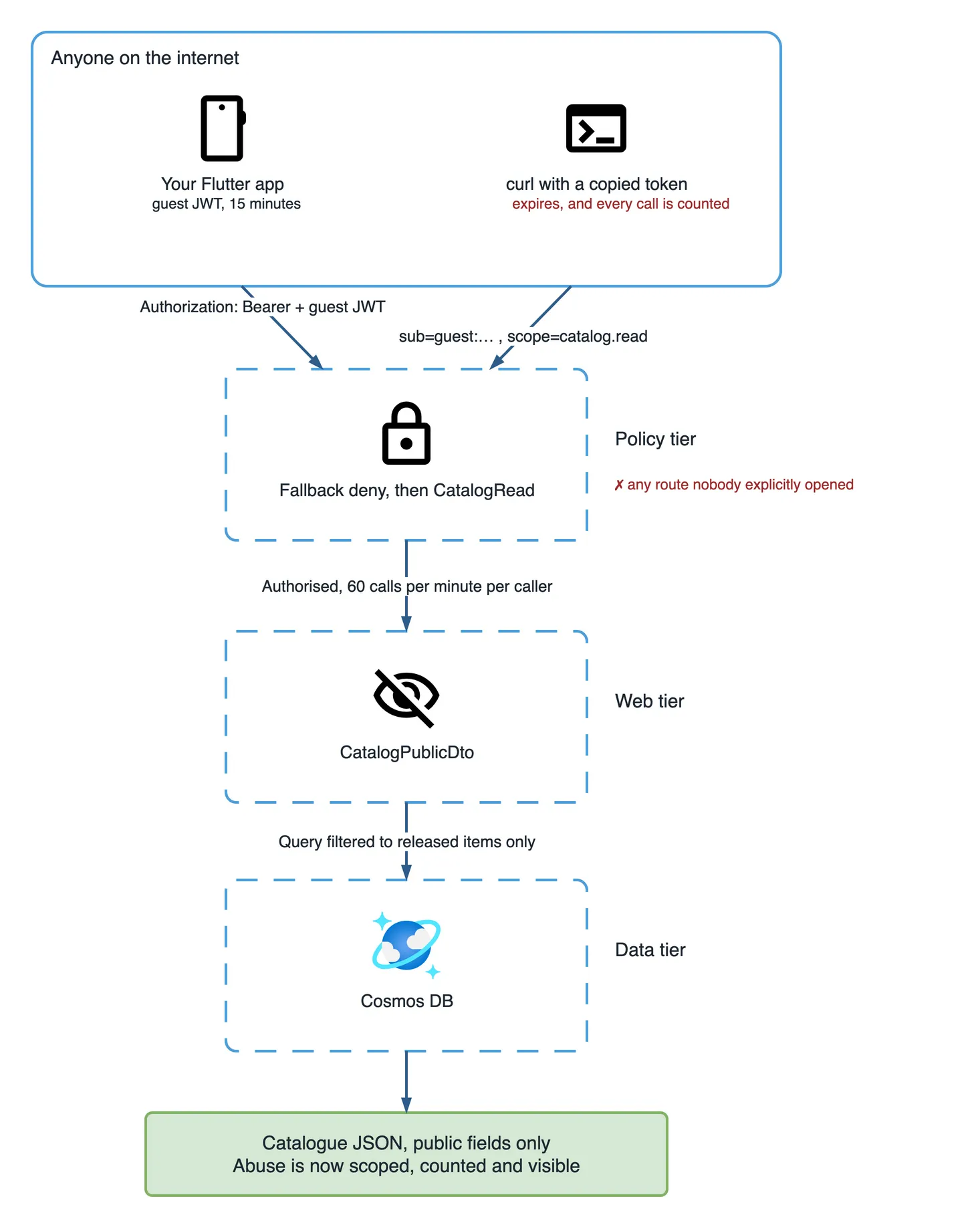
Counting the caller, not the IP
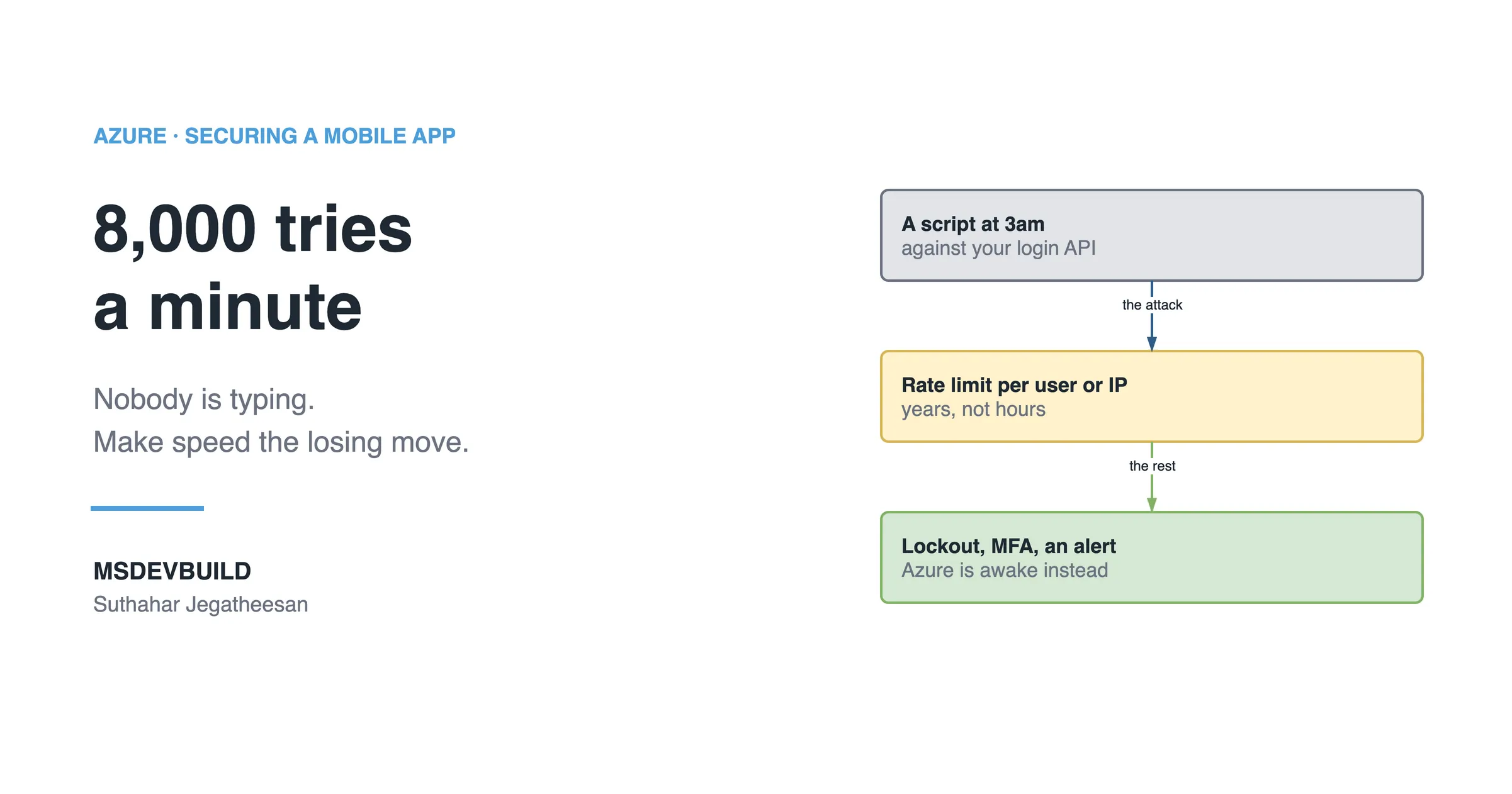
Rate limiting partitions on the token subject rather than the IP address, because IPs rotate hourly on a residential proxy pool and a whole office shares one behind NAT:
builder.Services.AddRateLimiter(o =>
{
    o.RejectionStatusCode = StatusCodes.Status429TooManyRequests;
    o.AddPolicy("catalog", ctx =>
    {
        var key = ctx.User.FindFirst("sub")?.Value
                  ?? ctx.Connection.RemoteIpAddress?.ToString()
                  ?? "unknown";

        return RateLimitPartition.GetTokenBucketLimiter(key, _ =>
            new TokenBucketRateLimiterOptions
            {
                TokenLimit = 60,
                TokensPerPeriod = 60,
                ReplenishmentPeriod = TimeSpan.FromMinutes(1),
                QueueLimit = 0,
            });
    });
});
In front of that, API Management does the same counting before the traffic ever reaches your compute, which is the cheaper place to reject it. The validate-jwt policy and rate-limit-by-key pair up like this:
<inbound>
  <base />
  <validate-jwt header-name="Authorization" failed-validation-httpcode="401"
                require-expiration-time="true">
    <openid-config url="https://api.msdevbuild.com/.well-known/openid-configuration" />
    <audiences><audience>msdevbuild-catalog</audience></audiences>
    <required-claims>
      <claim name="scope" match="any"><value>catalog.read</value></claim>
    </required-claims>
  </validate-jwt>

  <check-header name="X-Firebase-AppCheck" failed-check-httpcode="401"
                failed-check-error-message="Attestation required" ignore-case="true" />

  <rate-limit-by-key calls="60" renewal-period="60"
    counter-key="@(context.Request.Headers.GetValueOrDefault("Authorization","").AsJwt()?.Subject
                   ?? context.Request.IpAddress)" />
  <quota-by-key calls="5000" renewal-period="86400"
    counter-key="@(context.Request.Headers.GetValueOrDefault("Authorization","").AsJwt()?.Subject
                   ?? context.Request.IpAddress)" />
</inbound>
None of it means anything while the App Service still answers the open internet directly, so the origin gets locked to Front Door:
az webapp config access-restriction add \
  --resource-group rg-msdevbuild-prod --name msdevbuild-api \
  --rule-name allow-front-door --priority 100 --action Allow \
  --service-tag AzureFrontDoor.Backend \
  --http-header x-azure-fdid=<your-front-door-id>
That header rule is the part people skip. The service tag alone allows every Front Door instance in Azure, including one an attacker creates in five minutes. The full request path, layer by layer, is the subject of how Azure protects a mobile app.
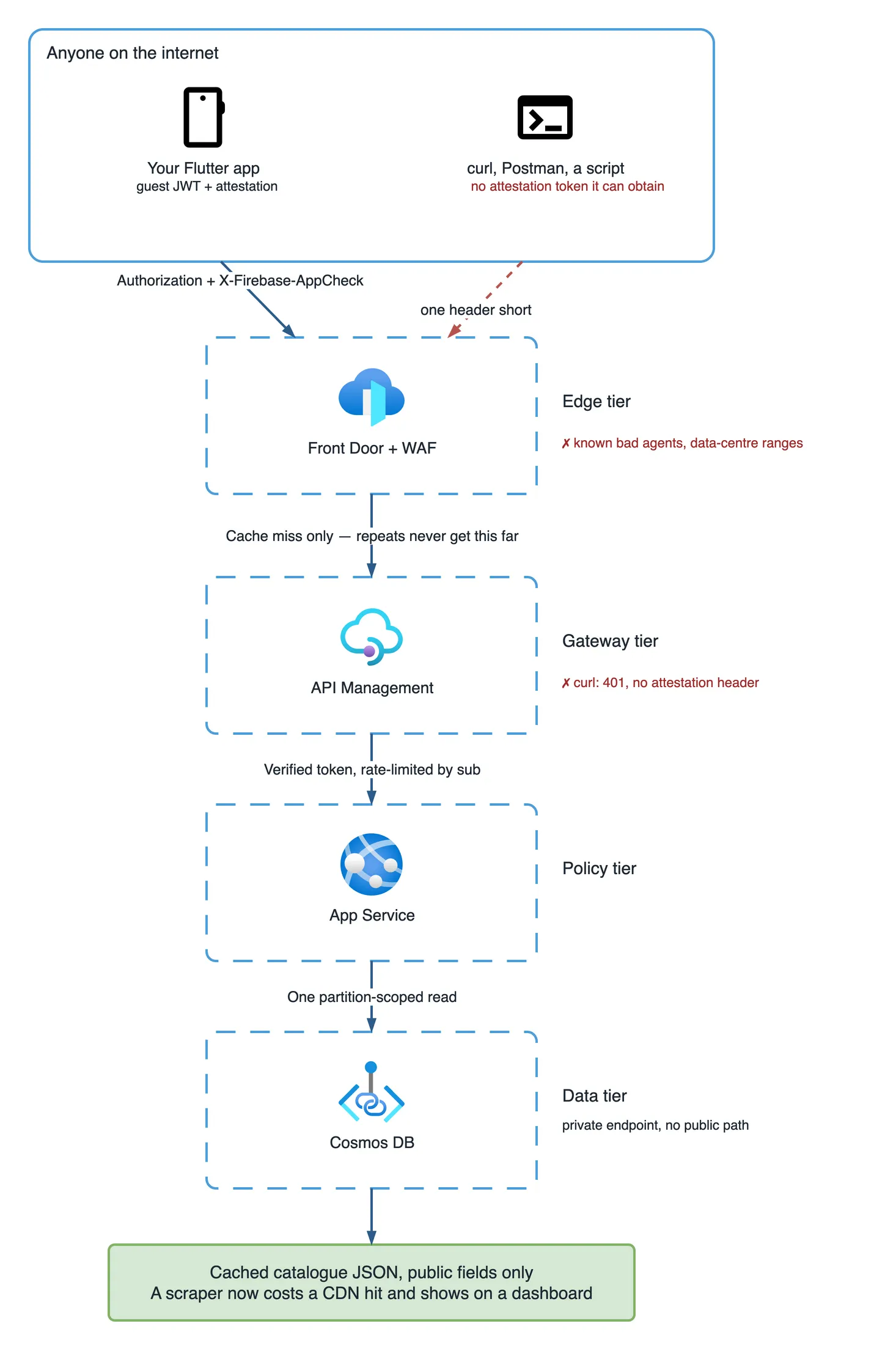
The fix, in the order we shipped it
Order mattered more than I expected. Three of these steps are impossible until an earlier one exists.
- Strip the internal fields from the public response. One afternoon, no dependencies, and it closed the actual leak.
- Issue guest tokens and have the clients attach them, while the old path still works.
- Turn on the fallback deny policy and open the catalogue routes explicitly.
- Rate-limit by token subject. Impossible before step 2, because there was nothing to count.
- Put Front Door in front, cache the catalogue GETs, lock the origin to the Front Door ID.
- Enforce App Check after a fortnight in monitoring mode.
Twelve days end to end, with the app store release for step 2 taking most of it. That release cadence is the reason step 1 went first: a server-side change ships in an hour, and anything needing a new app version ships when Apple feels like it.
Why the obvious fixes did not work
- “Require login for search.” Product said no, and product was right. Conversion on a forced signup wall is grim.
- “Add an API key to the app.” A key inside a shipped app is public, and rotating it needs a store release measured in days.
- “Raise the Cosmos DB throughput.” We did. It bought two hours and a bigger bill.
- “Block the IP addresses.” Nine became forty inside an hour. Residential proxy pools are cheap now.
- “Obfuscate the mobile app.” It converts a five-minute bypass into a two-hour bypass, once, for the first attacker who bothers.
The field that leaked, not the route
The real damage was never the route being open. It was that the anonymous endpoint returned the same object the staff dashboard used, serialised straight out of the entity:
| Field in the response | Who should see it |
|---|---|
name, price, imageUrl | Anyone |
costPrice | Finance, and the restaurant partner |
stockOnHand | Operations |
launchDate on an unreleased item | Nobody outside the company |
isActive: false records | Nobody outside the company |
The app filtered unreleased items in the UI, so nobody noticed the API was still sending them. That is how a launch date reached a comparison site. A separate CatalogPublicDto with five properties fixed it, and I now treat a shared DTO between an anonymous endpoint and an internal one as a defect on sight.
The guardrail: two queries and one test
A fix that nobody can see decay is a fix with a shelf life. These three run continuously.
The first query finds callers behaving like scripts rather than people. Real customers do not issue 600 searches an hour across 400 distinct paths:
requests
| where timestamp > ago(1h) and url has "/api/catalog"
| extend sub = tostring(customDimensions["guest_sub"])
| summarize calls = count(), paths = dcount(url), p95 = percentile(duration, 95) by sub
| where calls > 600
| order by calls desc
The second one is the regression alarm. It should return zero rows forever, and the day it does not, somebody has shipped an endpoint that skipped the policy:
requests
| where timestamp > ago(24h) and url has "/api/catalog"
| extend authMode = tostring(customDimensions["auth_mode"])
| where isempty(authMode) or authMode == "none"
| summarize count() by url, resultCode
The test is the one I trust most, because it fails at build time rather than at 2am. It walks the endpoint metadata and asserts that every route carries an explicit authorization policy, so a new controller cannot arrive quietly open:
[Fact]
public void Every_endpoint_declares_an_authorization_policy()
{
    var sources = _factory.Services.GetRequiredService<EndpointDataSource>();

    var undeclared = sources.Endpoints
        .OfType<RouteEndpoint>()
        .Where(e => e.Metadata.GetMetadata<IAuthorizeData>() is null
                 && e.Metadata.GetMetadata<IAllowAnonymous>() is null)
        .Select(e => e.RoutePattern.RawText)
        .ToList();

    Assert.Empty(undeclared);   // and AllowAnonymous requires a code review comment
}
What I would do differently on day one
- Write the public DTO before the public route. The route is easy to review; the field list is what actually leaks.
- Issue a guest token from the first sprint. Retrofitting one costs you an app store release and a compatibility window.
- Set the fallback policy to deny in the first commit of the project, when it is free.
- Cache anything anonymous at the edge, because the cheapest request is the one your compute never sees.
- Treat a client-side route guard as navigation, never as authorization.
- Keep one number on a dashboard: requests per token per hour. Every abuse pattern we have seen showed up there first.
The lesson I keep coming back to is narrow. “It came from our app” is not an identity, and nothing in an HTTP request can make it one. Give the anonymous caller a real, short-lived, tightly scoped identity instead, and the endpoint you were nervous about becomes an endpoint you can measure.