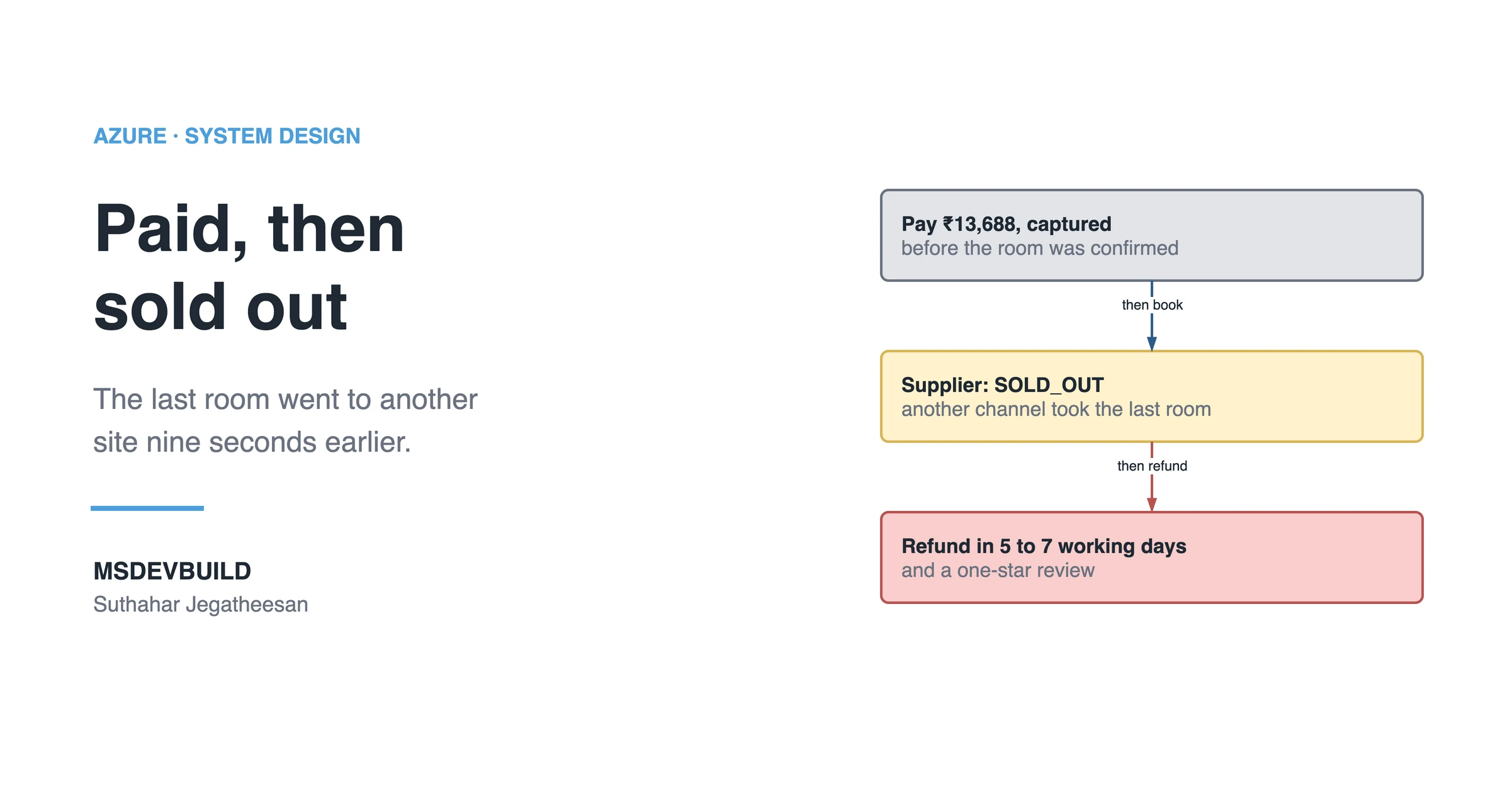
Hotel booking confirmation looks like one tap: place the order, pay, get a confirmation. Behind that tap sit three systems that can each say no, and a room that other booking sites are selling at the same moment. This is how a booking platform turns “Pay” into a confirmed room without charging for rooms it cannot deliver.
It is 21:14 on Saturday 26 September, and the Gandhi Jayanti long weekend starts on Friday. A traveller on your travel app has found the Sea Breeze Resort in Goa, the last Deluxe Sea View room for 2 to 4 October, at ₹13,688 all-in. They tap Pay. The money leaves their account.
Two seconds later the app says: “Booking failed. Your refund will reach you in 5 to 7 working days.”
Nine seconds before they tapped Pay, somebody on another booking site had taken that room. Nobody did anything wrong. The money still moved.
One Saturday night, three ways to lose a booking
| Time | What happened |
|---|---|
| Sat 21:00 | Long-weekend traffic. Hotels in Goa are selling their last rooms on every site at once |
| Sat 21:14 | The Sea Breeze traveller is charged ₹13,688, then told the booking failed |
| Sat 21:40 | 38 tickets: “money taken, no room” |
| Sat 22:10 | Supplier B slows down. 14 booking calls time out after 30 seconds. The app marks them failed and refunds them |
| Sun 23:00 | 69 bookings failed after payment. ₹8.3 lakh is on its way back to travellers |
| Mon 11:00 | Supplier B’s daily booking report arrives. Six of the “failed” bookings are confirmed at the hotel |
| Fri 2 Oct | A traveller with a confirmed booking arrives at another resort. It is full, and he is sent to a hotel 4 km away |
Three different failures hid in that week. The last room sold elsewhere after the traveller paid. A supplier that did not answer, where “no answer” was treated as “no”. And a confirmed booking at a hotel that had sold more rooms than it had.
The app’s booking flow was three lines long: charge the card, call the supplier, show the result. Every one of those failures lives in the gap between line one and line two.
The SQL query that found the ghost bookings
On Monday someone does what should have happened on Saturday: compare the platform’s view of each booking with the supplier’s. Supplier B sends a daily report of every booking it holds, loaded into dbo.SupplierBookingReport:
SELECT b.Id, b.State, b.PaymentState, b.Total,
       r.SupplierReference, r.Status AS SupplierStatus
FROM dbo.Bookings AS b
JOIN dbo.SupplierBookingReport AS r
  ON  r.Supplier        = b.Supplier
  AND r.ClientReference = CONVERT(varchar(36), b.Id)
WHERE b.State = 'Failed'
  AND r.Status = 'CONFIRMED'
  AND b.CreatedAt >= '2026-09-26';
Six rows. Six bookings the app told travellers had failed, refunded in full, and that the hotels were holding in the travellers’ names. The supplier would invoice the platform for all six. Two of the travellers had already booked somewhere else.
The failures by reason tell the rest:
SELECT FailureReason,
       COUNT(*)                                             AS bookings,
       AVG(DATEDIFF(second, PaidAt, SupplierRespondedAt))   AS avg_seconds_after_payment
FROM dbo.Bookings
WHERE CreatedAt >= '2026-09-26T15:30:00'   -- 21:00 IST, stored in UTC
  AND State = 'Failed'
GROUP BY FailureReason
ORDER BY bookings DESC;| FailureReason | bookings | avg_seconds_after_payment |
|---|---|---|
| SOLD_OUT | 47 | 2 |
| TIMEOUT | 14 | 30 |
| PRICE_CHANGED | 8 | 2 |
Every one of those 69 travellers paid first and heard “no” afterwards. Pay, then ask. That was the whole bug.
Why the same room gets sold twice
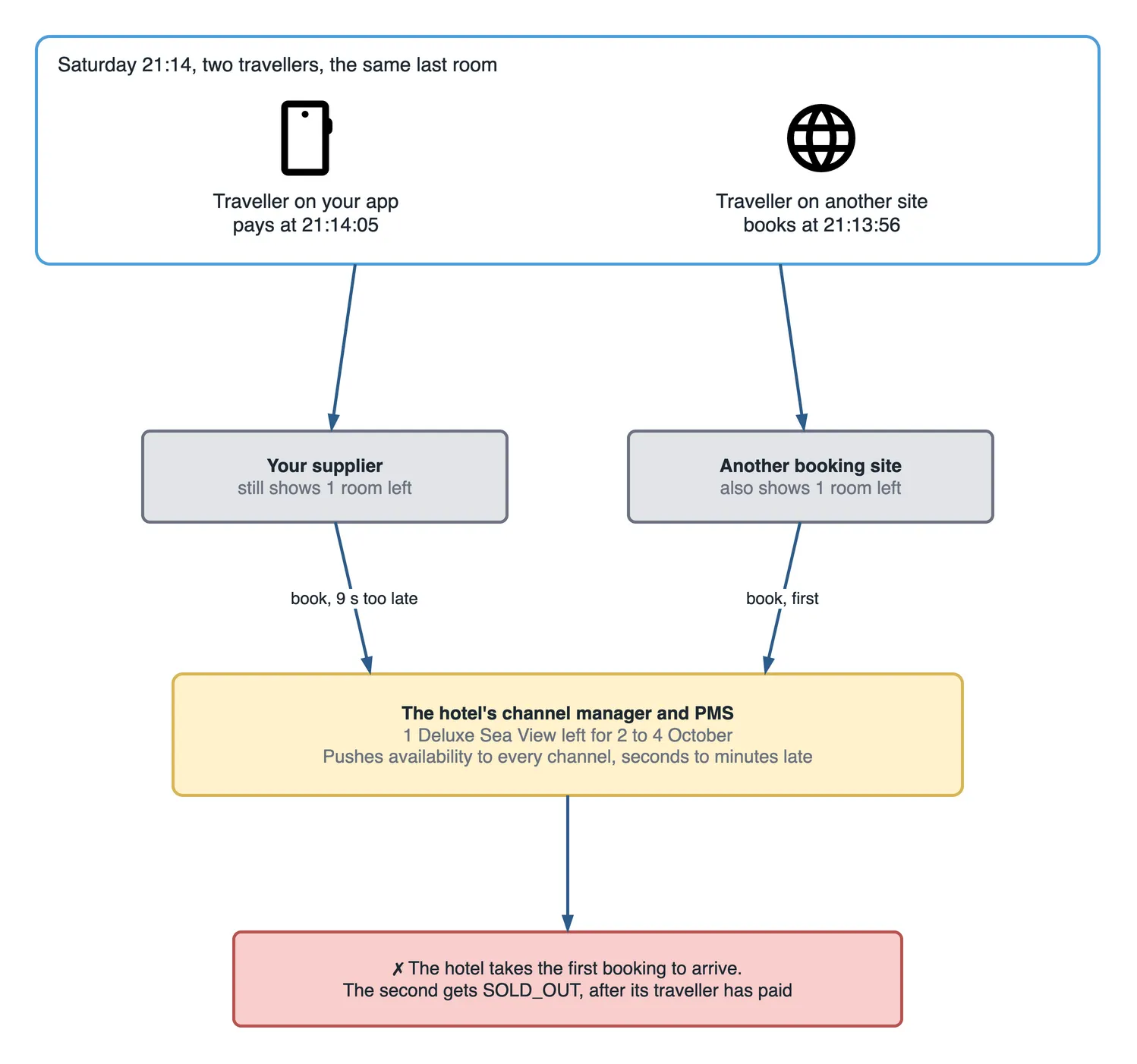
Nobody owns the room except the hotel. Your platform does not hold inventory; neither does your supplier, most of the time. The hotel keeps its rooms in a property management system (PMS), and a channel manager copies the availability to every site that sells them: your suppliers, other booking sites, the hotel’s own website.
That copy is always a little late. A room sold on one site at 21:13:56 is still shown as available on the others until the channel manager’s next update reaches them, seconds later on a quiet day, minutes later on a busy one. For those seconds, every site is selling the same last room, and each traveller sees “1 room left”.
There is no global lock to take. None. No site can reserve a room in another company’s system just because a traveller is looking at it. The hotel accepts whichever booking arrives first and refuses the rest.
So the question is not how to stop it. It cannot be stopped. The question is what the traveller’s money is doing while it happens.
What does booking confirmation actually involve?
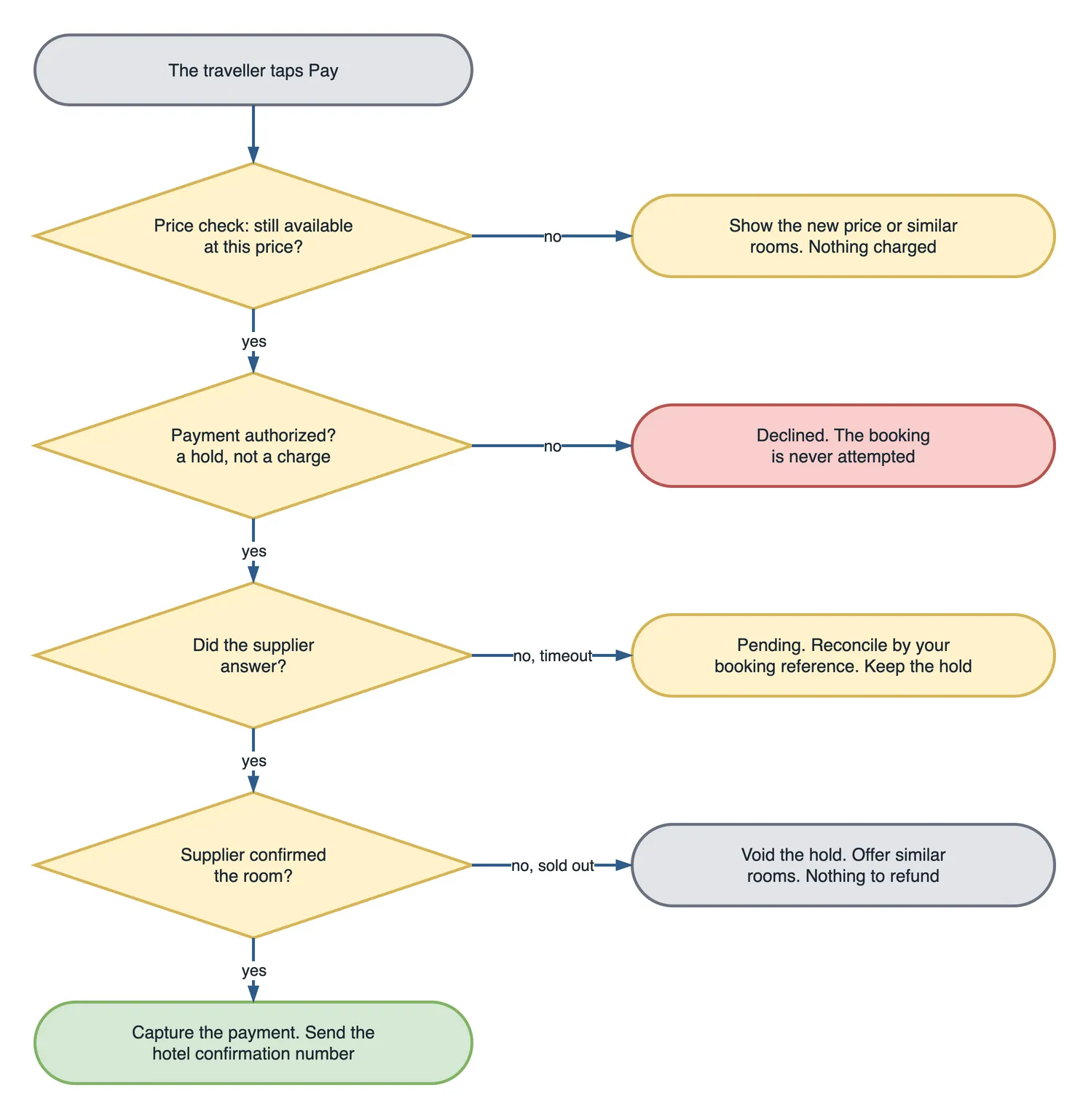
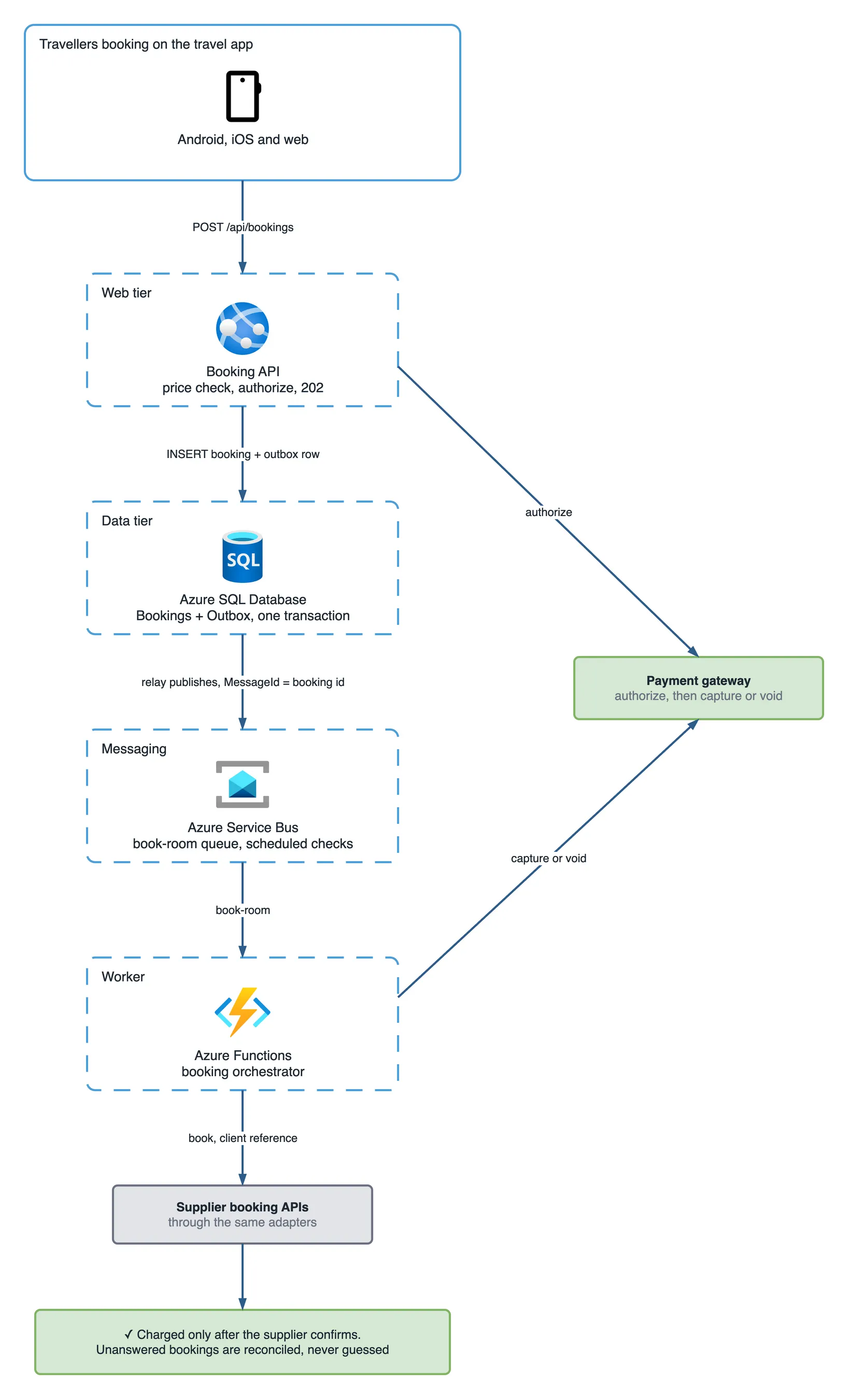
Four systems and five steps, and a booking is only confirmed when the last one says so:
- Price check. Ask the supplier again whether the room is still available at this price. The search result may be minutes old.
- Authorize the payment. Reserve the amount on the traveller’s card, a hold, without taking it.
- Book with the supplier. Send the booking with your own reference. The supplier passes it to the hotel.
- Capture the payment. Only after the supplier confirms and returns its reference.
- Confirm to the traveller. With the hotel’s confirmation number.
Every step can fail, and each failure has an opposite action that undoes what came before it. A declined card means nothing else happens. A sold-out room means voiding the hold. A capture that fails after a confirmed booking means retrying the capture, not cancelling the room. That arrangement, a chain of steps where each has a compensation, is the saga pattern.
The saga’s state is written down after every step, so any step can be retried or resumed after a crash:
| State | The money | What happens next |
|---|---|---|
PaymentAuthorized | held | The worker books with the supplier |
SupplierPending | held | The call is in flight, or unanswered and being reconciled |
Confirmed | held | Capture |
Captured | charged | Send the confirmation and the voucher |
Failed | hold voided | Offer similar rooms |
NeedsAttention | held | A person decides, before the hold expires |
Authorize first, capture only after the supplier confirms
The single most important change is also the smallest. Two calls instead of one. The old flow charged the card, a sale, in one step. The new flow splits it: authorize when the traveller taps Pay, capture when the supplier confirms. Most payment gateways call this manual capture.
An authorization makes the bank set the amount aside. The traveller sees it as pending, not as a charge. If the booking fails, the platform voids the authorization: the hold is released, and nothing is ever charged or refunded. On the traveller’s statement there is nothing to explain. No charge. No refund.
Compare that with the old flow. A refund is a second transaction, visible on the statement, and on Saturday night it took 5 to 7 working days to reach the traveller. Every sold-out room turned into a week of “where is my money?”
Two limits matter. An authorization expires after a few days, set by the card network and the issuing bank, so every booking must reach Captured or Failed well inside that window. And not every payment method supports a hold. For those, the saga is the same, it simply ends with a refund instead of a void.
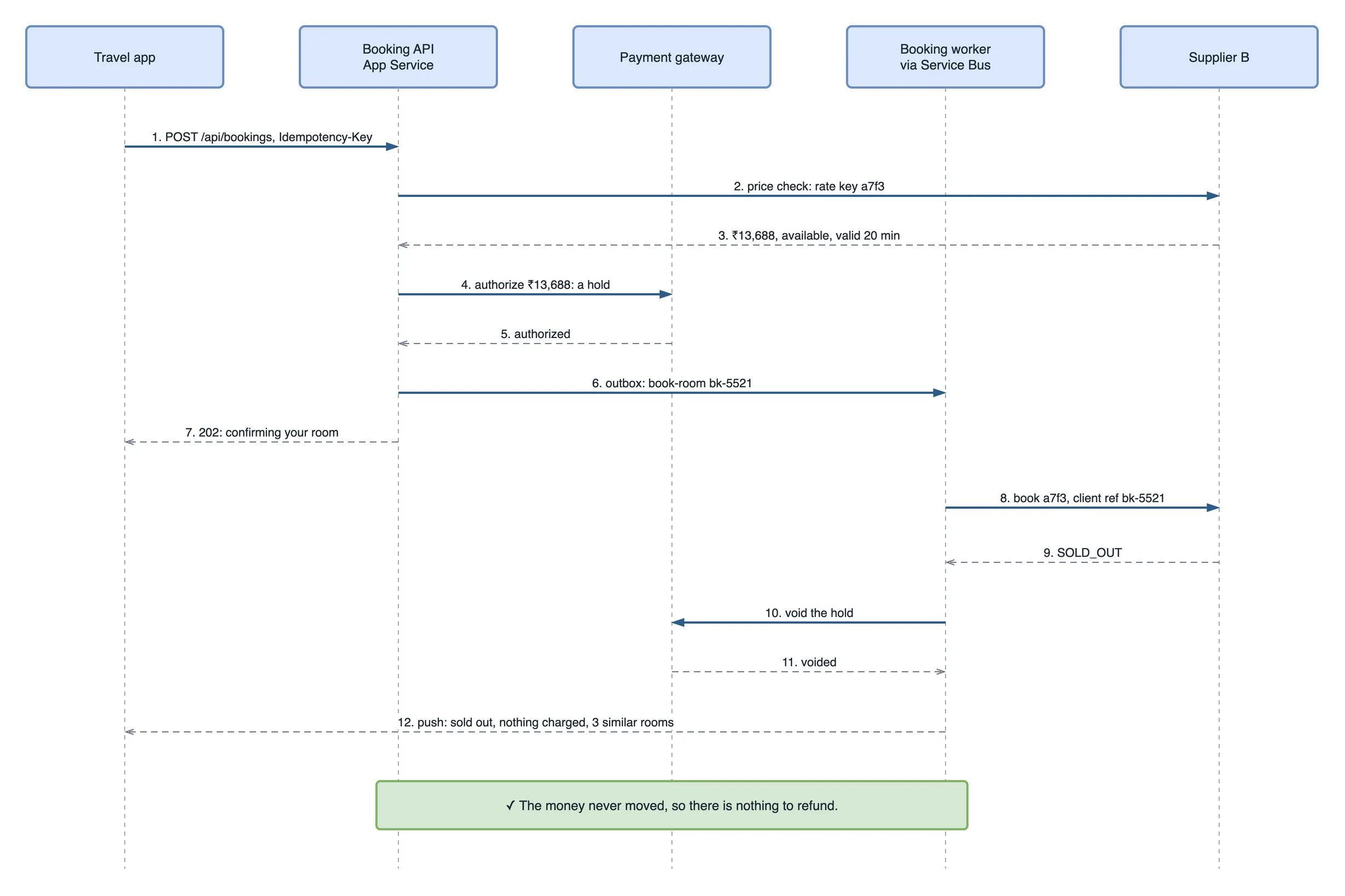
The booking API: price check, hold, then 202
The API does the parts the traveller must wait for, and hands the rest to a worker:
app.MapPost("/api/bookings", async (
    [FromHeader(Name = "Idempotency-Key")] Guid key,
    CreateBooking request, ClaimsPrincipal user,
    BookingService bookings, CancellationToken ct) =>
    await bookings.StartAsync(user.GetUserId(), key, request, ct))
    .RequireAuthorization();
public async Task<IResult> StartAsync(string userId, Guid key, CreateBooking request, CancellationToken ct)
{
var adapter = _adapters[request.Supplier];
// 1. Ask the supplier again. The search price may be two minutes old.
var quote = await adapter.CheckPriceAsync(request.RateKey, ct);
if (!quote.Available)
return Results.Conflict(new { reason = "sold_out" });
if (quote.AllIn != request.ExpectedAllIn)
return Results.Conflict(new { reason = "price_changed", quote.AllIn });
// 2. Hold the money. Nothing is charged yet. A retry reuses the same authorization.
var hold = await _payments.AuthorizeAsync(request.PaymentMethodId, quote.Total,
idempotencyKey: $"auth-{key}", ct);
if (!hold.Approved)
return Results.Problem("The payment was declined.", statusCode: 402);
// 3. Record the booking and the command to book it, in one transaction.
var bookingId = await _store.CreateWithOutboxAsync(userId, key, quote, hold.Id, ct);
return Results.Accepted($"/api/bookings/{bookingId}", new { bookingId, state = "Confirming" });
}The price check alone moves most of Saturday’s sold-out cases in front of the payment: a room already gone at the supplier is refused before any money is touched. The idempotency key does the same job it did for the double tap that charged twice: a unique index on (UserId, IdempotencyKey) in dbo.Bookings, and the same key passed to the gateway, so a retried Pay creates one booking and one hold.
CreateWithOutboxAsync writes two rows in one transaction:
BEGIN TRANSACTION;

INSERT INTO dbo.Bookings
    (Id, UserId, IdempotencyKey, Supplier, RateKey, Total, Currency,
     PaymentAuthorizationId, State, CreatedAt)
VALUES
    (@id, @userId, @key, @supplier, @rateKey, @total, @currency,
     @authorizationId, 'PaymentAuthorized', SYSUTCDATETIME());

INSERT INTO dbo.Outbox (MessageId, QueueName, Body, CreatedAt)
VALUES (@id, 'book-room', @body, SYSUTCDATETIME());

COMMIT;
This is the transactional outbox. Writing the booking and then sending a Service Bus message is two operations, and a crash between them leaves a booking that nobody books. Writing both rows in one transaction makes that impossible. A small relay reads new outbox rows and publishes them to the book-room queue with MessageId set to the booking ID, and the queue has duplicate detection switched on, so a relay that publishes the same row twice after a restart still produces one message.
The API answers 202 Accepted in about a second. The app shows “Confirming your room” and waits for a push notification, instead of holding a spinner open for however long the supplier takes.
What happens if another site sells the last room first?
The supplier refuses, the worker voids the hold, and the traveller is offered similar rooms with nothing charged. The worker is an Azure Function triggered by the book-room queue:
public async Task HandleAsync(BookRoom command, CancellationToken ct)
{
    // Only one worker may move a booking out of PaymentAuthorized. A redelivered
    // message finds the state already moved and stops here.
    if (!await _store.MoveAsync(command.BookingId, BookingState.PaymentAuthorized,
                                BookingState.SupplierPending, ct))
        return;

    var booking = await _store.GetAsync(command.BookingId, ct);
    SupplierBookingResult result;
    try
    {
        result = await _adapters[booking.Supplier].BookAsync(
            new BookingRequest(booking.RateKey, booking.Guest,
                               ClientReference: booking.Id.ToString()), ct);
    }
    catch (Exception ex) when (ex is TimeoutException or HttpRequestException or TaskCanceledException)
    {
        // No answer is not "no". The room may be booked. Ask again, later.
        await _reconcile.ScheduleAsync(booking.Id, attempt: 1, ct);
        return;
    }

    switch (result.Status)
    {
        case SupplierBookingStatus.Confirmed:
            await _store.ConfirmAsync(booking.Id, result.SupplierReference, result.HotelConfirmation, ct);
            await _payments.CaptureAsync(booking.PaymentAuthorizationId, booking.Total,
                                         idempotencyKey: $"capture-{booking.Id}", ct);
            await _store.MoveAsync(booking.Id, BookingState.Confirmed, BookingState.Captured, ct);
            await _notify.ConfirmedAsync(booking, result.HotelConfirmation, ct);
            break;

        case SupplierBookingStatus.OnRequest:
            // The hotel must accept it by hand. Keep the hold and ask again.
            await _reconcile.ScheduleAsync(booking.Id, attempt: 1, ct);
            break;

        default:   // SoldOut, PriceChanged, Rejected
            await _payments.VoidAsync(booking.PaymentAuthorizationId,
                                      idempotencyKey: $"void-{booking.Id}", ct);
            await _store.FailAsync(booking.Id, result.Status.ToString(), ct);
            await _notify.SoldOutWithAlternativesAsync(booking, ct);
            break;
    }
}
MoveAsync is one conditional UPDATE. It moves the state only if it is still what the caller expected, and returns whether a row changed:
UPDATE dbo.Bookings
SET    State = @to, UpdatedAt = SYSUTCDATETIME()
WHERE  Id = @id
  AND  State = @from;      -- 0 rows: another worker already moved it; stop
Service Bus delivers a message at least once, so the handler must survive seeing the same BookRoom twice. The conditional update makes the second delivery a no-op, and every payment call carries a key derived from the booking ID, so a retried capture or void is still one capture or one void.
“Similar rooms” is where the aggregator earns its keep. The same hotel through another supplier, the same room type at the next nearest hotel, the same hotel on the next night. A sold-out message with three good alternatives converts; a bare “booking failed” does not.
The booking nobody answered
Fourteen of Saturday’s bookings did not fail. They got no answer. The old flow treated “no answer” as “no”, refunded the traveller, and six of those rooms turned out to be booked.
A timeout tells you only that you do not know. Nothing more. The fix is to find out, using the one thing both sides share: your booking ID, sent to the supplier as the client reference. Most supplier booking APIs let you retrieve a booking by the reference you gave it. The reconcile step asks exactly that, on a schedule:
private static readonly TimeSpan[] Backoff =
    [TimeSpan.FromMinutes(1), TimeSpan.FromMinutes(2), TimeSpan.FromMinutes(5),
     TimeSpan.FromMinutes(15), TimeSpan.FromMinutes(30)];

public Task ScheduleAsync(Guid bookingId, int attempt, CancellationToken ct) =>
    _sender.ScheduleMessageAsync(
        new ServiceBusMessage(BinaryData.FromObjectAsJson(new ReconcileBooking(bookingId, attempt)))
        {
            MessageId = $"reconcile-{bookingId}-{attempt}"
        },
        DateTimeOffset.UtcNow + Backoff[attempt - 1], ct);

public async Task HandleAsync(ReconcileBooking check, CancellationToken ct)
{
    var booking = await _store.GetAsync(check.BookingId, ct);
    if (booking.State != BookingState.SupplierPending) return;        // already resolved

    var found = await _adapters[booking.Supplier]
        .FindByClientReferenceAsync(booking.Id.ToString(), ct);

    switch (found.Status)
    {
        case SupplierBookingStatus.Confirmed:
            await _saga.ConfirmAndCaptureAsync(booking, found, ct);      // same path as a normal confirm
            break;
        case SupplierBookingStatus.NotFound when found.IsFinal:
            await _saga.VoidAndFailAsync(booking, "NOT_BOOKED", ct);     // the supplier says it never happened
            break;
        default:
            if (check.Attempt < Backoff.Length)
                await ScheduleAsync(booking.Id, check.Attempt + 1, ct);
            else
                await _store.MoveAsync(booking.Id, BookingState.SupplierPending,
                                       BookingState.NeedsAttention, ct);   // a person decides
            break;
    }
}
Service Bus holds each check as a scheduled message, so there is no timer to run and nothing to lose in a restart. The traveller sees “we are confirming with the hotel” and gets a push the moment the answer arrives. About 53 minutes after the first timeout, after five checks, anything still unknown goes to a person, who has days, not minutes, before the authorization expires.
Confirmed, then the hotel is full
The third failure is the one no code on your side can prevent. It still needs a plan. The supplier confirmed the booking, the hotel had issued a confirmation number, and on Friday the hotel had no room. Hotels overbook, sometimes by accident through the same channel lag, sometimes on purpose to cover expected cancellations.
The hotel industry has a name for what happens next: the hotel walks the guest, moving them to a comparable hotel nearby at its own cost, often with transport paid. It is a hotel’s problem to solve. Mostly. It becomes your platform’s problem when the traveller hears about it at the front desk at 23:00.
Two habits turn it into a morning email instead:
- Reconfirm before arrival. Two days before check-in, ask the supplier for the booking’s status and the hotel confirmation number again. A booking the hotel no longer recognises shows up while there is still time to rebook.
- Keep both references on the booking. The supplier’s reference and the hotel’s confirmation number. Support can then call the hotel directly with the number the hotel uses, not one it has never seen.
How efficient is the new design?
Money now moves once per booking, after the room is certain, and every unknown outcome gets a scheduled question instead of a guess. Here is where Saturday’s 69 failed bookings would have ended up:
| Step | What it catches | From Saturday’s 69 |
|---|---|---|
| Price check, before any payment | Rooms already gone at the supplier, prices that moved | 38 sold out and 8 price changes, nothing touched |
| Supplier refuses at booking | The last room taken by another site in the seconds between | 9 sold out, hold voided |
| Reconcile by client reference | Timeouts where the room may be booked | 14 timeouts: 6 confirmed and captured, 8 voided |
| Pre-arrival reconfirmation | The hotel that overbooked | 1 walk, rebooked two days early |
Side by side, for two long-weekend Saturdays:
| Charge first | Authorize, book, capture | |
|---|---|---|
| Travellers charged for a room they did not get | 69 | 0 |
| Refunds | ₹8.3 lakh, 5 to 7 working days | none; 17 holds voided |
| Ghost bookings, refunded but confirmed | 6 | 0 |
| Wait before the app answers | up to 30 seconds on a spinner | about 1 second, then a push |
| Payment calls per successful booking | 1 | 2: authorize and capture |
The trade is one extra payment call per booking, a few milliseconds, for never refunding a sold-out room. The rules underneath: money moves only in the last step, and every “I don’t know” is scheduled to become “yes” or “no”. Neither depends on how many sites sell the same room.
Why the obvious fixes were wrong
- “Lock the room in our database while the traveller pays.” You do not own the room. Your lock stops your other travellers and nobody else.
- “Book first, then charge.” Then a declined card leaves you owning a confirmed room nobody paid for. The authorization comes first so the money is certain before the room is.
- “Refund automatically on a timeout.” That is how six ghost bookings happened. A timeout is a question, not an answer.
- “Retry the booking on a timeout.” Two rooms, unless the supplier de-duplicates. Look the booking up first.
- “Raise the booking timeout to two minutes.” Fewer unknowns, and a traveller watching a spinner for two minutes. The 202 and the push solve the waiting; reconcile solves the unknowns.
- “Hide the last room so it cannot be oversold.” Every site hiding its last room means the hotel cannot sell it anywhere.
The guardrail: one query and one alert
Nothing should stay unresolved. This query lists every booking still holding money without a final answer:
SELECT Id, Supplier, State, CreatedAt,
       DATEDIFF(minute, CreatedAt, SYSUTCDATETIME()) AS minutes_open
FROM dbo.Bookings
WHERE State IN ('PaymentAuthorized', 'SupplierPending', 'Confirmed', 'NeedsAttention')
  AND CreatedAt < DATEADD(minute, -60, SYSUTCDATETIME())
ORDER BY CreatedAt;
It runs every 15 minutes, and anything it returns pages the on-call engineer: a booking an hour old should be Captured or Failed. A Confirmed row in the list is the most urgent kind, a room booked and not yet paid for. The daily reconciliation against each supplier’s report, the Monday query from the top of this article, runs every morning instead of once after an incident.
System design interview questions from this design
- Design the booking step for a hotel or flight aggregator. Price check, authorize, book, capture, with a stored state machine and a compensation for every step.
- Two sites sell the last room at the same second. What happens? The hotel accepts the first to arrive; the other gets sold out. The design decides what the loser’s money is doing: held, then voided.
- The supplier times out. Did the booking happen? Unknown. Keep the hold, reconcile by your client reference with backoff, and escalate to a person before the authorization expires.
- Why a transactional outbox instead of sending the message after the insert? A crash between the two leaves a booking nobody books. One transaction writes both.
- Service Bus delivered the same message twice. What stops a double booking or a double capture? A conditional state update and idempotency keys on every payment call.
- Authorization or immediate charge: when would you choose each? Authorize when fulfilment can fail after payment, as with hotels and flights. Charge immediately when fulfilment is certain, as with a digital download.
What to do on day one, not after the first refund wave
- Use manual capture from the first booking. Changing the payment flow later touches every booking path.
- Send your own booking ID to every supplier as the client reference, and check that each supplier can find a booking by it.
- Store the booking state after every step, and make every transition a conditional update.
- Treat timeouts as unknown from the start. Build reconcile before you need it.
- Reconcile against every supplier’s booking report daily, and reconfirm with the hotel before arrival.
Key takeaways
- Every site sells from the same hotel inventory, copied with a delay, so the last room will sell twice. Plan for it.
- Authorize at Pay, capture after the supplier confirms, and void when it refuses. Then nothing needs refunding.
- A timeout means “unknown”, not “failed”. Reconcile by your own booking reference before touching the money.
- A saga with stored state, an outbox and conditional updates survives crashes and duplicate messages.
- Reconfirm with the hotel before arrival, because a confirmed booking can still meet a full hotel.
The next long weekend
Five weeks later, another long weekend, and the same Goa hotels selling their last rooms on every site at once.
At 20:52 a traveller taps Pay for the last sea-view room at a resort in Candolim. The price check passes. The hold goes through. Four seconds later the supplier says SOLD_OUT, and the app shows “That room just sold on another site. Nothing was charged. Here are three similar rooms.” The traveller picks the second one, the same resort through another supplier, and is confirmed in six seconds.
That night, 41 holds are voided. Refunds: zero. Three bookings go to reconcile, and all three resolve within five minutes. The Monday query from the top of this article returns no rows.