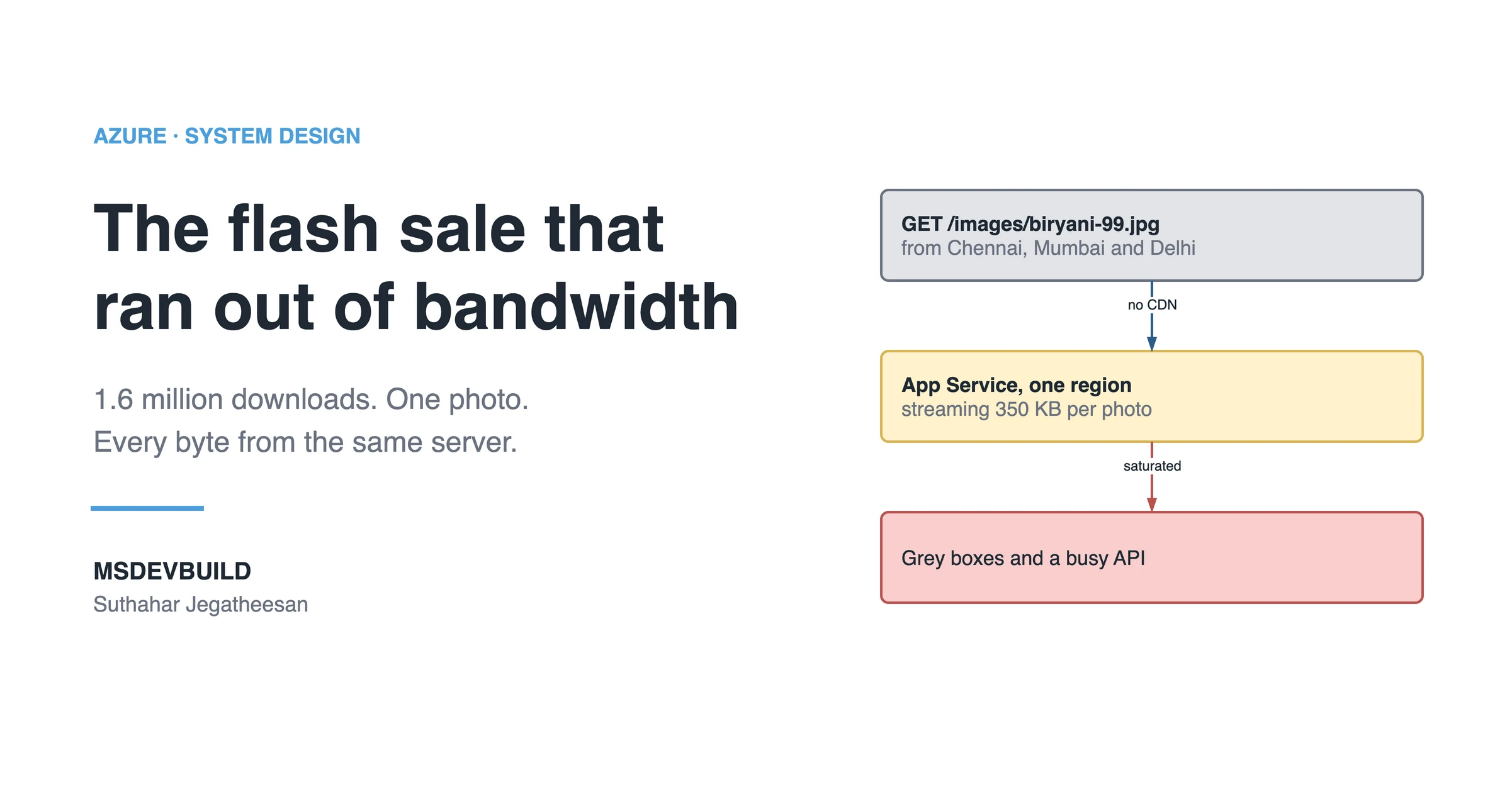
When 400,000 people open the same product page at once, the photos can hurt you more than the database. This is a flash sale where they did, and how a CDN on Azure Front Door, the replacement for classic Azure CDN, fixed it.
It is 12:30 on sale day, and you are still the engineer on call. The database is no longer timing out. It has been scaled from 8 vCores to 32, the errors have stopped, and the dish page data is coming back.
Then the restaurant partner sends the support team a second screenshot.
The price is on the screen now. The name, the rating, the “Add” button. And above them, where four photos of the biryani should be, four grey boxes. Six seconds later, one of them fills in.
“The food is not showing. People will not buy what they cannot see.”
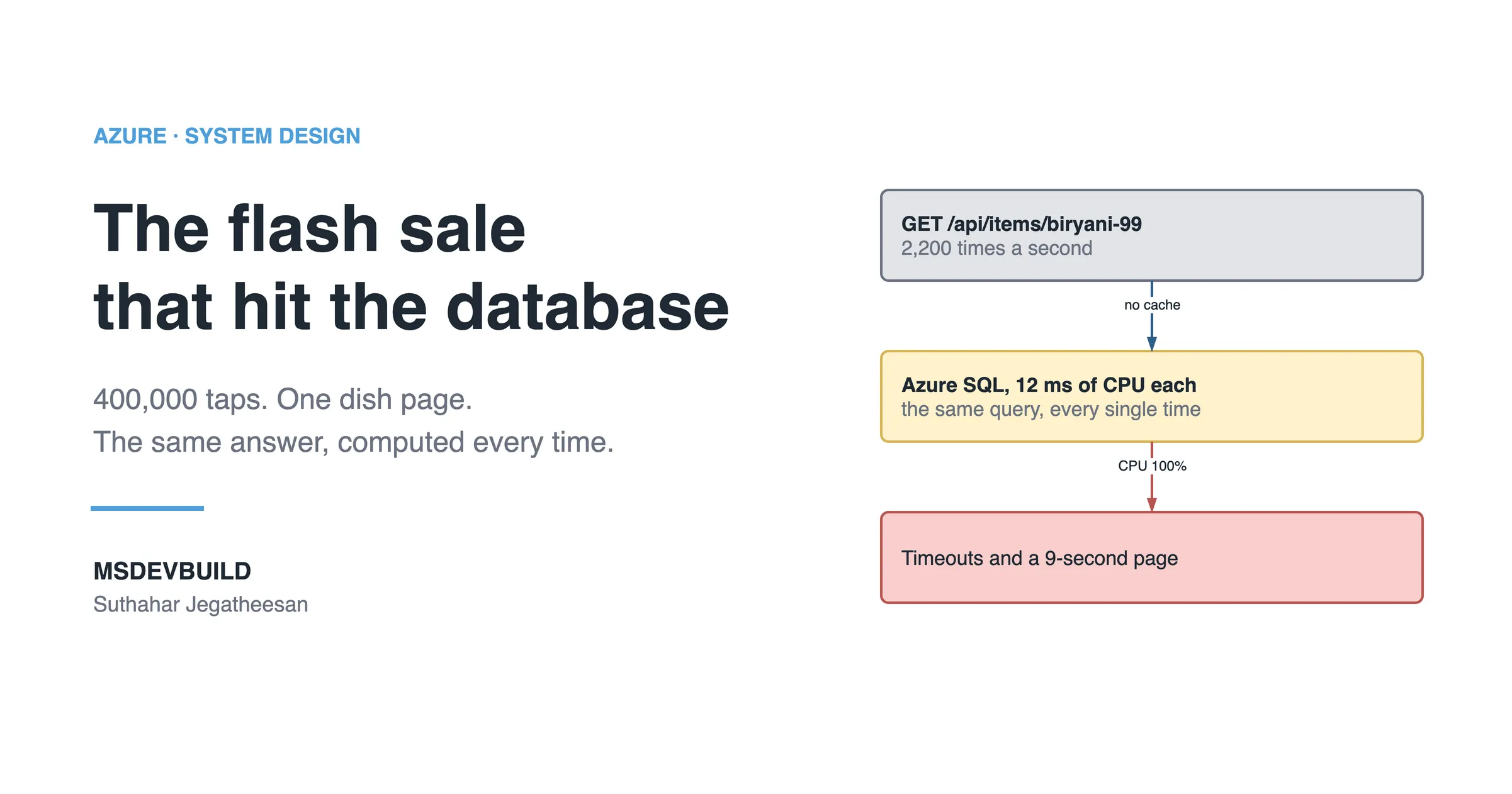
The partner is right, and this is the half of the incident nobody has looked at yet. The database half is in the flash sale that hit the database: a ₹99 biryani deal, a push notification to 400,000 people at 11:59, and one SQL query run 2,200 times a second. This is the other half. The photos, and how a CDN on Azure Front Door fixes them.
The query that asked what the servers were doing
The database fix has not made App Service any quieter. CPU is still high, and outbound network is flat against the top of its chart. So the next question for Application Insights is: what is App Service actually spending its time on?
requests
| where timestamp between (datetime(2026-08-20 11:55) .. datetime(2026-08-20 12:15))
| extend kind = case(url has "/images/", "image",
                     url endswith ".js" or url endswith ".css", "script or style",
                     "api")
| summarize requests = count(), avgMs = avg(duration) by bin(timestamp, 1m), kind
The answer comes back in three rows, and the biggest one is not the API.
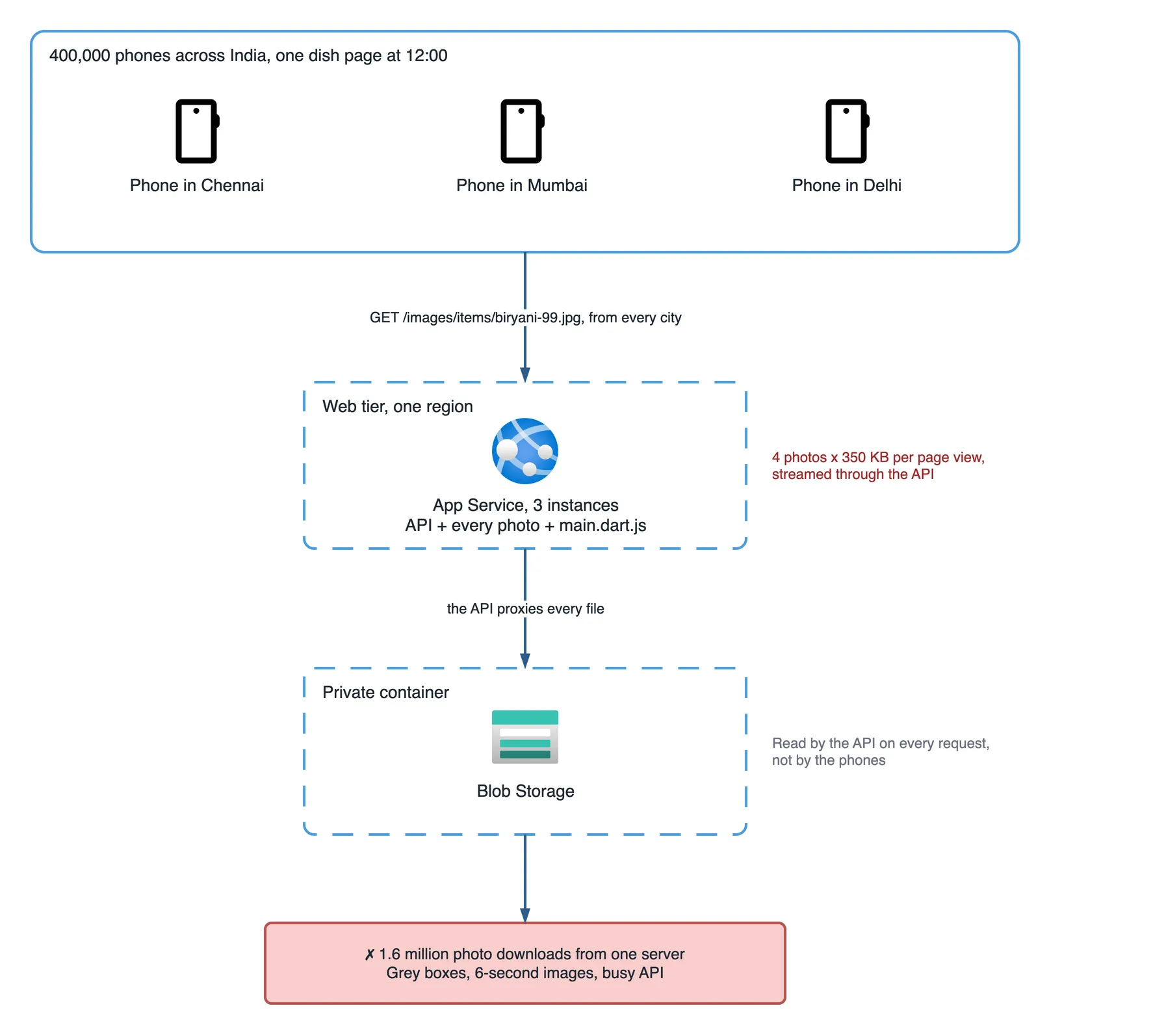
Images outnumber API calls four to one. Every dish photo, around 350 KB, is served by the API itself, which reads it from a private Blob Storage container and streams it back byte by byte. Four photos per page view. At the peak, that is 1.6 million photo downloads in a few minutes, every one of them from the same three App Service instances in one Azure region.
Every web visitor also downloads the Flutter web bundle, a few megabytes of main.dart.js, from the same place.
The servers are spending the biggest sale of the year as a file server.
The real problem: the same bytes, from far away
Same bytes, sent from far away, every single time.
The photo of the biryani was identical for all 400,000 people. Nothing about it depended on who was asking. And yet every request travelled from a phone in Delhi to a server in one Azure region, through the API code, into Blob Storage and all the way back.
Three things made it hurt:
- Distance. A photo that starts its trip 2,000 km away arrives slowly, no matter how fast the server is.
- The wrong machine. App Service instances are sized to run business logic. Streaming files ties up their threads and their outbound bandwidth, so the API calls queue behind the images.
- No copy anywhere closer. There was exactly one place in the world the photo could come from.
Scaling App Service out would have helped a little, and it would have meant paying for more servers to do a job servers should not be doing at all.
The same problem every big sale has
On Flipkart, Amazon or Shopee, a sale page is mostly pictures. Product photos, zoom images, banners, a short video, and a JavaScript bundle to show them all. For a few million people opening the same product at midnight, almost all of those bytes are identical.
No shopping site serves them from its application servers. They come from a CDN, and that is the tool this half of the incident needed.
When should you use a CDN on Azure?
Use a CDN whenever many people download the same bytes: photos, scripts, styles, fonts, banners, video. A CDN (content delivery network) keeps copies of your files at edge locations, data centres around the world close to the people downloading them. The first user in Chennai who asks for a photo makes the CDN fetch it once from your origin, the place the real file lives. That first request is a cache miss. The next ten thousand users in Chennai are cache hits: they get the copy from the edge, and your servers never see those requests.
On Azure, “Azure CDN” now means Azure Front Door Standard or Premium. The classic Azure CDN from Microsoft stopped accepting new profiles in August 2025 and retires on 30 September 2027, and Front Door is the migration target. Same idea, one resource that does CDN caching, routing and WAF together. If you already put Front Door in front of your API for security, as in how Azure protects a mobile app, the CDN is a route on the same profile, not a new service.
Use it when the same bytes go to many people:
| Content | Through the CDN? | Cache for |
|---|---|---|
| Product and dish photos | Yes | 1 year, with a versioned URL |
| Fingerprinted JS and CSS bundles (a hash in the filename) | Yes | 1 year |
| Fonts, icons, logos | Yes | 1 year |
| Promo banners and sale videos | Yes | Hours to days, versioned |
index.html, flutter_bootstrap.js, main.dart.js | Yes, but revalidated | no-cache, see below |
| Public catalogue JSON the same for everyone | Sometimes | A few seconds at most |
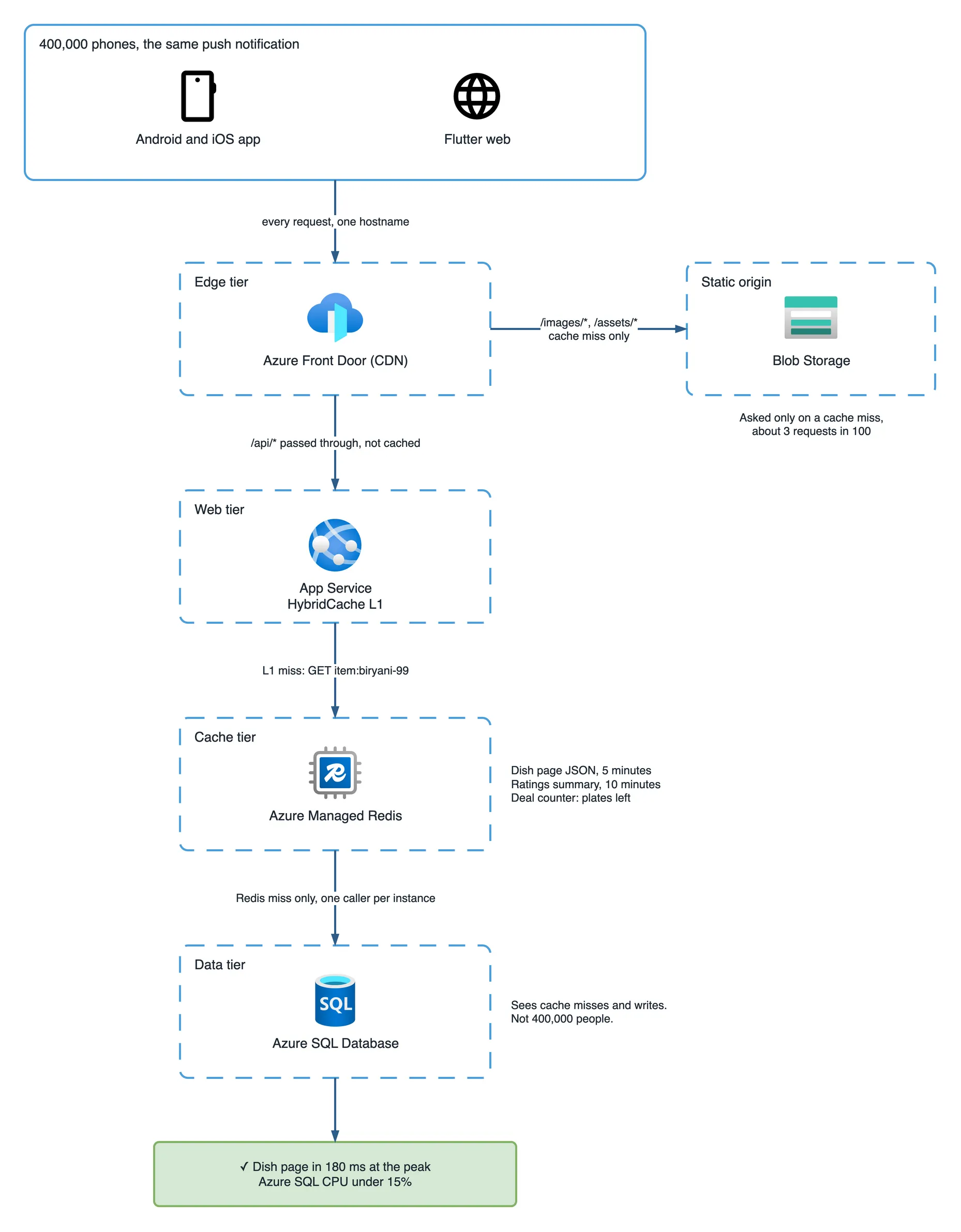
The fix moves the photos and the Flutter web build to Blob Storage behind Front Door, with one route for /images/* and /assets/*. That container holds only files meant for everyone, so it allows anonymous blob reads: anyone with the URL can download a file, no key needed. On Front Door Premium the storage account is reachable only through Private Link, a private connection from Front Door to storage, so nobody can skip the CDN and pull from it directly.
Each file is uploaded with its caching header set, so Front Door and the browser both know how long to keep it. The first version of the fix kept the original filenames, so it used a cautious seven days (max-age is in seconds, and 604800 seconds is seven days):
az storage blob upload-batch \
  --account-name stmsdevbuildassets --destination images \
  --source ./out/images --auth-mode login \
  --content-cache-control "public, max-age=604800"
That was enough for the second sale. It was also the setting that caused the next problem, a week later.
How efficient is the new design?
Origin work stops growing with the number of visitors and starts growing with the number of files and edge locations. That is the whole gain.
Here is where the 1.6 million photo downloads go once the photos sit behind Front Door:
| Layer | Share of photo requests | Why |
|---|---|---|
| The phone’s own cache | every repeat view | CachedNetworkImage keeps each URL on the device |
| Front Door edge | about 97 in 100 | Only the first request for a file at each edge goes further |
| Blob Storage, the origin | about 3 in 100 | Cache misses only |
| App Service | none | Files are no longer on the API’s path at all |
Side by side, for the same page and the same 400,000 people:
| First sale, no CDN | Second sale, with Front Door | |
|---|---|---|
| Photo load time | 6 seconds, grey boxes first | 0.3 seconds |
| Photo requests reaching App Service | 1.6 million | 0 |
| Photo bytes sent by App Service | about 560 GB (1.6 million × 350 KB) | 0 |
| Where a photo travels from | one Azure region | an edge a few kilometres away |
| Requests reaching the origin | every one | about 3 in 100 |
| App Service during the sale | 3 instances, busy moving files | 3 instances, doing API work only |
The rule: origin load is now files × edge locations, roughly once per cache lifetime. Double the visitors and Blob Storage does almost the same work, because the extra people are served by copies that already exist. That is why every large shop serves its pictures this way, and why the API can spend the whole sale on the one job only it can do: taking orders.
What should never be cached on a CDN?
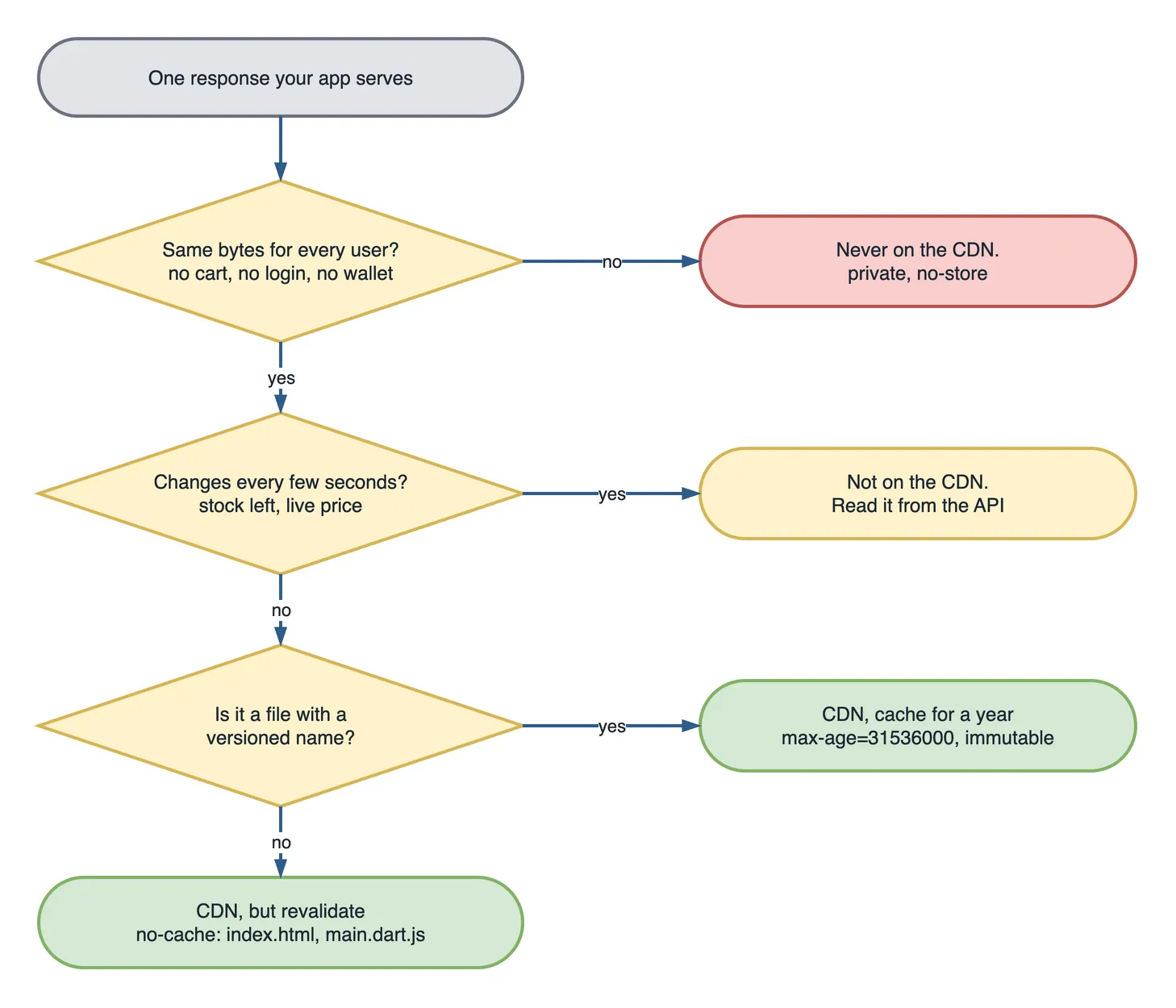
Anything personal, anything behind a login, and anything that changes by the second. A CDN gives the same response to everyone who asks for the same URL. That is the whole point, and it is also the danger. Do not cache at the CDN:
- Anything personal. Cart, orders, profile, addresses, wallet balance. Cache one user’s cart at the edge and the next person gets it.
- Authenticated responses. Send
Cache-Control: privateorno-storeon anything behind a token, and keep those routes off a caching route entirely. Then a mistake in one place is not enough to leak it. - Stock counts and live prices. A CDN cannot be told “this changed” fast enough for a number that changes every second.
- Checkout, payment and anything that writes.
POST,PUTandDELETEare never cached, and those routes should not be on a caching route at all. - Data behind a login that is the same for everyone. Tempting, but the CDN does not check the token. Cache it in Redis behind your API instead.
What happens if the CDN has an old image?
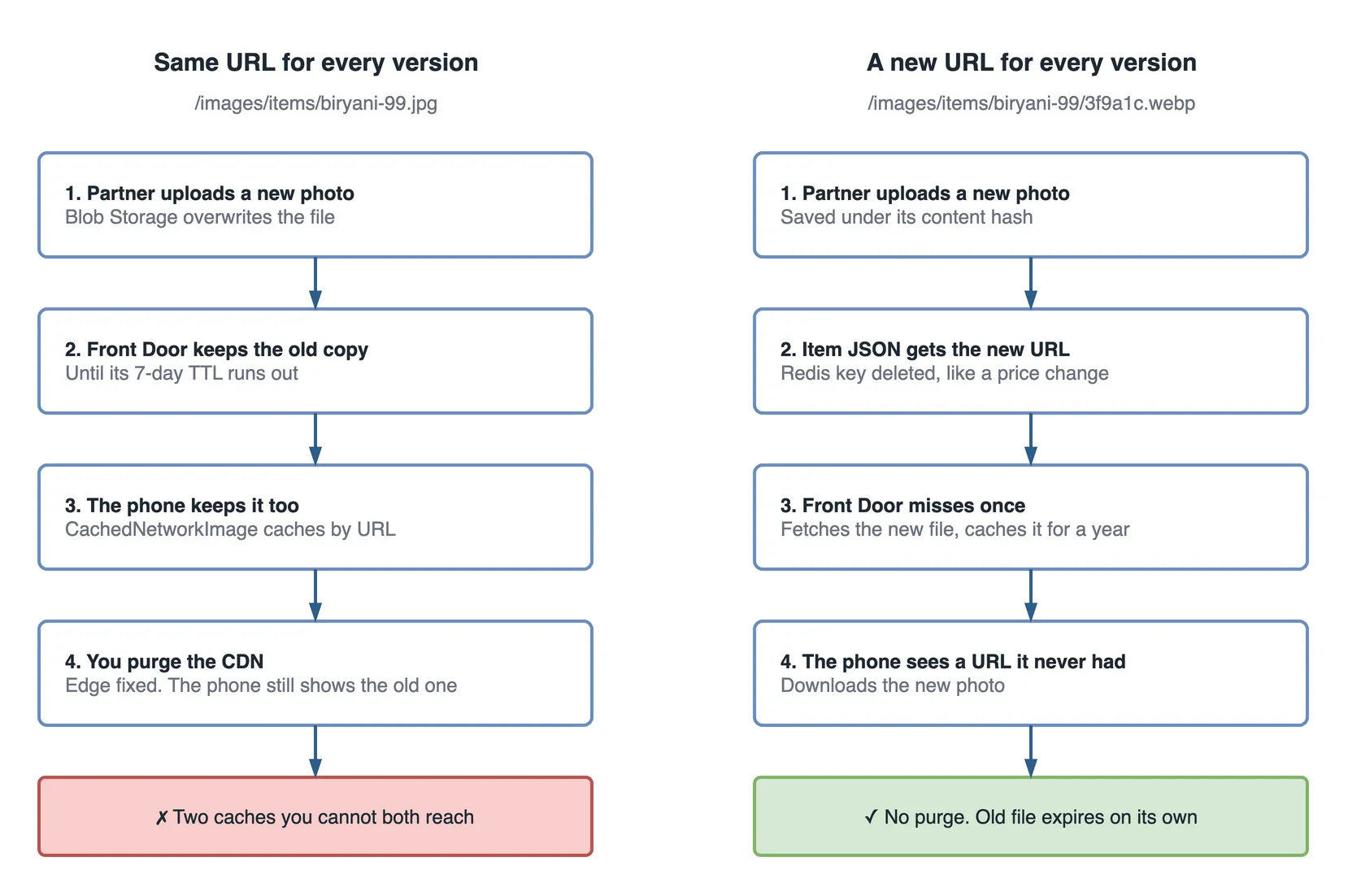
It keeps serving the old one until its cache time runs out, and so does every phone that already downloaded it. The fix is a new URL for every new file, not a purge.
The fix works for the second sale. Then, on the Monday after it, the restaurant partner replaces the biryani photo with a better one. Customers keep seeing the old photo for a week, and another screenshot arrives.
The photo is stored at /images/items/biryani-99.jpg with a seven-day cache. Uploading a new file to the same path changes Blob Storage and nothing else. Front Door keeps its copy until the seven days run out.
Purging Front Door fixes the edge in a few minutes:
az afd endpoint purge \
  --resource-group rg-msdevbuild-prod --profile-name afd-msdevbuild \
  --endpoint-name msdevbuild-assets --content-paths "/images/items/biryani-99.jpg"
The phones still show the old photo. The Flutter app renders images through AppImage, which uses CachedNetworkImage, and that caches on the device by URL. Same URL, same cached file. There is no purge command for 400,000 phones. None.
The fix is to stop reusing URLs. Every uploaded photo is now saved under its content hash, and the dish record stores the full URL:
/images/items/biryani-99/3f9a1c.webpBecause a hashed name never changes content, it can finally be cached for a year, and immutable tells the browser not to even ask whether a newer copy exists:
az storage blob upload \
  --account-name stmsdevbuildassets --container-name images \
  --name items/biryani-99/3f9a1c.webp --file ./biryani-99.webp --auth-mode login \
  --content-cache-control "public, max-age=31536000, immutable"
A new photo means a new URL in the dish JSON, and deleting the dish’s Redis key puts that new URL on the page within ten seconds. Front Door misses once, fetches the new file, and keeps it for a year. The phone has never seen that URL, so it downloads it. The old file expires on its own, and nothing ever needs a purge.
CDN and Redis, side by side
The two fixes from this sale are easy to mix up, because both are “a cache”. They cache different things, in different places, for different reasons.
| Azure Front Door (CDN) | Azure Managed Redis | |
|---|---|---|
| What it stores | Files and HTTP responses: images, JS, CSS, video | Data your API computed: JSON, objects, counters |
| Where it runs | Edge locations, next to your users | In your Azure region, next to your API |
| Who talks to it | The user’s browser or app, through your hostname | Your code |
| What it protects | Your servers and bandwidth, from repeated downloads | The database, from repeated reads |
| How you refresh it | New URL, or purge, which takes minutes | Delete the key from your code |
| How long entries live | Hours to a year | Seconds to minutes |
| Per-user data | Never | Possible, with care |
| If it fails | Front Door routes to another edge | Fall back to the database, slower |
| Flash sale job | The photos and the web app bundle | The dish page JSON, the deal counter |
Why the obvious fixes were wrong
- “Scale App Service up or out.” More servers doing a job servers should not do. The photos still travel from one region.
- “Make the Blob container public and link to it directly.” It takes the API out of the path, which helps, but every download still comes from one region and every byte is billed as storage egress, the charge for data leaving Azure.
- “Cache the whole dish page at the CDN.” It would cache the price and the stock count too, and serve “32 left” long after they were gone.
- “Set a one-year cache on the same filename.” Fast, until the photo changes. Then nobody sees the new one for a year.
- “Purge the CDN when a photo changes.” It fixes the edge and misses every phone that already has the file.
The guardrail: the hit ratio
The hit ratio is the share of requests the edge answers without going back to the origin. One query on the Front Door access logs tracks it. On a normal day the image hit ratio should stay above 90%. If it drops, somebody is uploading files without a cache header, or reusing URLs, or a route lost its caching rule:
AzureDiagnostics
| where Category == "FrontDoorAccessLog"
| where requestUri_s has "/images/" or requestUri_s has "/assets/"
| summarize total = count(),
            hits = countif(cacheStatus_s in ("HIT", "REMOTE_HIT", "PARTIAL_HIT"))
            by bin(TimeGenerated, 5m)
| extend hitRatio = round(100.0 * hits / total, 1)
The second guardrail is a rule in code review: an upload path that overwrites an existing blob name is rejected. New content, new name.
System design interview questions from this incident
- A product page has four large images and a million visitors in a minute. Where should the images come from? A CDN in front of object storage, with long cache lifetimes and versioned URLs. Not the application servers.
- Users still see an old product image after you updated it. Why, and how do you fix it for good? Two caches, the CDN and the device. Versioned URLs fix both; purges fix one.
- When would you not put a CDN in front of an API? Personal data, authenticated responses, anything that writes, and numbers that change every second.
- What is the difference between a CDN and Redis, and when do you need both? Files at the edge versus computed data next to the API. A sale page needs both.
- Your CDN hit ratio drops from 95% to 40% after a release. What do you check first? Cache headers on the new files, query strings or cookies varying the cache key, and whether the build started reusing filenames.
What to do on day one, not after the sale
- Serve every file from Blob Storage behind Front Door from the first release. Moving photos later means a data migration for every dish.
- Name every uploaded file by its content hash. Overwriting a file in place is how stale images happen.
- Send
no-cacheon the Flutter entry files and a year on everything fingerprinted, from the first deploy. - Watch the hit ratio, not just the error rate. A CDN that stopped caching still returns 200.
Key takeaways
- If everybody downloads the same bytes, they should not come from your application servers.
- On Azure, a CDN means Azure Front Door Standard or Premium in front of Blob Storage.
- Cache versioned files for a year, and revalidate the files that keep their name.
- Never cache personal data, authenticated responses or numbers that change by the second.
- Change a file by giving it a new URL. Purging reaches the CDN, not the phones.
The next sale
A month after the first sale, the next flash deal is booked for 12:00. At 9:40 that morning the restaurant partner uploads a new biryani photo. It gets a new hashed URL, and nobody purges anything.
At 12:00 the partner opens the dish page and sends a screenshot. The new photo, four of them, all there, loaded before the price did.
At 12:11 another one arrives. SOLD OUT.
The servers never see most of those photo requests, and that is the whole point. The bytes everybody wants come from an edge a few kilometres from each phone, not from the API.