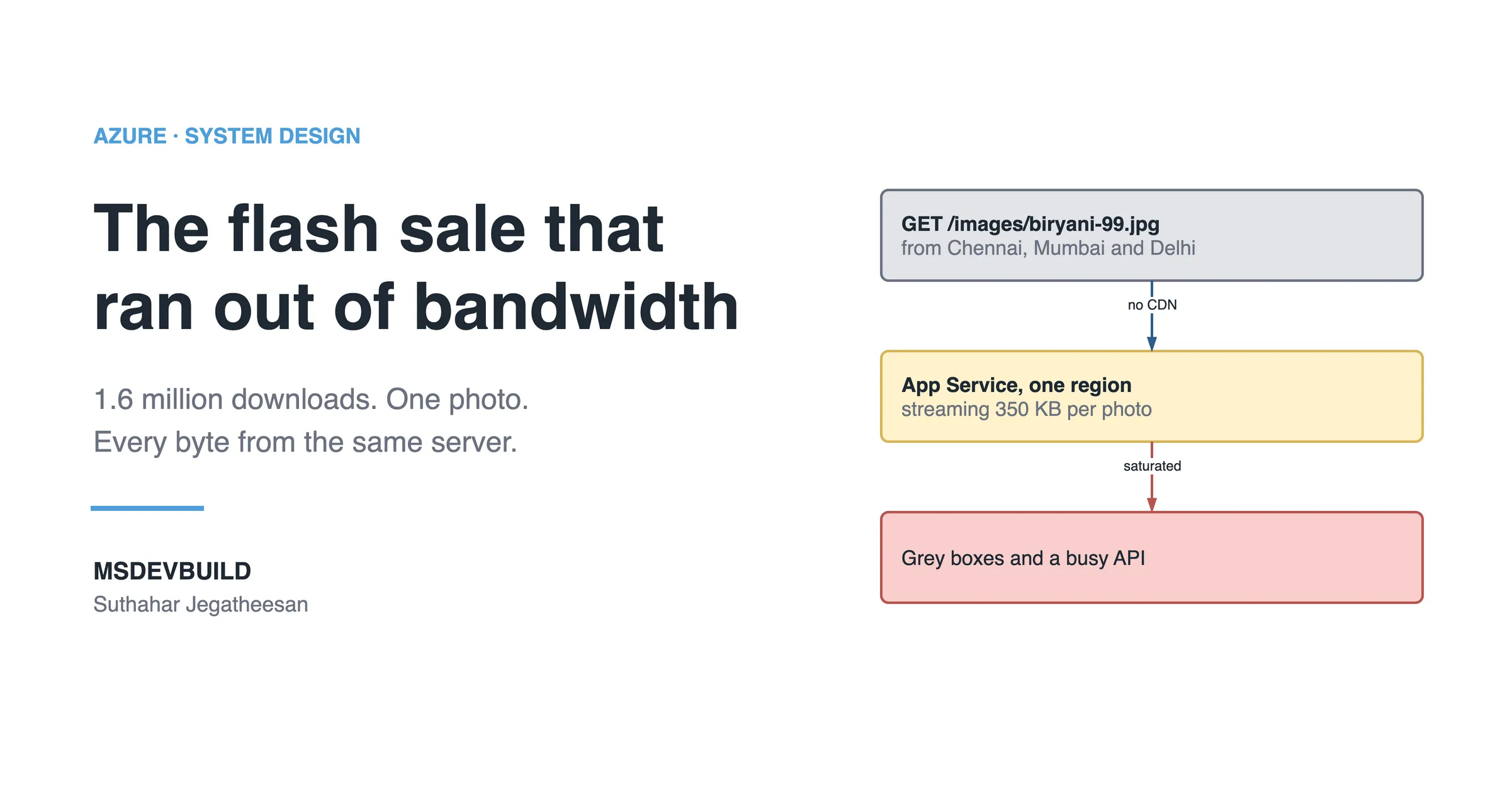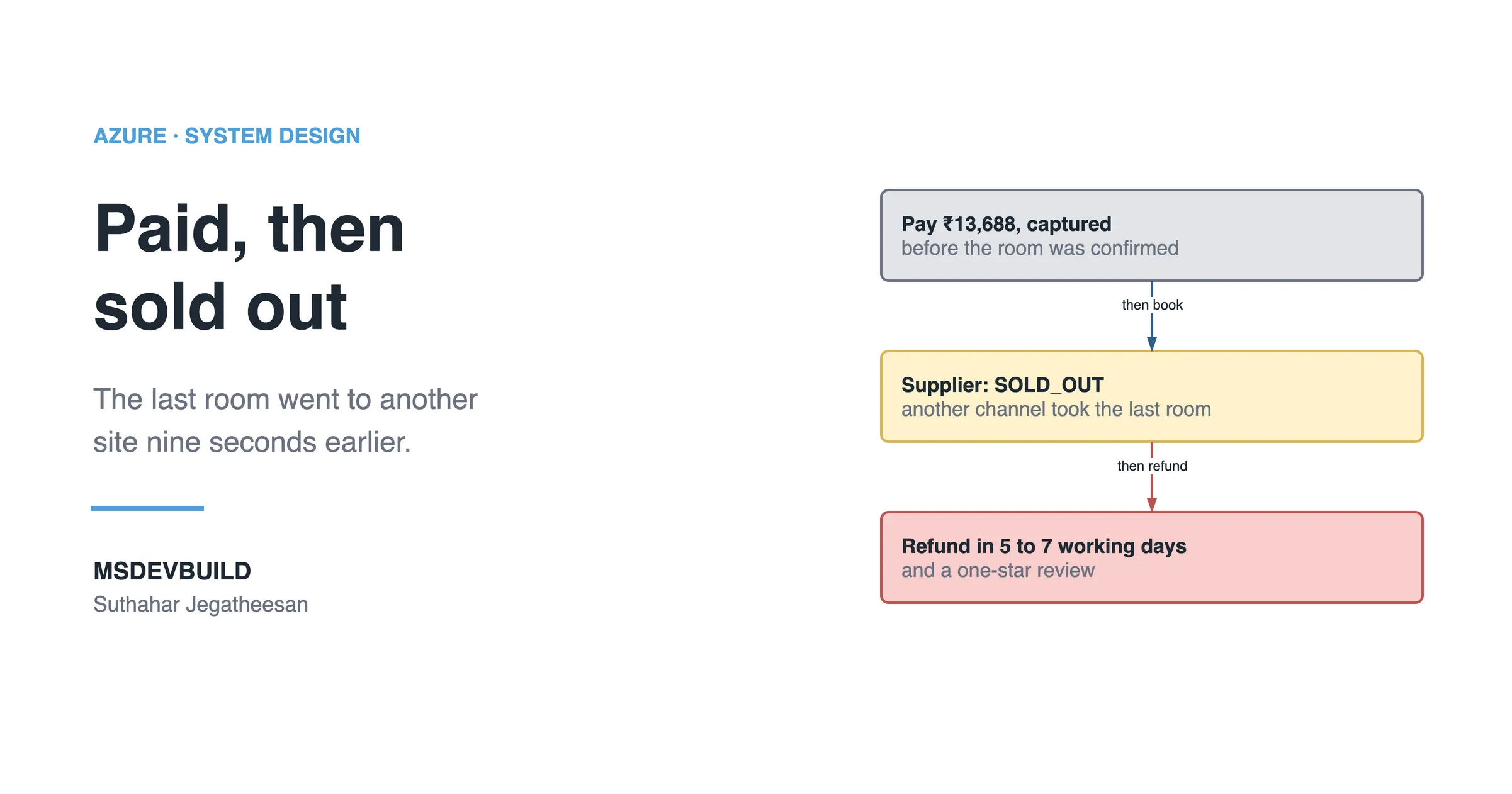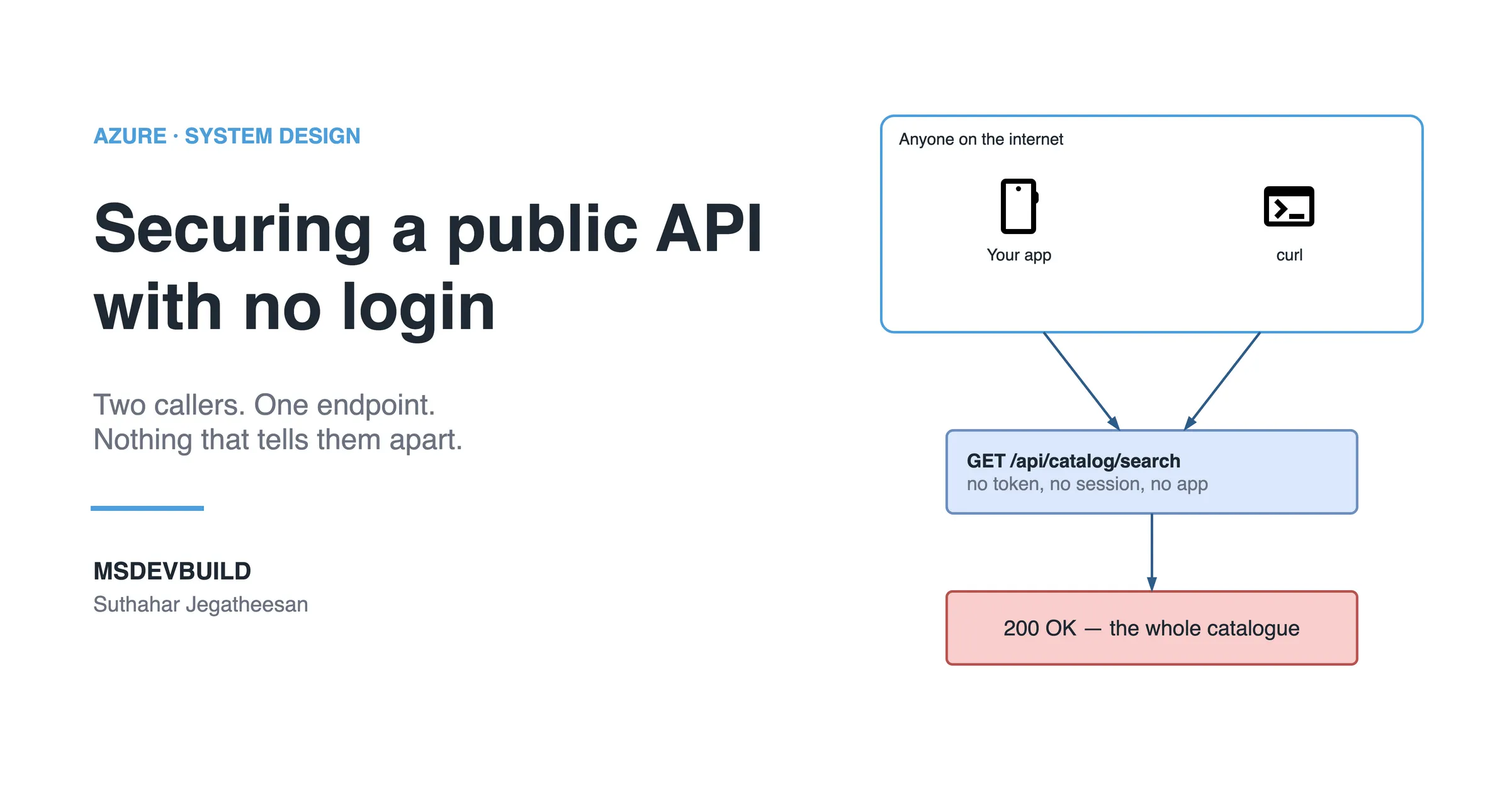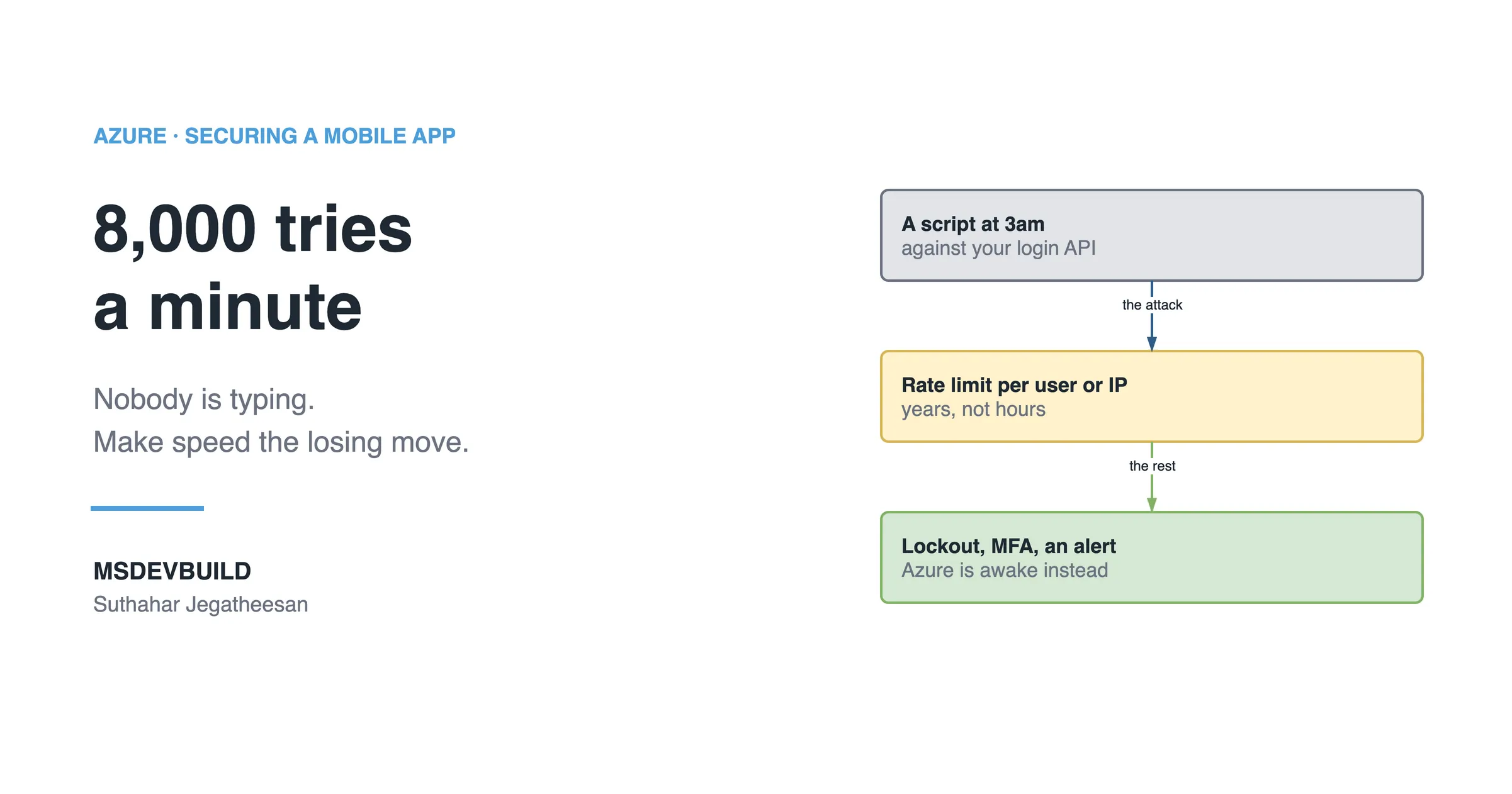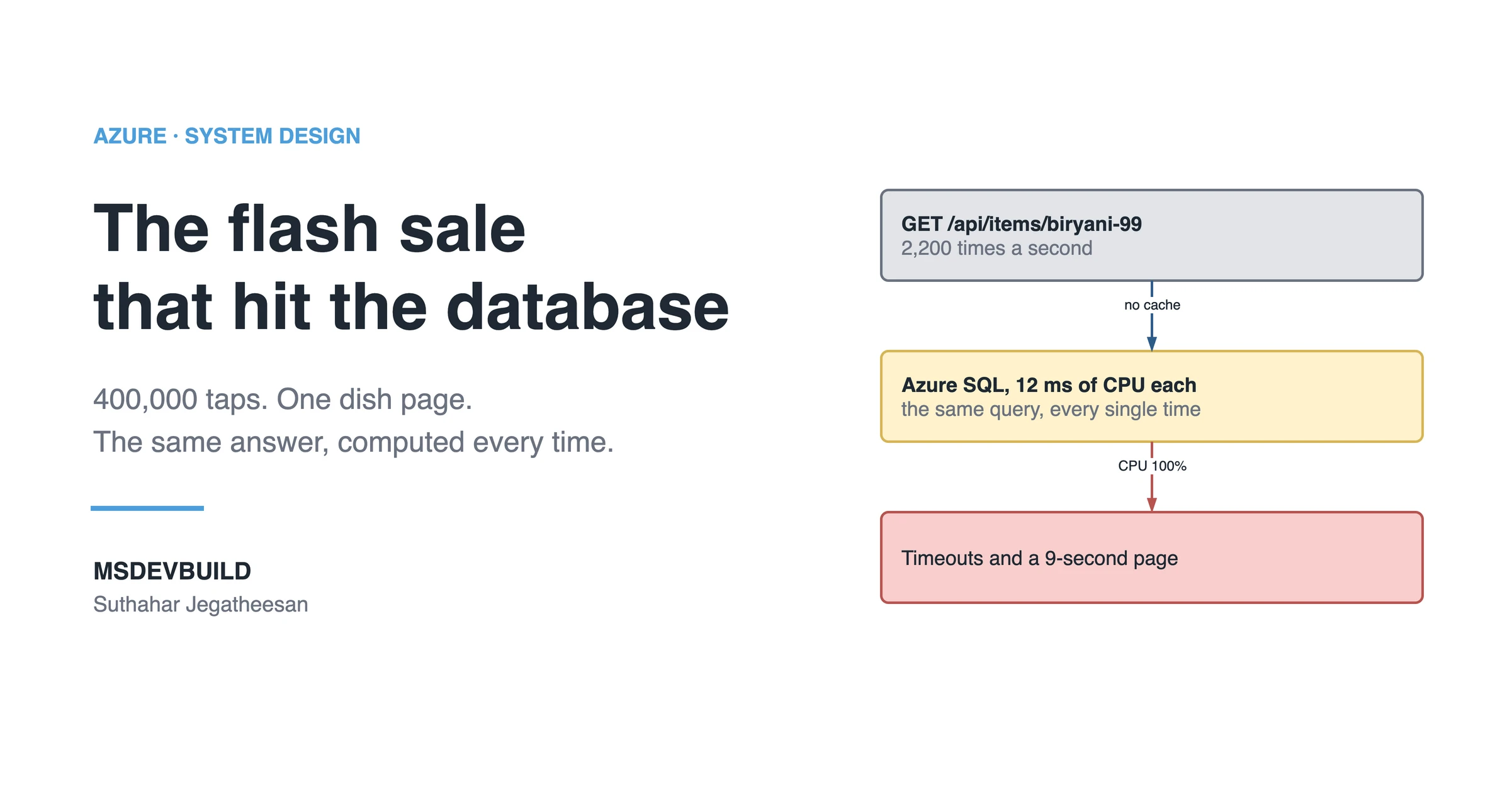
It is 12:01 on a Thursday afternoon, and you are the engineer on call for a food delivery app. A restaurant partner in Chennai has just sent the support team a screenshot. A spinner, then grey boxes where the biryani photos should be, then, nine seconds later, the price.
The message underneath says: “Sale started. Nobody can see the dish.”
It is the app’s first flash deal. A Chettinad biryani for ₹99, 5,000 plates across Chennai, from noon. Marketing sent a push notification to about 400,000 people at 11:59, and it worked better than anyone planned. Everybody tapped it at once.
You open the app on your own phone. Nine seconds, on good 4G.
The strange part is that nothing is down. Every health check is green. No errors on the status page, no alerts firing. The app is simply slow for everybody, at exactly the moment everybody is looking at it.
The deal was meant to sell out in fifteen minutes. At this rate it will take all afternoon.
Two separate problems are hiding inside those nine seconds. This article is the one that hits the database, and how Azure Managed Redis (AMR), the successor to Azure Cache for Redis, fixes it. The photos are the other one, and they need a completely different fix.
Forty minutes, and two fixes that made it worse
Here is how the first forty minutes typically go, as the incident channel would record them:
| Time | What happened |
|---|---|
| 11:59 | Push notification goes to 400,000 people |
| 12:00 | Deal goes live. Dish page p95 jumps from 240 ms to 9 seconds |
| 12:01 | The restaurant partner’s screenshot |
| 12:04 | 300 messages in the support inbox, all some version of “app not working” |
| 12:05 | Azure SQL CPU hits 100% and stays there. The API logs fill with Timeout expired |
| 12:07 | App Service is scaled out from 3 instances to 8. The page gets slower, and SQL error 10928 appears |
| 12:12 | Azure SQL is scaled from 8 vCores to 32. The errors stop. The bill roughly quadruples |
| 12:26 | One SQL query shows the whole problem in a single row |
| 12:40 | 1,100 of 5,000 plates sold. Most people have given up and closed the app |
The first guess, at 12:07, is the natural one. App Service CPU sits at 55%, not great, and somebody says “the API is too small”. Five more instances go in.
It gets worse. Much worse. Each App Service instance keeps its own pool of up to 100 SQL connections, so eight instances can hold 800 queries open at once. An Azure SQL database on the General Purpose tier with 8 vCores allows 800 concurrent workers. The API reaches that wall inside a minute, and a new error joins the timeouts:
Resource ID : 1. The request limit for the database is 800 and has been reached.That is SQL error 10928. The extra servers did not add capacity. They added callers to the thing that was already drowning.
The Azure SQL metrics tell the rest. CPU is pinned at 100%, and every query waits in line for a scheduler. Nothing is broken inside SQL Server; each query is fine on its own. There are just far too many of them, the same shape as the scraping load I wrote about in securing a public API with no login: repeated reads nobody needed.
Scaling the database to 32 vCores at 12:12 makes the errors go away. It does not make the page fast, and it does not explain anything.
The SQL query that showed it in one row
At 12:26 somebody finally asks the database itself a simple question: which queries are running, how often, and what does each one cost?
-- Top queries by execution count since the plan cache last cleared
SELECT TOP (5)
    qs.execution_count,
    qs.total_worker_time   / qs.execution_count / 1000.0 AS avg_cpu_ms,
    qs.total_logical_reads / qs.execution_count          AS avg_logical_reads,
    qs.total_worker_time   / 1000000.0                   AS total_cpu_seconds,
    SUBSTRING(st.text, 1, 120)                           AS query_text
FROM sys.dm_exec_query_stats AS qs
CROSS APPLY sys.dm_exec_sql_text(qs.sql_handle) AS st
ORDER BY qs.execution_count DESC;
One row sits on top of everything else: the dish page query, about 130,000 executions a minute, at 12 ms of CPU and around 900 logical reads each.
This is the query:
SELECT m.Id, m.Name, m.Description, m.Price, m.DiscountPrice, m.ImageUrl,
       r.Name                                AS RestaurantName,
       AVG(CAST(rv.Rating AS decimal(3, 2))) AS Rating,
       COUNT(rv.Id)                          AS ReviewCount
FROM dbo.MenuItems        AS m
JOIN dbo.Restaurants      AS r  ON r.Id = m.RestaurantId
LEFT JOIN dbo.Reviews     AS rv ON rv.MenuItemId = m.Id
WHERE m.Id = @id
GROUP BY m.Id, m.Name, m.Description, m.Price, m.DiscountPrice, m.ImageUrl, r.Name;
Nothing is wrong with it. It uses an index, it returns one row, and it takes 12 ms. The cost is the rating: the biryani has 18,000 reviews, and AVG and COUNT walk all of them on every call. Same item. Same restaurant. Same 18,000 reviews. Every time.
2,200 executions a second at 12 ms of CPU each is about 26 seconds of CPU work every second. That needs roughly 26 vCores. The database has 8.
The system is not busy. It is busy repeating itself.
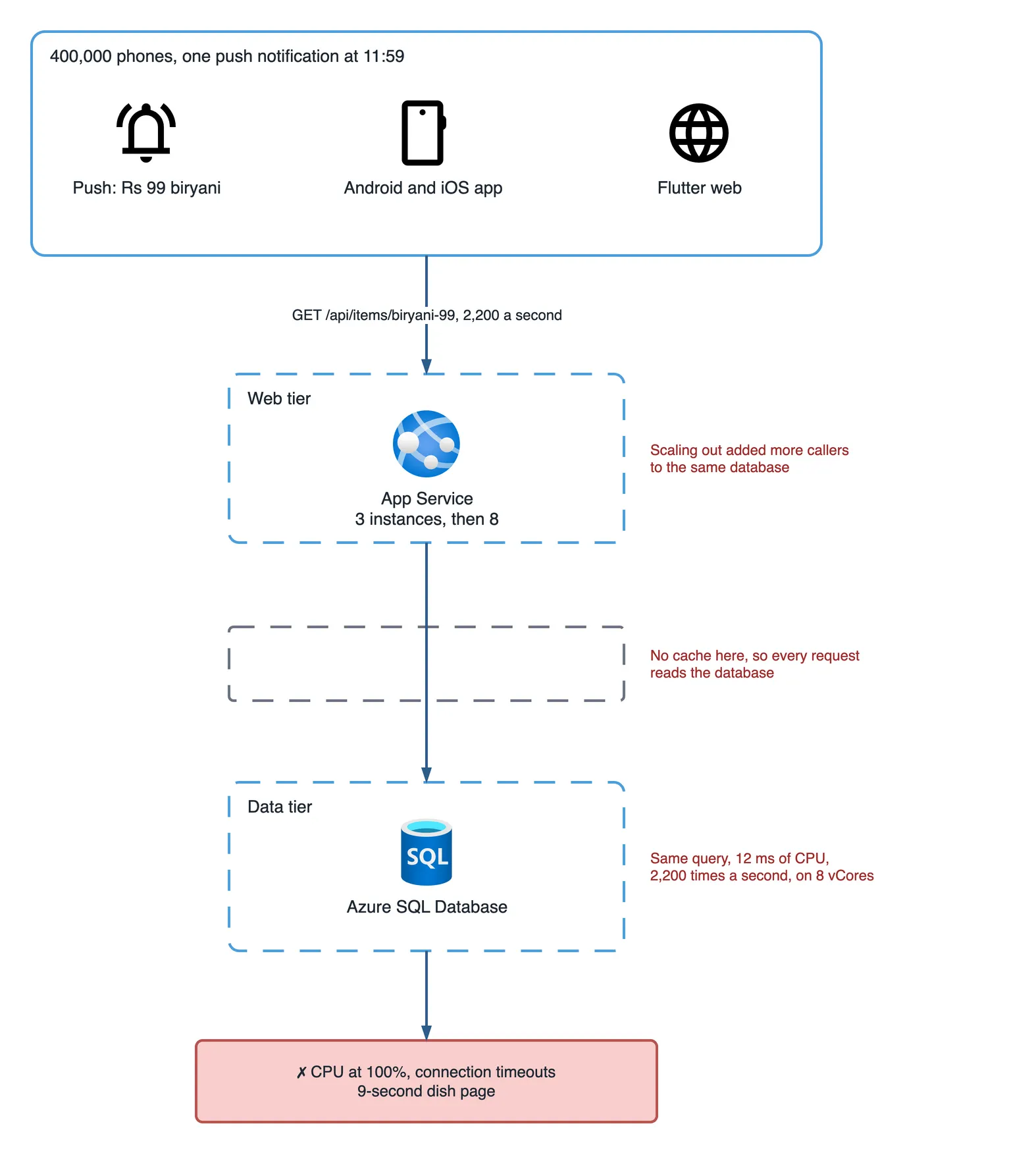
What is the real problem?
The real problem was not traffic. It was repetition.
400,000 people did not ask 400,000 different questions. They asked one question, “show me biryani-99”, and the API worked the answer out from scratch for each of them.
Three things lined up:
- A push notification is a starting gun. Normal traffic arrives spread over an hour. A push sends most of its readers to one page inside two minutes.
- The database was the only place the answer lived. No copy anywhere closer. Every request paid full price.
- Automatic retries multiplied the load. A throttled read did not go away. It came back.
That is why scaling out made it worse. It gave the same repeated work more doors into the database. Remember the pattern, because you will see it again: when adding servers makes a slow page slower, the bottleneck is behind the servers.
The same problem every big sale has
None of this is special to food delivery. Think about Big Billion Days on Flipkart, Prime Day on Amazon, or 11.11 on Shopee. At midnight a phone goes on sale at half price, and a few million people open the same product page in the same minute.
Every one of them sees the same product name, the same description, the same star rating. Only a few numbers change: the price when the deal starts, and the stock count as it drops.
So the question is not “how do we handle millions of users?” It is narrower. How do we stop the database doing the same work millions of times? That is the job Azure Managed Redis exists for. Knowing exactly what to put in it, and what to keep out, is the difference between a sale that sells out and a sale that times out.
The post-mortem, and the questions in the order they came
The next morning the team sits in a room with the graphs on the screen. Nobody wants to talk about the outage. Everybody wants to talk about the fix, and the questions come in roughly this order:
- Should we just have used Redis? For what, exactly?
- So do we put everything in Redis?
- If the price changes during the sale, what does the customer pay?
- What if Redis itself goes down at 12:00?
The rest of this article answers them in that order. If you would rather see it before you read it, the same incident is a one-minute short video:
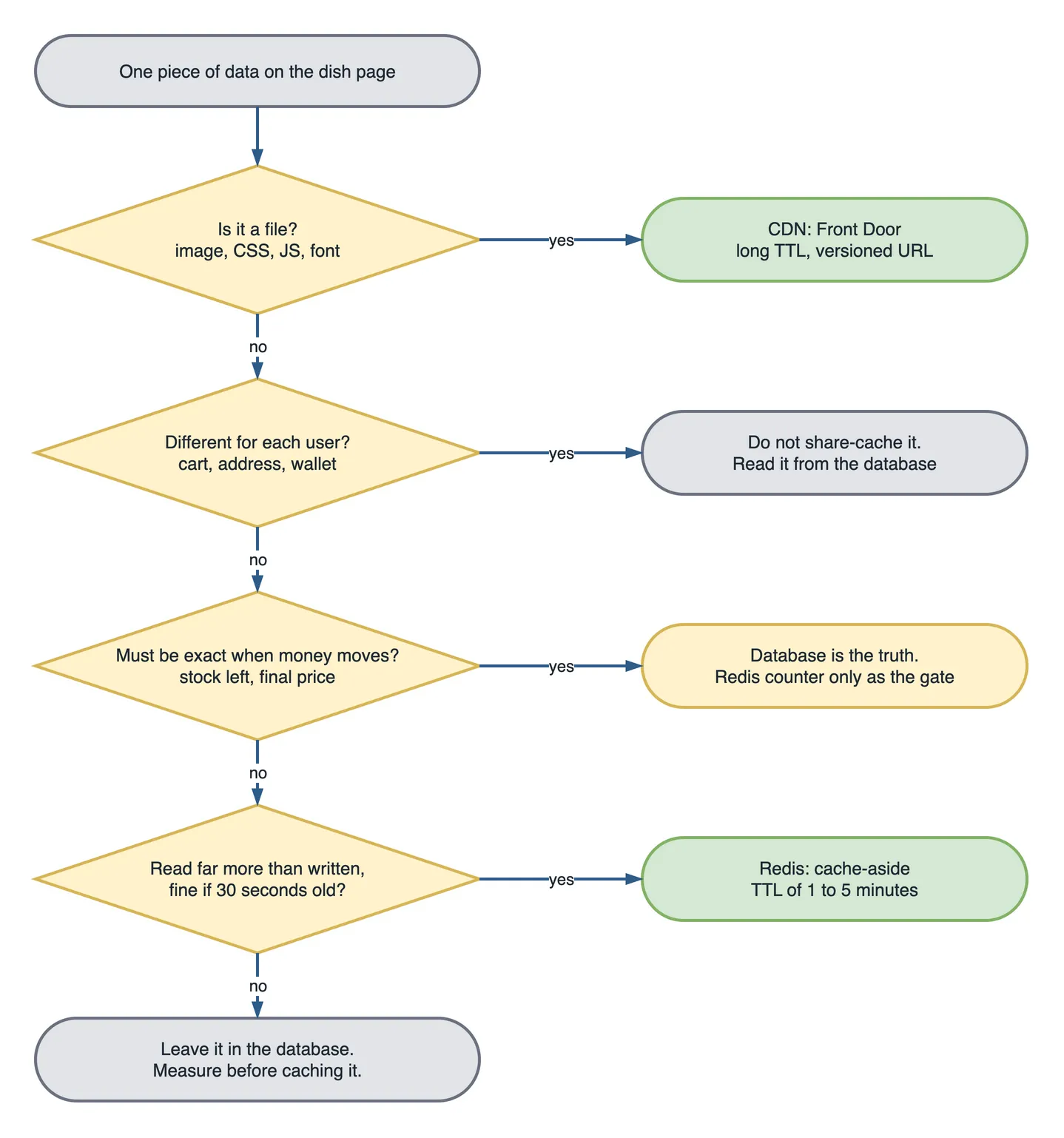
When to use Azure Managed Redis
Use Azure Managed Redis when many users read the same data far more often than it changes, and a few seconds of staleness hurts nobody. The dish page is exactly that.
“Should we just have used Redis?” is the first question in the room, and the answer is yes. But the useful answer is for what, because the wrong things in Redis cause worse outages than this one.
Azure Managed Redis is an in-memory key-value store that sits in your Azure region, next to your API. Your API asks Redis first. If the answer is there, the database never hears about it. If it is not, the API reads the database once and puts the answer in Redis for the next caller. This is called cache-aside.
Reach for it when all four of these are true:
- Many users read the same data. A product page, a menu, a category list, a “top 20 dishes near you”.
- It is read far more often than it changes. A dish description changes monthly. It is read 130,000 times a minute during a sale.
- Being a little out of date is acceptable. If the rating shows 4.6 for thirty seconds after it became 4.7, nobody is harmed.
- The database is the bottleneck, and you have measured it. The query above is the measurement.
What data belongs in Redis
| Data | Put it in Redis? | Time to live |
|---|---|---|
| Dish or product details: name, description, photo URLs | Yes | 5 minutes |
| Ratings summary, review count | Yes | 10 minutes |
| Category list, home page banners, “popular now” | Yes | 1 to 5 minutes |
| Restaurant opening hours | Yes | 15 minutes |
| Login session and short-lived tokens | Yes, as the session store | The session length |
| Rate-limit counters | Yes | The rate window |
| Deal counter: plates left | As a fast gate, not the record | Until the deal ends |
| The price a customer is charged | No | Read the database at checkout |
| Cart, addresses, payment details | No | Per-user, read the database |
Azure Managed Redis or Azure Cache for Redis?
Use Azure Managed Redis for anything you build now. Azure Cache for Redis is being retired: the Basic, Standard and Premium tiers on 30 September 2028, and the Enterprise tiers on 31 March 2027, according to the retirement FAQ. Most tutorials and Stack Overflow answers still say “Azure Cache for Redis”, so here is what actually changes:
| Azure Cache for Redis | Azure Managed Redis (AMR) | |
|---|---|---|
| Status | Retiring, 2027 and 2028 | Current, the target for new builds |
| Engine | Redis community edition | Redis Enterprise stack |
| Host name | name.redis.cache.windows.net | name.region.redis.azure.net |
| Port | 6380 over TLS | 10000 |
| Default sign-in | Access keys | Microsoft Entra ID |
| Tiers | Basic, Standard, Premium, Enterprise | Balanced, Memory Optimized, Compute Optimized, Flash Optimized |
| Scaling out | Premium clustering | Clustering built in, OSS clustering policy by default |
| Your .NET code | StackExchange.Redis | the same client, a new host and port |
For a read-heavy cache like this dish page, the Balanced tier is the usual starting point: it pairs memory and vCPU at 4:1, which suits many small, fast reads.
When not to use Redis
Do not use Redis for the only copy of anything, for per-user data, or for any value that decides money. The second question comes fast. “So we put everything in Redis?” This is the point where a team that just got burned by the database overcorrects.
A cache is a second copy of your data, and every second copy can be wrong. Skip Redis when:
- It would be the only copy. Redis can evict keys under memory pressure and can lose recent writes in a failover. Orders, payments and inventory records belong in the database.
- Every user sees different data. A cart is read by one person. Caching it saves nothing and adds an invalidation problem.
- The value decides money. A price shown on a product page can be a few seconds old. A price charged at checkout cannot.
- Writes are as frequent as reads. If the cache is invalidated after every read, you pay for both and gain nothing.
- The database is not the problem. If your page is slow because of a 2 MB image, Redis will not help. That is a different problem with a different fix.
The Azure Managed Redis fix: cache-aside with one caller per key
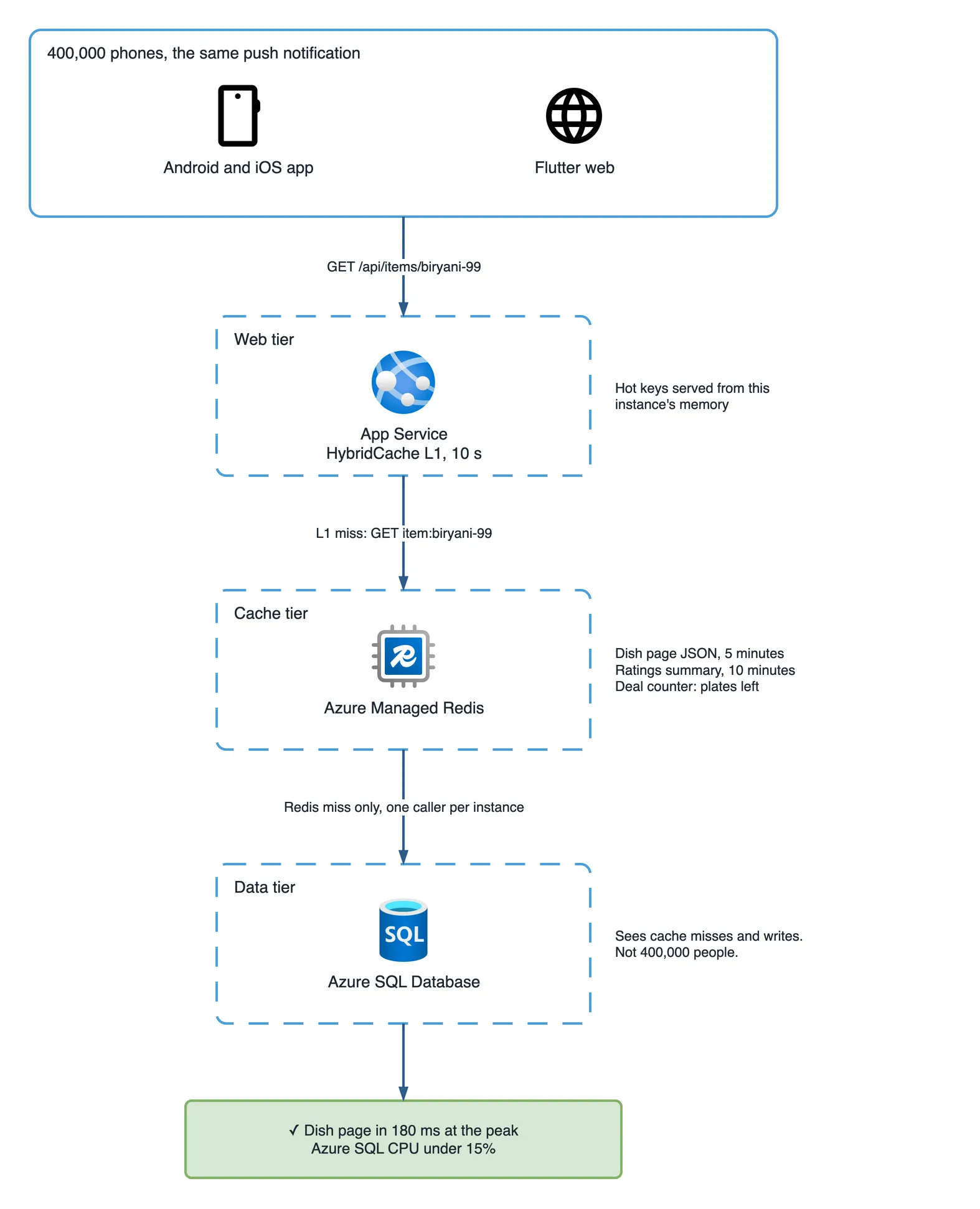
Here is the fix. The API is ASP.NET Core on App Service, and it uses HybridCache from Microsoft.Extensions.Caching.Hybrid with Redis behind it, for one reason more than any other: it lets only one request per instance build a missing entry, while the others wait for that result. Plain IDistributedCache does not, and without that, a key expiring at the peak sends every waiting request to the database at the same moment. That is called a cache stampede, and it is exactly what happened at 12:00.
// Program.cs
using Azure.Identity;
using Microsoft.Extensions.Caching.Hybrid;
using StackExchange.Redis;

// Azure Managed Redis: "msdevbuild-cache.centralindia.redis.azure.net:10000"
var redisOptions = ConfigurationOptions.Parse(builder.Configuration["Redis:Endpoint"]!);
await redisOptions.ConfigureForAzureWithTokenCredentialAsync(new DefaultAzureCredential());
redisOptions.AbortOnConnectFail = false;   // start the app even if Redis is not reachable
redisOptions.ConnectTimeout = 2000;
redisOptions.AsyncTimeout = 500;           // a slow cache is worse than no cache

builder.Services.AddStackExchangeRedisCache(o => o.ConfigurationOptions = redisOptions);

builder.Services.AddHybridCache(o =>
{
    o.DefaultEntryOptions = new HybridCacheEntryOptions
    {
        Expiration = TimeSpan.FromMinutes(5),          // Redis, shared by every instance
        LocalCacheExpiration = TimeSpan.FromSeconds(10) // this instance's memory
    };
});
Azure Managed Redis uses Microsoft Entra ID by default, so the App Service managed identity signs in through Microsoft.Azure.StackExchangeRedis and there is no access key in configuration to leak or rotate. It also sits behind a private endpoint with public access off, the same way every data service does in how Azure protects a mobile app. The two timeouts are the part people skip. The client default is five seconds, and a five-second wait on a cache is worse than going straight to the database.
The endpoint barely changes:
app.MapGet("/api/items/{id}", async (string id, HybridCache cache,
                                     ICatalogReader catalog, CancellationToken ct) =>
{
    var page = await cache.GetOrCreateAsync(
        $"item:{id}",
        async token => await catalog.GetItemPageAsync(id, token),
        cancellationToken: ct);

    return page is null ? Results.NotFound() : Results.Ok(page);
});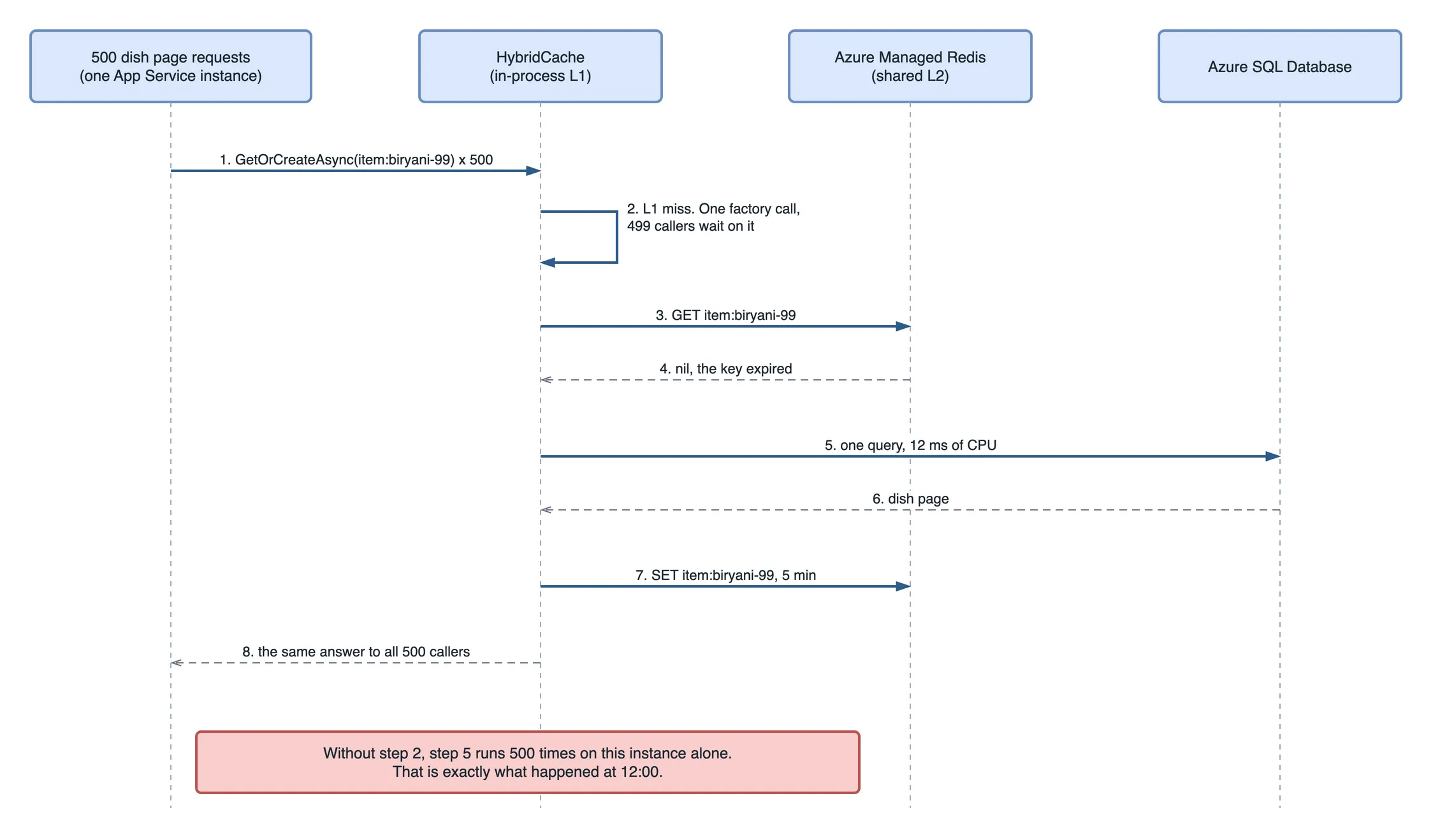
The single-caller guarantee is per instance. With eight instances, a key expiring at the peak means up to eight database reads, not 2,200. Azure SQL does not even notice eight.
How efficient is the new design?
The database stops working in proportion to the number of people and starts working in proportion to the number of dishes. That is the whole gain, and the numbers show it plainly.
Here is where the 2,200 requests a second for biryani-99 end up once all three layers are in place, across eight App Service instances:
| Layer | Answers per second for this dish | Why |
|---|---|---|
| In-process memory (HybridCache L1) | about 2,199 | Each instance keeps the answer for 10 seconds |
| Azure Managed Redis | under 1 | Each instance asks Redis once every 10 seconds: 8 instances in 10 s |
| Azure SQL Database | about 0.03 | One query per instance when the 5-minute Redis entry expires: 8 in 300 s, at worst |
That is 2,200 queries a second turned into roughly two queries a minute, for exactly the same traffic.
Side by side, for the same push to the same 400,000 people:
| First sale, no cache | Second sale, with the cache | |
|---|---|---|
| Dish page p95 | 9 seconds | 180 ms |
| Dish page queries on Azure SQL | 2,200 a second | about 2 a minute |
| CPU that query needed | about 26 vCores | a small fraction of one |
| Azure SQL size | 32 vCores, scaled in a hurry | back to 8, CPU under 15% |
| App Service | scaled from 3 to 8 instances | 3 instances, unchanged |
| Errors | Timeout expired, error 10928 | none |
| 5,000 plates | 1,100 sold in the first 40 minutes | sold out in 11 minutes |
The rule that makes this a design and not a lucky tweak: database load is now hot keys × instances ÷ cache lifetime. Double the visitors and Azure SQL does the same work. Put twice as many dishes on sale and it does twice a very small amount.
It protects Redis too. Under the default OSS clustering policy each key lives on one shard, so a single hot key cannot be spread across the cluster. The in-process copy is what keeps that one shard at under one read a second.
It also changes what scaling out does. At 12:07, every new App Service instance was another caller hammering the database. With the cache in front, a new instance adds one query every five minutes and a lot of memory that can answer on its own, so scaling out finally adds capacity.
What happens when the price or stock changes?
Write the database, then delete the cache key, and never let checkout read the cache. Stock is different again: Redis holds a counter as a gate, and the database keeps the record.
This is the question that should worry you most, and every restaurant partner asks it before a sale: “If I change the price during the sale, what will customers pay?”
If the honest answer is “whatever was in the cache”, you have a much bigger problem than a slow page. Price and stock get different treatment, because they break in different ways.
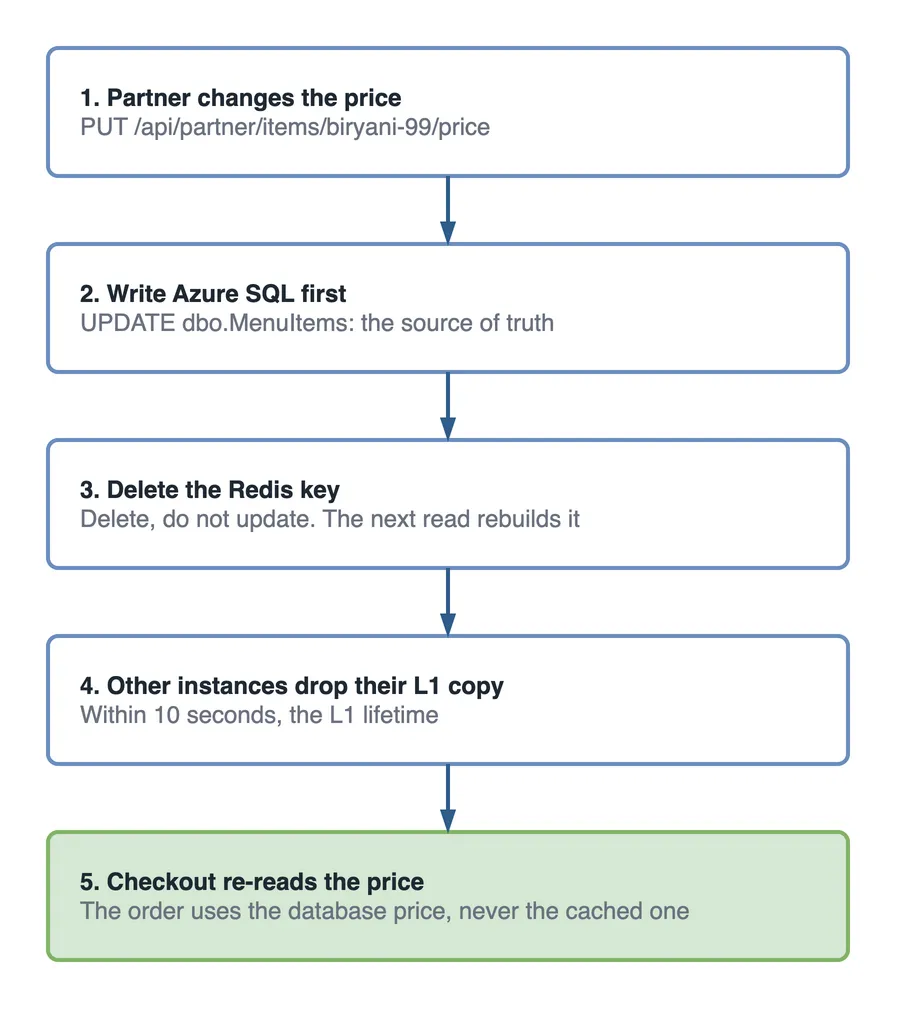
Price. A partner can change the price from the restaurant dashboard at any time. The rule is: write the database first, then delete the cache entry. Delete, never update. If two updates race, an update can leave the older value in Redis. A delete only ever leaves “no value”, and the next read fetches the truth.
app.MapPut("/api/partner/items/{id}/price", async (string id, PriceChange change,
    ICatalogWriter catalog, HybridCache cache, CancellationToken ct) =>
{
    await catalog.UpdatePriceAsync(id, change.Price, ct);  // 1. the source of truth
    await cache.RemoveAsync($"item:{id}", ct);            // 2. then drop the copy
    return Results.NoContent();
}).RequireAuthorization("PartnerOnly");
RemoveAsync clears Redis and this instance’s memory. The other instances still hold their in-memory copy for up to ten seconds, which is why LocalCacheExpiration is ten seconds and not five minutes. For a price shown on a page, ten seconds is fine. For a price charged, it is not, so checkout never uses the cache. It runs its own query, SELECT Price FROM dbo.MenuItems WHERE Id = @id, and puts that number on the order.
Stock. “Plates left” is the one number everybody watches and everybody changes. You cannot cache it with a TTL, because it is wrong the moment the next order lands. You also do not want 2,200 requests a second queuing for one row. SQL Server can decrement a counter safely, but every buyer waits for the same row lock, and that lock queue becomes the next outage.
So Redis holds the counter as a gate, and the database holds the record:
var left = await redis.StringDecrementAsync($"deal:{dealId}:left");
if (left < 0)
{
    await redis.StringIncrementAsync($"deal:{dealId}:left");   // give it back
    return Results.Conflict(new { reason = "sold_out" });
}

// Redis said yes. The database still has the final word.
await orders.PlaceDealOrderAsync(order, dealId, ct);
Inside PlaceDealOrderAsync, in the same transaction as the order insert, SQL Server does the real claim. The WHERE clause makes it impossible to go below zero:
UPDATE dbo.Deals
SET    PlatesLeft = PlatesLeft - 1
WHERE  Id = @dealId
  AND  PlatesLeft > 0;   -- 0 rows affected: sold out, roll back the order
DECR is atomic, so two requests can never both take the last plate. Redis answers the question “is it worth trying?” in under a millisecond. The UPDATE is the record. Only the requests Redis let through ever reach that row, so it sees at most 5,000 claims in total instead of 2,200 a second, and a reconciliation job every minute compares the two counts. If they disagree, the database wins. The number on the dish page reads the same counter, rounded down to “fewer than 50 left”, because an exact count that changes forty times a second is noise to a customer anyway.
What happens if Redis is unavailable?
The site gets slower but stays correct, as long as Redis is a cache-aside speed-up and not a dependency. The last question in the room turns the whole fix around. Redis now sits between 400,000 people and the database. What if Redis goes down at 12:00?
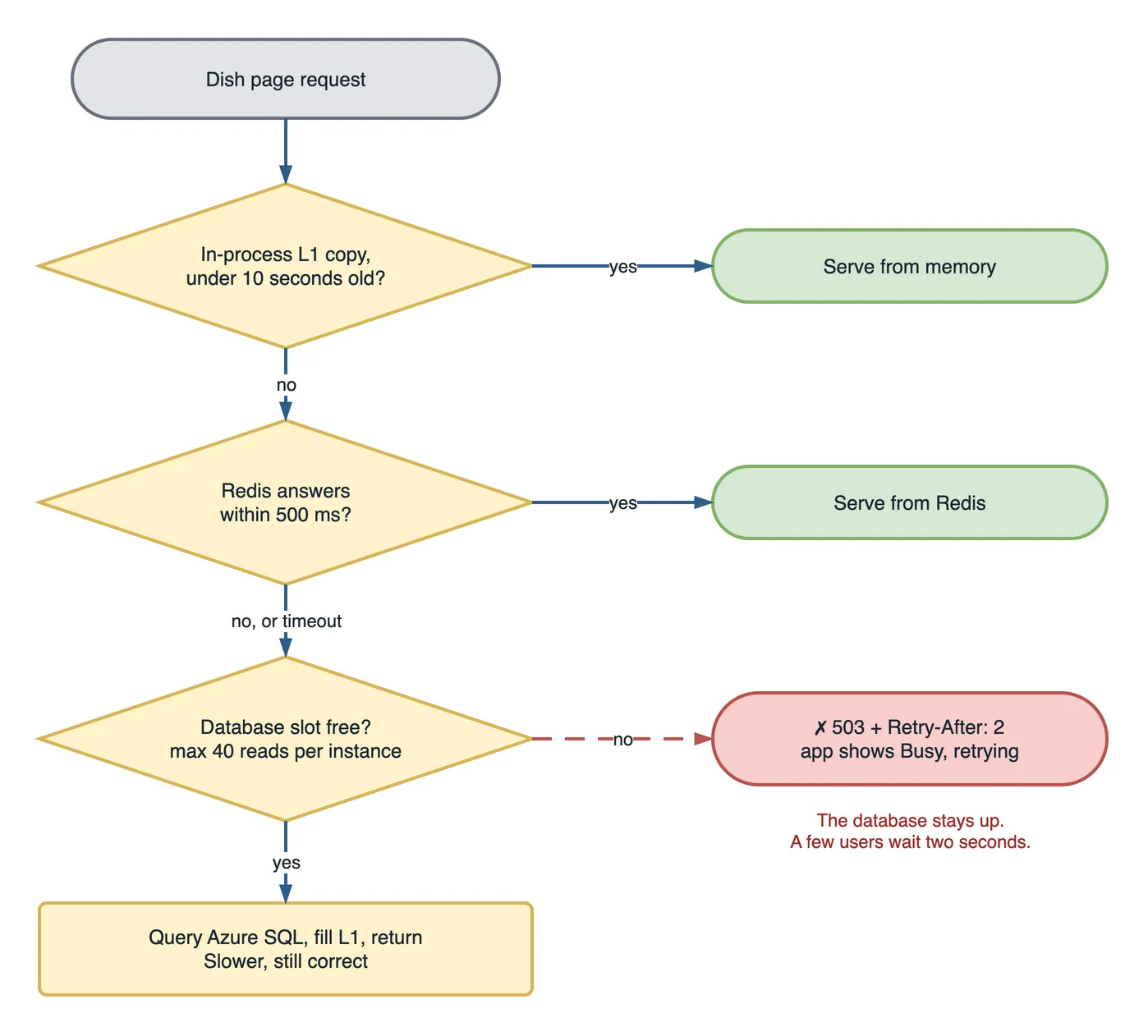
If the cache is built as cache-aside, a Redis outage makes the site slower, not wrong. The data is still in the database. The danger is that “slower” means every request now goes to the database at once, which is the exact outage this article started with.
Three settings keep it contained:
- Short timeouts. 500 ms on Redis calls. A request that waits five seconds for a dead cache has already failed.
- The in-process copy.
HybridCache’s memory layer keeps serving hot keys for ten seconds while Redis is away, and on a sale day the hot keys are nearly all of the traffic. - A cap on database reads. At most 40 queries per instance go to Azure SQL at once, well under its 800-worker limit even across eight instances. Anything beyond that gets a fast
503withRetry-After, and the app shows “busy, retrying” instead of a spinner.
The cap sits inside the cache’s factory, not on the endpoint. Put it on the endpoint and it throttles cache hits too, which are the requests you most want to serve:
public sealed class CatalogReader(IDbConnectionFactory db) : ICatalogReader
{
    private static readonly SemaphoreSlim DbSlots = new(40);   // per instance

    public async Task<ItemPage?> GetItemPageAsync(string id, CancellationToken ct)
    {
        if (!await DbSlots.WaitAsync(TimeSpan.FromMilliseconds(250), ct))
            throw new DatabaseBusyException();   // mapped to 503 + Retry-After: 2

        try { return await QueryItemPageAsync(id, ct); }   // the SELECT from earlier
        finally { DbSlots.Release(); }
    }
}
Test it before any sale by rebooting the Redis instance in the middle of a load test. In this setup the p95 goes from 180 ms to 1.4 seconds for about forty seconds, no errors reach the database, and nobody files a ticket. A restart is also the realistic failure: patching and scaling operations briefly drop connections, so this path runs in production whether you plan for it or not.
Why the obvious fixes were wrong
- “Scale out App Service.” It gave the repeated work more paths into the database. Eight instances were slower than three.
- “Scale the database up.” 32 vCores worked, at the price of paying for the same answer 2,200 times a second.
- “Raise Max Pool Size on the connection string.” More connections per instance only reach the 800-worker limit sooner.
- “Put everything in Redis.” Including the cart and the checkout price. Every one of those needs invalidation logic, and each one is a new way to charge someone the wrong amount.
- “Make the Redis TTL one hour.” Fewer misses, but a price change stays wrong on the page for an hour, and every partner call becomes a support ticket.
- “Update the cached value when the price changes.” Two racing updates leave the older price in Redis. Delete the key instead.
The guardrail: two queries and one rehearsal
The first query counts SQL calls per dish page request, from Application Insights. With the cache working, it sits well below 0.1. An alert fires above 0.5, which catches a cache that stopped working, before the next sale does:
let pages = requests
    | where timestamp > ago(15m) and url has "/api/items/"
    | summarize pages = count();
dependencies
| where timestamp > ago(15m) and type == "SQL"
| summarize dbCalls = count()
| extend pages = toscalar(pages)
| extend callsPerPage = round(1.0 * dbCalls / pages, 2)
The second one asks the database directly. Query Store keeps execution counts per interval, so this shows whether the dish page query is running at cache-miss rates or at traffic rates. A few hundred executions an hour is the cache doing its job. Hundreds of thousands means it is not:
SELECT TOP (5)
    q.query_id,
    SUM(rs.count_executions)      AS executions_last_hour,
    AVG(rs.avg_cpu_time) / 1000.0 AS avg_cpu_ms,
    MAX(qt.query_sql_text)        AS query_text
FROM sys.query_store_runtime_stats          AS rs
JOIN sys.query_store_runtime_stats_interval AS i  ON i.runtime_stats_interval_id = rs.runtime_stats_interval_id
JOIN sys.query_store_plan                   AS pl ON pl.plan_id = rs.plan_id
JOIN sys.query_store_query                  AS q  ON q.query_id = pl.query_id
JOIN sys.query_store_query_text             AS qt ON qt.query_text_id = q.query_text_id
WHERE i.start_time > DATEADD(hour, -1, SYSUTCDATETIME())
GROUP BY q.query_id
ORDER BY executions_last_hour DESC;
The rehearsal matters more. Before every flash sale, an Azure Load Testing run replays the push notification: 2,500 requests a second to one item, ramping up in thirty seconds, with a Redis reboot halfway through. If the p95 stays under a second and Azure SQL CPU stays under 50%, marketing gets the go-ahead to send the push.
System design interview questions from this incident
These come up in real interviews, usually phrased around Amazon or Flipkart. Each one is a section of this article.
- A million users open the same product page in one minute. What do you cache, and for how long? They want to hear you split the page into shared data and money data, not “add Redis”.
- What is a cache stampede, and how do you prevent it? One key expires, every waiting request misses at once. Single-flight per key, a small in-process cache, and staggered TTLs.
- A seller changes the price. How does the new price reach users, and what guarantees the customer is charged correctly? Write the database, delete the key, and never use the cached price at checkout.
- How do you sell exactly 5,000 units without overselling when 50,000 people click Buy? Atomic decrement as a gate, the database as the record, and reconciliation between them.
- Your Redis cluster goes down during the sale. What happens? Short timeouts, in-memory fallback, and a cap on database concurrency, so a cache outage does not become a database outage.
- Your cache hit ratio is 99% but the site is still slow. Where do you look? The 1% might be the expensive path, the hot key might sit on one Redis shard, or the slow part might not be data at all.
What to do on day one, not after the sale
- Put
HybridCachein front of every read-heavy public endpoint before the first sale, not after it. - Decide, per field, whether it may be cached, and write that down beside the DTO. Price and stock needed the most care, and they were the ones nobody had thought about.
- Set Redis timeouts in the first commit. The five-second default is a trap you only find under load.
- Load test the push notification, not the average day. Average traffic never breaks anything.
Key takeaways
- A flash sale is the same read repeated, so cache the read, not the traffic.
- Use Azure Managed Redis for shared, read-heavy data that can be seconds old.
- Keep the price you charge, the cart and the only copy of anything in the database.
- On a change, write the database and delete the key. Never update it.
- Let one request per key rebuild a miss, and cap database reads so a Redis outage stays small.
The second sale
Three weeks later, the second flash deal runs with the cache in place. Same biryani, same ₹99, same push to the same 400,000 people.
At 12:11 the restaurant partner sends another screenshot. It says SOLD OUT.
The dish page stays under 200 ms the whole time, and the Azure SQL CPU graph barely moves. Nobody bought a bigger database. The API just stopped asking it the same question 2,200 times a second.
The grey boxes where the photos should have been are the other half of that afternoon, and they are next in this series.