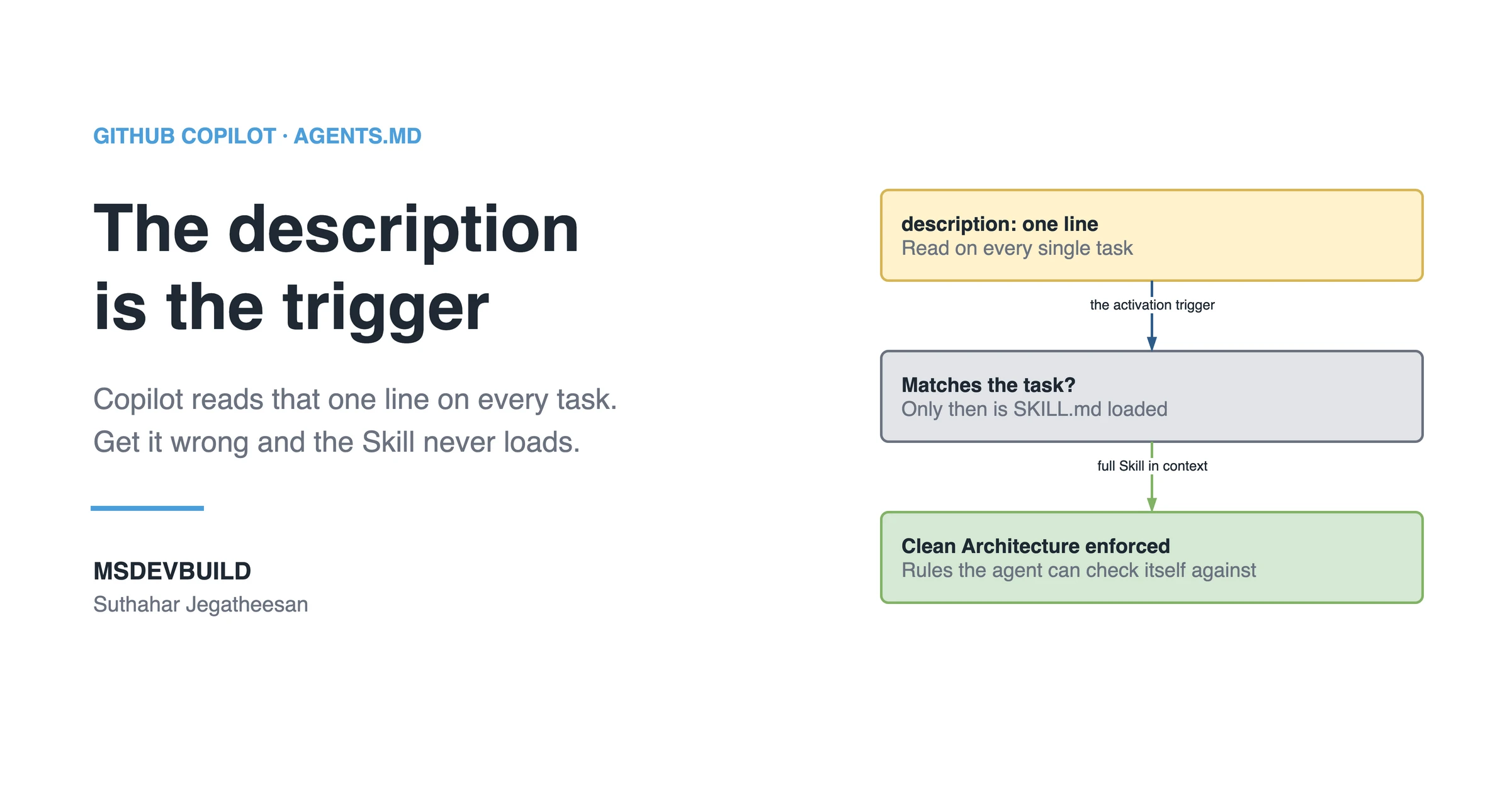
A GitHub Copilot Skill for .NET is one SKILL.md file that teaches Copilot how your team builds a Web API feature: Clean Architecture layers, CQRS with MediatR, FluentValidation, one response contract, and the tests. This is a build-along. We start from an empty file and end with a tested Skill that stops the most common mistake Copilot makes in an ASP.NET Core codebase: putting the whole feature in the controller.
Picture a developer on the team that builds the orders API behind a food delivery app like MSDevBuild Eats. They ask Copilot to add a new endpoint, and Copilot writes the entire thing inside the controller: business logic, a raw DbContext call, an if (order == null) return NotFound(), and an anonymous object as the response. It compiles. It even works. And it is wrong in five ways the team agreed never to do.
The tech lead had explained all of this to Copilot before, in chat, on a different feature, two weeks earlier. The knowledge was real. It lived in a prompt nobody could reuse.
Why Copilot Skills exist covered the why: where Skills sit between prompts, instructions and agents, and why progressive disclosure matters. This article is the opposite. No theory. One complete, production-shaped SKILL.md, built step by step, and tested against the exact mistake above.
One week of the same five mistakes
| Day | What happened |
|---|---|
| Mon | “Add a CreateOrder endpoint.” The action queries DbContext directly and returns an anonymous object |
| Tue | Review asks for a Command, a handler, a validator and ApiResponse<T>. The rework takes the afternoon |
| Wed | “Add a GetOrderById query.” Same shape: logic in the controller, NotFound() inline, no test |
| Thu | A second developer, a different feature, the same five review comments |
| Fri | The tech lead turns the review comments into a Skill, the one this article builds |
The command that found the controllers doing too much
Before writing the Skill, measure the problem. Controllers in this architecture should only send requests through IMediator. Anything else in them is a rule already broken:
# Controllers touching the database directly
grep -rlE 'DbContext|SaveChangesAsync|\.Include\(' src/Api/Controllers

# Controllers deciding not-found themselves instead of the handler
grep -rnE 'return NotFound\(\)' src/Api/Controllers

# Actions returning anonymous objects instead of ApiResponse<T>
grep -rnE 'return (Ok|Created)\(new \{' src/Api/Controllers
At the end of the scenario week, the three commands returned:
| Rule broken | Matches |
|---|---|
Controller touching DbContext | 3 controllers |
NotFound() decided in the controller | 5 actions |
Anonymous object instead of ApiResponse<T> | 4 actions |
Twelve matches, all from the same week, all written by Copilot from a reasonable default. After the Skill, run them again after every feature. They should return nothing.
If you would rather see the idea first, it is a short video:
What you need before we start
This is a hands-on build. The setup it assumes is nothing exotic.
- A .NET Web API using Clean Architecture with CQRS. If you use MediatR, FluentValidation, and an
ApiResponse<T>wrapper, you will feel right at home. If you use something similar, adjust the rules to match. - GitHub Copilot with Agent Skills available on your plan, in VS Code or Visual Studio. Microsoft’s guide to using Agent Skills with GitHub Copilot covers the IDE side.
- A repo you can commit to, because Skills are files in the repo.
One honest note before we go: Agent Skills is a fast-moving area, and exact availability and folder conventions shift between Copilot releases. Treat the paths here as the current shape, and confirm against your Copilot version. The thinking is stable even when the plumbing moves.
Where the Skill file lives
A Skill is a folder with a SKILL.md inside it, under .github/skills. The layout we are building toward:
your-api/
├─ .github/
│  ├─ copilot-instructions.md        # always-on, small, general
│  └─ skills/
│     └─ dotnet-cqrs-feature/
│        ├─ SKILL.md                 # the Skill we build in this article
│        └─ reference/
│           └─ error-handling.md     # optional detail, loaded on demand
├─ src/
│  ├─ Domain/
│  ├─ Application/
│  ├─ Infrastructure/
│  └─ Api/
└─ tests/
The folder name and the name in the frontmatter should match. That keeps things easy to find in a pull request review six months from now, when someone asks “which Skill wrote this?”.
Step 1: Start with just the frontmatter
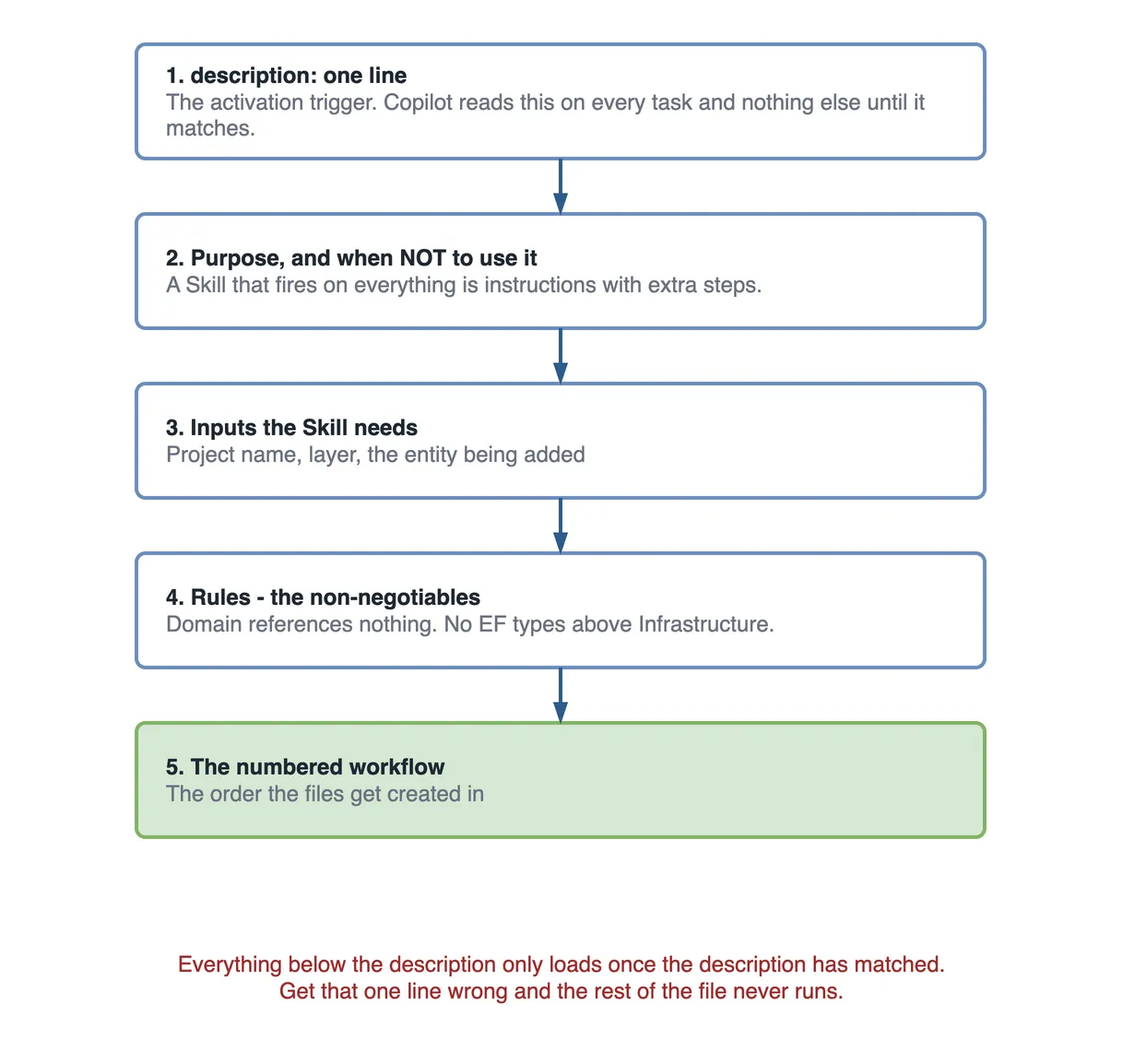
Create the file .github/skills/dotnet-cqrs-feature/SKILL.md and write nothing but the header first. I do this deliberately. The frontmatter, and specifically the description, is the single most important part of the whole file. It is the activation trigger. Copilot reads the description of every Skill on every task and loads the full body only when the description matches the work.
So if the description is weak, nothing else you write matters. The Skill never fires.
A weak description, the kind I wrote on my first attempt:
---
name: dotnet-cqrs-feature
description: Helps with backend .NET development and coding standards.
---
That reads fine to a human and fails completely with Copilot. “Backend development” matches almost any task and none of them sharply. It gave me inconsistent activation for a week before I understood why.
The strong version names the concrete trigger words a developer would actually type.
---
name: dotnet-cqrs-feature
description: >
  Use when adding or changing a feature in the .NET Web API.
  Enforces Clean Architecture layers, MediatR CQRS, FluentValidation,
  the ApiResponse<T> contract, structured logging, and xUnit tests.
  Trigger phrases: "new endpoint", "add command", "add query",
  "add feature", "create handler".
---
The difference is not politeness, it is precision. A strong description does three things: it states the job, it lists what the Skill enforces, and it spells out the phrases that should wake it up. When a developer types “add a query to get an order by id”, the words “add query” and “get an order” line up with this description and the Skill activates.
In short: write the description last in your head and first in the file, and treat it as a matching rule, not a summary.
Step 2: When should the Skill stay out of the way?
Now we give the Skill body a spine. The first section tells Copilot what this Skill is for and, just as much, when to stay out of the way. The “when not to use” part saves you from a Skill that muscles into tasks it should not touch.
# Building a Web API feature the way we build it

## Purpose
Add or modify a feature in the .NET Web API so it matches our
Clean Architecture and CQRS conventions on the first try — correct
layers, MediatR, validation, the response contract, and tests.

## When to use
- Adding a new endpoint (create, read, update, delete).
- Adding a Command (write) or Query (read).
- Extending an existing feature with a new use case.

## When NOT to use
- Pure Domain modelling with no application use case yet.
- Infrastructure-only changes (EF Core migrations, DI wiring).
- Frontend, Flutter, or Azure work — those have their own Skills.
I learned the value of “when not to use” the hard way. An early Skill of mine kept trying to add MediatR handlers to database migration tasks, because I had never told it where its job ended. Two lines fixed it.
Step 3: Add the inputs the Skill needs
Before Copilot can build a feature, it needs to know what facts to gather. This section is short but it stops Copilot from inventing property names or guessing the operation type.
## Inputs required
Before generating code, confirm you know:
- Feature name (e.g. Orders, Payments).
- Operation type: Command (write) or Query (read).
- The request fields and their types.
- The shape of the response DTO.
- Any not-found or conflict cases to handle.
If any of these is unclear, ask one short question before writing code.
That last line matters more than it looks. Without it, Copilot fills gaps with assumptions. With it, Copilot asks “is this a Command or a Query?” and you avoid a whole wrong file.
Step 4: Add the rules, your non-negotiables
This is the heart of the Skill. These are the architecture rules I would say out loud in a code review. Writing them here means I never have to say them again.
## Rules (non-negotiable)
- Domain has NO dependency on Application or Infrastructure.
- Every write is a Command; every read is a Query.
- No business logic in controllers. Controllers only send via IMediator.
- Validate inputs with FluentValidation, never inline `if` checks.
- All responses use ApiResponse<T>. Never return raw entities.
- Log with ILogger and structured properties, not string interpolation.
- Every handler ships with xUnit tests before it is considered done.
Keep rules as flat statements. “Do X” and “Never do Y”. Copilot follows crisp, testable rules far better than paragraphs of explanation. I once wrote a rule as a soft suggestion (“try to keep controllers thin”) and got thick controllers back. Changed it to “No business logic in controllers” and the behaviour flipped.
Step 5: Add the numbered workflow
Rules say what must be true. The workflow says what order to do things in. This is where the Skill turns into a repeatable recipe.
## Workflow
1. Create DTOs in Application/Features/{Feature}/.
2. Create the Command or Query as a record implementing IRequest.
3. Create the Handler implementing IRequestHandler.
4. Create a FluentValidation validator for the request.
5. Add a thin controller action that only sends the request via IMediator.
6. Write xUnit tests: one happy path, one validation failure,
   one not-found case.
7. Run the validation checklist below before finishing.
The order is deliberate. DTOs first so the shapes exist, then the request and handler, then validation, then the controller, then tests. When Copilot follows this order it rarely doubles back to fix a type mismatch, because each step depends only on steps already done.
Step 6: Add real code examples
Now we show Copilot exactly what “correct” looks like. This is where most Skills go weak. People write abstract Foo/Bar snippets and Copilot produces abstract code back. Use real, production-shaped examples with real names. I use an orders feature because that was the task in the scenario.
First, the command and handler:
## Example: a Command and its Handler// Application/Features/Orders/CreateOrderCommand.cs
public sealed record CreateOrderCommand(Guid CustomerId, List<OrderLine> Lines)
: IRequest<ApiResponse<OrderDto>>;
public sealed class CreateOrderHandler
: IRequestHandler<CreateOrderCommand, ApiResponse<OrderDto>>
{
private readonly IOrderRepository _repo;
private readonly ILogger<CreateOrderHandler> _logger;
public CreateOrderHandler(IOrderRepository repo, ILogger<CreateOrderHandler> logger)
{
_repo = repo;
_logger = logger;
}
public async Task<ApiResponse<OrderDto>> Handle(
CreateOrderCommand request, CancellationToken ct)
{
var order = Order.Create(request.CustomerId, request.Lines);
await _repo.AddAsync(order, ct);
_logger.LogInformation(
"Order {OrderId} created for customer {CustomerId}",
order.Id, request.CustomerId);
return ApiResponse<OrderDto>.Ok(order.ToDto());
}
}Why this shape works in production: the handler does one job, its dependencies are injected so it is testable, the log line uses structured properties (so it is queryable in Application Insights rather than a flat string), and the return type is a contract the mobile app already understands. Every one of those is a rule from Step 4 shown in practice.
Next, the validator. This is the piece Copilot skips most often, so I always include it as an example.
// Application/Features/Orders/CreateOrderValidator.cs
public sealed class CreateOrderValidator : AbstractValidator<CreateOrderCommand>
{
    public CreateOrderValidator()
    {
        RuleFor(x => x.CustomerId).NotEmpty();
        RuleFor(x => x.Lines).NotEmpty()
            .WithMessage("An order must have at least one line.");
        RuleForEach(x => x.Lines).ChildRules(line =>
        {
            line.RuleFor(l => l.Quantity).GreaterThan(0);
            line.RuleFor(l => l.ProductId).NotEmpty();
        });
    }
}
Then the controller, kept intentionally thin. This is the exact code Monday’s version got wrong, so it earns its place in the Skill.
// Api/Controllers/OrdersController.cs
[ApiController]
[Route("api/orders")]
public sealed class OrdersController : ControllerBase
{
    private readonly IMediator _mediator;

    public OrdersController(IMediator mediator) => _mediator = mediator;

    [HttpPost]
    public async Task<IActionResult> Create(
        CreateOrderCommand command, CancellationToken ct)
    {
        var result = await _mediator.Send(command, ct);
        return result.ToActionResult();
    }
}
Notice there is no logic here at all. No null checks, no repository, no mapping. The controller receives the request, sends it, and translates the ApiResponse<T> into an HTTP result. That is the whole job of a controller in this architecture.
Finally, the test. If a Skill produces code but no tests, it has produced half a feature.
// tests/Application.Tests/Orders/CreateOrderHandlerTests.cs
public class CreateOrderHandlerTests
{
    [Fact]
    public async Task Handle_ValidOrder_ReturnsOkWithOrderId()
    {
        var repo = new Mock<IOrderRepository>();
        var logger = new Mock<ILogger<CreateOrderHandler>>();
        var handler = new CreateOrderHandler(repo.Object, logger.Object);

        var command = new CreateOrderCommand(
            Guid.NewGuid(),
            new List<OrderLine> { new(Guid.NewGuid(), Quantity: 2) });

        var result = await handler.Handle(command, CancellationToken.None);

        Assert.True(result.Success);
        Assert.NotEqual(Guid.Empty, result.Data!.Id);
        repo.Verify(r => r.AddAsync(It.IsAny<Order>(), It.IsAny<CancellationToken>()),
            Times.Once);
    }
}
Three real examples, real names, real assertions. Copilot mirrors the quality of the examples you give it. Give it production code and it returns production code.
Step 7: Add a validation checklist
The checklist is what turns “looks done” into “is done”. I make Copilot run through it before it hands work back. It is also the exact list a human reviewer would check, so it doubles as your PR gate.
## Validation checklist
Before finishing, confirm every item:
- [ ] Domain has no reference to Application or Infrastructure.
- [ ] Write is a Command, read is a Query — named correctly.
- [ ] Handler implements IRequestHandler and has one responsibility.
- [ ] A FluentValidation validator exists for the request.
- [ ] Controller action only sends via IMediator, no logic.
- [ ] Response is wrapped in ApiResponse<T>.
- [ ] Logging uses structured properties, not string interpolation.
- [ ] xUnit tests cover happy path, validation failure, and not-found.
The same checklist as a table, the way I keep it in my head when reviewing:
| Check | Correct | Common failure |
|---|---|---|
| Layering | Domain has no outward deps | Domain references EF Core |
| CQRS split | Write = Command, read = Query | One class does both |
| Validation | FluentValidation validator | Inline if in the handler |
| Controller | Thin, only IMediator.Send | Business logic in the action |
| Response | ApiResponse<T> | Raw entity or anonymous object |
| Logging | Structured properties | $"Order {id}" interpolation |
| Tests | Happy, invalid, not-found | No tests at all |
Step 8: Add the expected output
Finish the Skill by telling Copilot what a correct result looks like as files. This removes ambiguity about “am I done”. When the file list matches, the feature is structurally complete.
## Expected output
A correct result for a new "CreateOrder" feature produces:
- Application/Features/Orders/CreateOrderCommand.cs
- Application/Features/Orders/CreateOrderHandler.cs
- Application/Features/Orders/CreateOrderValidator.cs
- Application/Features/Orders/OrderDto.cs
- Api/Controllers/OrdersController.cs (action added)
- tests/Application.Tests/Orders/CreateOrderHandlerTests.cs
That is the whole Skill. Frontmatter, purpose, when-not-to-use, inputs, rules, workflow, examples, checklist, expected output. You now have a complete, assembled SKILL.md. Commit it and test it for real.
Testing the Skill: give Copilot a real task
A Skill you have not tested is a guess. So run the exact scenario from the top of this article. Open Copilot Chat in agent mode and give it a fresh task:
Add a GetOrderById query to the orders API.
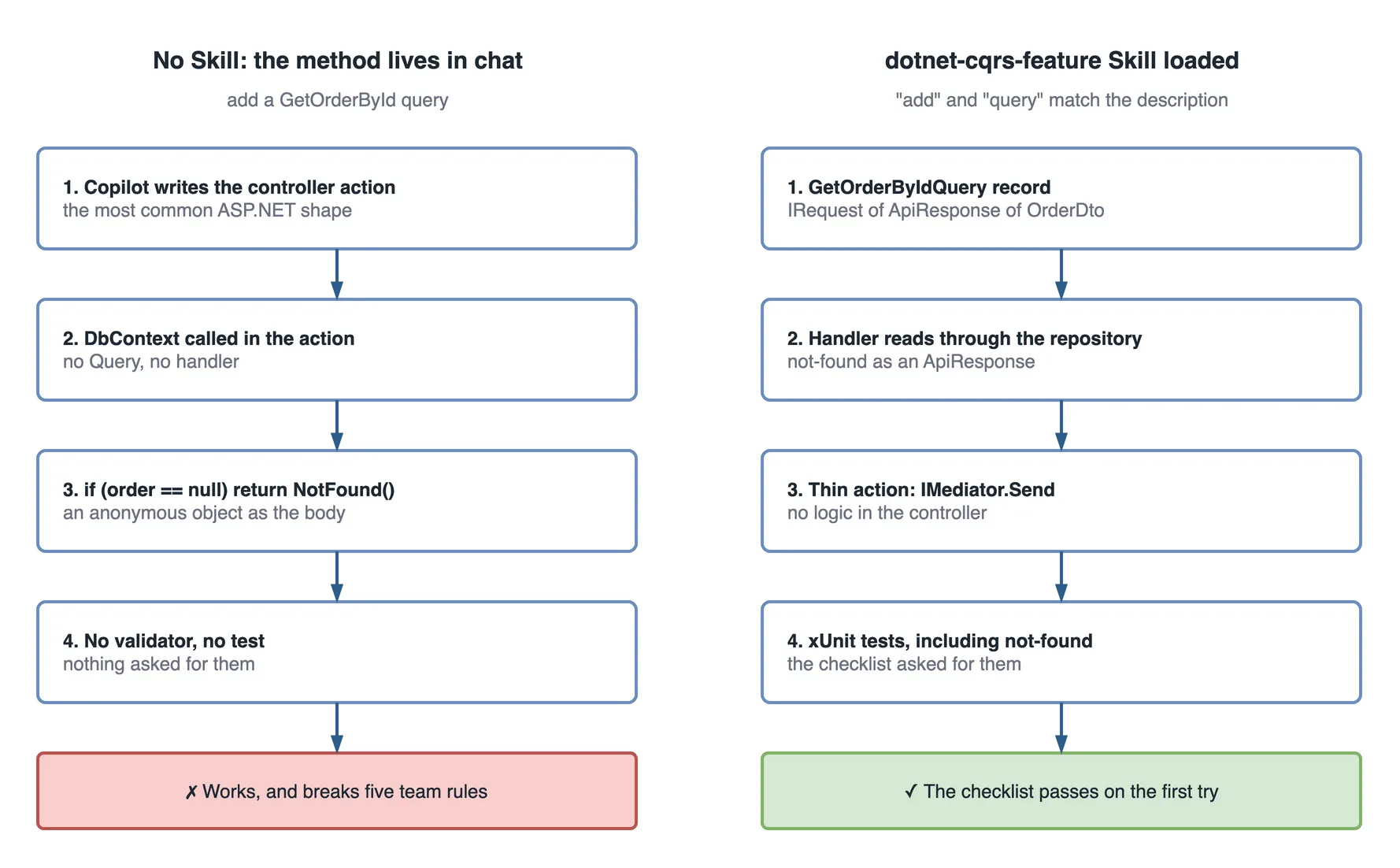
Good activation looks like this. Copilot should recognise the words “add” and “query”, match them against your dotnet-cqrs-feature description, and pull in the Skill. You will see it produce, in order:
- A
GetOrderByIdQueryrecord implementingIRequest<ApiResponse<OrderDto>>. - A handler that reads through the repository and returns a not-found
ApiResponsewhen the order is missing. - A thin controller action wired through
IMediator. - xUnit tests including the not-found case, because the Skill told it to.
If you get that, the Skill works. The knowledge that used to live in a lost chat message now runs itself.
How to tell the description failed to trigger
Sometimes you ask for a query and Copilot writes logic straight into the controller anyway. That is the tell that the Skill did not activate. Do not start editing the rules. The rules are fine; they were never loaded. The problem is the description did not match.
Two quick fixes, in order:
- Add the exact words you used to the description’s trigger phrases. If you typed “read an order” and the description only lists “add query”, add “read” and “get” to the triggers.
- Reference the Skill by name in your prompt once to confirm the body itself is good: “Using the dotnet-cqrs-feature skill, add a GetOrderById query.” If that produces correct code, you have proven the body works and the fault is purely the description’s matching.
In short: bad output on the first prompt is usually an activation problem, not a content problem. Fix the trigger words before you touch anything else.
Common failure modes while building this Skill
These are the three I hit most, and the ones I watch for when reviewing a teammate’s first Skill.
The description is a summary, not a trigger. This is the number one reason a Skill sits dead in the repo. “Backend coding standards” describes the Skill but matches no specific task. List the literal phrases a developer types. I think of the description as search keywords, not a book blurb.
The Skill grows into a wall. My first serious Skill hit 700 lines because I kept adding edge cases and long explanations. Copilot started following the top half and ignoring the bottom. The fix is progressive disclosure: keep SKILL.md under about 500 lines as the map, and move deep detail into a reference/ file the Skill points to. For example:
## Error handling
For the full error-to-HTTP mapping and problem-details format,
see reference/error-handling.md in this Skill folder.
Copilot pulls that reference in only when the task is about error handling. The main Skill stays lean.
The examples are abstract. Foo, Bar, DoSomething(). Abstract examples produce abstract code. Every example in this Skill uses a real orders feature with real field names, and that is not decoration. It is the difference between Copilot guessing your style and copying it.
Where to go from here
You now have one working Skill. The real payoff comes from a small, focused library of them. The path that works:
Start by turning today’s Skill into a set. One Skill per job, not one giant Skill for everything. For a .NET API that usually means a dotnet-cqrs-feature Skill, a separate dotnet-integration-test Skill, and later one per other stack the team owns. Each stays sharp because each does one thing.
Treat Skills as code. Review them in pull requests. When a convention changes, the Skill changes in the same PR, so the AI and the humans learn the new rule at the same moment. A Skill that drifts out of date is worse than no Skill, because it confidently produces the old pattern.
If you are rolling this out across a team, pair the Skill with a small always-on instructions file. That split is covered in Copilot custom instructions; the short version is that instructions carry who you are and Skills carry how you do a specific job. They work best together.
The Flutter and Azure Skills follow the same recipe you just used: description as trigger, rules, workflow, real examples, checklist. Only the content changes. If you can write one for .NET, you can write one for any stack your team owns.
How efficient is the Skill?
The Skill costs its description on every request and its body only on backend feature work. The saving is the rework the checklist prevents.
| Size | Paid on | |
|---|---|---|
The description | about 330 characters, roughly 85 tokens | every request |
The full SKILL.md with examples | about 7,000 characters, roughly 1,750 tokens | only when a feature task matches |
For one feature in the scenario week, before and after the Skill:
| Monday, no Skill | Friday, Skill loaded | |
|---|---|---|
| Files produced | 1, the controller | 6, the expected-output list |
grep matches for broken rules | 4 | 0 |
| Review comments about architecture | 5 | 0 |
| Review rounds | 2 | 1 |
The rule underneath: the Skill is paid for once per matching task; a missing Skill is paid for once per review. At about 1,750 tokens a feature, the Skill costs less than one review comment takes to write.
Questions a tech lead will ask about this
- “Why not put these rules in copilot-instructions.md?” Because the examples and checklist are about 1,750 tokens, and they only matter when someone adds a feature. The instructions file would carry them on every request.
- “How do we know the Skill fired?” Read what came back. A thin controller and a handler mean it loaded; logic in the controller means the description did not match.
- “Who maintains it?” Whoever owns the API’s architecture. When a convention changes, the Skill changes in the same pull request.
- “Does it replace code review?” No. It removes the architecture comments from review, so review can spend its time on the logic.
- “Can the three
grepcommands go into CI?” Yes, and they should. The Skill makes the right shape likely; the check makes the wrong one fail.
What to do on day one
- Collect the last month’s architecture review comments. They are the Skill’s rules.
- Write the description first, from the words people type when they ask for this work.
- Use one real feature from your codebase for every example.
- End the Skill with a checklist and an expected-output file list.
- Run the three
grepcommands in CI so a missed activation cannot reachmain.
Key takeaways
- A Skill’s description is its activation trigger; write it as a matching rule, not a summary.
- Rules as flat statements, a numbered workflow, real examples, a checklist, an expected output: that is the whole recipe.
- Test the Skill on the exact task that went wrong, and treat bad output on the first prompt as an activation problem.
- Keep
SKILL.mdunder about 500 lines and move detail into areference/folder. - Pair it with a CI check for the rules that must never break.
The next endpoint
The following Monday, the same developer asks Copilot to “add an UpdateOrderStatus command to the orders API”.
“Add” and “command” match the description. Copilot creates the command record, a handler, a FluentValidation validator, a one-line controller action and three xUnit tests, in the order the workflow lists them. The three grep commands return nothing.
Review takes ten minutes, and every comment is about the status rules themselves. The tech lead closes the chat window without typing a single explanation.