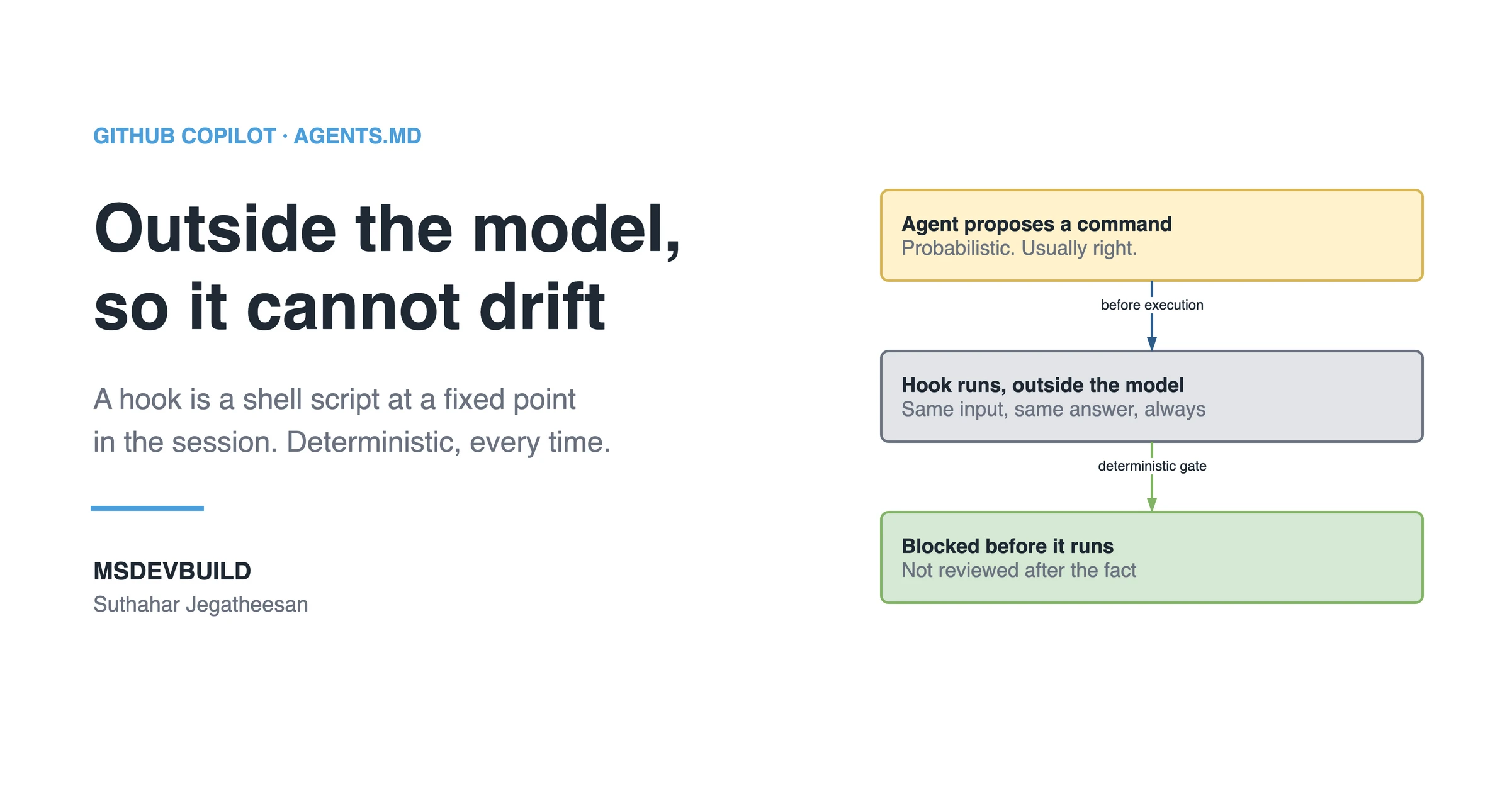
A GitHub Copilot hook is a small shell script that runs automatically at a fixed point in an agent session, outside the AI model, so it does exactly what you told it every time. Instructions ask the model to follow a rule; a hook enforces it. This is a beginner’s guide to why you need hooks and how to write your first one in about ten minutes, shown on a real hook from a real repository.
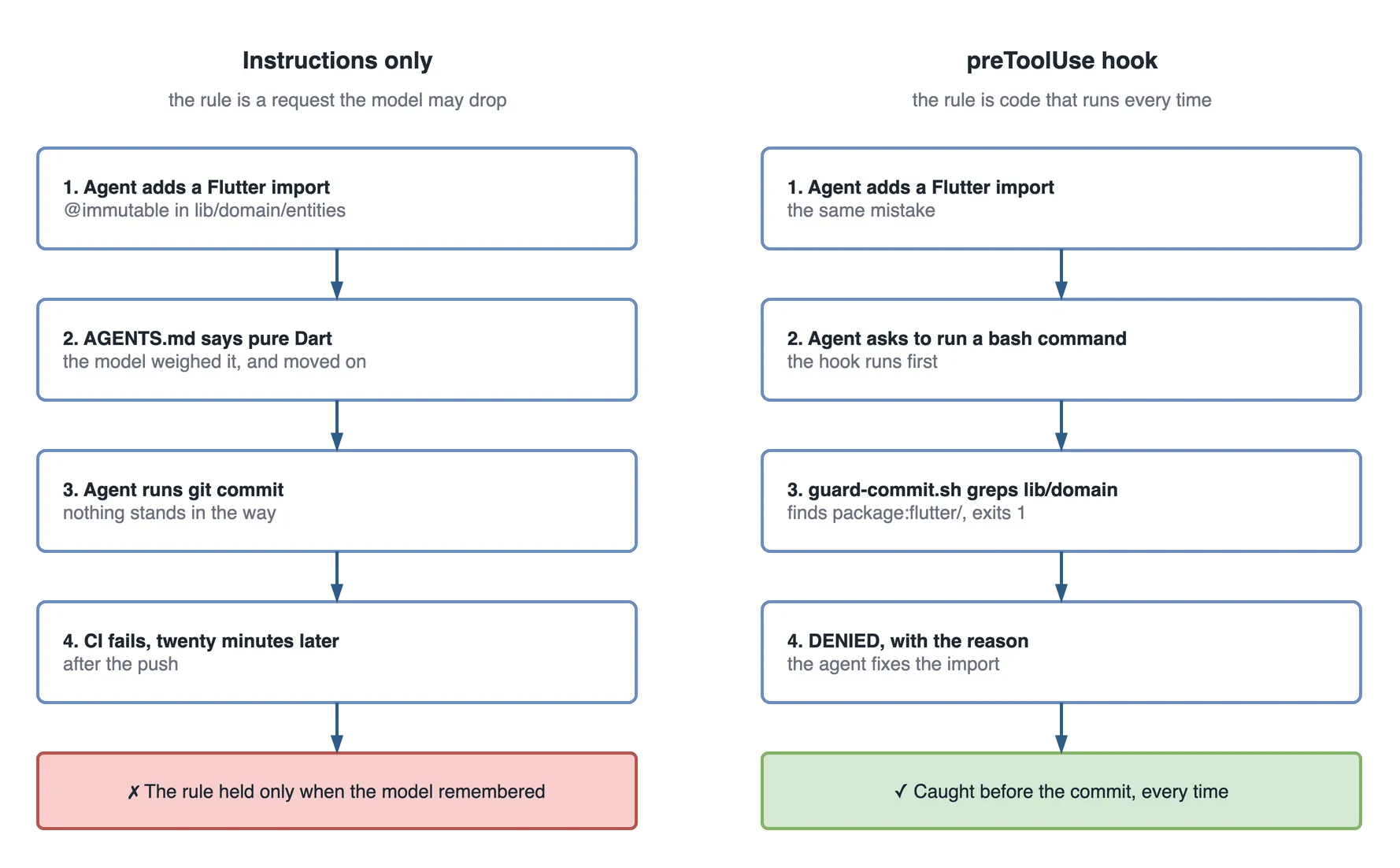
Picture a Copilot agent working in the MSDevBuild Eats food delivery app on a small cleanup task. It is doing well. Then it decides an entity in lib/domain would be tidier with @immutable, adds import 'package:flutter/foundation.dart'; to get it, and asks to run git commit.
That one import breaks the app’s most important rule: lib/domain is pure Dart and never imports Flutter. The rule is in AGENTS.md. The rule is in copilot-instructions.md. The model read both, and on this task it weighed them against a tidy annotation and moved on.
In this repository, the commit never happens. A preToolUse hook runs before the agent’s bash command, finds the import, prints why, and denies the call. The agent reads the reason and removes the import.
One caveat up front: Copilot hooks are an evolving feature. Parts of it have moved between preview and general availability, and the exact config keys can shift, and differ between Copilot CLI and the cloud agent. Before you rely on a hook in a real repo, confirm the syntax against the current GitHub Copilot documentation.
If custom instructions and Skills are new to you, start with why Copilot Skills exist. This article is also the practical follow-through on the limits of AI code review: the checks you must never skip do not belong in a polite request to the AI. They belong in a hook.
One cleanup task, two ways it could end
| Step | Instructions only | With the preToolUse hook |
|---|---|---|
| 1 | The agent adds package:flutter/foundation.dart to an entity | The same |
| 2 | It asks to run git commit | It asks to run git commit; the hook runs first |
| 3 | The commit goes through | guard-commit.sh greps lib/domain, finds the import, exits 1 |
| 4 | The push triggers CI; the dependency rule fails twenty minutes later | “DENIED: lib/domain must stay pure Dart”, and the agent fixes it |
The command the hook runs
The heart of the app’s hook is one line anybody can run by hand:
grep -rn "package:flutter/" lib/domain/On the clean repository it prints nothing and the hook allows the command. With the agent’s import added, it prints the offending line, and the script turns that into a denial:
# from .github/hooks/scripts/guard-commit.sh
if grep -rn "package:flutter/" lib/domain/ 2>/dev/null; then
  echo "DENIED: lib/domain must stay pure Dart — no package:flutter import."
  echo "Fix the import before running another command."
  exit 1
fi
Try it yourself: clone the app, add a Flutter import to any file in lib/domain/entities/, and run bash .github/hooks/scripts/guard-commit.sh; echo "exit $?". You get the denial and exit 1. Remove the import and you get exit 0.
If you would rather see the idea first, it is a short video:
What is a GitHub Copilot hook, in plain words?
A GitHub Copilot hook is a small script that runs automatically at a specific moment in the agent’s work, and it runs outside the AI model.
That last part is the whole idea. When you chat with a Copilot agent, the model is guessing the next best action based on probability. It is brilliant, but it is not guaranteed. Ask it the same thing twice and you might get two different answers. That is fine for writing code. It is not fine for a rule like “never delete files outside the build folder”.
A hook is the opposite. It is plain code that you wrote. It runs every time, and it does exactly what you told it. No guessing.
Here is the analogy I use with beginners. Think of an airport security checkpoint. The passengers (the AI’s ideas) can be anything. Some are fine, some are not. The checkpoint (the hook) does not negotiate. It has one fixed rule, it applies that rule to everyone, and it does the same thing every single time. The AI is the creative traveller. The hook is the guard who follows the rulebook.
In short: the model is probabilistic and creative. The hook is deterministic and boring. You want both, doing the jobs they are each good at.
Why do beginners need hooks at all?
The honest answer: because the AI is probabilistic, and some things in your project must not be left to chance. A hook is the deterministic guardrail you control. Here are the five reasons that matter most when you are starting out.
- Safety. The AI can suggest a destructive command. A
preToolUsehook can inspect that command and deny it before it runs. A recursive delete on a mistyped path, or a Flutter import in the domain layer, stopped before it runs. - Consistency. You want every AI-written file to pass the formatter and the linter. A hook can run the formatter after each edit, so nobody has to remember.
- Auditing. For a team or anything with compliance rules, you often need a record of what the AI did and why. A hook can log every prompt and every tool call to a file. No trust required, because it is a fact on disk.
- Setup and teardown. A hook can prepare the environment when a session starts (check the branch, warm a cache) and clean it up when the session ends (delete temp files, archive logs).
- Control without changing the agent. You cannot rewrite how Copilot’s model thinks. You can wrap it in hooks. Same agent, your rules.
This is the point from the code review article, made concrete: an advisory instruction is a request the model may drop. A hook is enforcement that runs no matter what the model decided. If skipping a check would be a real problem, that check is a hook.
When can a hook run? The Copilot agent lifecycle
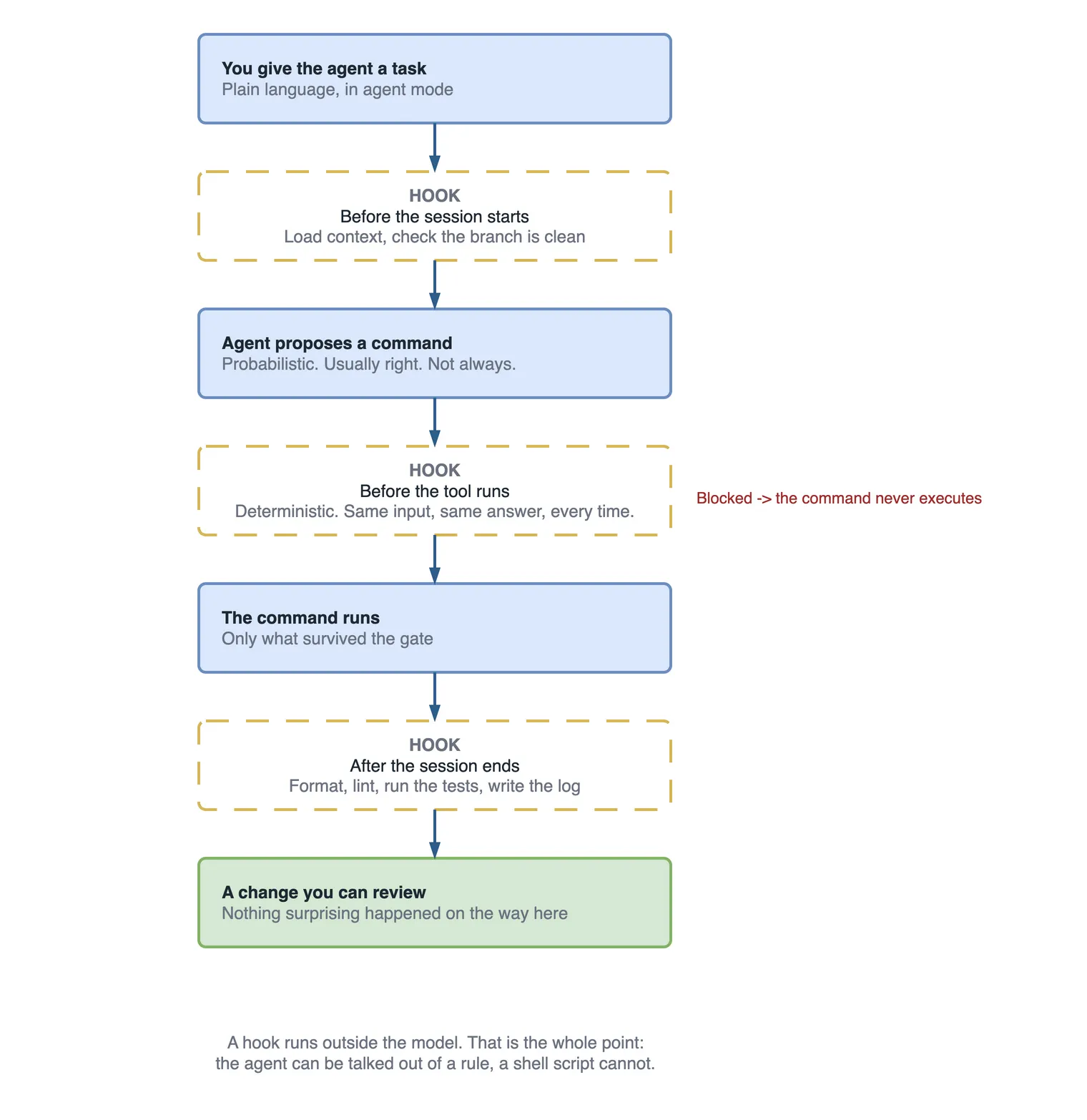
A hook is only useful if you know when it fires. Copilot gives you a set of lifecycle events, and each one is a moment where your script can run. Here is a session as a timeline:
 session begins
      │
      ▼
 ┌─────────────┐
 │ sessionStart│   init environment, log start, validate project state
 └─────────────┘
      │
      ▼
 ┌────────────────────┐
 │ userPromptSubmitted│   log the prompt for audit / usage analysis
 └────────────────────┘
      │
      ▼
 ┌─────────────┐
 │  preToolUse │   ★ APPROVE or DENY the tool (e.g. block a bad command)
 └─────────────┘
      │
      ▼
   [ the tool actually runs: bash, edit, view, ... ]
      │
      ▼
 ┌─────────────┐
 │ postToolUse │   after the tool ran (e.g. run the formatter on the edit)
 └─────────────┘
      │
      ▼
 ┌─────────────┐
 │  agentStop  │   the agent finished its response
 └─────────────┘
      │
      ▼
 ┌─────────────┐
 │ sessionEnd  │   cleanup temp files, archive logs, send a notification
 └─────────────┘
Two more events sit off the main line: preCompact runs before Copilot compacts the conversation context to save room, and errorOccurred runs when a recoverable error happens. You will not need those on day one.
Here is each event with a one-line “use it for” so you can scan and remember:
| Event | Fires when | Use it for |
|---|---|---|
sessionStart | A session begins or resumes | Init the environment, log the start, validate project state |
userPromptSubmitted | You submit a prompt | Log the request for auditing and usage analysis |
preToolUse | Before the agent uses a tool | Approve or deny the tool — block dangerous actions |
postToolUse | After a tool runs | Run a formatter, run tests, react to the result |
agentStop | The agent finishes its response | Final gate before it hands back to you |
sessionEnd | The session completes or ends | Cleanup temp resources, archive reports, notify a channel |
preCompact | Before context is compacted | Preserve or snapshot state you care about |
errorOccurred | A recoverable error happens | Log the error, alert, or record context |
The one to remember is preToolUse. It is the only event that can stop the agent. Every other event observes or reacts; preToolUse decides.
Your first hook, step by step
Now to a working hook of your own. We will start with the safest possible one: a sessionStart hook that just writes a line to a log. It cannot break anything, and it teaches you the shape.
Where the hook lives
In a repository, hooks live in JSON files under .github/hooks/. Any hook file you put there applies whenever a Copilot agent runs in that repo. So create the folder and a file:
your-repo/
└── .github/
    └── hooks/
        └── session-log.json
The minimal JSON shape
Every hook file needs two things: a version field set to 1, and a hooks object. Inside hooks, you add an array keyed by the event name. Here is the complete, copy-pasteable first hook:
{
  "version": 1,
  "hooks": {
    "sessionStart": [
      {
        "command": "echo \"[$(date -u +%FT%TZ)] Copilot session started\" >> .copilot-session.log"
      }
    ]
  }
}
That is a real, working hook. Every part matters, because understanding these four things is 90% of hooks.
"version": 1: the format version. It must be present and set to1. Think of it as telling Copilot which rulebook to read."hooks": the container object. Everything else lives inside it."sessionStart": the event name. It is an array, because you can attach more than one hook to the same event. They run in order."command": the shell command that runs. Here it appends a timestamped line to.copilot-session.log. The$(date -u ...)gives you a UTC timestamp so the log is sortable.
Start your next Copilot agent session in that repo, and a line appears in .copilot-session.log. That is it. You wrote a hook.
One beginner tip from experience: add .copilot-session.log to your .gitignore unless you actually want the log committed. I have seen a first hook accidentally turn every session into a noisy commit.
Examples of hooks you can build
Once the shape clicks, the question becomes “what should I build?” Here is a practical menu. Scan the table first, then I will show two fuller snippets.
| Event | Example hook | Why you’d build it |
|---|---|---|
preToolUse | Deny rm -rf, force-push, or writes outside allowed paths | Safety — stop a destructive command before it runs |
postToolUse | Run the formatter/linter after an edit | Consistency — AI code matches team style automatically |
userPromptSubmitted | Append prompt + time + user to an audit file | Compliance and usage analysis |
sessionStart | Check the branch, deps, and that no secrets are staged | Catch a bad starting state early |
sessionEnd | Archive the session log, ping a Slack/Teams channel | Record-keeping and team visibility |
preToolUse (on commit) | Run tests before letting a commit through | Deterministic quality gate |
The safety hook: block a dangerous command
This is the general form of the app’s guard. A preToolUse hook can inspect what the agent is about to run and deny it. The tool call details are passed to your script (Copilot provides them via stdin or environment, depending on the current spec; check the docs for the exact field names), so your script reads the proposed command and exits with a non-zero status to deny it.
{
  "version": 1,
  "hooks": {
    "preToolUse": [
      {
        "command": ".github/hooks/deny-dangerous.sh"
      }
    ]
  }
}
And the script it points to:
#!/usr/bin/env bash
# .github/hooks/deny-dangerous.sh
# Reads the proposed tool input and denies obviously destructive commands.

input="$(cat)"   # the tool call payload Copilot passes on stdin

# Fail loud and non-zero to DENY the tool call.
if echo "$input" | grep -Eq 'rm[[:space:]]+-rf|git[[:space:]]+push[[:space:]]+--force|:>[[:space:]]*/'; then
  echo "BLOCKED: destructive command denied by hook policy" >&2
  exit 1
fi

exit 0   # zero = allow the tool to run
The parts that matter: the script exits 0 to allow and non-zero to deny. It fails loud, printing to stderr so you see why it blocked. And it keeps the rule simple and readable, because a guard you cannot read is a guard you will eventually disable.
A common mistake here: writing an over-clever regex that also blocks harmless commands. If your guard cries wolf, people turn it off, and then it protects nobody. Start narrow. Block the two or three commands you truly never want, and widen only when you have a real reason. To harden it for production, keep the deny list in a small config the team reviews, and log every block so you can tune the rules from real data.
The audit hook: log every prompt
For teams, this one earns its keep fast. A userPromptSubmitted hook records what people asked the AI to do.
{
  "version": 1,
  "hooks": {
    "userPromptSubmitted": [
      {
        "command": "printf '%s\\t%s\\t%s\\n' \"$(date -u +%FT%TZ)\" \"${USER:-unknown}\" \"$COPILOT_USER_PROMPT\" >> .github/hooks/audit.tsv"
      }
    ]
  }
}
It writes a tab-separated line: timestamp, user, and the prompt (Copilot exposes the prompt to the hook; confirm the exact variable name in the current docs). Now you have a factual record of AI usage. Not a guess, not a “I think someone asked it to refactor auth”, a log. For anything touching compliance, that record is the difference between “we believe” and “we can show you”.
One production note: an audit log can contain sensitive text people typed into prompts. Treat that file like any other sensitive artifact. Restrict who can read it, and never commit it to a public repo.
Hooks vs Instructions vs Skills: which layer do I reach for?
Beginners get these three confused, so here is the clean split. Copilot gives you layers, and each does a different job:
| Layer | What it is | When you reach for it |
|---|---|---|
| Instructions | Advisory guidance in plain language | You want to shape the AI’s default behaviour and tone |
| Skills | A reusable, packaged method the agent can invoke | You have a repeatable task with a known-good recipe |
| Hooks | Deterministic code that runs outside the model | You must enforce a rule that can never be skipped |
The mental test is one question: can this rule be occasionally ignored without harm? If yes, an instruction is fine. If no (skipping it once means a deleted folder, a broken build, or a missing audit trail), it is a hook. Instructions ask. Hooks enforce.
For the deeper story on Skills, why Copilot Skills exist covers where that layer fits. Here, just remember: hooks are the layer that does not negotiate.
Beginner mistakes: do’s and don’ts
The potholes people hit with their first hooks:
| Do | Don’t |
|---|---|
| Keep hooks fast and deterministic | Put slow or network-heavy work in a hook — it stalls the agent |
| Fail loud, print why to stderr | Swallow errors silently, so a broken guard looks like a passing one |
Version hooks in the repo (.github/hooks/) | Keep them only on your machine, where teammates never get them |
| Start with logging, then graduate to blocking | Block everything on day one and frustrate the whole team |
| Keep secrets out; read them from the environment | Hardcode a token or key inside a hook script |
The one I feel strongest about is start with logging before blocking. When you begin by logging, you learn what the agent actually does before you decide what to forbid. Half the rules people think they need turn out to be unnecessary, and the other half turn out to need a slightly different shape than they guessed. Watch first, then enforce.
How efficient is a hook?
A hook costs milliseconds of shell time and no tokens at all, because it runs outside the model. What it saves depends on how late the mistake would otherwise have been caught.
| Where the Flutter import is caught | Cost |
|---|---|
| By the preToolUse hook, before the command runs | a few milliseconds; the agent fixes it in the same session |
| By the git pre-commit hook | seconds, if the developer has hooks installed |
| By CI after the push | a pipeline run, about twenty minutes, and a context switch |
| By a reviewer | review time, and only if they notice |
| In production | a layering break that makes the domain untestable without Flutter |
The rule underneath: a rule enforced in a hook costs the same on the millionth run as the first, and it never forgets. An instruction costs tokens on every request and works most of the time.
Questions a tech lead will ask about this
- “We already have a git pre-commit hook. Why a Copilot hook too?” Because an agent can run many commands before it commits, and not every developer installs git hooks. The Copilot hook runs the same script earlier.
- “Won’t the agent just work around a denial?” It reads the reason and usually fixes the cause. If it tries a different command, the hook runs again.
- “What should the first hook be?” A logging hook, to learn what the agent actually does. Then one
preToolUseguard for the rule that hurts most. - “How do we stop hooks slowing the agent down?” Keep them to fast, local checks. A
grepis fine; a full test suite on every command is not. - “Where does the rule live?” Once, in a script both the Copilot hook and the git hook call.
What to do on day one
- Add a
sessionStartlogging hook and read the log after a week. - Pick the one rule a broken build would cost you most for, and write it as a script that exits 1.
- Wire that script to
preToolUse, and to your gitpre-commithook too. - Keep the denial message specific enough that the agent can fix the cause.
- Confirm the hook JSON keys against the current GitHub docs for your Copilot surface.
Key takeaways
- A GitHub Copilot hook is a shell script that runs automatically at a lifecycle point in an agent session, outside the model, so it is deterministic.
- Hooks live in
.github/hooks/*.jsonin a repo (also in Copilot CLI config), withversion: 1and ahooksobject keyed by event name. - The lifecycle:
sessionStart→userPromptSubmitted→preToolUse→ tool runs →postToolUse→agentStop→sessionEnd, pluspreCompactanderrorOccurred. preToolUseis the powerful one: it can approve or deny a tool call, so it can block dangerous commands before they run.- Use hooks for safety, consistency, auditing, and setup/teardown: the checks that must never be skipped.
- Start with a logging hook, then graduate to a
preToolUseguard. It is an evolving feature, so confirm syntax against current GitHub docs.
The next cleanup task
A week later, an agent in the same repository is asked to “move the price formatting helper somewhere shared”. It picks lib/domain/, because the helper has no state. The helper also picks a text colour from the theme, so it imports package:flutter/material.dart.
The agent asks to run flutter test. The hook runs first, the grep finds the import, and the reply is the same two lines as before: denied, and why. The agent moves the helper to lib/core/utils/ instead and runs the tests again. They pass.
Nobody on the team saw it happen. That is the point.