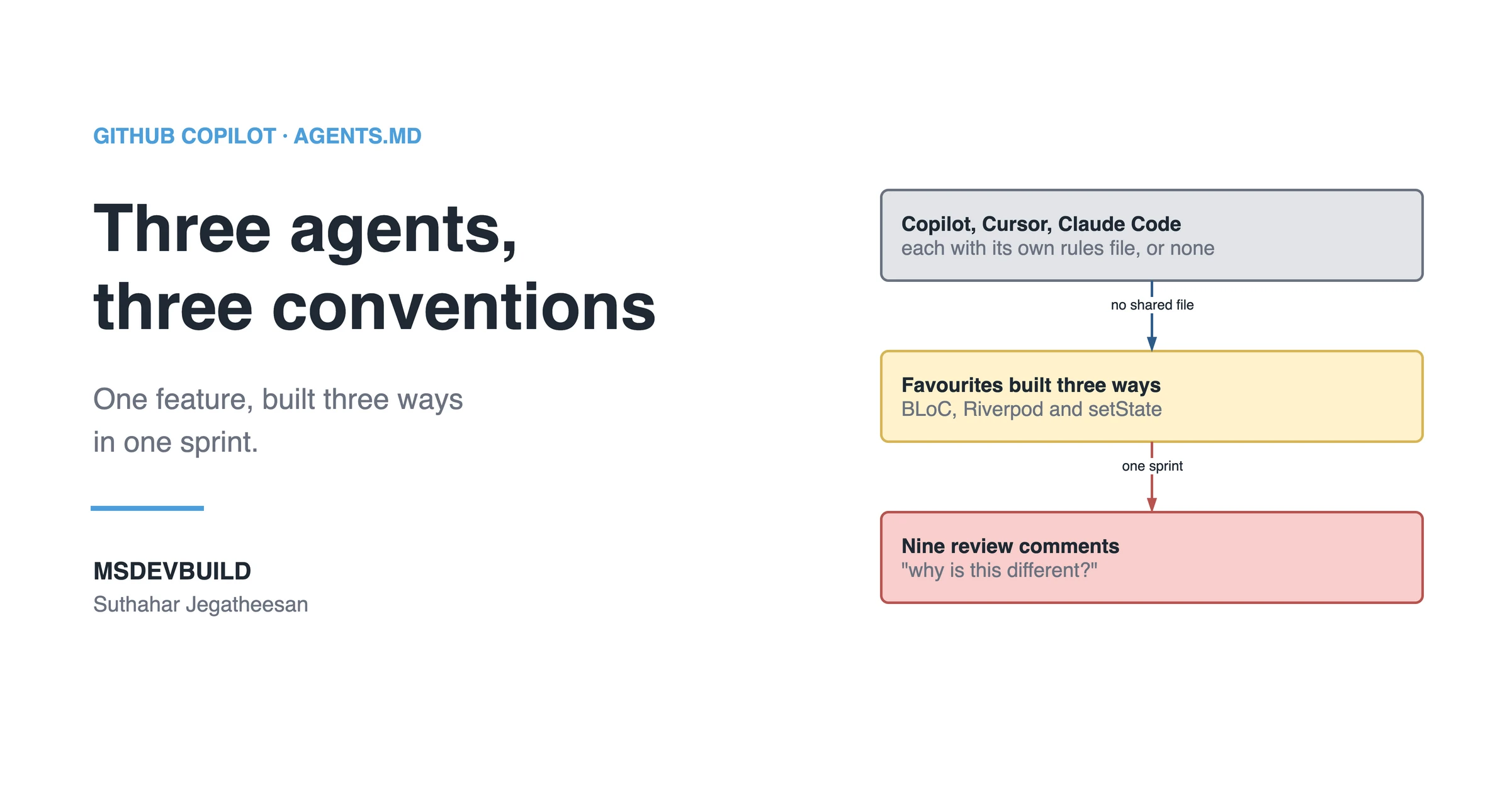
AGENTS.md is one file at the root of your repository that every AI coding agent reads before it writes code. It exists because an agent will not stay consistent with itself, or with the agent on the next developer’s laptop, unless something tells it how. This is what that inconsistency looks like on a real app, and what the file saves.
Picture the MSDevBuild Eats team starting a sprint. One developer uses GitHub Copilot, one has switched to Cursor, one is trying Claude Code. Each is asked for a piece of the same new feature: let customers save favourite restaurants.
By Friday the feature works. It is also written three different ways.
One sprint, three tools, three “correct” versions
| Day | What happened |
|---|---|
| Mon | The Copilot developer adds a FavouritesCubit, matching the BLoC used everywhere else |
| Tue | The Cursor developer builds the favourites list screen. Cursor reaches for Riverpod and adds it to pubspec.yaml |
| Wed | The Claude Code developer adds the heart button on the restaurant card with a StatefulWidget and setState |
| Thu | Each part talks to favourites through its own helper. There are now two ways to load the same list |
| Fri | The pull request: nine review comments that all ask a version of “why is this different from everywhere else?” |
Nobody did anything wrong. Each agent made a reasonable local choice with zero view of what the others had done. Each tool also had its own idea of the rules: Copilot read .github/copilot-instructions.md, Cursor had no rules file, and Claude Code had none either.
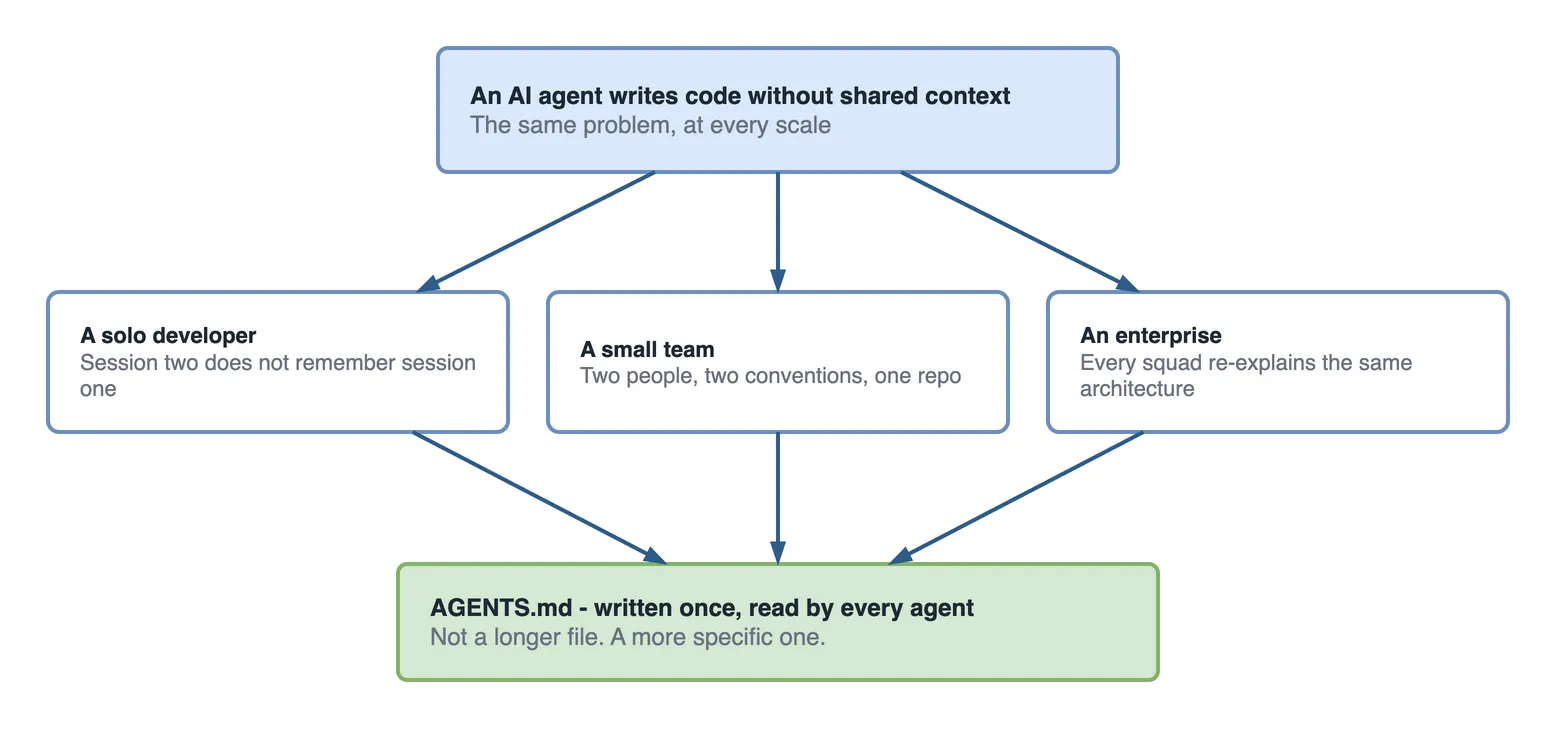
That is the whole problem, and it does not depend on team size.
Solo developer. In January you ask an agent for a login screen. It picks one way to manage state, one folder structure, one style of error handling. In April you ask again in the same project and get a different answer. Nothing carried January’s decision forward.
Small team. Three developers, three reasonable choices for the same problem, and duplicate helpers because no agent can see what already exists two folders away.
Enterprise. The same thing, at a size where squads do not know they chose differently until a shared feature makes two patterns meet.
The commands that showed the drift
On Friday the tech lead stops reading the pull request line by line and asks the repository a different question: how many ways do we manage state now?
# Features using the house pattern: BLoC or Cubit
grep -rlE 'extends (Bloc|Cubit)<' lib/features | cut -d/ -f3 | sort -u | wc -l

# Anything using Riverpod, which the app does not use
grep -rlE 'riverpod|ConsumerWidget|StateNotifier' lib pubspec.yaml

# Screens holding state with setState
grep -rl 'setState(' lib/features
On the favourites branch the answers come back as three lines where there should be one:
| Pattern | Where |
|---|---|
| BLoC / Cubit | every feature, including favourites/bloc/favourites_cubit.dart |
| Riverpod | pubspec.yaml and favourites/presentation/favourites_screen.dart |
setState | restaurant/presentation/widgets/favourite_heart.dart |
Run the same three commands on main and the Riverpod one returns nothing. The setState one does return files, and every hit is local form state: a checkbox, a selected emoji, a carousel page, a quantity stepper. That is fine. What is not fine is setState holding a feature’s data, which is what the favourites heart did. It is also a sign the rule needs one more word: “not setState for business state”. The drift arrived in one sprint, from three tools that each followed their own defaults.
The real problem: every agent starts from zero
An AI agent does not remember yesterday’s session, and it cannot see another developer’s. Every session starts from the training data and whatever files are open. If the repository does not say “we use BLoC”, the agent picks whichever state library fits the prompt best, and three prompts can easily give three answers.
Per-tool rules files help only the people using that tool. The Copilot developer was consistent with the app because copilot-instructions.md said so. Cursor and Claude Code never read that file.
What AGENTS.md actually fixes
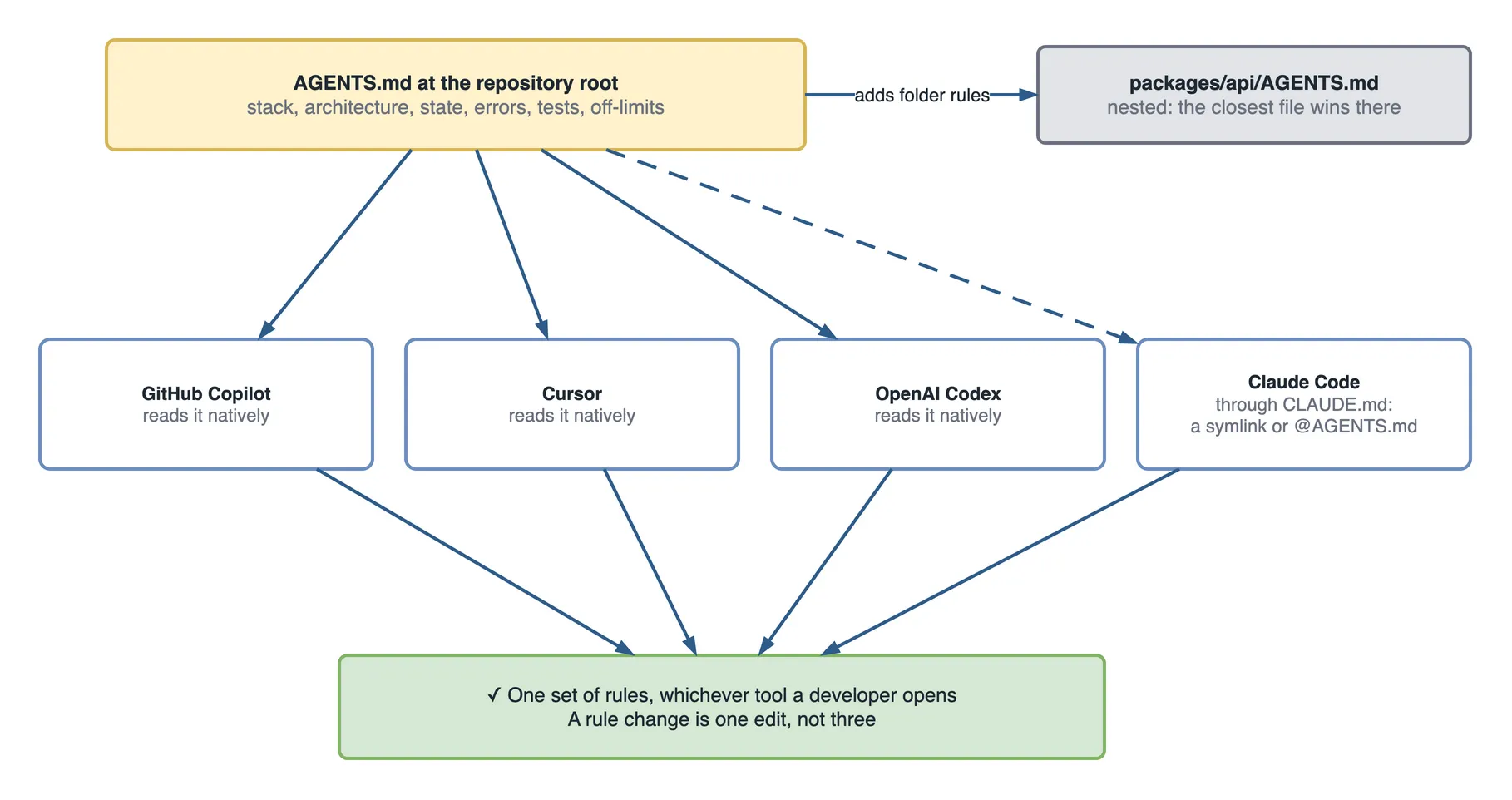
It is one Markdown file at the root of the repository. Agents read it automatically before they write anything. It tells them the architecture, the one approved way to handle state and data, where things belong, and what already exists so they do not rebuild it.
It does not matter whether you write Dart, TypeScript, C# or Python, or whether you are a team of one or two hundred. The fix is the same because the problem is the same.
There is a difference between handing someone repository access and saying “go”, and walking them through how the project is built. An agent needs that walkthrough every session. AGENTS.md is that walkthrough, written once and read automatically every time after.
If you would rather see it first, the idea is a short video:
How is this different from copilot-instructions.md?
They overlap in purpose and differ in scope and in who reads them. Copilot custom instructions are the Copilot-only version of the same idea.
.github/copilot-instructions.md | AGENTS.md | |
|---|---|---|
| Who reads it | GitHub Copilot | Codex, Cursor, Copilot, Windsurf, Aider and more, natively |
| Where it lives | One fixed path | The root, plus optional nested files per folder or package |
| Origin | A GitHub convention | An open, vendor-neutral standard |
| Claude Code | Not applicable | Through a symlink or an @AGENTS.md import |
| Best fit | A Copilot-only team | Anyone using, or likely to use, more than one tool |
If everyone uses Copilot and plans to stay there, copilot-instructions.md is simpler. The moment a second tool shows up, AGENTS.md stops being the extra file and becomes the one that saves you from maintaining three near-identical instruction files that drift apart.
You can run both. Copilot reads AGENTS.md as well as its own file, so the cleanest setup is shared rules in AGENTS.md and only Copilot-specific guidance, like how to write pull request summaries, in copilot-instructions.md.
A generic example, not tied to any framework
Here is the shape that works for any stack or team size:
# AGENTS.md

## Project
Web app, React frontend, Node/Express backend, PostgreSQL. Monorepo.

## Architecture
Feature-based folders, not type-based. Each feature owns its components,
hooks, and API calls — don't split a feature across /components and /hooks
at the top level.

## State management
Use the existing Zustand store in /src/store. Don't introduce Redux,
Context-based state, or a second store.

## API layer
All requests go through /src/api/client.ts. Don't call fetch() directly
in components, and don't create a second HTTP client.

## Error handling
API errors return a Result<T, Error> type, never throw across the
API boundary. Log unexpected errors through /src/lib/logger.ts.

## Testing
Vitest for units, Playwright for e2e. New features need at least one
unit test per new function in /src/api or /src/store.

## Off-limits
- Don't modify /prisma/migrations
- Don't add new npm dependencies without flagging it in the PR description
Swap the details and the same shape works for a Django backend, a Spring Boot service, a Flutter app or an Angular frontend. The sections stay: stack, architecture, the one approved pattern for state and data, error handling, testing, and what is off-limits.
For the Flutter version, open the AGENTS.md in the food delivery app. It has nine sections, the same ones as above plus setup commands, hard business rules and conventions, filled in for a Clean Architecture Flutter app with BLoC. Its state management section is the line that would have stopped the favourites sprint: “BLoC / Cubit … Not Riverpod, not Provider, not setState.”
Creating the file, step by step
The simplest version costs nothing. Create a file named AGENTS.md at the root of your repository. Plain Markdown, no tools, no config. Every agent that reads it picks it up from there.
In VS Code with Copilot there is a faster way: open Copilot Chat and type /init.
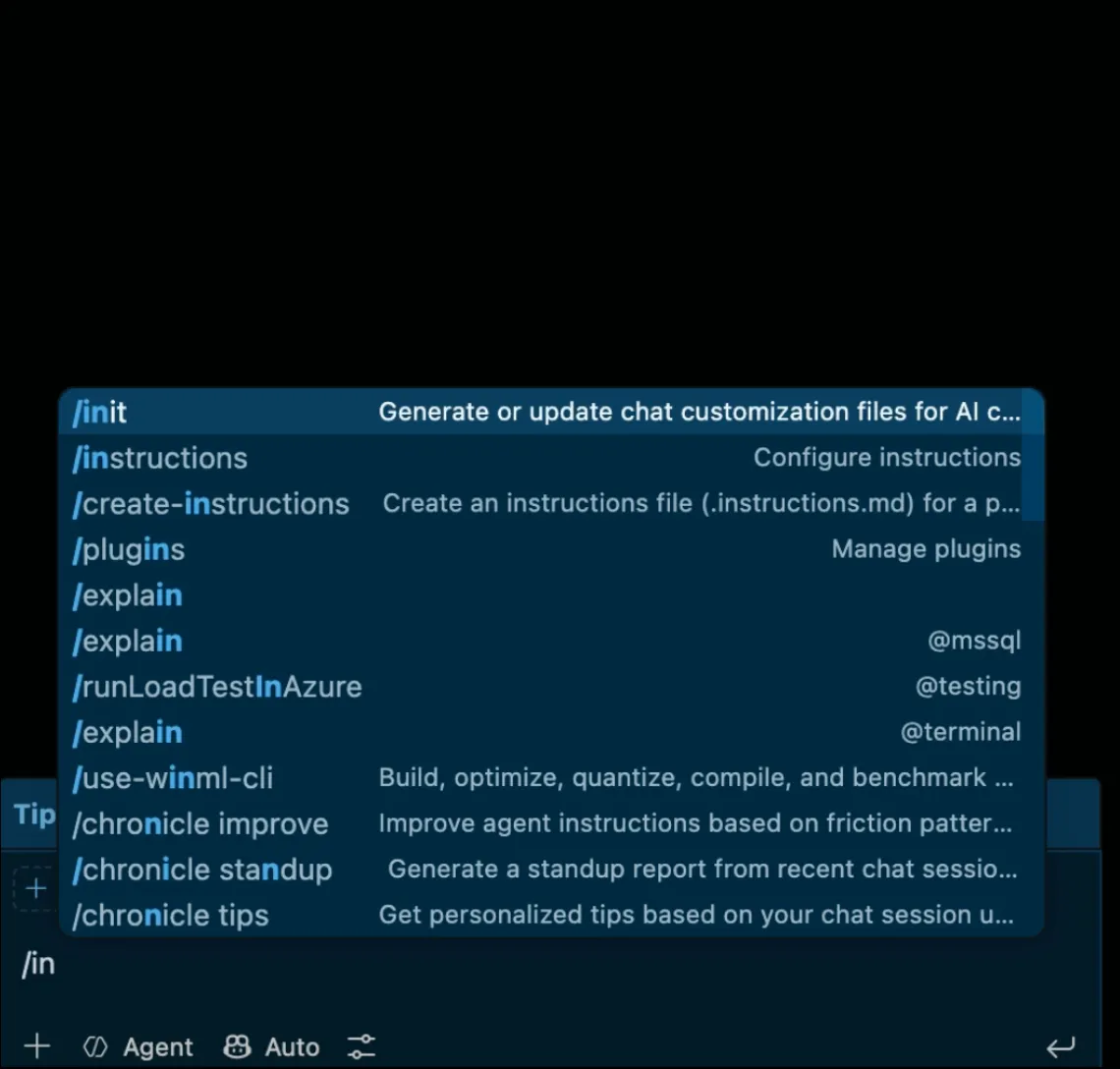
It scans the repository and drafts a first version from what it finds: dependencies, folder structure, existing config. Treat it as a draft. It is good at spotting patterns that are already consistent, but it cannot tell you which one to keep if the codebase already has two or three competing ones. That call is still yours.
For a monorepo, or sub-projects with different stacks, add more AGENTS.md files inside subfolders. The file closest to the code being edited wins. Keep shared rules at the root and sub-project details in the nested files.
Claude Code and AGENTS.md
AGENTS.md is an open standard, and a long list of tools read it natively: OpenAI Codex, Cursor, GitHub Copilot, Windsurf, Aider, Cline, Continue, Goose, Zed and more. No per-tool setup.
The exception is easy to get wrong: when this was written, Claude Code did not read AGENTS.md natively. It reads its own file, CLAUDE.md. The documented workaround is one of these:
# Option 1: a symlink, so Claude Code reads AGENTS.md through CLAUDE.md
ln -s AGENTS.md CLAUDE.md
# Option 2: an import line inside CLAUDE.md
@AGENTS.mdEither way you keep one source of rules. This area moves fast, so check the current Claude Code docs before you pick one; native support may have arrived since.
When AGENTS.md is not the fix
Use AGENTS.md for any rule an agent would otherwise guess. Do not expect it to do three things.
- Clean up drift that already exists. It stops new drift. Three state libraries already in the codebase stay there until someone removes two of them. Budget that as its own task; the discovery approach in understanding a legacy codebase with Copilot is a good way to find every variant first.
- Enforce a rule. It guides; it does not block. If Riverpod must never be merged, add a check in CI that fails when
riverpodappears inpubspec.yaml. - Hold secrets or environment details. Every agent reads it, and it is committed. Keys, connection strings and internal URLs never belong in it.
How much workload does it actually save?
There is no controlled study, and anyone quoting a confident percentage is guessing. What you can do is measure it on your own repository, the way the favourites sprint was measured. The file costs almost nothing to run and saves the same kinds of work every sprint.
What the file costs:
| Size | |
|---|---|
| The food delivery app’s AGENTS.md | 108 lines, 4,548 characters |
| Added to each agent request | roughly 1,100 tokens |
| Time to write a first version | an hour, with /init for the draft |
What changed for the favourites feature, rebuilt the following sprint with AGENTS.md in place and every tool pointed at it:
| Without AGENTS.md | With AGENTS.md | |
|---|---|---|
| State patterns in the feature | 3 | 1 |
| New dependencies nobody agreed | 1 (Riverpod) | 0 |
| Ways to load favourites | 2 | 1 |
| Review comments about conventions | 9 | 1 |
| Rules files to keep in sync | 3 (or none) | 1, plus a symlink |
Where the savings show up, in the order you will notice them:
- Code review time drops first. Reviewers stop asking “why is this different?” and review the logic.
- Rework drops next. Fewer features get built on the wrong pattern, so fewer need a partial rebuild.
- Ramp-up drops, slowly. A new developer, or you returning to an old side project, reads one file instead of reverse-engineering competing patterns.
The rule underneath: the cost is one file read per request; the saving grows with the number of tools and people writing code. One developer on one tool saves a little. Three developers on three tools save a sprint’s worth of “why is this different?”.
Questions a tech lead will ask about this
- “We already have copilot-instructions.md. Why another file?” Because only Copilot reads it. The first time someone opens Cursor or Claude Code, the rules stop applying.
- “Won’t AGENTS.md and copilot-instructions.md contradict each other?” Only if the shared rules live in both. Put them in AGENTS.md and keep the Copilot file for Copilot-only guidance.
- “Does it fix the Riverpod screen we already merged?” No. It stops the next one. Removing the existing one is a separate task.
- “How do we stop someone ignoring it?” You cannot, with a Markdown file. A CI check on
pubspec.yamland a lint on imports turn the important rules from advice into a failed build. - “Who updates it?” Whoever changes a convention, in the same pull request that changes the code.
What to do on day one of a mixed-tool team
- Create
AGENTS.mdat the root, and draft it with/initif you use Copilot. - Move the shared rules out of any tool-specific file into AGENTS.md.
- Symlink
CLAUDE.mdto it, or add@AGENTS.mdtoCLAUDE.md. - Add a CI check for the one or two rules that must never break.
- Run the three
grepcommands above once a sprint, and watch for a second answer.
Key takeaways
- The problem is not your framework or team size. It appears whenever an agent writes code without shared context.
- Per-tool rules files only reach the people using that tool. AGENTS.md reaches every agent.
- Copilot, Codex, Cursor and many others read AGENTS.md natively; Claude Code needs a symlink or an import line.
- AGENTS.md stops new drift. Existing drift needs its own cleanup, and critical rules need a CI check.
- Measure the savings on your own repo: count competing patterns and convention comments before and after.
The next sprint
Two weeks later, the same three developers pick up the next feature: order notes for the rider. The repository now has an AGENTS.md, a CLAUDE.md symlinked to it, and a CI check that fails if riverpod appears in pubspec.yaml.
Copilot, Cursor and Claude Code each build their part. All three reach for a Cubit. All three load order data through the existing GetOrderById use case.
The pull request gets one comment about conventions, a missing const. The grep commands return one line each, and the favourites cleanup ticket is the only place Riverpod still appears.