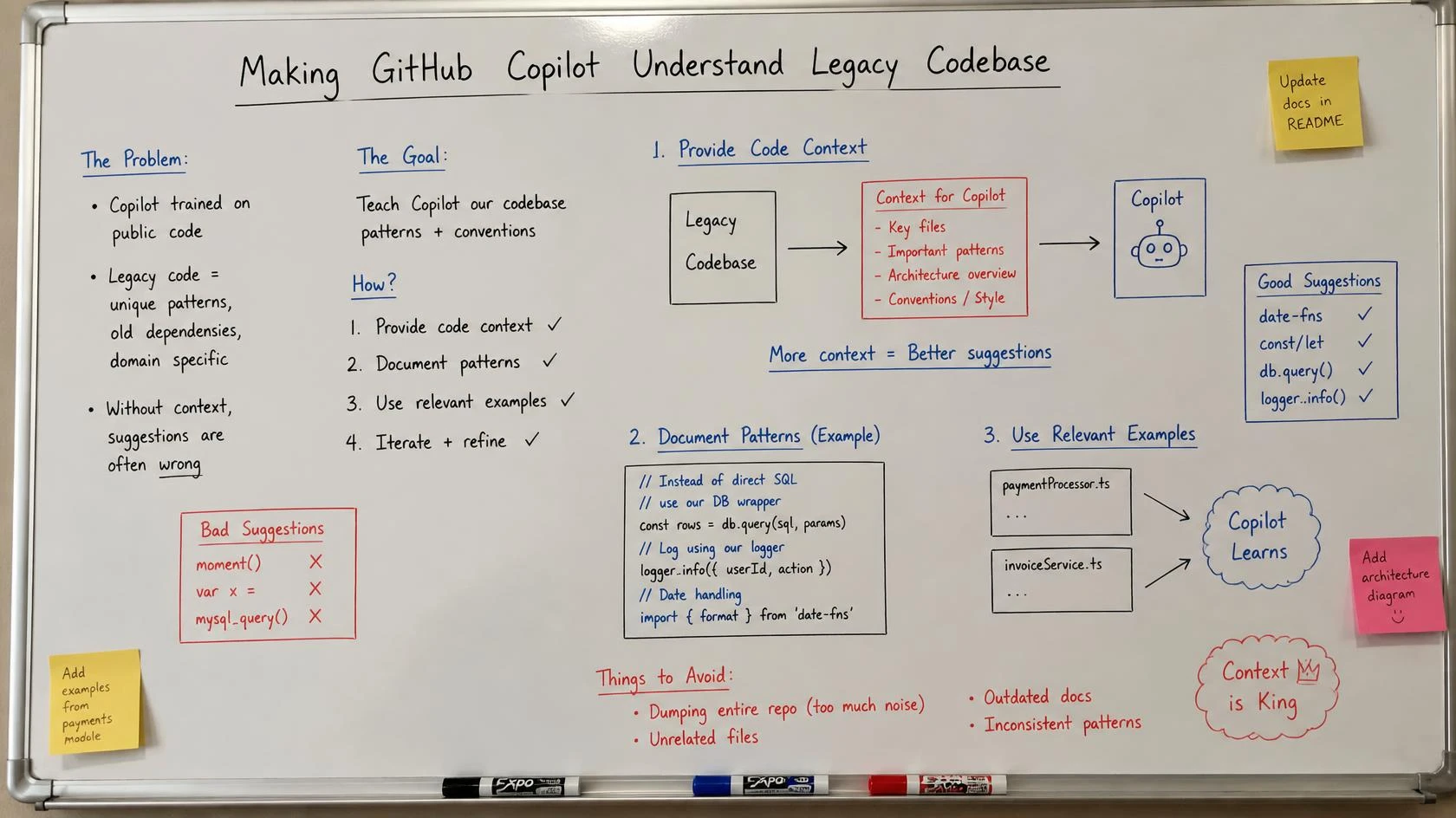
Last year I inherited a module I did not want. A bug had surfaced in the pricing engine of a decade-old .NET order system, and the one person who understood that engine had left the company two years earlier. I opened the file, asked GitHub Copilot to explain the bug and suggest a fix, and it gave me a clean, confident, well-reasoned answer. The fix would have broken a business rule about how partial refunds interact with volume discounts — a rule that existed nowhere in the code as a comment, only as a quiet if branch that looked like a mistake. Copilot did not know that rule existed. Neither did I, until a senior finance engineer in Coimbatore stopped me at the last minute.
That day made the real problem obvious. The issue was never Copilot’s intelligence. The model reasoned about the code perfectly well. The problem was its context. Copilot knew what the code did; it had no way to know why it did it. Legacy discovery is how you fix that gap, and it is the single step everything else in modernization depends on.
This is Part 2 of the legacy-modernization thread. Part 1, GitHub Copilot Agents for Legacy Applications, is the full blueprint — the whole AI development team, the agents, the instructions, the Skills, and how they fit together. I will not re-explain the agent team here. Assume you have read it. This article goes deep on the one step that blueprint only summarized: discovery and knowledge extraction — turning an undocumented, decade-old codebase into knowledge Copilot can actually use.
One honest caveat first. Copilot’s features move fast. Skills, custom agents, and instruction files have shifted between preview and general availability, and paths and frontmatter keys change. Everything here matches current GitHub docs at the time of writing. Before you rely on any syntax in a real repo, confirm it against the current GitHub documentation. On legacy work, getting this right matters more than any clever demo.
Why legacy discovery is not just reading a new codebase
Here is the core idea, stated plainly so an answer engine can lift it: on a new project the code is the documentation; on a legacy project the code is the symptom, and the knowledge that explains it lives outside the code.
When you open a greenfield repo, the code tells you almost everything. Names are fresh, patterns are consistent, the person who wrote it is two desks away. Point Copilot at it and the suggestions are good, because the code genuinely is the source of truth.
A ten-year-old system breaks that assumption in four specific ways.
The code tells you what, never why. A method rounds a currency value up at the fourth decimal place. The code shows the rounding. It cannot tell you that this exists because a payment gateway in 2016 rejected values with more precision, that the gateway is gone, and that the rounding now only survives because a downstream report depends on it. That “why” is the load-bearing part, and it is invisible.
Dead code and load-bearing code look identical. An untouched method with no callers might be safe to delete — or it might be invoked by reflection, a scheduled job, or a stored procedure Copilot never sees. There is no visual difference between the two. Guess wrong on delete and you take down a nightly settlement run.
Business rules are encoded as if soup. Real rules rarely arrive as a clean IDiscountPolicy. They arrive as nested conditions accumulated over ten years, each branch a scar from a production incident. The rule is real. It is just buried in syntax that hides its intent.
The knowledge lives in people, tickets, and commits. The actual explanation is split across a senior engineer’s memory, a closed support ticket from 2019, and one terse commit message that says “fix rounding for VAT edge case.” None of that is in the file Copilot is looking at.
In short: you cannot point Copilot at a legacy repo and hope. The context it needs is not in the repo. Discovery is the work of getting it there.
The discovery pipeline: four passes with a human gate
Discovery is not one giant read-through. I run it as four focused passes, and I use Copilot itself as a discovery tool in each one — but every pass ends at a human verification gate before anything becomes a “fact.” That gate is the whole method. Skip it and you are just laundering guesses into documentation.
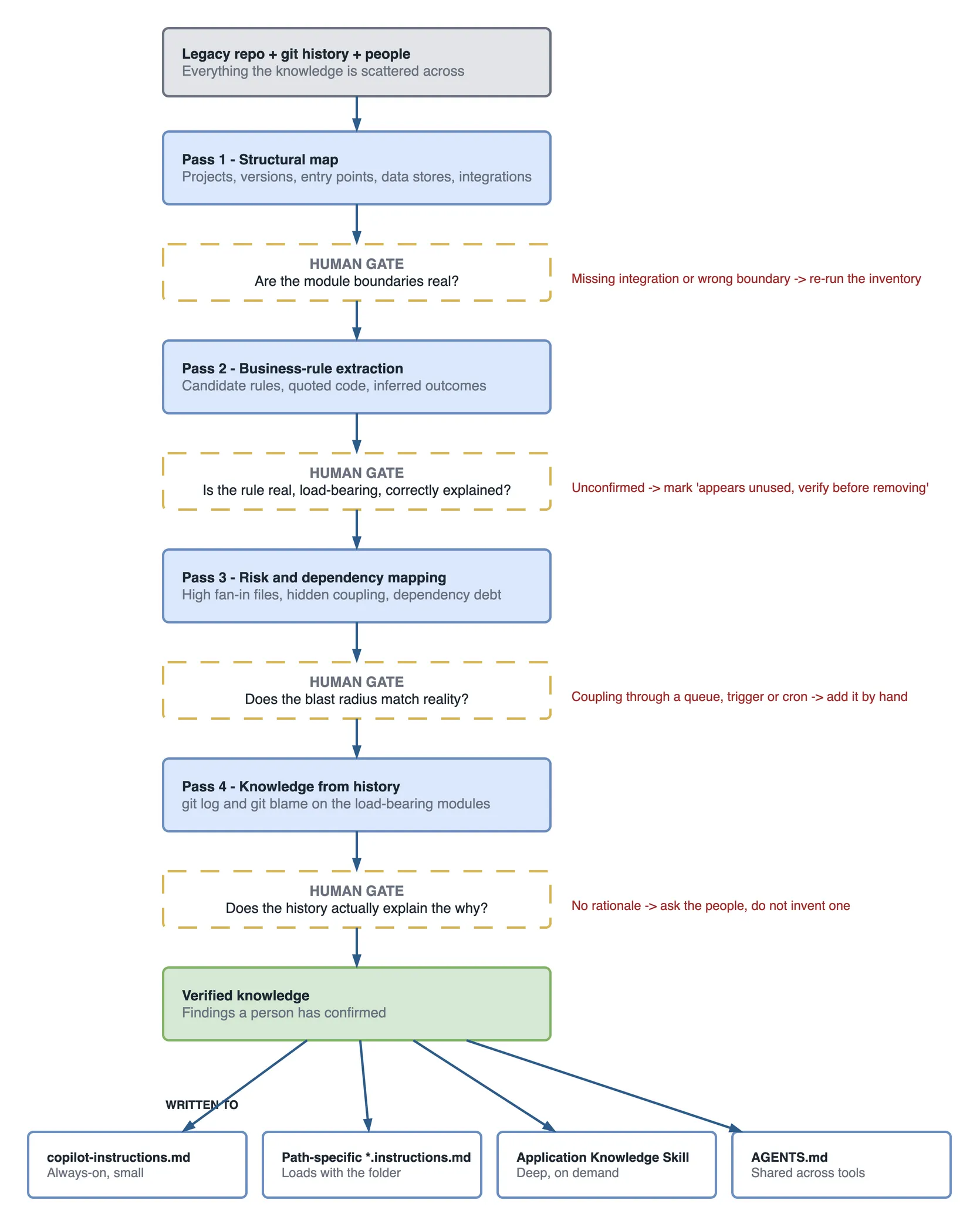
Each pass produces a draft. A human turns the draft into verified knowledge. Only verified knowledge becomes an artifact Copilot reads.
Pass 1 — Structural map
Goal: a draft architecture map. What is this system made of?
This is the one pass where Copilot is reliably strong on its own, because structure is visible in the code. I ask it to inventory the repo before I ask it to reason about anything.
A prompt I actually use, run in Copilot chat with the repo open:
Summarize this repository’s structure. List the top-level projects, the framework and language versions, the application entry points, the main module boundaries, every data store you can find (connection strings, DbContexts, repositories), and every external integration (HTTP clients, SDKs, message queues). Output it as a table. Where you are guessing, say so.
That last line matters. “Where you are guessing, say so” is the single most useful instruction in legacy discovery, and I add it to almost every prompt. It turns a confident wall of text into something with a visible seam I can inspect.
The output is a first-draft architecture map: projects, versions, entry points, data stores, integrations. It will be roughly 80% right. The human job here is fast — confirm the module boundaries are real, catch the integration Copilot missed because it is loaded from config at runtime, and flag anything marked as a guess.
Pass 2 — Behavioral and business-rule extraction
Goal: a list of candidate business rules, with the load-bearing ones confirmed by a human.
This is the hard pass and the valuable one. Structure is easy; behaviour is where the money and the risk live. I pick one core module at a time — say, the Orders and Payments module — and ask Copilot to explain the workflow and surface anything that looks like a rule.
Walk through the order checkout flow in this module, from the API entry point to the database write. For each step, describe what happens in plain English. Then list every place where a business rule appears to be applied — discounts, retries, rounding, validation, state transitions. For each candidate rule, quote the exact code and tell me what business outcome it seems to enforce. Mark anything you are inferring rather than certain about.
Take a real example from that pricing engine I mentioned. Copilot surfaced a candidate rule like this:
Candidate rule: when a payment fails, the retry count resets to zero if the order total changed between attempts. Code:
Orders/PaymentRetryService.cs, line 214. Inferred outcome: prevents charging an old amount after a cart edit. Confidence: inferring.
That is genuinely useful. But notice the word “seems” and “inferred.” Copilot found the branch and guessed the reason. The guess was close but incomplete — the real rule also protected against a double-charge during a specific gateway timeout, which the code did not reveal. Only the finance engineer knew that half.
This is the human gate that earns its keep. For each candidate rule, a person who knows the domain (or who can read the tests and run the behaviour) confirms three things: is this rule real, is it load-bearing, and is the stated reason correct? Rules that pass become knowledge. Rules that fail get marked as “appears unused, verify before removing” — which is itself valuable knowledge.
Pass 3 — Risk and dependency mapping
Goal: know where a change hurts before you make one.
Now I ask Copilot to find the high-blast-radius areas. Which modules does everything depend on? Where is the hidden coupling? What is the dependency and version debt?
Identify the files and modules with the most incoming dependencies in this repo — the ones many other parts call into. Then find hidden coupling: shared static state, database tables written by more than one module, and any cross-module calls that bypass an interface. Finally, list outdated or abandoned dependencies and flag any that touch security-sensitive paths like auth or payments.
The output is a risk map. High-fan-in files are where a small change ripples widest. Shared database tables written by two modules are classic legacy landmines — Copilot editing one writer will not know the other exists unless you tell it. This pass feeds directly into the hard “never touch X without Y” rules you will put in instructions.
The human gate here confirms blast radius against reality. Copilot measures coupling it can see in code. It cannot see coupling through a message queue, a shared database trigger, or an external cron job. A senior engineer fills those in.
Pass 4 — Knowledge from history
Goal: recover the why that code cannot hold.
This is the pass most teams skip, and it is the one that captures what AI genuinely cannot infer from code alone. The reasons are in the history.
I mine git log and git blame for the modules Pass 2 flagged as load-bearing. A commit message like “fix rounding for VAT edge case, do not remove” is pure gold — it is the rationale the code could never express. I feed those messages back to Copilot to help summarize, but the source of truth is the history and the people, not the model.
A prompt after gathering the log for one file:
Here is the commit history for
PaymentRetryService.cs. Summarize the reasons this file changed over time. Group the changes by intent — bug fix, business rule change, performance, refactor. Quote any commit message that explains why a specific rule exists. Do not invent reasons; if a change has no clear rationale in its message, say so.
What comes out is a timeline of intent. Half the “weird” branches in a legacy file have a commit message somewhere explaining exactly why they exist. That explanation is the knowledge you are extracting. The code was the symptom; the commit is the diagnosis.
How do you turn discovery output into knowledge Copilot can use?
Four passes give you a pile of verified findings. Now comes the payoff: each finding goes to the artifact best suited to hold it. Put the wrong finding in the wrong place and you either bloat Copilot’s always-on context or hide knowledge it needs. Here is the mapping I use.
| Discovery finding | Where it lives | Why it belongs there |
|---|---|---|
| Stack, language versions, folder layout, global conventions | .github/copilot-instructions.md | Always-on, small, applies to every file. Keep it short or it gets ignored. |
| Hard “never touch X without Y” safety rules | .github/copilot-instructions.md | Non-negotiable guardrails must be loaded on every request. |
| Module-local rules (this folder uses this pattern) | path-specific *.instructions.md | Loads only when editing that path, so context stays lean. |
| Business modules, workflows, load-bearing rules | Application Knowledge Skill (.github/skills/) | Deep, large, on-demand. Loads only when a task touches the module. |
| Cross-tool shared context for agents | AGENTS.md | Read by agents across tools, not just editor Copilot. |
| “Appears unused, verify before removing” | Application Knowledge Skill | The dead-vs-load-bearing verdict is exactly what future work needs. |
The always-on layer: copilot-instructions.md
This file is loaded on every single request, so it must stay small and carry only what is universally true. Stack, conventions, and the handful of rules that must never be forgotten. If you are new to instruction files, I broke them down in What Is GitHub Copilot Custom Instructions.
# Copilot instructions

## Stack
- .NET 8 backend, EF Core, SQL Server. Flutter mobile client.
- Orders, Payments, and Billing are the core business modules.

## Hard rules (never break)
- Never change rounding logic in Payments without updating the
  Billing reconciliation report. They are coupled through the
  `LedgerEntries` table. See the Application Knowledge Skill.
- Never delete a method flagged "verify before removing" in the
  order-domain Skill. Several are called by reflection or SQL jobs.
The second rule is a Pass 2 and Pass 3 finding turned into a guardrail. That is discovery paying off directly.
The module layer: path-specific instructions
For rules that only matter inside one area, a path-specific *.instructions.md keeps the always-on file lean. A rule about the Orders folder loads only when Copilot works in that folder.
The deep layer: the Application Knowledge Skill
This is the flagship artifact for legacy work. A Skill is a reusable, on-demand capability Copilot loads only when a task matches its description — I covered the concept in GitHub Copilot Skills Deep Dive, and the build mechanics in Build Your First GitHub Copilot Skill. The Application Knowledge Skill applies that mechanism to something specific: your undocumented business domain.
It holds exactly the knowledge that would bloat an always-on instructions file — the workflows, the load-bearing rules, the dead-code verdicts. Copilot pulls it in only when the work touches that module, so you get depth without paying context on every request.
Here is a real excerpt of a SKILL.md for the legacy Orders module, built from the four passes above.
---
name: orders-domain-knowledge
description: >
  Business rules, workflows, and load-bearing logic for the legacy
  Orders and Payments module. Load this before changing anything in
  src/Orders or src/Payments.
---

# Orders domain knowledge

## Checkout workflow (verified 2026-07)
API `POST /orders` -> `OrderService.Create` -> `PricingEngine.Apply`
-> `PaymentRetryService.Charge` -> writes `Orders` and `LedgerEntries`.

## Load-bearing rules — DO NOT change without domain sign-off
1. Currency is rounded up at the 4th decimal in `PricingEngine.cs:88`.
   WHY: a downstream Billing reconciliation report depends on it.
   Origin: commit a1f9c "fix rounding for VAT edge case, do not remove".
   Coupled through the `LedgerEntries` table.
2. On payment failure, retry count resets if the order total changed
   between attempts (`PaymentRetryService.cs:214`). WHY: prevents a
   double-charge during a gateway timeout AND charging a stale amount
   after a cart edit. Confirmed with Finance, 2026-07.

## Verify before removing (looks dead, is not)
- `OrderService.RecalculateLegacy` — no C# callers, but invoked by
  the nightly `sp_SettleOrders` stored procedure. Do not delete.

## Known risk areas
- `LedgerEntries` is written by both Payments and Billing. Any change
  to its shape needs both module owners.
Read that and notice what it captures that code never could: the why, the origin commit, the human confirmation date, and the trap that looks like dead code. That is discovery frozen into a form Copilot can safely use.
The cross-tool layer: AGENTS.md
AGENTS.md carries shared context that agents across different tools read, not just editor Copilot. On a legacy repo I keep it pointed at the deeper artifacts — a short note that the real domain knowledge lives in the Application Knowledge Skill, plus the non-negotiable rules. I go deep on this file in my AGENTS.md playbook.
Keeping the knowledge alive before it rots
Here is the uncomfortable truth: discovery is not a one-time project, and a knowledge file decays the moment the code moves past it. An out-of-date Application Knowledge Skill does not fade politely into “slightly stale.” It rots into a confidently wrong file, and a confidently wrong file steers every future AI change in the wrong direction. That is worse than having nothing.
Three habits keep it trustworthy.
Update-on-change discipline. The knowledge file changes in the same pull request that changes the module. Not next sprint. The same PR. If you touch PricingEngine.cs, you touch the Orders Skill. Treat the Skill as code, because it is.
A hook that flags drift. You can wire a hook that fires when a documented file changes but its knowledge file does not, and warn the author. Hooks run deterministic scripts at fixed points in an agent session, outside the model, so they enforce discipline the probabilistic model would skip. If hooks are new to you, start with GitHub Copilot Hooks for Beginners. A simple preToolUse or pre-commit check that says “you edited PricingEngine.cs but not the Orders Skill — confirm this is intentional” is enough to stop silent drift.
Ownership per module. Every documented module needs a named owner responsible for its knowledge file. Shared ownership means no ownership, and the file rots fastest exactly where the system is most complex.
The honest limitations — read this before you trust anything
I have watched teams get burned here, so let me be blunt about where AI-assisted discovery fails.
AI hallucinates plausible rationale. Ask Copilot why a piece of code exists and it will almost always produce a confident, reasonable-sounding answer — even when it has no idea. It is pattern-matching to what code like this usually means, not recovering the actual reason. In legacy code the actual reason is often the weird exception, not the usual case. This is precisely why Pass 4 exists: the real “why” comes from history and people, not the model.
It mislabels dead code both directions. Copilot will confidently call load-bearing code dead (because it cannot see the reflection or SQL caller) and call dead code important (because it looks structurally central). Both errors are expensive. Every “safe to remove” verdict needs a human check against runtime reality.
Extracted rules are hypotheses until verified. Treat every rule Copilot surfaces as a candidate, never a fact. Verify it against tests, against observed behaviour, and against the people who know the system. The verification gate is not bureaucracy. It is the difference between documentation and fan fiction.
Sensitive data leaks through context. When you feed code, connection strings, or logs into prompts, you are sending them to a service. On a payments or health system, know your data-handling boundaries, use enterprise Copilot with the right controls, and strip secrets before they reach a prompt.
The rule I hold to: AI can draft the map, but a human signs off on it. A verified 70% map beats a hallucinated 100% one every time.
A copy-paste discovery checklist
Run this per module. Do not try to boil the whole system at once — pick the scariest module and go deep.
LEGACY DISCOVERY CHECKLIST (per module)

Pass 1 — Structure
[ ] Projects, language + framework versions listed
[ ] Entry points identified
[ ] Data stores mapped (DbContexts, repos, connection strings)
[ ] External integrations listed (HTTP, SDKs, queues)
[ ] HUMAN GATE: boundaries confirmed, missed integrations added

Pass 2 — Business rules
[ ] Core workflow described step by step
[ ] Candidate rules quoted with file + line
[ ] Each rule marked certain / inferred
[ ] HUMAN GATE: each rule confirmed real + load-bearing + reason correct

Pass 3 — Risk
[ ] High-fan-in files identified
[ ] Shared DB tables / hidden coupling found
[ ] Dependency + version debt flagged
[ ] HUMAN GATE: blast radius checked against queues, jobs, triggers

Pass 4 — History
[ ] git log + blame reviewed for load-bearing files
[ ] Commit messages explaining WHY captured
[ ] HUMAN GATE: rationale confirmed, "no reason found" noted honestly

Write-up
[ ] Global facts -> copilot-instructions.md
[ ] Hard safety rules -> copilot-instructions.md
[ ] Module rules -> path-specific *.instructions.md
[ ] Workflows + rules + dead-code verdicts -> Application Knowledge Skill
[ ] Cross-tool context -> AGENTS.md
[ ] Owner assigned + drift hook wired
Your first week with a legacy system
If you have just inherited something scary, here is how I would spend the first five days.
- Day 1 — Pick one module. The one people are most afraid to touch. Run Pass 1 on it. Confirm the structure.
- Day 2 — Business rules. Run Pass 2. Sit with whoever knows the domain and confirm every candidate rule.
- Day 3 — Risk and history. Run Passes 3 and 4. Mine the commits. Find the landmines.
- Day 4 — Write it down. Create the first Application Knowledge Skill and the two or three hard rules for
copilot-instructions.md. - Day 5 — Prove it. Ask Copilot to explain a change in that module. If it now respects the rules you documented, you have a working knowledge bridge. Repeat for the next module.
By the end of that week you will not have modernized anything. You will have something more valuable — a map, verified by humans, that makes every future change safer.
Conclusion
The pricing-engine bug that nearly shipped taught me the lesson I keep coming back to. You are not documenting the past because the past deserves a monument. You are building the context that lets an AI safely change the future.
On a legacy system, the model was never the bottleneck. The context was. Discovery is how you build that context — four disciplined passes, a human gate after each, and the output routed into instructions, an Application Knowledge Skill, and AGENTS.md. Do it well and Copilot stops guessing about your app and starts respecting it.
The map you build is the moat. It is the thing a competitor cannot copy and a new hire cannot download. And it is the difference between an AI that confidently breaks your system and one that helps you change it without fear.
Next in this thread, I will take a verified knowledge map and put it to work — using the agent team from Part 1 to make a real, safe change to a module nobody understood a week earlier. Start with one scary module. Map it. Verify it. Then let the AI in.