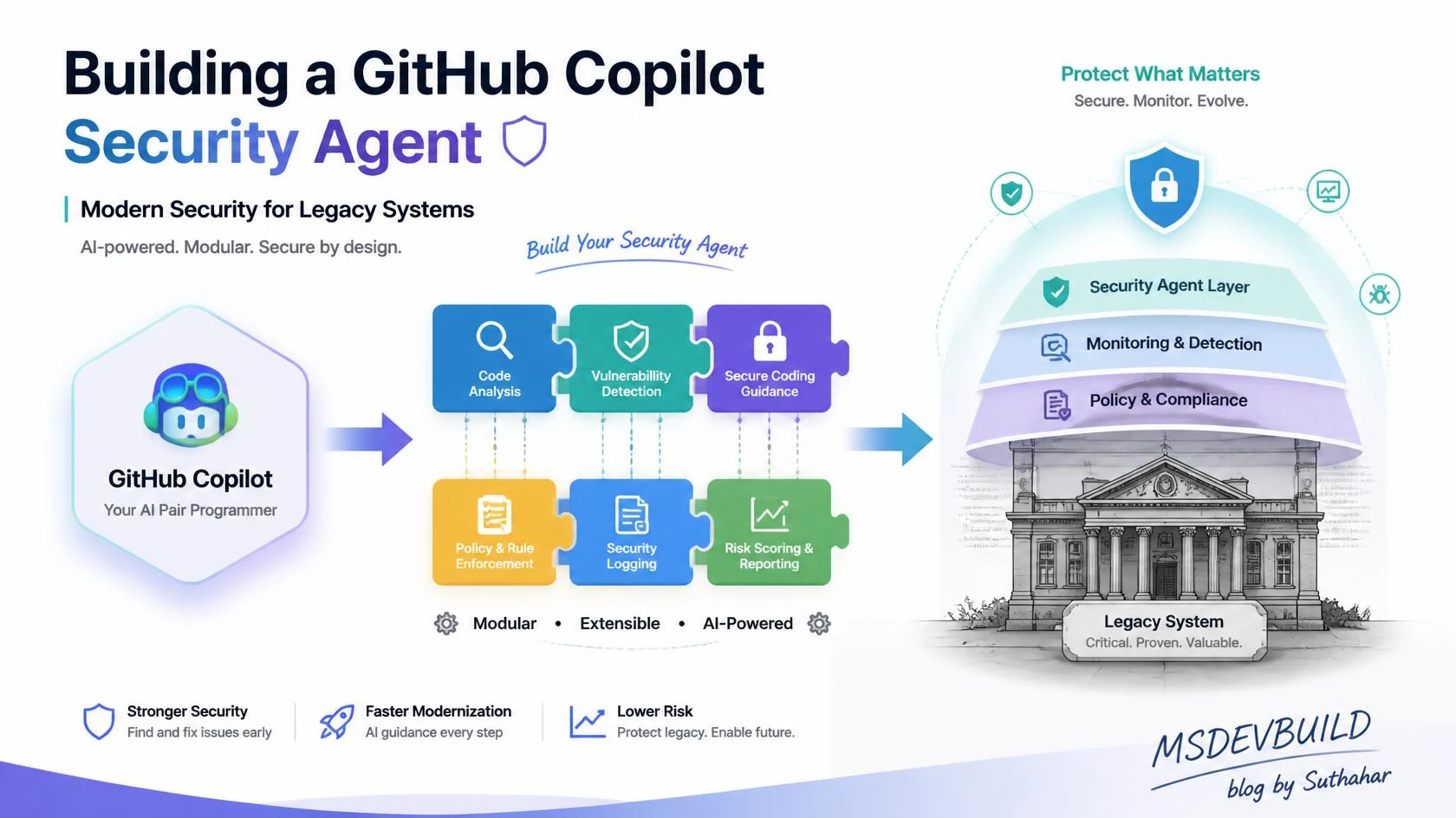
A pen test finished on a legacy order system I looked after. One finding stood out. Any logged-in user could view and cancel another customer’s order by changing an ID in the URL. The endpoint required login. It did not check who owned the order. The flaw had been in the code for years. Human reviews had missed it. Our AI review had missed it too. It gave the code a green tick and suggested two better names.
This stayed with me. Nobody was careless. The code was clean. It had an [Authorize] attribute, so it looked protected. The AI saw the attribute and moved on. To a pattern matcher, a logged-in endpoint can look safe. But authentication asks, “Are you logged in?” Authorization asks, “Can you use this resource?” The gap between these questions is where many serious legacy security bugs live. This is a business-logic authorization flaw. A simple pattern cannot find it.
This article explains how to build a GitHub Copilot security agent for legacy systems that helps without creating false confidence. I will be direct. Overselling AI in a security article is dangerous. My code-review-limits post makes the same point: AI can review how code is written. It cannot know if the code does the right thing. That difference matters even more in security.
This is Part 4 of my legacy-modernization series about Copilot. It assumes you have read the article about Copilot agents for legacy applications. That article explains the full AI team pattern. Here, we focus on one role: security.
One warning before we start. Copilot agents, Skills, and hooks can change. Their paths and frontmatter keys may change too. Skills in review are in public preview as I write this. The examples match the current GitHub docs. Check the latest docs before using them. In security work, correct setup matters more than a good demo.
Where security debt hides in legacy systems
Legacy systems often hide security debt. New code is written after people learn security lessons. Old code was written before those lessons. Then nobody wants to change it. These are the problems I find most often.
- Old login and session code. Some systems use custom login code, tokens that never expire, or unsafe sessions. This code is hard to change because many other parts of the system depend on it.
- Dependencies with known CVEs. A package may be several major versions old. An upgrade may break other parts of the app, so nobody upgrades it.
- SQL injection from string concatenation. For example:
"SELECT * FROM Orders WHERE Id = " + id. - Secrets in config and source code. Connection strings and API keys may be in
web.configor in the Git history. - Endpoints without the right authorization. A user may be logged in but still allowed to access another user’s data. This was the problem in my pen test.
- Permissions that are too broad. A service account may be
db_ownerbecause it fixed a bug years ago. - Sensitive data without encryption. Personal information, such as names, email addresses, and card data, may be stored in plain text or written to logs.
- No audit logs. When something goes wrong, there may be no record of who did what. You may find the breach months later.
Legacy security debt is not one bug. It is a set of old decisions. The code is hard to change because nobody fully understands it. That is why an AI helper is useful. It is also why you must be careful about what you trust it to do.
What an AI security agent is genuinely good at
The value is real. I use this kind of help every week.
A GitHub Copilot security agent is useful for a first review. It is good at problems with clear patterns:
- SQL and input validation. It can find queries built from strings and input that is not checked.
- Hardcoded secrets. A 32-character hex value assigned to
apiKeymay look like a secret. The agent can flag it. - Missing authorization. It can find an endpoint with no
[Authorize]attribute. It can also find an action that is missing the attribute while similar actions have it. - OWASP categories. It can group findings under categories such as injection, broken access control, and security misconfiguration.
- CVE explanations. Give it a Dependabot alert. It can explain why the CVE may matter to your use of the package.
- Fix suggestions. It can write a parameterized query, change a config value, or add an
[Authorize(Policy = ...)]line. A human must review the result. - Scanner results. It can group many CodeQL alerts into a shorter list. This is one of its best uses.
- Security tests. Ask it for a test that stops a user from cancelling another user’s order. It can create a useful first draft.
This can save a lot of time. Nobody should ship string-built SQL in 2026. An AI agent can help catch it. It raises the basic level of security. That is useful.
What it misses, and where it is dangerous
Now for the hard part. This is why the article exists. AI can catch basic problems. It can still miss the flaws that cause real breaches.
- Business-logic authorization flaws. Can user A use user B’s resource? This was the problem in my pen test. The code looked correct. The user was logged in, and the endpoint had an attribute. The missing check was a business rule. AI cannot know that an order belongs to someone unless you give it that information.
- Broken access control in a workflow. Step 3 may trust that step 1 checked permissions. But step 3 may also be reachable by itself. Each file may look correct. The bug is between the files.
- Threat modeling. Who might attack the system? What are the trust boundaries? What happens if a token leaks? These questions need a view of the whole system.
- Confident wrong answers. AI may report a bug that is not real. For example, it may flag SQL injection even though the value was parameterized earlier. It may also say code is safe when it did not understand the code.
Here is how I explain it: an AI security review is a smoke detector, not a fire marshal. A smoke detector is cheap and always on. It can find smoke. It cannot tell you that the building has poor exits. You need a person who understands the whole system for that.
AI can make both kinds of mistakes. It can raise a false alarm. It can also miss a real problem. So each part of the process needs a clear owner. This table shows the approach.
| Concern | Who owns it | Type | Can it block a merge? |
|---|---|---|---|
| Concatenated SQL, missing validation | AI agent (advisory) + CodeQL | AI flags, scanner confirms | Only the scanner |
| Hardcoded secret in a diff | Secret scanning + push protection | Deterministic | Yes — blocks the push |
| Vulnerable dependency (known CVE) | Dependabot + dependency review | Deterministic | Yes — as a required check |
| OWASP-category triage, CVE explanation | AI agent (advisory) | Probabilistic | No |
| Remediation draft, security tests | AI agent (advisory) | Probabilistic | No |
| Business-logic authorization | Human security engineer | Judgment | Yes — human gate |
| Broken access control across workflow | Human security engineer | Judgment | Yes — human gate |
| Threat model, trust boundaries | Human security engineer | Judgment | Yes — human gate |
| Accountability for what ships | Human security engineer | Judgment | Always human |
The design is simple. The AI gives advice. The scanner blocks bad changes. A person makes the final decision. The rest of this article shows how to build it.
The architecture: advisory AI, deterministic gate, human judgment
This diagram shows the whole system. The AI agent gives a fast first review. The scanners form the blocking gate. The human answers the questions that tools cannot answer.
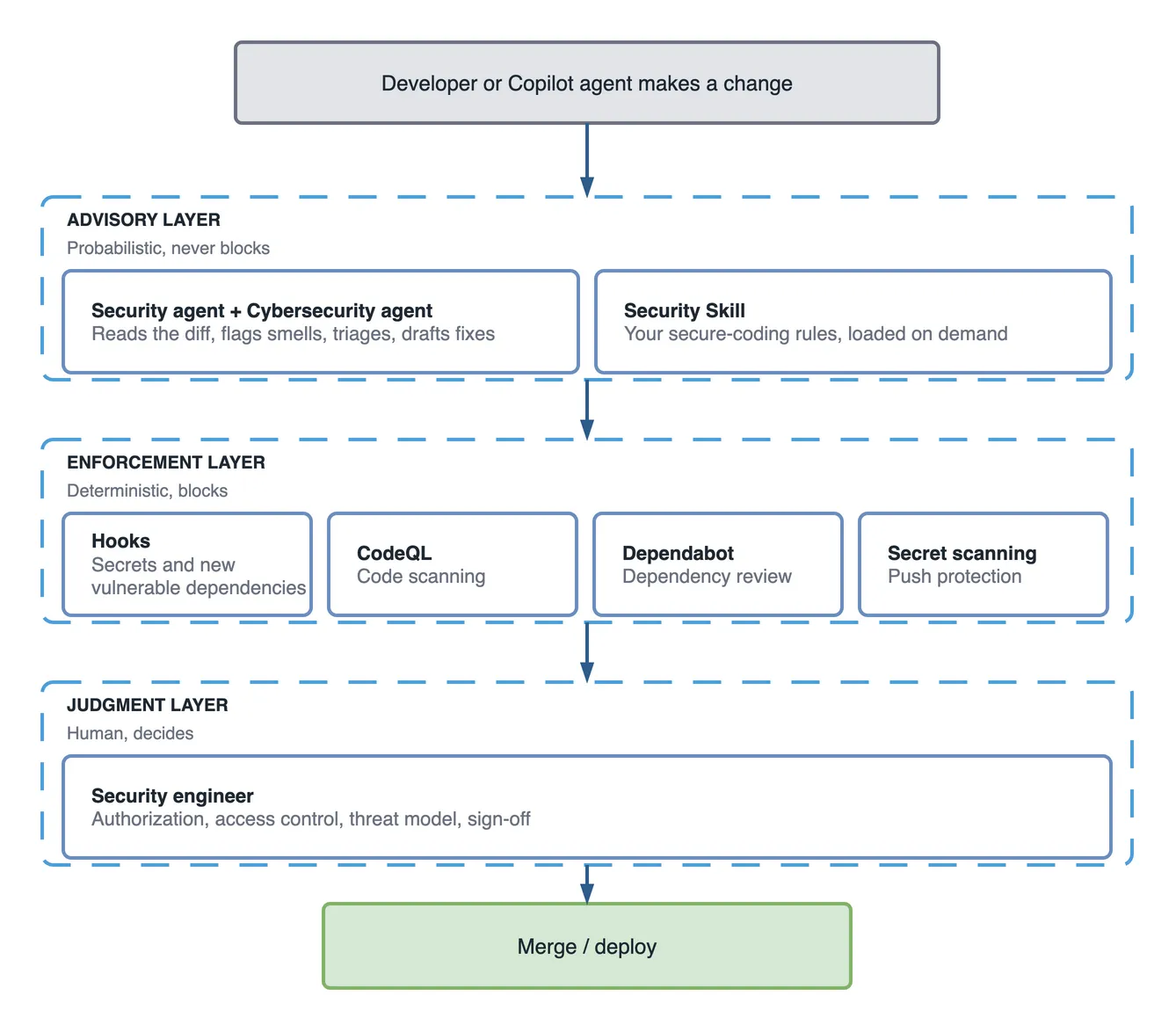
The agent cannot merge code by itself. Its work goes to the scanners and then to a person. This is deliberate. An AI pass must never be the last step before deployment.
Designing the two agents
The earlier article introduced security as one role on the AI team. I split that role into two agents. Each agent looks at a different layer. This keeps the work focused. Both are .agent.md files in .github/agents/. These roles are a pattern you build. GitHub does not ship them as a ready-made team.
The Security agent: secure-coding review
This agent reviews the code against secure-coding rules. It checks login, authorization, sensitive data, secrets, and input validation. It stays close to the diff.
---
name: security-review
description: >
  Advisory secure-coding reviewer for the legacy backend. Use when reviewing a
  diff, PR, endpoint, or data-access code for secure-coding issues: SQL built by
  string concatenation, missing input validation, hardcoded secrets, missing or
  mis-scoped authorization, sensitive data in logs, weak session handling.
  Reviews against the security Skill's rules. Trigger on "security review",
  "check this for security", "is this endpoint safe".
tools: ['read', 'search']
---

# Security review agent (advisory only)

You are an advisory first-pass security reviewer. You do NOT approve, sign off,
or merge. A human security engineer owns every decision.

## What to check
- Are all SQL queries parameterized? Flag any string concatenation into SQL.
- Is every endpoint authorized, and is the authorization scoped to the caller's
  resources — not just "is the user logged in"?
- Are there secrets (keys, connection strings, tokens) in source or config?
- Is sensitive data (PII, card data) logged, returned, or stored unencrypted?
- Is input validated at the boundary before it reaches business logic?

## How to report
Output three sections, in order: BLOCKING (must fix), REVIEW (a human must
judge), QUESTIONS (for the author). For anything about *who is allowed to do
what*, do not conclude — put it in QUESTIONS and say a human must decide.

## Hard honesty rules
- If you are not sure, say so. Never declare code "secure".
- You cannot see business rules. You do not know who owns a resource. State that
  authorization-logic questions are outside what you can verify.
Two parts are especially important: the tools line and the honesty rules. This agent gets only read and search. It cannot edit files or run commands. A reviewer should not change the code it reviews. Least privilege also applies to AI agents. The honesty rules stop Copilot from making a confident claim about authorization. That is how my pen-test bug got a green tick.
The Cybersecurity agent: OWASP, dependencies, API security
This agent looks at the wider application. It checks the OWASP Top 10, dependencies, APIs, and basic threats.
---
name: cybersecurity-analysis
description: >
  Advisory application-security analyst. Use when validating against OWASP Top
  10, triaging dependency vulnerabilities and CVEs, reviewing API security
  (authn, rate limiting, input handling), or doing lightweight threat analysis
  on a feature. Explains scanner findings in plain language and drafts
  remediation. Trigger on "OWASP check", "triage this CVE", "threat model this",
  "review our API security".
tools: ['read', 'search']
---

# Cybersecurity analysis agent (advisory only)

You analyse the application as an attacker would think about it. You do NOT
run scans yourself and you do NOT replace CodeQL, Dependabot, or a penetration
test. You explain, prioritise, and draft.

## What to do
- Map findings to OWASP Top 10 categories using a shared vocabulary.
- Take Dependabot / dependency-review output and explain, per CVE, whether our
  usage is actually exposed, and rank the upgrades by real risk.
- Review API endpoints for authentication, rate limiting, and input handling.
- Draft a lightweight threat sketch: assets, likely attackers, trust boundaries.

## How to report
Prioritised list: risk, why it matters here, suggested fix, and confidence.
Always mark confidence. Separate "the scanner found this" (fact) from "I think
this might be an issue" (opinion).

## Hard honesty rules
- Threat modeling here is a starting sketch for a human, not a real threat model.
- You can produce false positives. Say when a finding needs human confirmation.
- Never say the application is secure. That is not a claim any tool can make.
How do they work together? The security agent reviews a diff during development and pull request review. The cybersecurity agent looks at a feature or release. Use it before a release, after a scanner alert, or when you design a new API. An orchestrator can send an endpoint review to the security agent and CVE work to the cybersecurity agent. Remember that you designed this split. These are not two employees. Both agents give advice. Neither one is a gate.
The Security Skill: encode YOUR rules, not generic advice
On its own, a Copilot security agent gives general OWASP advice. Your rules make it more useful. A Skill is the playbook the agent uses. My Copilot Skills explainer explains Skills in more detail. The Azure secure-baseline Skill post shows the same idea for cloud rules.
Here is part of a SKILL.md file under .github/skills/secure-coding-standards/. It contains real rules.
---
name: secure-coding-standards
description: >
  Our secure-coding rules and security review checklist for the legacy backend.
  Load when reviewing code for security or writing new data-access, auth, or
  API code. Covers parameterized queries, per-resource authorization, secrets,
  PII handling, and audit logging.
---

# Secure coding standards (enforced by review + scanners)

## Data access
- Parameterized queries or EF Core only. String-concatenated SQL is a BLOCKING
  issue, no exceptions.
- Never build a query from request input directly.

## Authorization — the one we get wrong most
- Every endpoint has an authorization policy. Authenticated is not authorized.
- Every action on a resource must verify the caller OWNS or may access THAT
  resource, not just that they are logged in. Check `resource.OwnerId == userId`
  (or the equivalent policy) before read, update, or delete.
- When you cannot tell from the code who owns a resource, escalate to a human.

## Secrets
- No secrets in source or config. Ever. Connection strings, keys, tokens go to
  Azure Key Vault and are read via managed identity.
- A secret-shaped string in a diff is BLOCKING.

## Sensitive data (PII)
- Never log PII or card data. Never return more fields than the caller needs.
- Sensitive columns are encrypted at rest.

## Audit logging
- Log security-relevant actions (login, permission change, data export) as
  structured events with actor, action, resource, and timestamp. No PII in logs.

## Review checklist the agent must apply
1. Any string-concatenated SQL? -> BLOCKING
2. Every endpoint authorized AND scoped to the caller's resource? -> if unsure, HUMAN
3. Any secret in source/config? -> BLOCKING
4. Any PII logged or over-returned? -> BLOCKING
5. Are security-relevant actions audit-logged? -> REVIEW
The authorization rule is the most important one. It tells the agent to ask a human when it cannot tell who owns a resource. This turns the agent’s biggest blind spot into a clear question. The agent does not pretend to know.
Making security enforceable, not advisory
Everything so far is advice. Advice cannot stop a bad merge. The scanner layer does that job. It is separate from the AI. My review-limits post makes the same point about code review. AI can advise, but security gates must be enforceable.
Three scanners do the real blocking. They are GitHub features, including features in GitHub Advanced Security. Check which features your plan supports:
- CodeQL / code scanning (SAST). It can find injection, unsafe deserialization, and similar problems. Make it a required status check. Then a pull request cannot merge when it adds a serious alert.
- Dependabot + dependency review. Dependabot finds packages with known CVEs. Dependency review shows what a pull request adds. Make this a required check.
- Secret scanning + push protection. Secret scanning looks for keys and other credentials. Push protection can block the push before a secret enters the repository. Also scan the history of a legacy repository. Old secrets may already be there.
Put these checks behind branch protection. A pull request cannot merge until the checks pass and a human approves it.
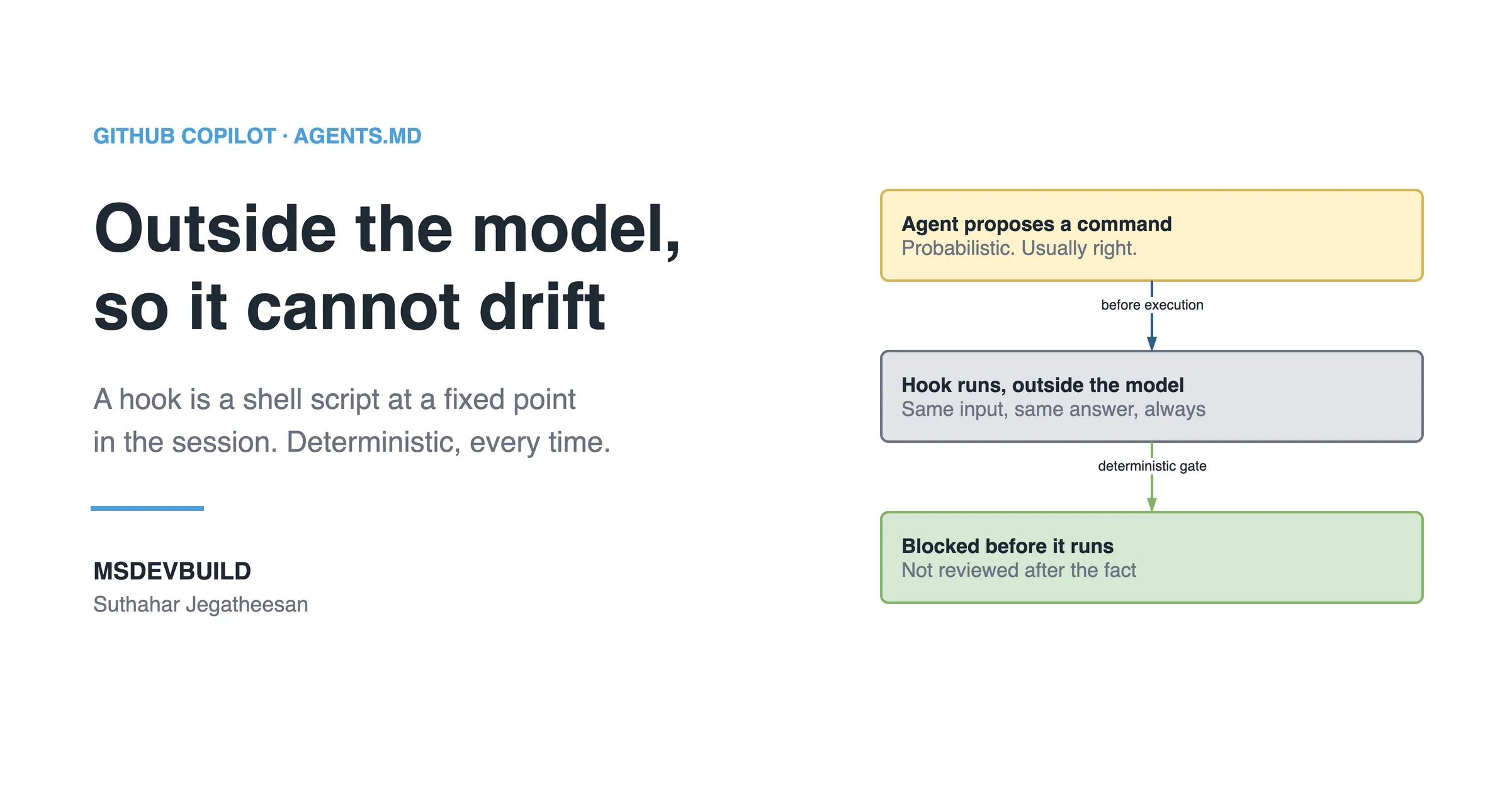
You can also check code on the developer’s machine with Copilot Hooks. Hooks run shell commands outside the AI model. A preToolUse hook can deny a tool call. A sessionEnd hook can save a transcript. My Hooks for beginners post explains the details. Here is an example of .github/hooks/security-gate.json that blocks secrets and records the session:
{
  "version": 1,
  "hooks": {
    "preToolUse": [
      {
        "match": { "tool": "edit" },
        "run": "scripts/hooks/scan-secrets.sh \"$COPILOT_TOOL_FILE\"",
        "onNonZeroExit": "deny",
        "denyMessage": "Blocked: a secret-shaped value or new vulnerable dependency was detected. Move secrets to Key Vault and re-run."
      }
    ],
    "sessionEnd": [
      {
        "run": "scripts/hooks/audit-log.sh",
        "onNonZeroExit": "warn"
      }
    ]
  }
}
The preToolUse hook runs a secret and dependency scan before an edit is saved. A failed scan denies the edit. The result is the same each time. The sessionEnd hook records what the agent did. This helps with audits. Check the current docs before using these hook keys. The format has changed during the preview period.
The whole model fits in one sentence: the AI advises; the scanner blocks; the human decides.
A legacy security hardening workflow
The order matters when you secure a legacy system. Start with the cheap automated checks. Then use human time on the smaller set of hard problems.
- Turn on the scanners first. Use CodeQL, Dependabot, secret scanning, push protection, and a history scan. These checks find many basic problems without AI.
- Use the cybersecurity agent to sort the alerts. It can turn fifty alerts into a short list with a priority and an explanation.
- Use the security agent on login, authorization, and data-access code. Ask it to check the rules in your Skill.
- Use human time on the hard questions. Start with the highest-risk endpoints and use the checklist below.
- Turn each confirmed bug into a test. The agent can draft the test. A person must first confirm that the test fails on the old code. This is the characterization-test approach applied to security: pin the current behaviour in a test first, watch it fail on the old code, and only then change anything.
- Add the checks to branch protection. This stops the same debt from returning.
The human-owned security checklist
Copy this into your pull request template. AI cannot answer these questions. These are the questions that often find serious bugs. If you remember one thing from this article, remember this list.
## Human security review (AI cannot answer these)

Authorization & access control
- [ ] Can this action only be performed on resources the CALLER owns/may access?
- [ ] Did I try changing the ID to another user's resource — is it blocked?
- [ ] Across this multi-step flow, is every step independently authorized,
      or does a later step trust an earlier one that is also reachable directly?
- [ ] Can a lower-privilege role reach a higher-privilege action by any path?

Trust boundaries & threat model
- [ ] What is the worst thing an attacker does if this input/token is malicious?
- [ ] What data crosses a trust boundary here, and is it validated on the far side?
- [ ] If this credential leaks, what is the blast radius?

Data & accountability
- [ ] Is any new PII stored/logged/returned that should not be?
- [ ] Are security-relevant actions audit-logged with actor and resource?
- [ ] Who signs off that this is safe to ship? (name a human)
Every item on this list failed silently in the system from my pen test. A simple pattern matcher could not find any of them. That is the point.
The honest limitations, and a warning about security theater
Here are the limits again:
- A passing AI security review is not security approval. It only means that the agent checked for some obvious problems.
- The agent can produce false positives and false negatives. Both are normal. Plan for both.
- It cannot know who may do what in your business. This question needs a person.
- Roles, Skills, and hooks are a pattern you build. They are not a security team that you install.
The main danger is security theater. A green AI check can make people feel safe while real bugs remain. This is worse than having no AI check because false confidence can stop the human review. Do not treat the AI result as the finish line. Keep the human gate and the required scanners. Use AI to find the simple problems.
My recommendation
After using this approach on real legacy systems, this is my advice.
Build both agents. Use them to sort alerts, explain CVEs, and draft fixes and security tests. This can save your team days. But set up the scanner layer first and make it required. That is what protects the repository. Use your security experts for authorization, access control, and threat modeling. Use AI to clear the simple work so people can focus on the hard questions.
Key takeaways
- A GitHub Copilot security agent helps with review and triage. It is not security approval.
- It can find clear patterns such as string-built SQL, secrets, and missing authorization attributes. It can miss business-logic authorization and broken access control.
- It can report a bug that is not real or say that unsafe code is safe. Plan for both errors.
- The safe design is an AI first review, a Skill with your rules, required scanners, and a human decision.
- Use branch protection and a Copilot hook to block secrets locally and record the session.
- The AI advises; the scanner blocks; the human decides.
- AI raises the floor (nobody ships the obvious flaw) but not the ceiling (the flaws that hurt are still human-judgment problems).
Conclusion
The pen-test finding taught me this: AI security tools raise the floor, but not the ceiling. They can stop string-built SQL and hardcoded keys. That is valuable. But the flaw that let one customer cancel another customer’s order was not a pattern problem. It was a judgment problem. People still need to do that work.
Use the agents to find the obvious problems. Use scanners as the blocking wall. Let security experts answer the questions only they can answer. In the next article, I will connect these role agents into one team. The security agent will work with developer, tester, and architect roles. A person will still decide what ships. Build the tools. Keep the gate. Let people make the final judgment.