
Free tool · GitHub Copilot
AI Token Calculator for GitHub Copilot
Paste a prompt, source code, JSON or a log. See its tokens and what a request costs in AI Credits, on any of 29 Copilot models.
Token and cost calculator
Your text stays in this browser. Tokens are counted by the open-source gpt-tokenizer library running on this page; nothing you type or paste is sent to a server or an AI provider, and it isn’t saved. The site’s Google Analytics records page views only.
Simple mode prices one typical Copilot Chat request: about 8,500 tokens of Copilot context around your text, an 800-token answer and no caching. That is a new chat; the lessons below use about 12,000, because a chat a few messages in also resends its history. Switch to Advanced to change any of these.
Copilot never sends your prompt alone: it adds its own instructions, your repository instructions, tool definitions, chat history and referenced files. Choose “Only your text” to price a direct API call.
What the model writes back: about 300 for a short reply, 800 for a diff, thousands for a whole file. Reasoning models also write hidden thinking tokens, which OpenAI and Anthropic bill as output even though you don’t see them.
The share of each call’s input that repeats a recent request and is billed at the cached price, often 10% of input or less. Providers only cache prompts above a minimum size (512 to 4,096 tokens) and drop entries after minutes of inactivity; switching models loses the cache.
The share stored for later reuse. GitHub lists a cache-write price, about 1.25× input, for Anthropic models and the GPT-5.6, GPT-6 and GPT-6.1 families; elsewhere it costs the same as normal input. Usually the first call of a session writes and later calls read.
Keep 1 for a chat question. In agent mode one prompt starts many model calls (read files, run tools, edit, test) and every call is billed.
What each call adds to the next: the answer it wrote plus tool output such as file reads and test logs. Every later call re-sends it. Used only with more than one model call.
For the monthly estimate. A Copilot Business seat includes 1,900 AI Credits a month and Enterprise 3,900, pooled across the organization.
On paid plans, letting Copilot choose the model takes 10% off model costs in Copilot Chat and Copilot cloud agent. Usage is still priced at the rates of the model Auto picks.
Copilot context sent with your text
Typical sizes, not published figures: change them to match your setup.
- Input tokens
- 0
- Output tokens
- 0
- AI Credits per request
- 0
- AI Credits per month
- 0
your estimate estimate
Formula and assumptions
credits = (fresh input × input price + cached × cached price + cache writes × write price + output × output price) ÷ 1,000,000 × 100, summed over model calls, less 10% with Auto
This is an estimate. What you are actually billed is what GitHub reports under Billing → AI usage. Import that report below to compare.
See how your text splits into tokens
Compare with another version of your prompt
Uses your text and settings above. Pick a model name to select it. “~” marks an estimated token count.
Compare with your actual usage
Import the AI usage report from GitHub to see the credits you really used, by model and by person, the most expensive days, and how GitHub’s figures compare with this calculator’s prices. To get it: Billing → AI usage → Get usage report; GitHub emails a CSV covering up to 31 days (GitHub’s guide).
The file is read in this browser and never uploaded. Nothing from it is stored after you leave the page.
How do I count the tokens in my text?
Paste it into a tokenizer for the model family you use. OpenAI publishes its tokenizers, so the o200k_base count here is exact for that encoding and a close estimate for GPT models. Anthropic, Google and the other providers don’t publish browser tokenizers, so their counts are estimated ranges; for exact figures, use the provider’s token-counting API or your Copilot usage report.
Read the full article: What Is an AI Token? Why Every AI Cost Is Calculated in Them
Understand AI tokens
How Copilot counts and bills tokens, in 9 short lessons
Optional, and in any order: pick a lesson from the bar below. Each answers one question in plain words; lessons 6 to 8 are advanced. One final check at the end, and your place is saved on this device.
Lesson 1 of 9
How Copilot counts tokens
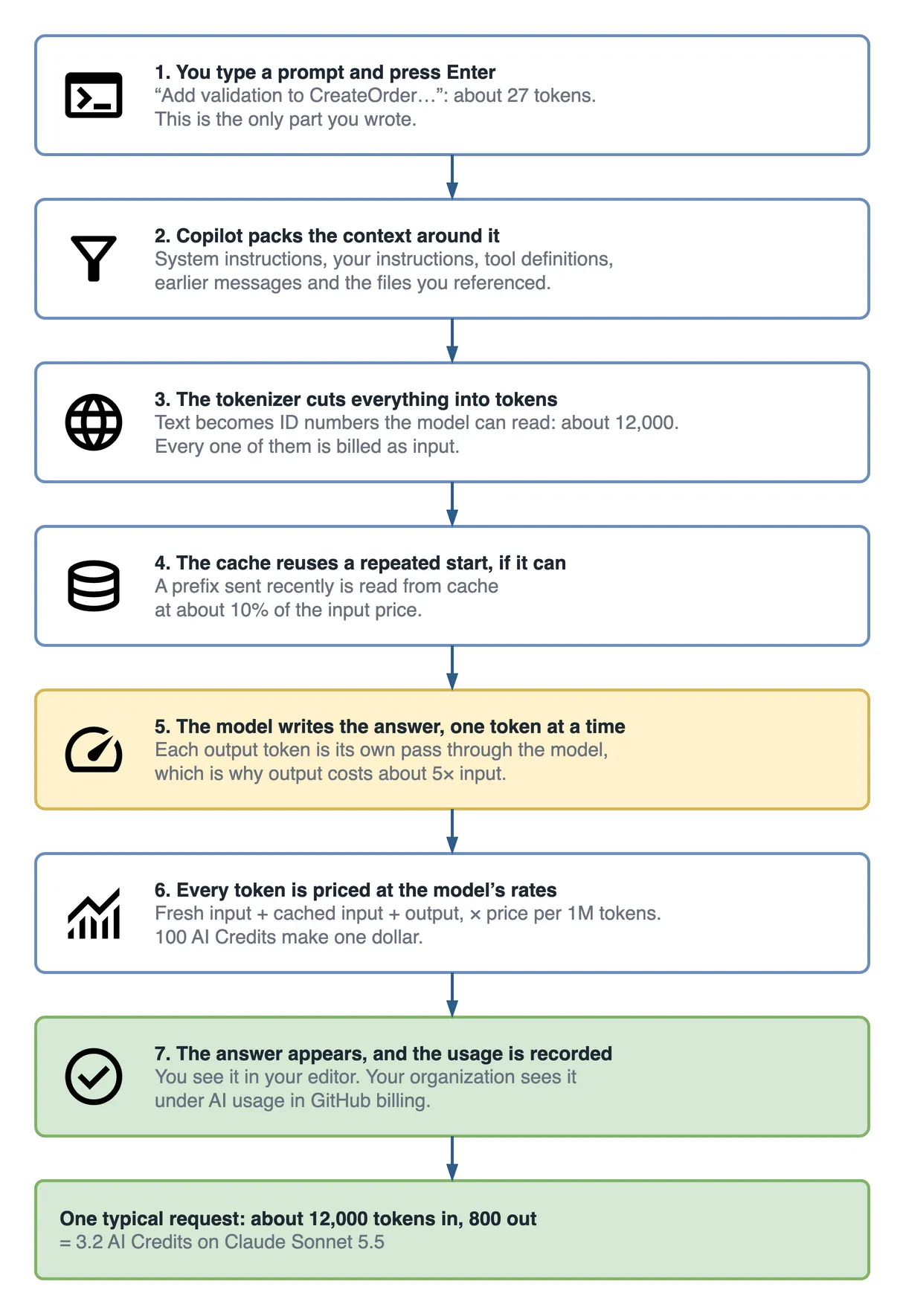
Everything you send to Copilot and everything it writes back is counted in tokens. Since June 1, 2026, those tokens are what your organization pays for, in GitHub AI Credits. Start with the one-line idea below, then follow the numbered steps.
How does GitHub Copilot count and bill tokens?
Copilot adds up four kinds of tokens per request: input (everything sent), cached input (repeated parts, usually 10% of the input price, 25% on Grok), cache writes (storing a prefix for reuse, about 1.25× input, on Anthropic and the newer GPT families) and output (everything written back, about 5× the input price). Each is multiplied by the model’s price, and the total is billed in AI Credits.
Read the full article: What Is an AI Token? Why Every AI Cost Is Calculated in Them
Everything you send is input
Everything written back is output, about 5× the price
Tokens × the model’s price = AI Credits
Each kind of token has its own price per million, set by the model you pick. Inline code completions are not billed in AI Credits on paid plans.
One prompt, four steps
Lesson 2 of 9
Learn tokens, scene by scene
A short animated lesson in ten scenes, from “what is a token?” to what a request costs. Press Play lesson and watch, or pick a scene and go at your own pace. The arrow keys move between scenes.
What is a token in AI?
A token is a small piece of text that a language model reads and writes: often a whole short word, or part of a longer one. In English, one token is about 4 characters or three quarters of a word, so 100 tokens is roughly 75 words.
Read the full article: What Is an AI Token? Why Every AI Cost Is Calculated in Them
Text is cut into small pieces
Each piece becomes an ID number
About 4 characters make 1 token
Six everyday comparisons optional
The same ideas as the lesson above, each as a picture you can replay: bricks, a parcel, a taxi meter, a packed box, a snowball and couriers.
Tokens are like LEGO bricks
AI models don’t read letters or words. They read bricks: short pieces of text. A common word is one brick; a long or unusual word is several.
A handy rule: 1 token ≈ 4 letters ≈ ¾ of a word. So 100 tokens is about 75 words. Code needs more bricks, because symbols like ( and ; are bricks too.
Your request is a parcel
You write a short note. But Copilot packs a whole parcel around it so the AI can help: its rulebook, your project’s instructions, a toolbox, your earlier messages, and the code files you pointed at.
The parcel is weighed in tokens, and you pay for the whole parcel, not just your note.
The answer runs on a taxi meter
The AI writes its answer one token at a time, and the meter keeps ticking until it stops. Output tokens have a higher fare than input, about 5 times on most models.
Asking for “just the change” is a short ride. Asking for the whole file again is a long one.
Cache is a box that’s already packed
Send a follow-up a minute later and most of the parcel is the same. The AI service keeps a recent copy, so those parts are reused instead of repacked, usually at 10% of the input price or less.
The copy expires after a period of inactivity that each provider sets, and changing the model mid-chat throws it away.
Request 1
Request 2
A long chat is a snowball
The AI has no memory, so every new message re-sends the whole conversation. Message 10 carries messages 1 to 9 inside it.
Like a snowball rolling downhill, each message is bigger than the last, and the total grows fast.
The model is your courier
The same parcel costs very different amounts depending on the courier. Light models are economy: cheap and fine for simple jobs. Big reasoning models are express: great for hard problems, but up to 100× the price.
Not sure? Auto picks a courier for you, and on paid plans takes 10% off in Copilot Chat and the cloud agent.
Lesson 3 of 9
Watch the model generate
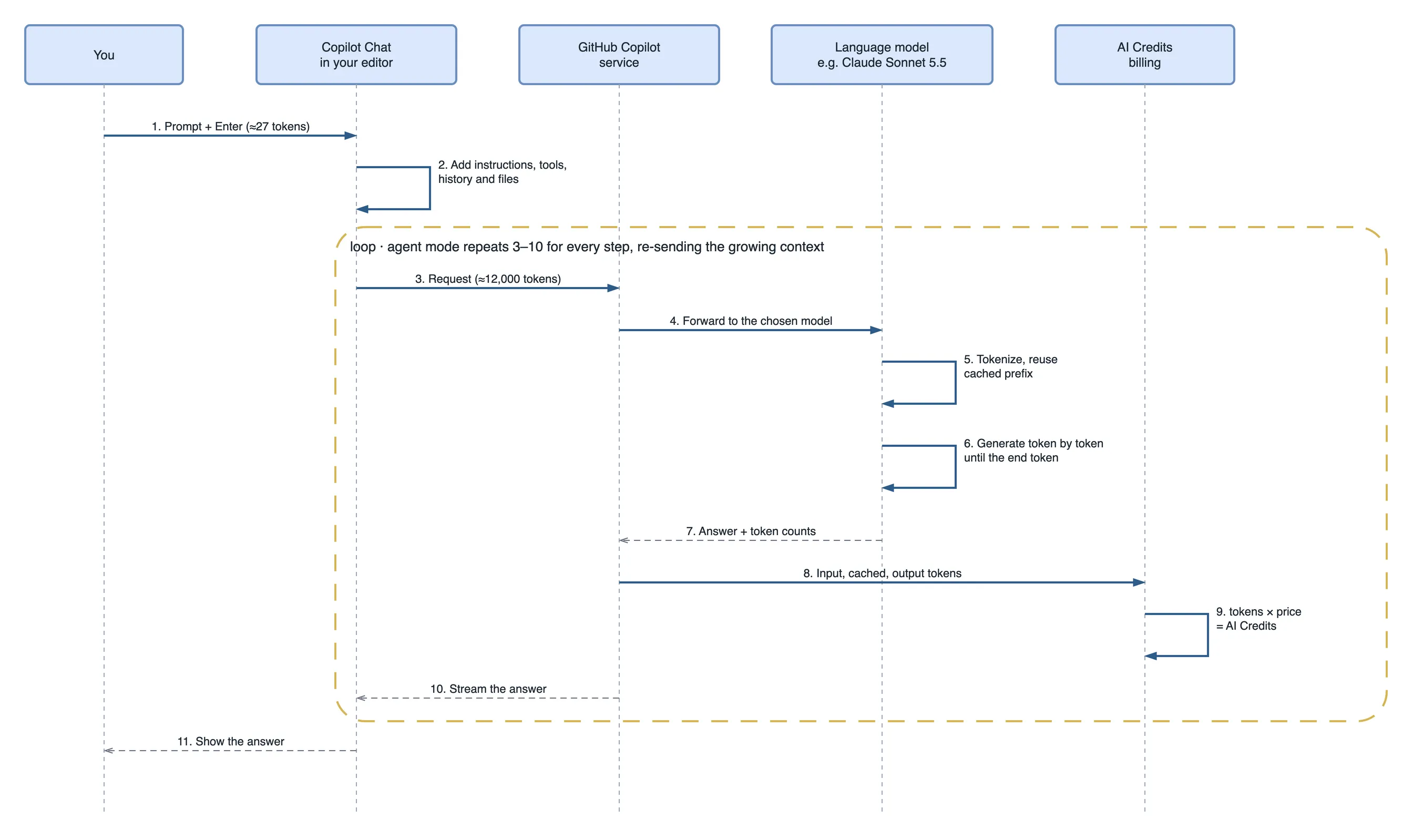
A language model writes by repeatedly predicting the most likely next token. Press Play to watch, or Step to go one token at a time.
Why do output tokens cost more than input tokens?
The model reads all input tokens together in one pass, but writes output one token at a time, with a separate pass for each. Every model on GitHub’s list prices output higher, 3–8 times the input price and 5 times on most.
Read the full article: What Is an AI Token? Why Every AI Cost Is Calculated in Them
The model reads everything so far
…then adds one token at a time
It stops when it predicts the end token
Why output is pricier
Input tokens are read together in one pass. Output tokens are produced one at a time, each needing its own pass through the model. Every model on GitHub’s list prices output higher than input: 3–8× (5× on most).
When does it stop?
The model keeps going until it predicts a special end token or hits a length limit. Asking for “only the changed lines” makes the end token come much sooner.
Reasoning models think first
Models with reasoning write hidden “thinking” tokens before the answer. OpenAI and Anthropic bill them as output, and you pay for all of them even though you don’t see them; on OpenAI they also take up room in the context window. Higher reasoning effort means more of them.
Billed once, read many times
The model looks back at the whole sequence for every new token, but you are billed for each input token once per request and each output token once.
Lesson 4 of 9
The best way to ask
The cheapest prompt is the one that gets the right answer first time. A focused prompt is often a little longer, but it avoids retries, exploring and long answers, which is where most tokens go.
How do I write a prompt that uses fewer tokens?
Name the exact file or method, say what to change, give the rules to follow, and say what to return, such as only the diff. A focused prompt can be a little longer, but it avoids exploring, retries and long answers, which is where most tokens go.
Read the full article: How to Save AI Tokens: 15 Habits That Cut My Copilot Context Waste
A vague prompt makes the model guess
Guessing means retries, each bigger than the last
A focused prompt gets it first time
Prompt makeover: how people ask, and the best way to ask
Pick a way you might ask Copilot. See it rebuilt in four parts, and why each part saves tokens.
fix this
TaskFix the crash when the cart is empty on the checkout screen.
Context#file:lib/features/checkout/bloc/checkout_bloc.dart, stack trace selected.
ConstraintsKeep the existing BLoC events.
Done whenShow only the changed method.
- Names the bug and where it happens, so Copilot does not explore to find it.
- The stack trace points straight at the cause.
- “Only the changed method” keeps the output, the priciest part, short.
explain this code
TaskExplain what CartBloc does when an item is removed,
Context#file:lib/features/cart/bloc/cart_bloc.dart
Constraintsfor a developer new to BLoC,
Done whenin 5 short bullet points.
- One behaviour, not the whole file.
- Says who the answer is for, so it is neither too basic nor too deep.
- A length limit stops a long essay you would only skim.
write tests for this
TaskWrite unit tests for CartBloc: add item, remove item, empty cart.
Context#file:lib/features/cart/bloc/cart_bloc.dart, existing tests in test/bloc.
ConstraintsFollow the style of the existing tests. No new packages.
Done whenTests only. Run them and report any failure.
- Lists the cases, so Copilot does not invent twenty of its own.
- Pointing at existing tests means the first version matches the team’s style.
- A clear finish line: tests written, run, and reported.
can you make this better
TaskSplit the build method in checkout_screen.dart into smaller widgets.
Context#file:lib/features/checkout/presentation/checkout_screen.dart
ConstraintsNo changes to behaviour or layout.
Done whenShow the new widgets and the updated build method only.
- “Better” can mean anything, so the model guesses and you retry.
- One concrete change, with what must not change.
- Only the new and changed code comes back, not the whole file.
why is it not working??
TaskThe cart total does not update after removing an item.
Context#file:lib/features/cart/bloc/cart_bloc.dart. Expected 2 items; the screen still shows 3.
ConstraintsFind the cause before changing any code.
Done whenExplain the cause in 2 sentences, then give the minimal fix.
- Describes what you see and what you expected: the two facts debugging needs.
- Asking for the cause first stops a rewrite that hides the real bug.
- A short, two-part answer instead of a long guess.
add google login to my app
TaskPlan Google sign-in for the auth feature.
Context#file:lib/features/auth/presentation/login_screen.dart and the auth bloc.
ConstraintsFollow the flutter-feature skill. No code yet.
Done whenA numbered plan of at most 8 steps.
- A big feature asked in one go turns into a long, costly agent run.
- A plan is cheap, and you can correct it before any code is written.
- The skill gives the agent the repo’s structure, so it does not guess.
review my code pls
TaskReview this diff for null-safety and BLoC state bugs.
ContextThe diff selected in the editor.
ConstraintsIgnore formatting and naming.
Done whenAt most 5 issues, most serious first.
- Says what to look for, so the review is not a list of style nits.
- Only the diff is sent, not the whole project.
- A cap keeps the answer focused on what matters most.
Hi Copilot! Hope you are doing well. Could you please help me, if possible, with adding a loading spinner? Thanks a lot!!
TaskAdd a loading spinner to the checkout screen while the order is being placed.
Context#file:lib/features/checkout/presentation/checkout_screen.dart
ConstraintsUse the existing theme colours.
Done whenShow only the changed widget.
- Greetings and thanks do not change the answer; the missing details do.
- The spinner now has a place and a moment to appear.
- Every token goes into instructions the model can act on.
continue what we did yesterday
TaskContinue the promo-code work.
Context#file:PLAN.md, with the decisions so far and the open tasks.
ConstraintsStay on the plan. Ask before changing it.
Done whenDo step 3 of the plan, then stop.
- A new chat remembers nothing from yesterday; the plan file gives it the context in a few hundred tokens.
- Far cheaper than pasting, or re-sending, the whole old chat.
- A clear stopping point keeps the run short.
The better prompt is often longer. It still costs less, because it gets the right answer first time: no exploring, no retries, and no long answer to skim.
Prompt checker
Build a focused prompt optional
Lesson 5 of 9
Continue the chat, or start fresh?
Every message re-sends the whole chat. Sometimes that is the cheapest way to work, and sometimes the most expensive. Here is how to tell, and how to carry your context over when you do start again.
Does continuing a Copilot chat cost more than starting a new one?
It depends on the cache and the topic. Each message re-sends the whole chat, but soon after the last message most of it is read from cache, usually at 10% of the input price or less. A quick follow-up on the same task is usually cheapest in the same chat; after a break, or for a new topic, a new chat with a short summary costs less.
Read the full articles: How to Save AI Tokens: 15 Habits That Cut My Copilot Context Waste · 400K AI Tokens a Month: My Daily GitHub Copilot Workflow That Makes the Budget Last
Same task, minutes later: the history comes from cache
After a long break, the cache has expired
New topic? New chat, with a short summary
Same chat or new chat? Run the numbers
Describe where you are. The next five messages are priced both ways on Claude Sonnet 5.5, with 800 output tokens each.
Illustrative model: the cache holds everything sent before the current message until you take a long break; a new chat starts with a 1,000-token summary and pays full price on its first message. Real caching varies by model.
When to continue, and when to start fresh
✓ Continue the chat when
- It is a quick follow-up on the same task
- The answer depends on what was just said
- You are still working on the same files
- You are on the same model, with the same settings
↻ Start a new chat when
- The topic changes
- You are back after a break: caches expire after a period of inactivity set by each provider
- The chat has grown long, or the answers start to drift
- You want a different model: the cache is lost anyway
- The history is full of logs and files you no longer need
Tip: new task, new chat
Make it a habit: when you finish one task and start another, clear the chat first. Saved files, custom instructions and memory are kept; only the conversation is dropped.
- You pay for history you no longer need. With the defaults in the calculator above (12,000 tokens of starting context and 15 messages of 3,000 tokens each), every new message carries about 57,000 tokens. In a fresh chat it carries about 12,000 plus your question: roughly 45,000 fewer input tokens on every message that follows.
- On a new topic, none of that history helps. Fresh from the cache it is cheap, but it is still sent, and after a break the cache has expired and it is billed at full input price.
- Answers get better. Old files, logs and decisions from the last task stay in front of the model and pull its answers toward that task. A clean chat answers the question you actually asked.
- You stay further from the limits. A shorter context keeps you under the context window and the long-context price line, so Copilot does not have to compact or trim mid-task.
/clear, select New Chat (+), or press Ctrl+N (⌘N on macOS). Note: /new here scaffolds a project, it does not clear the chat./clear starts a new conversation (/new and /reset do the same). /compact keeps going on a summary instead./clear; /compact summarizes instead./clear starts a new conversation with empty context. /compact summarizes and continues the same one.Carry your context over, cheaply
Lesson 6 of 9 · Advanced
Calculation patterns
The same price formula behaves very differently depending on how you work. Pick a pattern, move the sliders, and watch each model call stack up.
Why does a long chat or agent session cost so much more?
The model keeps no memory, so every new message or agent step re-sends the whole conversation so far. Input grows each turn, so total tokens rise much faster than the number of questions. Caching and a new chat for a new topic keep it down.
Read the full articles: 400K AI Tokens a Month: My Daily GitHub Copilot Workflow That Makes the Budget Last · Designing a Multi-Agent GitHub Copilot Orchestrator for Legacy Teams (Honestly)
Message 1 is small
Message 5 re-sends messages 1 to 4
The total grows much faster than the chat
Eleven before-and-after scenarios optional
Common situations, each replayed both ways. Every bar is one model call; its height is the tokens it carries.
Measured by GitHub
GitHub tracked token use in its own agentic workflows using an “effective tokens” measure (output weighted 4×, cached input 0.1×, scaled by model tier), then pruned unused MCP tools, replaced some MCP calls with the GitHub CLI, and moved suitable workflows to cheaper models.
A 40-tool GitHub MCP server can add 10–15 KB of tool schema to every turn; pruning unused tools saved 8–12 KB per call. Source: GitHub blog, “Improving token efficiency in GitHub Agentic Workflows”.
Lesson 7 of 9 · Advanced
Instructions, skills & hooks
Copilot lets you add knowledge and automation to every session. Each piece enters the model’s context at a different moment, so each has a different token cost.
Do custom instructions, skills and hooks use tokens?
Custom instructions are sent with every request, so keep them short. Copilot loads a skill only when it judges the skill relevant, so its steps aren’t in every request. Hooks run as commands outside the model (in Copilot CLI and Copilot cloud agent) and use no model tokens unless they add text to the context.
Read the full articles: What Is GitHub Copilot Custom Instructions? (And Why Your Project Needs One) · GitHub Copilot Skills Deep Dive: The Missing Layer Between Prompts, Instructions, and Agents · GitHub Copilot Hooks for Beginners: Why You Need Them and What You Can Build
Instructions ride on every request
A skill loads its steps only when needed
A hook trims noisy tool output
When each one costs tokens
| Feature | Where it lives | When it is in the request | How to keep it cheap |
|---|---|---|---|
| Custom instructions | .github/copilot-instructions.md, or AGENTS.md files (the nearest one wins) | Every chat and agent request in the repo | A short map: stack, build and test commands, real pitfalls |
| Path-specific instructions | .github/instructions/*.instructions.md | Only when files matching its applyTo pattern are involved (on GitHub.com, cloud agent and code review only) | Move language- or folder-specific rules here |
| Prompt files | .github/prompts/*.prompt.md | Only when you run that prompt | Save your best focused prompts for the team |
| Agent skills | .github/skills/<name>/ (also .claude/skills or .agents/skills) | Loaded when Copilot judges it relevant to the task | Put long how-tos here instead of in instructions |
| Custom agents | .github/agents/ | While that agent is selected | Give each agent only the tools it needs |
| MCP tools | MCP server configuration | Every enabled tool’s definition, on every request | Enable only the toolsets the task needs |
| Hooks | .github/hooks/*.json | Run as commands outside the model; add tokens only when they add context | Trim noisy tool output, block wasteful reads |
Skills follow the open Agent Skills standard: Copilot loads a skill’s instructions when they are relevant, instead of including them in every conversation. Hooks are supported in Copilot CLI and Copilot cloud agent, and in preview in VS Code.
Your setup’s cost on every request
Set the sizes for your repository. Example sizes are pre-filled; tool and skill sizes are typical estimates.
A map saves the agent from exploring
Without guidance, an agent spends its first calls exploring: reading folders and files to guess your framework, test command and style, and then fixing its wrong guesses.
A short .github/copilot-instructions.md rides along on every request, so it costs a few hundred tokens each time, but it removes the exploring. A skill is extra know-how (for example “how we write unit tests”) that is loaded only when the task needs it.
Too much is also a problem: a 6,000-token instructions file is paid on every single call.
Hooks: shrink what the model has to read
A postToolUse hook runs after a tool and can change the result the model sees. Here, a test run prints a long log; the hook keeps only the failures. A preToolUse hook can deny a tool call, for example reading node_modules.
Illustrative sizes. See GitHub’s hooks reference for events and configuration.
One project, five setups: what each addition costs and saves optional
One task in one project, run with nothing set up, then adding instructions, custom agents, skills and hooks one at a time.
Orders API
- Stack
- .NET 8, ASP.NET Core, EF Core, xUnit
- Size
- ~180 files, 2 test projects
- The task
- “Add a discount-code endpoint, with validation and unit tests.”
- Run by
- Copilot agent mode
All five setups side by side
Illustrative model of one task: per-call context = Copilot’s system instructions + tool definitions + your instructions + skill descriptions + task + referenced files, growing with each call’s tool output and answer. “Redo factor” covers tasks that need a second attempt. No caching is assumed. Real numbers depend on your repository; compare with your usage report.
📘 Instructions: the map
Costs a few hundred tokens on every request. Saves the agent from exploring folders to learn your stack, commands and conventions. The single best first step.
🤖 Custom agents: the right specialist
Each agent gets only the tools it needs (fewer tool definitions per call), its own focused instructions, and can run on a model sized for the job: a reasoning model to plan, a lighter one to write tests.
🧰 Skills: know-how on demand
Only a short description sits in context. The full steps load when the task matches, so detailed procedures don’t ride along on every request, yet the agent follows them first time.
🪝 Hooks: automatic guard rails
Commands that run outside the model at set moments. They can block wasteful tool calls (reading generated files) and shrink noisy tool output, so less text is re-sent on every later call.
Lesson 8 of 9 · Advanced
How to write them well
Templates, do’s and don’ts for instructions, custom agents, skills and hooks. Start with “Which one do I need?”, then open the tab you need.
Should I use instructions, a skill, a custom agent or a hook?
Use custom instructions for what every request needs, path-specific instructions for rules on some files, a skill for a detailed recipe some tasks need, a custom agent for a specialist role, a hook for what must always happen, and a prompt file for a prompt you repeat.
Read the full articles: The Complete AGENTS.md Playbook: Build AI Coding Agents That Work Like Your Best Engineer · Building Your First GitHub Copilot Skill: A .NET Clean Architecture SKILL.md, Start to Finish · GitHub Copilot Hooks for Beginners: Why You Need Them and What You Can Build
Every request needs it? Instructions
Only some tasks need the recipe? A skill
Must always happen? A hook
Which one do I need?
Lesson 9 of 9
Habits and final check
Habits that keep usage low without lowering quality, then ten questions, one on each big idea, to check your understanding.
What are the best habits to save GitHub Copilot tokens?
Attach only the code that matters, ask for diffs instead of whole files, stay on one model during a task, start a new chat for a new topic, use a light model for routine work, and keep instructions short. None of these lowers answer quality.
Read the full articles: How to Save AI Tokens: 15 Habits That Cut My Copilot Context Waste · 400K AI Tokens a Month: My Daily GitHub Copilot Workflow That Makes the Budget Last
Pack light: attach only the code that matters
Short ride: ask for the diff, not the file
New topic? Start a new chat
Habits that save tokens
These come from GitHub’s own guidance on using AI credits efficiently. Tap a card to see why it works.
Final check: 10 questions
0 / 10 answeredOne question on each big idea. Each answer explains why, and links back to the lesson if you miss it.
-
1Which kind of token is usually priced highest?
-
2About how many English words are 100 tokens?
-
3Your 10-token question is sent with 12,000 tokens of context. How many input tokens are billed?
-
4Hidden “thinking” tokens from reasoning models are billed as…
-
5What throws the cache away in the middle of a chat?
-
6As a chat gets longer, total input tokens grow…
-
7A GPT-5.6 Sol request goes above 272K input tokens. What happens?
-
8Why can agent mode cost much more under AI Credits?
-
9Which of these is sent with every single request?
-
10A rule that must be enforced every time, whatever the model decides, belongs in…
AI usage and cost optimisation
What a Copilot request costs, and how to spend less
How GitHub prices each token, what makes a request expensive, and the full price list the calculator uses.
How are GitHub Copilot AI Credits calculated?
Multiply fresh input, cached input and output tokens by the model’s price per million tokens, add them, and convert: 1 AI Credit is $0.01. For example, 12,000 input and 800 output tokens on Claude Sonnet 5.5 cost 3.2 credits.
Read the full article: 400K AI Tokens a Month: My Daily GitHub Copilot Workflow That Makes the Budget Last
Old: every prompt was 1 request × a multiplier
New: you pay for the tokens each request uses
100 AI Credits make one dollar
GitHub Copilot model prices
USD per 1 million tokens, from GitHub’s Models and pricing page, checked 6 November 2026. 1 AI Credit = $0.01. Business seats include 1,900 credits a month and Enterprise 3,900, pooled across the organization; they reset on the 1st (00:00 UTC) and don’t roll over (billing docs).
| Model | Input | Cached | Cache write | Output | Long context |
|---|---|---|---|---|---|
| OpenAI | |||||
| GPT-6 LunaLightweight | $0.10 | $0.01 | $0.13 | $0.50 | Above 272K input: $0.20 in · $0.02 cached · $0.75 out |
| GPT-5.4 nanoLightweight | $0.20 | $0.02 | — | $1.25 | — |
| GPT-5.6 LunaLightweight | $0.20 | $0.02 | $0.25 | $1.20 | Above 200K input: $0.40 in · $0.04 cached · $1.80 out |
| GPT-6.1 TerraVersatile | $1.00 | $0.05 | $1.25 | $5.00 | Above 272K input: $2.00 in · $0.10 cached · $7.50 out |
| GPT-5.3-CodexPowerful | $1.75 | $0.17 | — | $14.00 | — |
| GPT-5.6 TerraVersatile | $2.00 | $0.20 | $2.50 | $12.00 | Above 272K input: $4.00 in · $0.40 cached · $18.00 out |
| GPT-6 SolPowerful | $2.00 | $0.20 | $2.50 | $10.00 | Above 272K input: $4.00 in · $0.40 cached · $15.00 out |
| GPT-6.1 SolPowerful · GitHub’s suggested replacement for GPT-5.5 | $2.00 | $0.10 | $2.50 | $10.00 | Above 272K input: $4.00 in · $0.20 cached · $15.00 out |
| GPT-5.6 SolPowerful | $4.00 | $0.40 | $5.00 | $20.00 | Above 272K input: $8.00 in · $0.80 cached · $30.00 out |
| GPT-6 AstraPowerful | $10.00 | $1.00 | $12.50 | $50.00 | Above 272K input: $20.00 in · $2.00 cached · $75.00 out |
| Anthropic | |||||
| Claude Haiku 5.5Lightweight | $0.10 | $0.01 | $0.13 | $0.50 | Above 100K input: $0.50 in · $0.05 cached · $2.50 out |
| Claude Haiku 4.5Versatile | $1.00 | $0.10 | $1.25 | $5.00 | — |
| Claude Sonnet 5.5Versatile | $2.00 | $0.10 | $2.50 | $10.00 | — |
| Claude Sonnet 5Versatile | $2.00 | $0.20 | $2.50 | $10.00 | — |
| Claude Sonnet 4.6Versatile | $3.00 | $0.30 | $3.75 | $15.00 | — |
| Claude Sonnet 4Versatile | $3.00 | $0.30 | $3.75 | $15.00 | — |
| Claude Opus 5.5Powerful | $4.00 | $0.20 | $5.00 | $20.00 | — |
| Claude Opus 5Powerful | $5.00 | $0.50 | $6.25 | $25.00 | — |
| Claude Opus 4.8Powerful | $5.00 | $0.50 | $6.25 | $25.00 | — |
| Claude Opus 4.8 (fast mode)Powerful · Preview | $10.00 | $1.00 | $12.50 | $50.00 | — |
| Claude Fable 5Powerful | $10.00 | $1.00 | $12.50 | $50.00 | — |
| Claude Fable 5.1Powerful | $10.00 | $0.25 | $12.50 | $50.00 | — |
| Gemini 3.8 FlashVersatile · Promotional price until 31 Dec 2026 | $0.75 | $0.075 | — | $3.75 | — |
| Gemini 4 ArgonPowerful · Promotional price until 1 Dec 2026 | $2.00 | $0.10 | — | $10.00 | — |
| Microsoft | |||||
| MAI-Code-1.1-FlashLightweight | $0.20 | $0.02 | — | $1.20 | — |
| xAI | |||||
| Grok 4.5Versatile | $2.00 | $0.50 | — | $6.00 | Above 200K input: $4.00 in · $1.00 cached · $12.00 out |
| Grok 4.6Versatile | $2.00 | $0.50 | — | $6.00 | Above 200K input: $4.00 in · $1.00 cached · $12.00 out |
| Grok 4.7Versatile | $2.00 | $0.50 | — | $6.00 | Above 200K input: $4.00 in · $1.00 cached · $12.00 out |
| Moonshot AI | |||||
| Kimi K3Powerful | $3.00 | $0.30 | — | $15.00 | — |
Long context shows the input and output price once a request passes the threshold; cached and cache-write prices rise too. GitHub doesn’t publish per-model context-window sizes on its pricing page. Code completions and next edit suggestions aren’t billed in AI Credits.
How PRU multipliers worked
Under request-based billing, each prompt you sent in Copilot Chat (ask, edit, agent or plan mode) used one premium request, multiplied by the model’s multiplier. A cheap model might count as 0.33 of a request; a frontier model as 27. The prompt’s length didn’t matter. Agent tool calls didn’t count, only your prompts. Copilot code review used 13 per review.
Multipliers shown are those GitHub lists today for Pro and Pro+ subscribers still on an annual plan; they were raised on June 1, 2026. All other plans moved to AI Credits.
Why GitHub moved to AI Credits
Copilot now runs long, multi-step agent sessions across whole repositories. Under PRU billing, a quick question and a multi-hour agent session could cost the same, while the real compute differed by thousands of times. GitHub said that model was no longer sustainable, and moved to billing by actual tokens at each model’s published rates.
Plan prices didn’t change: Business includes $19 of credits per user (1,900 credits), Enterprise $39 (3,900). Completions and next edit suggestions stay free.
Input, output and cached tokens
Try your own text in the Token calculator, or watch tokens being generated in Watch it generate.
Real cost comparison examples
Five everyday tasks priced on six Copilot models at published rates. No caching assumed, so long sessions here are the worst case.
AI Credits per task (1 credit = $0.01). Token sizes are typical examples.
GPT vs Claude Opus vs Sonnet
USD per 1M tokens from GitHub’s Models and pricing page (read 6 Nov 2026). Legacy multipliers apply only to annual Pro and Pro+ plans.
Why agent mode can become expensive
Under PRU billing, one prompt to an agent was one request, no matter how many steps it took. Under AI Credits, every model call in the loop is billed, and each call re-sends the growing conversation plus the latest tool output.
Calculate your team’s monthly Copilot cost
Estimate only, 21 working days. Check your real figures at github.com/settings/billing → AI usage, or download the usage CSV for per-request model and tokens.
Best strategies to reduce token usage
Each links to an interactive scenario with before and after numbers.
Tips to save your monthly AI Credits budget
Questions people ask
Frequently asked questions
Short, direct answers about tokens, AI Credits and this calculator.
Is this AI Token Calculator free, and is my text sent anywhere?
It is free, and your text stays in your browser. Tokens are counted by the open-source gpt-tokenizer library running on the page, so nothing you paste is sent to a server or an AI provider. The site uses Google Analytics to count page views; it is not sent your text.
How many tokens is 1,000 words?
About 1,300 tokens of English, using the rule that one token is roughly three quarters of a word. Code, JSON and logs use more tokens for the same length, because symbols and indentation are tokens too.
How accurate are the Claude and Gemini token counts?
They are estimates. Anthropic and Google do not publish browser tokenizers, so the calculator shows a range based on typical differences from the OpenAI count. For exact numbers, use the provider’s token-counting API or your Copilot usage report.
Are GitHub Copilot code completions billed in AI Credits?
No. On paid plans, inline code completions and next edit suggestions do not use AI Credits. Copilot Chat, agent mode, Copilot CLI and code review do.
How many AI Credits come with Copilot Business and Enterprise?
Copilot Business includes $19 of credits per user each month (1,900 AI Credits) and Enterprise includes $39 (3,900). Credits are pooled across the organization and reset on the 1st of each month.
What is cached input, and how much does it save?
Cached input is the repeated start of a request, such as instructions and earlier messages, reused from a recent call. It is billed at a fraction of the normal input price, usually 10% or less (5% on Claude Sonnet 5.5), but the cache is lost if you switch models or wait too long.
Why is Copilot agent mode more expensive than a chat question?
One agent task runs many model calls, and each call re-sends the growing conversation plus the latest tool output. Twenty calls can add up to hundreds of thousands of input tokens, while a chat question is a single call.
Are thinking tokens from reasoning models billed?
Yes. Model providers bill the hidden reasoning written before the answer as output tokens, the most expensive kind; GitHub prices Copilot requests by input, cached and output tokens. Higher reasoning effort means more thinking tokens, so raise it only for hard problems.
Where can I see my real GitHub Copilot token usage?
In your GitHub billing settings under AI usage, which shows credits by feature and model. You can also download the usage report for per-request model and token detail. The figures on this page are estimates.
Are the model prices on this page current?
They are GitHub’s published per-million-token rates, checked on 6 November 2026, including the higher long-context rates some models charge above a size threshold. Prices change, so check GitHub’s Copilot models and pricing page before you plan a budget.
Go deeper
Read the full articles
What is an AI token?
Why every AI cost is calculated in tokens, and how input, output and cache are priced.
How to save AI tokens
15 habits that cut Copilot context waste without lowering answer quality.
A monthly token budget
A daily GitHub Copilot workflow that makes a fixed budget last the month.
Get new posts by email
New technical articles, Azure AI and GitHub Copilot updates, and upcoming events. No spam, unsubscribe anytime.