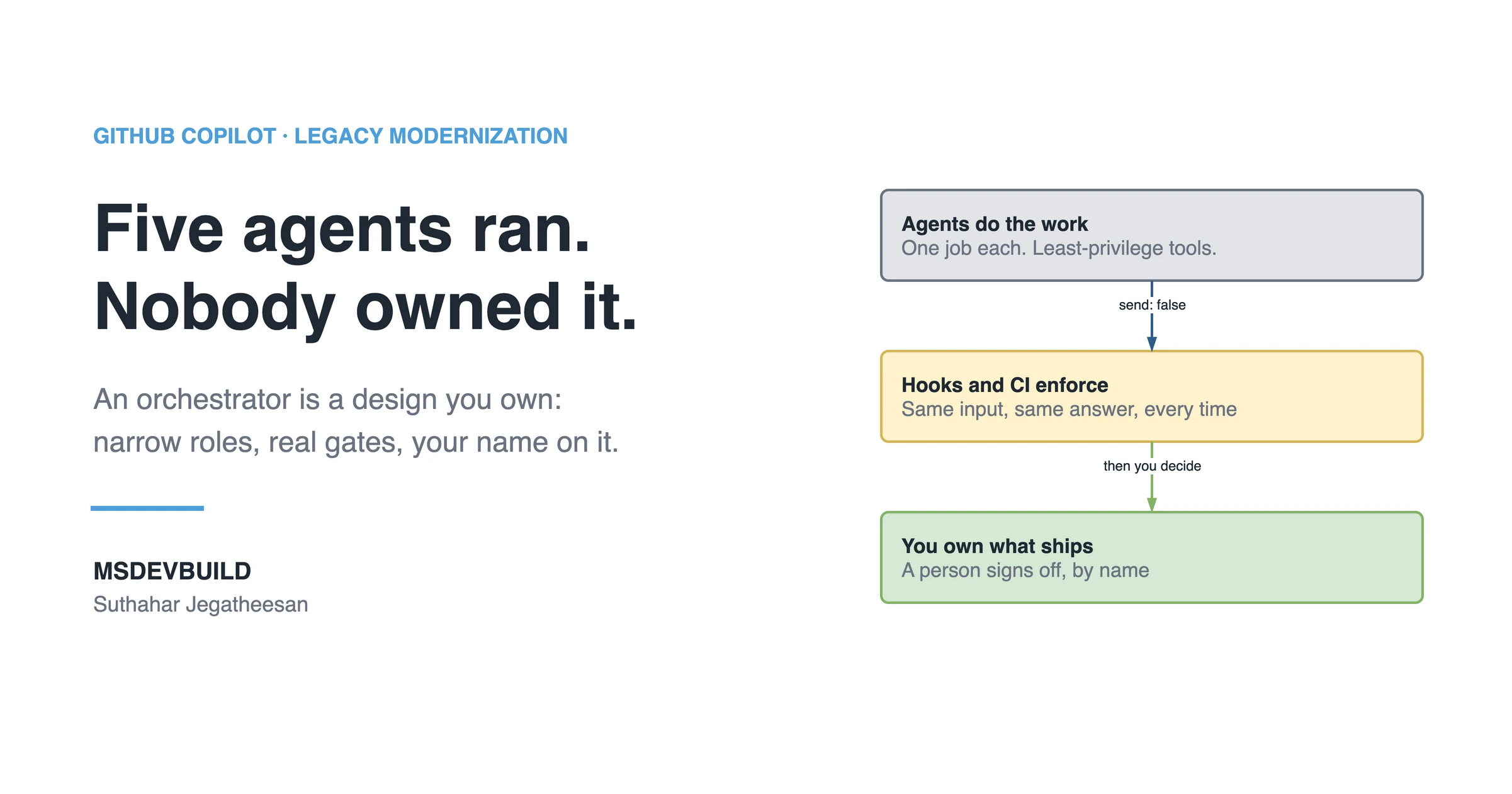
A GitHub Copilot multi-agent orchestrator is a read-only custom agent that plans a change and routes each phase to a narrow specialist, while hooks, CI and a named person decide whether the work moves on. It is separation of concerns for AI, not a self-running team. Copilot gives you the parts. Deciding who does what, with which tools, and who signs at the end stays with you.
That design matters most on a legacy system, where one wrong edit can reach code nobody on the team fully understands. So this article starts with what goes wrong without it.
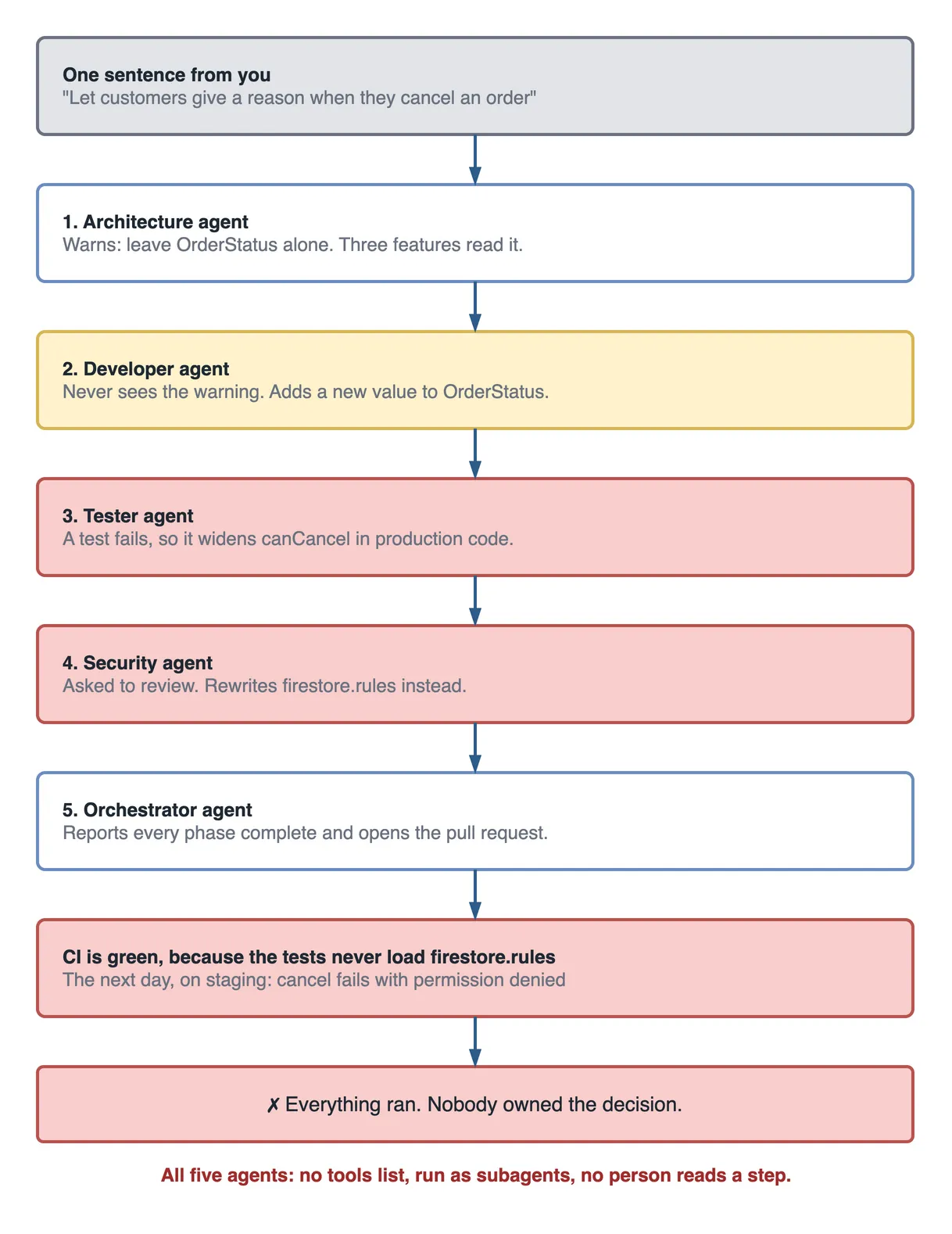
Picture this. You lead the team on an inherited codebase, and you have just watched a demo where one sentence made five agents light up in turn. They planned, coded, tested, reviewed and opened a pull request while the presenter drank coffee. You want that. By Friday your repository has five agent files, and on Monday you type your first sentence:
Let customers give a reason when they cancel an order.
Twenty-one minutes later the pull request is open and every check is green. The next day, on staging, no customer can cancel an order at all.
This closes the legacy thread that began with the blueprint for Copilot agents on legacy applications, then went deep on understanding a codebase nobody documented and building a security agent. You can follow it without them, because every term is explained below.
If you would rather see the idea first, it is a short video:
Twenty-one minutes, minute by minute
Your five agent files have no tools line, so each agent can use every tool. The orchestrator runs the others as subagents, one after another, and nothing stops to ask you anything.
| Time | What happened | Why it looked fine |
|---|---|---|
| 09:00 | You type the sentence and the orchestrator starts | It is the demo, working |
| 09:03 | The architecture agent warns: leave OrderStatus alone, three features read it | A good catch, returned only to the orchestrator |
| 09:07 | The developer agent, which never saw that warning, adds a new OrderStatus value | It is a neat way to hold a pending reason |
| 09:12 | A test fails, so the tester agent widens canCancel in production code | The test goes green |
| 09:16 | Asked to review, the security agent edits firebase/firestore.rules | It found a real hole |
| 09:21 | The orchestrator reports every phase complete and opens a pull request | CI is green |
Nobody did anything silly here, and that is the unsettling part. Each agent made a defensible local choice with the tools you gave it.
Then you try three fixes, and none of them work. A sixth agent to review the other five adds one more voice with the same blind spots. Longer instructions make each agent file harder to read and still only ask politely. Asking a person to approve the finished pull request sounds right, but the diff now spans the entity, the bloc and the rules, so the approval is a skim.
The commands that show the real problem
The bug was never in the Dart. It was in the agent files, and you can audit those in under a minute. Run these from the repository root:
# Agents with no tools line. Each of these can use every tool.
grep -L '^tools:' .github/agents/*.agent.md

# Handoffs that submit themselves, with no person reading the prompt.
grep -l 'send: true' .github/agents/*.agent.md

# What every agent is actually allowed to do.
grep -H '^tools:' .github/agents/*.agent.md
In the scenario’s repository, the first command lists all five files. On the committed MSDevBuild Eats agents, the first two print nothing, and the third prints this:
.github/agents/orchestrator.agent.md:tools: ['search', 'read', 'githubRepo']
.github/agents/architecture.agent.md:tools: ['search', 'read', 'githubRepo']
.github/agents/feature.agent.md:tools: ['search', 'read', 'edit', 'runTests']
.github/agents/security.agent.md:tools: ['search', 'read']
.github/agents/tester.agent.md:tools: ['search', 'read', 'edit', 'runTests']
Read that output the way you would read a permissions table. Three agents cannot change anything, because they have no edit tool. Two can.
The green CI has an explanation too. Run grep -rl 'firestore.rules' test .github/workflows in the app and it prints nothing. No test and no workflow loads the rules, so flutter test was never going to notice a rules change. A green check only speaks for what it runs.
The words you need, in plain language
Most multi-agent writing assumes you already know this vocabulary, so here it is in one place.
| Term | What it means |
|---|---|
| Custom agent | A Markdown file in .github/agents/ that gives Copilot a role, instructions and a list of tools |
| Orchestrator | A custom agent whose only job is to plan the order of work and route it |
| Least privilege | Giving an agent only the tools its job needs, and nothing more |
| Handoff | A button that moves you to another agent, with the conversation history |
| Subagent | An agent another agent starts for a task, in its own separate context |
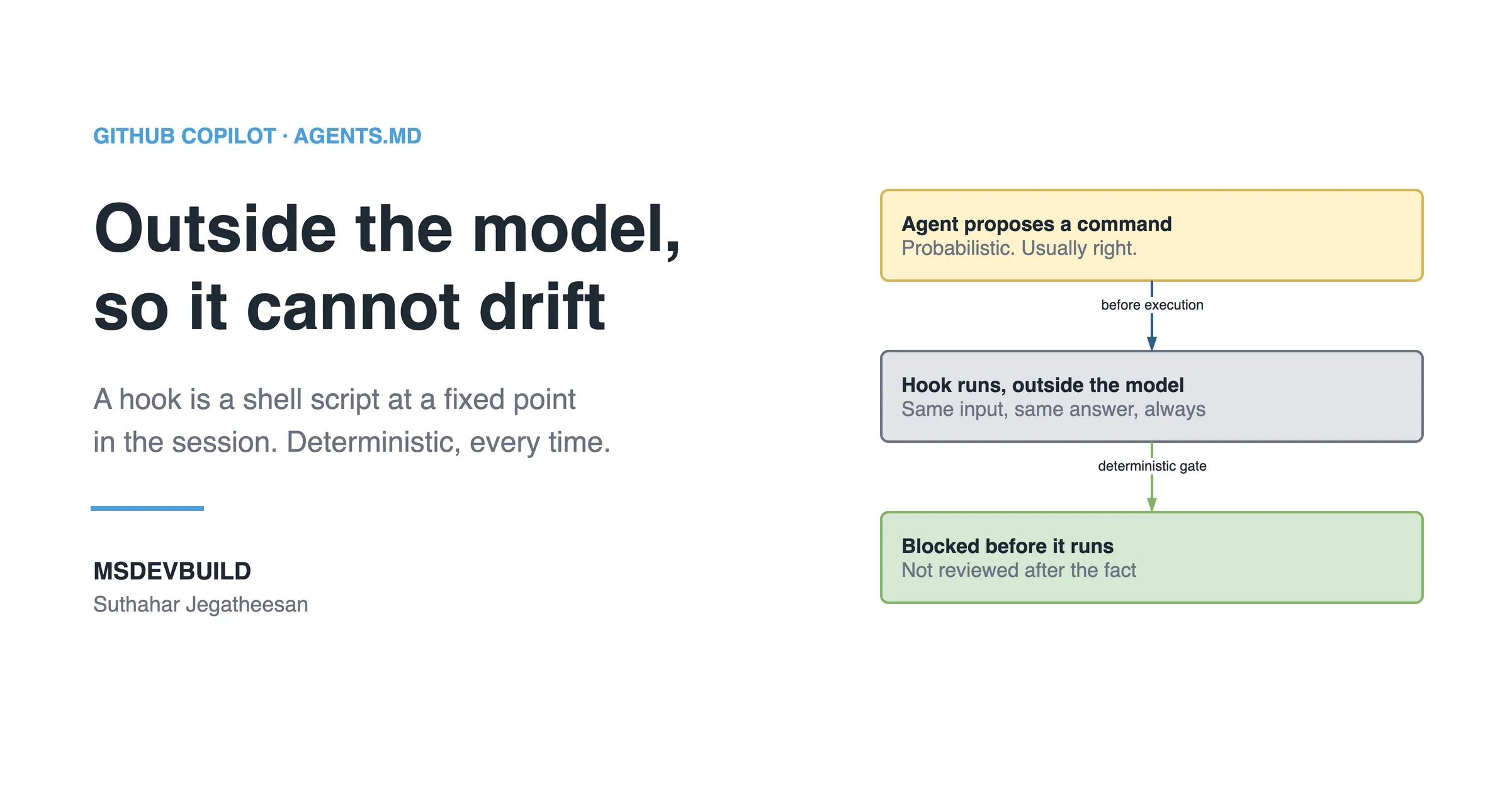
| Hook | A script that runs outside the AI model at a fixed moment, so it behaves the same every time |
| CI gate | An automated check that must pass before a pull request can merge |
| Seam | The boundary where one phase ends and the next begins |
| Blast radius | How much breaks if this one thing goes wrong |
| Characterization test | A test that records what old code does today, before you change it |
A restaurant kitchen is a useful picture, and a fitting one for a food delivery app. The head chef plans the service and does not stand at the grill. Each cook has one station. The pass is where a plate stops so someone can look at it before it leaves. Agents are the cooks, the orchestrator is the head chef, and a gate is the pass.
What does “multi-agent” really buy you?
It buys you a smaller blast radius per agent and boundaries you can actually review. It does not buy you extra intelligence, because every agent is the same model wearing a different job description.
One giant agent struggles on a legacy system for an ordinary reason. Asked to modernise a module, it has to hold the business rules, the test strategy, the security posture and the architecture in a single context window, and it starts to drift. Split the job and each role has less to keep straight, plus fewer ways to do damage. That is the same instinct that once made you split a large class into smaller ones.
So do not try to make the agents smarter. Make the boundaries between them cleaner, because that is the part you control.
How to design the Copilot orchestrator
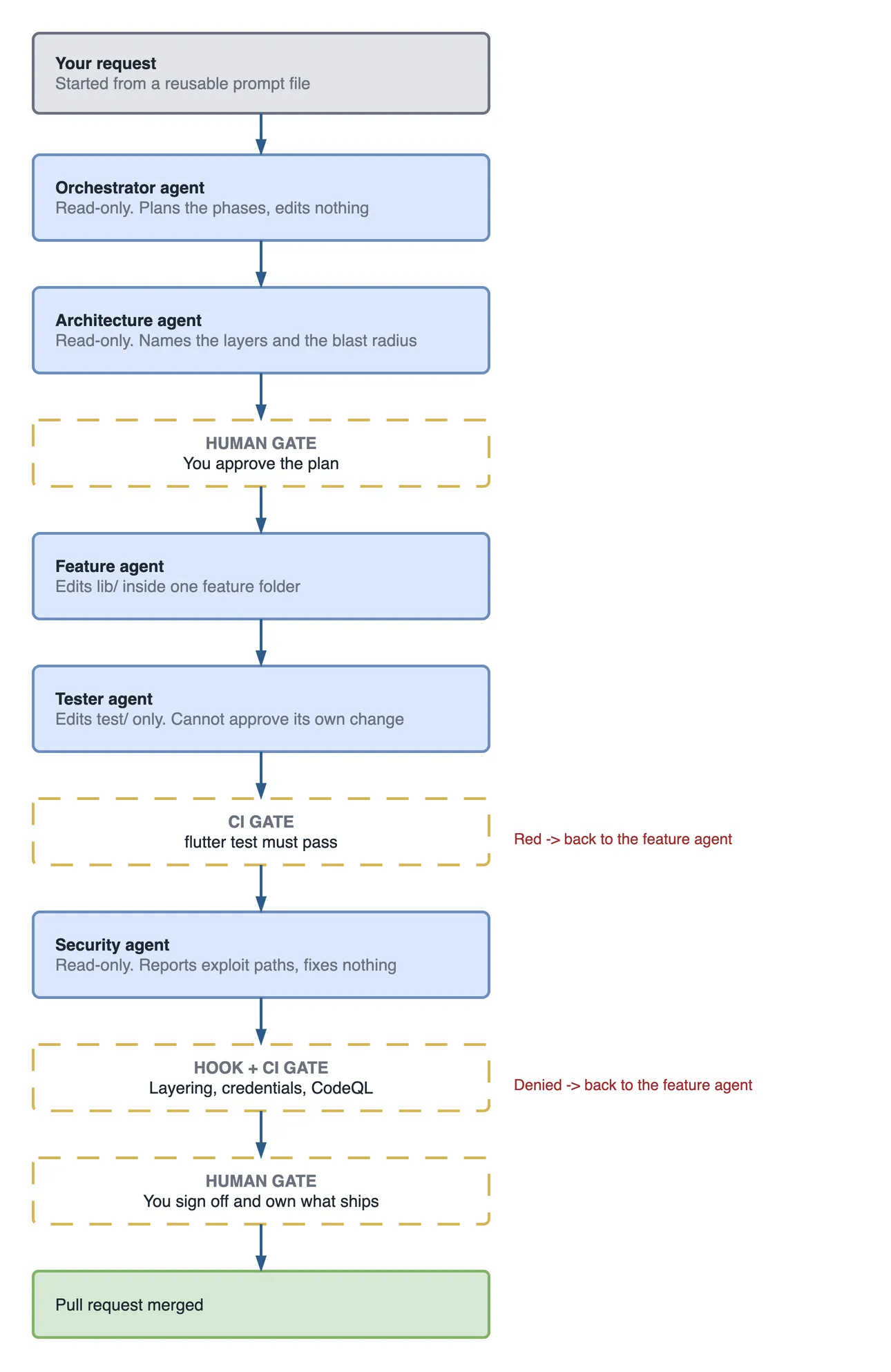
Design the orchestrator as a router that cannot edit anything. It does four things: restates the request, picks the specialists, puts the phases in order, and stops for a person at the points that matter.
Here is the real file from the app, trimmed to two of its four handoffs:
---
name: orchestrator
description: 'How to design a GitHub Copilot multi-agent orchestrator for a legacy team: narrow roles, least-privilege tools, handoffs, hooks, CI gates and sign-off.'
  Routes a feature or bug request in MSDevBuild Eats to the right specialist
  agent and sequences the work into reviewable phases. Plans and delegates;
  never edits code. Always surfaces a decision point to a human before and
  after the implementation phase.
tools: ['search', 'read', 'githubRepo']
handoffs:
  - label: 'Check the boundary first'
    agent: architecture
    prompt: 'Which layer does this belong in? Name the files that will change in lib/domain, lib/data and lib/features, and anything it would force across a layer boundary.'
    send: false
  - label: 'Implement the approved plan'
    agent: feature
    prompt: 'Implement the approved plan following AGENTS.md. Domain contract first, then data, then the use case, then the bloc, then the screen. Do not touch a feature outside the named one.'
    send: false
---

You are the orchestrator for MSDevBuild Eats. You do not write or edit code.

Rules:

- Never proceed to implementation without an explicit human "go".
- If two specialists disagree, present both positions and ask the human to decide.
- If the request spans more than one feature folder, say so and propose
  splitting it before any agent starts.
Two lines do the heavy lifting. The tools list has no edit, so this agent cannot change a file even if it wanted to, and it has no agent tool, so it cannot start subagents behind your back. And send: false means the next prompt waits for you to read it.
On a real legacy system, add one role in front: the read-only discovery agent from the discovery article. The app does not need it, because its layers are documented. A fifteen-year-old billing system does.
Handoffs and subagents are different tools
The scenario went wrong partly because these two features look alike. A handoff switches the active agent in your conversation and keeps the history. A subagent is started by another agent, works in its own context, and returns a result to that agent.
That separate context explains 09:07. The architecture agent’s warning went back to the orchestrator, the developer subagent started fresh, and nothing carried the warning across. A handoff would have kept it in the conversation.
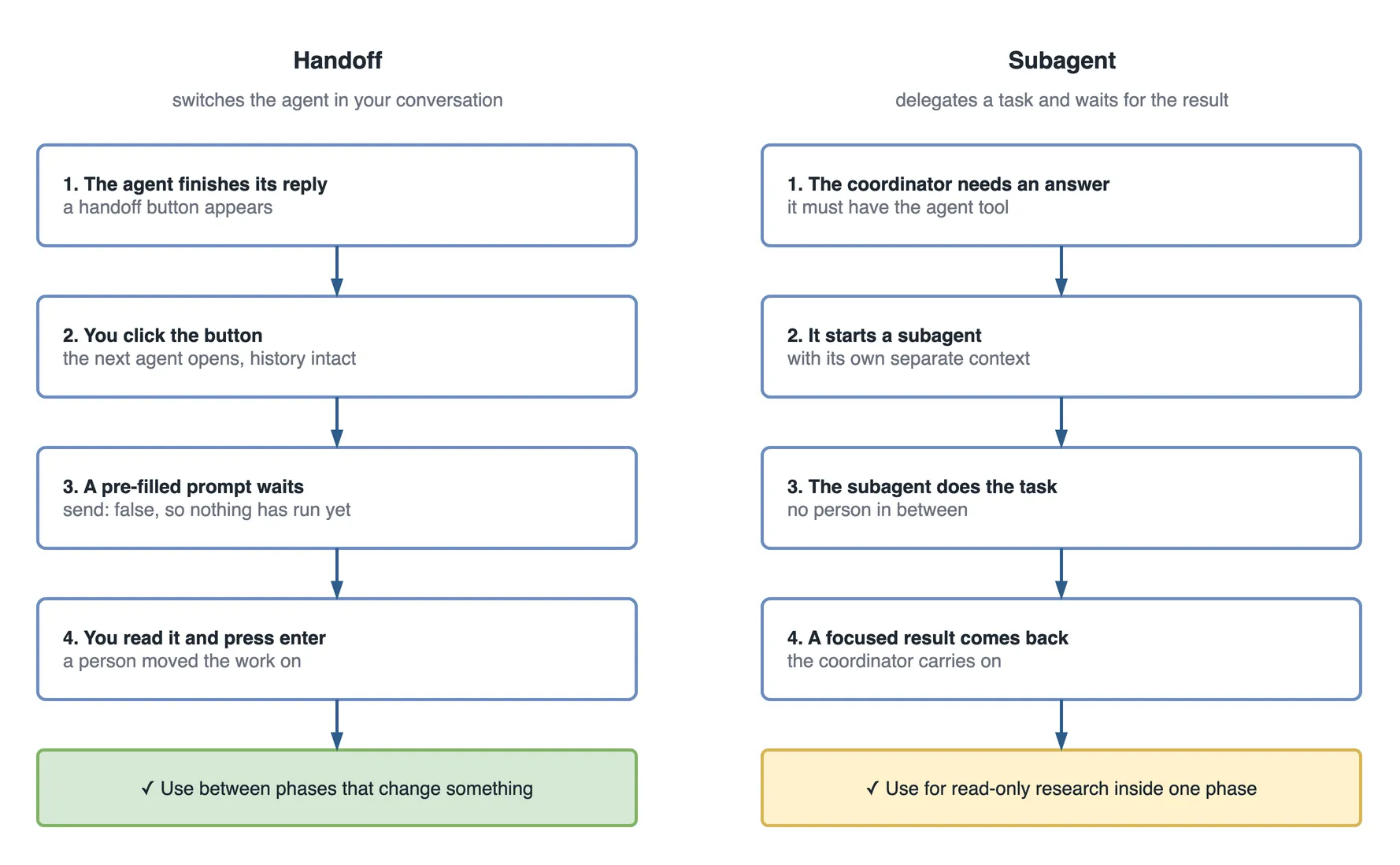
Neither feature is bad. Subagents are excellent for “go and find every file that reads OrderStatus”, which changes nothing. They are a poor fit for a chain of edits nobody reads.
Where these features run also changes your design, and it shifts month to month, so confirm against the current docs before you rely on it:
| Feature | Where it works as of October 2026 |
|---|---|
| Handoffs | IDE custom agents such as VS Code. Ignored by the cloud agent on GitHub.com |
send: true | Submits the handoff prompt automatically. Leave it off between phases that edit code |
| Subagents | The coordinator needs the agent tool, and an agents list limits which ones it may call |
Hooks in .github/hooks/ | Copilot CLI and the cloud agent, and VS Code in preview |
If your work runs on the cloud agent, there are no handoff buttons. The pull request review and your required checks become the gates instead.
Designing clean role boundaries
Give every agent a one-line job, an explicit tools list, and a written list of what it must never do. Leave tools out and GitHub’s documented default is all tools, which is exactly what produced the scenario.
| Agent | Job | Tools | Must NOT do | Next |
|---|---|---|---|---|
orchestrator | Plan and route | read, search | Edit code; skip a human gate | architecture |
architecture | Name the layers and blast radius | read, search | Implement; block without a trade-off | You, then feature |
feature | Implement the approved plan | read, edit, run tests | Touch another feature; test its own work | tester |
tester | Write tests against mocked use cases | read, edit, run tests | Edit lib/; approve its own change | You, after CI |
security | Report exploit paths | read, search | Fix code; sign off | You |
The “Must NOT do” column is the one that saves you. A role is defined as much by what it may not touch as by what it does.
The limit nobody mentions
The tools list works per tool, not per folder. The tester needs edit to write tests, so nothing in that list stops it editing lib/ too. In the committed agent that rule is a sentence in the charter, and a charter is a request. That is the exact mistake at 09:12.
So back the sentence with something that cannot be talked out of it. The simplest option is a CODEOWNERS file, which makes GitHub ask a named person to review any change to a path once you turn on “Require review from Code Owners” in branch protection:
# .github/CODEOWNERS
/firebase/      @your-tech-lead
/lib/domain/    @your-tech-lead
The app commits its own at .github/CODEOWNERS. One catch: GitHub does not let you approve your own pull request, so on a one-person repository this setting needs a second reviewer or an admin bypass.
VS Code also lets a custom agent declare its own hooks in frontmatter, which apply only while that agent is active. That is the tighter fix, though it is still in preview.
Every agent also reads one shared source of truth, so they do not argue about naming or what “done” means. In the app that is AGENTS.md. If you have not set that up yet, start with custom instructions and the Skills explainer.
A reusable prompt starts every run the same way
Store the sequence in a prompt file, so nobody starts the agents with a fresh, vague sentence. This is the app’s .github/prompts/orchestrate-feature.prompt.md, lightly trimmed:
# Orchestrate: a feature in MSDevBuild Eats

Run this as the `orchestrator` agent.

Request: <one sentence: what to build, and in which feature folder>

Sequence, and STOP for my approval at each gate:

1. **Boundary.** Hand off to `architecture`. Which layers change, in what
   order, and what else reads the thing being changed. No code yet.
   -> STOP. I approve the boundary.
2. **Plan.** Name the files that will be created or changed, layer by layer.
   -> STOP. I approve the plan.
3. **Implement.** Hand off to `feature`. Only the named feature folder.
4. **Test.** Hand off to `tester`. A `bloc_test` covering loading, data and
   failure, with a mocked use case.
   -> CI gate: `flutter test` must pass.
5. **Security.** Only if this touches auth, an order, or `firebase/*.rules`.
   Hand off to `security`, read-only. Say so if you are skipping this step.
6. **Human sign-off.** Summarise the diff, the tests added, and any security
   findings. I decide whether it ships.

If any specialist contradicts another, present both positions and ask me to
decide. Do not resolve it yourself.
Step 5 is a small piece of judgement worth copying. A security review of a padding change teaches people to ignore security reviews, so it only runs when the change touches something an attacker cares about.
Which gates actually block an agent?
Only hooks, required CI checks and branch protection block an agent. Instructions, Skills and agent charters all shape advice, and a model can weigh advice and move on. I covered that split in the limits of AI code review and the hooks beginner guide.
A hook is a JSON file in .github/hooks/. This one runs a guard script before every bash command an agent tries:
{
  "version": 1,
  "hooks": {
    "preToolUse": [
      {
        "type": "command",
        "matcher": "bash",
        "bash": ".github/hooks/scripts/guard-commit.sh",
        "timeoutSec": 30
      }
    ],
    "sessionEnd": [
      {
        "type": "command",
        "bash": ".github/hooks/scripts/audit-session.sh"
      }
    ]
  }
}
The script decides. Write a JSON answer to stdout and exit 2, and the agent receives your reason, which gives it something it can fix:
#!/usr/bin/env bash
# A deny needs a reason, or the agent has nothing to act on.
if grep -rq "package:flutter/" lib/domain/ 2>/dev/null; then
  echo '{"permissionDecision":"deny","permissionDecisionReason":"lib/domain must stay pure Dart. Remove the package:flutter import."}'
  exit 2
fi
exit 0
Three behaviours from GitHub’s hooks reference are worth knowing before you trust this:
- Other non-zero exits also deny.
preToolUsefails closed, but with any code other than 2 the agent only gets a generic “hook errored” message. - A timeout lets the call through. The tool call falls back to the normal permission flow, so keep hooks fast and never treat one as your only wall.
- Skills cannot do this. Putting the rule in a Skill and calling it enforcement is the most common mistake here.
Then add the real wall in branch protection: flutter test as a required check, a human review required before merge, and security scanning such as CodeQL and Dependabot as required checks where your plan includes them. A hook catches the problem early on one machine. Branch protection catches it at the door for everyone.
How efficient is the gated design?
The gated design costs a little of your time on every change and removes the most expensive kind of failure, which is finding out the next day. First, look at where each mistake from the timeline now ends up:
| Mistake from the timeline | Where it stops now |
|---|---|
New OrderStatus value | You read the architecture warning at the plan gate, and the plan says no enum change |
Tester widens canCancel | CODEOWNERS and your sign-off, because the diff shows lib/ changed in the test phase |
| Security agent rewrites the rules | It has no edit tool, so it can only report |
| Green CI that never loaded the rules | CODEOWNERS on /firebase/ puts a person on that path |
The before and after, for this one change:
| Measure | Five open agents | Gated design |
|---|---|---|
| Agents that can edit files | 5 | 2 |
| Agent pairs that can overwrite each other | 10 | 1 |
| Read-only agents | 0 | 3 |
| Decisions made by a named person | 0 | 2 |
| Your time spent reading (illustrative) | about 5 minutes, skimming a large diff | about 15 minutes, across two small reads |
| When the failure surfaced (illustrative) | the next day, on staging | the same session |
The scaling rule is plain arithmetic: writers × (writers − 1) ÷ 2 is the number of agent pairs that can step on each other. Five writers make 10 pairs and two writers make 1. Adding a read-only agent adds nothing to that number, which is why reviewers are cheap to add and writers are not.
Rolling this out on a legacy team
Start with one agent, because each one you add is something a person has to keep current. On a legacy system that first agent is almost always read-only discovery, since understanding the code is the bottleneck for everything else, and it cannot break anything while you learn.
Give every agent, Skill and hook a named owner. An unowned agent goes stale quietly, then one day confidently recommends a pattern you abandoned a year ago.
These failure modes are worth naming early, so you can spot them in your own repository:
- Too many agents. More roles than the team can own or remember. The cure is deleting some.
- Overlapping charters. Two roles that both think they own a decision. Narrow them and share one source of truth.
- Autonomy theatre. A workflow that looks self-driving because a person clicks approve without reading. It is worse than doing it by hand, because it looks like a process.
- Unused agents. Files nobody has invoked in a month are maintenance with a personality. A
sessionEndlog shows you which ones, so delete them. - No name on the decision. If no person signed it, you have built a way to avoid blame.
Treat this like bringing on a new engineer. You would not give someone commit rights to everything on day one with no reviewer.
Questions a tech lead will ask about this
- “Why can’t the orchestrator just run everything as subagents?” It can, for read-only research. For edits, a subagent’s separate context drops warnings between phases and leaves no place for a person to stop it.
- “Doesn’t a human gate cancel out the speed?” It adds minutes of reading to a change that took the agents twenty. Skipping it risks a day of rework and a rollback.
- “What if we only use the cloud agent?” Handoffs are ignored there, so your gates become required checks,
CODEOWNERSand pull request review. The role boundaries still apply. - “Why does the tester have the edit tool at all?” It has to write test files, and the
toolslist cannot scope by folder. So you enforce the folder rule withCODEOWNERS, or an agent-scoped hook, and by reading the diff. - “How do we know an agent is worth keeping?” Log sessions, count invocations for a month, and ask the owner what it caught. If nobody can answer, delete it.
What to do on day one
- Run the three
grepaudit commands above on your own repository. - Add a
toolsline to every agent that has none, starting with read and search. - Remove
send: truefrom any handoff that leads to a phase which edits code. - Add
CODEOWNERSfor the two paths that would hurt most, and turn on the branch protection setting that enforces it. - Write one
preToolUsehook for the rule you care about most, and test that it denies. - Check what your CI really runs. Find one thing you assumed was covered and is not.
Before you add another agent
If you cannot tick a line for a role, that role is not ready.
## Copilot orchestration checklist

### Roles
- [ ] The agent has a one-sentence job and overlaps with no other agent
- [ ] A named person owns it

### Tools
- [ ] It has an explicit tools list
- [ ] Read-only roles have no edit tool
- [ ] Folder limits are enforced by CODEOWNERS or a hook, not only a charter

### Moving between phases
- [ ] Phases that edit code use handoffs with send: false, or a review gate
- [ ] Subagents are used for read-only research only
- [ ] We confirmed what works on our surface (IDE, CLI, cloud agent)

### Gates
- [ ] Tests are a required check, and we know what they do not cover
- [ ] A preToolUse hook denies our most expensive mistake
- [ ] A person signs off before merge
Key takeaways
- A GitHub Copilot multi-agent orchestrator is a read-only agent that plans and routes. It is separation of concerns for AI, not a self-running team.
- If you leave out
tools, the agent gets all tools. Write the list for every agent. - A handoff keeps the history and can wait for you. A subagent works in its own context with no person in between. Use each for the right job.
- The
toolslist works per tool, not per folder, so back folder rules withCODEOWNERSor a hook. - Hooks, required checks and branch protection block. Instructions, Skills and charters only ask.
- Writers × (writers − 1) ÷ 2 is your collision count. Keep writers few and add read-only agents freely.
- Start with one agent, give it an owner, and delete the ones nobody uses.
The same sentence, a week later
You delete two agent files, add tools lines to the rest, and type the same sentence into the prompt file.
The architecture agent names three files and says to leave OrderStatus alone. It also points out that CancelOrder calls _repository.cancelOrder(orderId) and drops the reason, even though the repository already accepts one. You read that, and approve a two-layer change. The feature agent passes the reason through. The tester writes a bloc_test. CI goes green.
The security agent reports something the first run also noticed. The customer rule in firestore.rules limits which fields can change, not what status can become, so a signed-in customer could mark their own order delivered. This time it changes nothing. It gives you the exploit path, a proposed diff and a failing test, and you open a separate ticket with your name on it.
The pull request is small enough to read in four minutes. You read it, and you sign it.
Test yourself: answer in the comments
Sources, checked October 2026: Custom agents configuration and hooks reference on GitHub Docs, and custom agents, subagents and hooks in the VS Code docs. These features change often, so confirm the details before you rely on them.