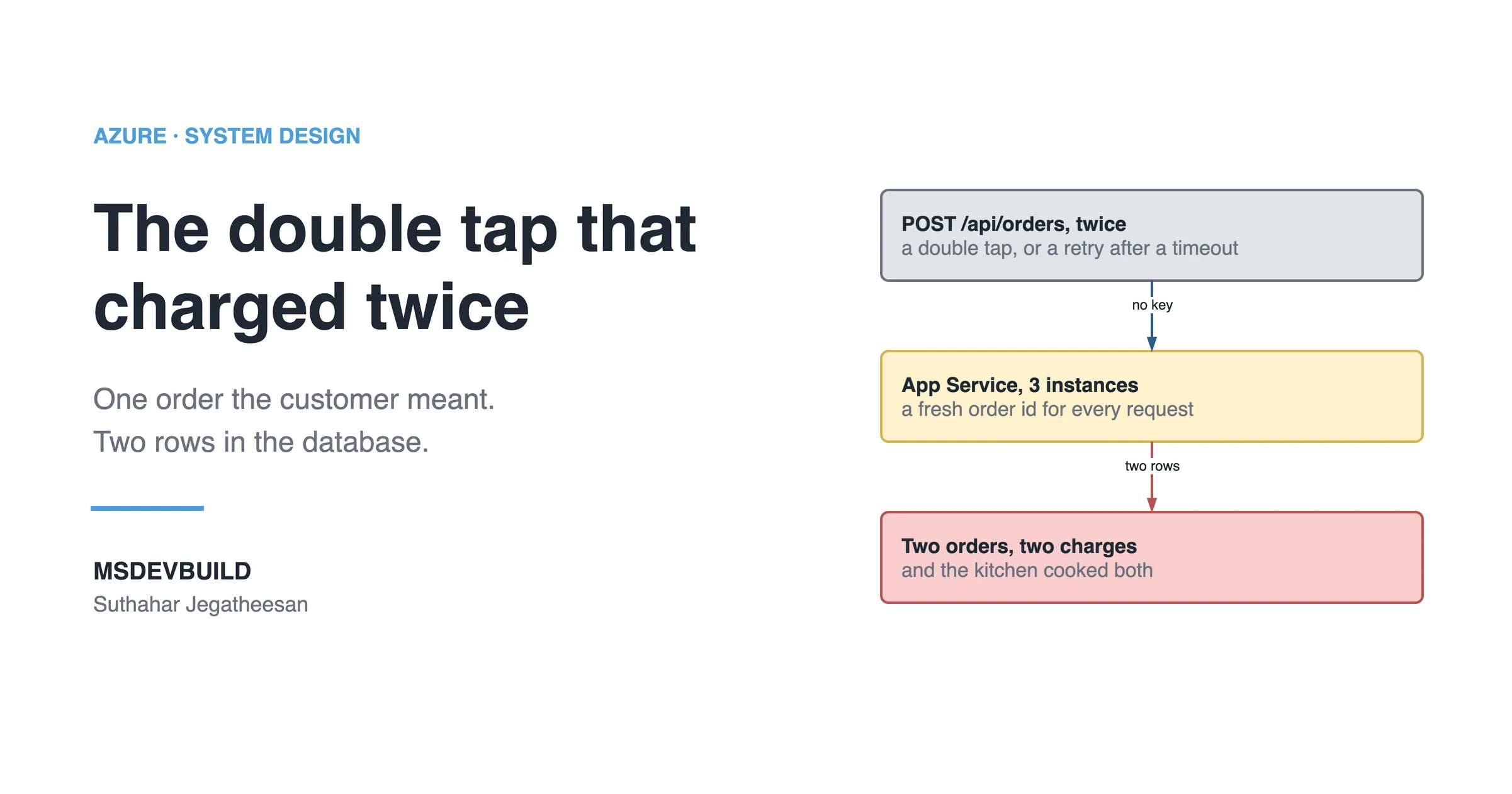
One tap on “Place order” should create one order. When a double tap or a retry after a timeout creates two, the fix isn’t a smarter button. It’s an idempotency key from the app and a unique index in Azure SQL, and this is the Friday night that proves it.
It’s 20:10 on a Friday, the dinner rush, and you’re the engineer on call for a food delivery app. The support inbox has a new kind of ticket.
“I ordered one biryani. I was charged ₹410 three times.”
Ten minutes later a restaurant partner calls. Two identical orders from the same customer, 180 milliseconds apart. The kitchen cooked both, the rider delivered both, and the customer refused the second bag at the door.
Nothing is down. Error rates are normal. The payment gateway is slow tonight, but it’s working. Every order in the database is a valid order. There are just too many of them.
Ninety minutes, and two fixes that didn’t hold
| Time | What happened |
|---|---|
| 19:30 | Dinner rush. The payment gateway’s p95 climbs from 1.2 seconds to 11 |
| 19:42 | First ticket: “charged twice for one order” |
| 19:58 | A restaurant partner calls about identical orders, both already cooked |
| 20:05 | Hotfix 1 on web: a two-second debounce on the button. Duplicates keep coming |
| 20:25 | Hotfix 2 in the API: reject an order if the same user placed the same total in the last 60 seconds |
| 20:40 | Duplicates slow down but don’t stop. A customer ordering a second meal for a flatmate is now blocked |
| 20:52 | One SQL query splits the duplicates into two groups, and the cause is obvious |
| 21:05 | Hotfix 2 rolled back. Refunds start |
Both hotfixes were guesses about one cause. There were two.
The debounce only helps a customer who taps twice in two seconds. That’s all it does. Hotfix 2 looks sensible and fails in two ways. Two requests 180 ms apart both run the “any recent order?” check before either one inserts. Both see nothing. Both insert. And it can’t tell a duplicate from a real second order, so it blocks paying customers.
The SQL query that split the duplicates in two
At 20:52 somebody stops guessing and asks the database how far apart the duplicate orders are. LAG puts each order next to the previous one with the same user, restaurant and total:
WITH o AS (
    SELECT Id, UserId, PlacedAt,
           LAG(PlacedAt) OVER (PARTITION BY UserId, RestaurantId, Total
                               ORDER BY PlacedAt) AS PrevPlacedAt
    FROM dbo.Orders
    WHERE PlacedAt >= '2026-09-25T14:00:00'   -- 19:30 IST, stored in UTC
)
SELECT b.gap,
       COUNT(*)                                          AS duplicates,
       MIN(DATEDIFF(millisecond, o.PrevPlacedAt, o.PlacedAt)) AS min_ms,
       MAX(DATEDIFF(millisecond, o.PrevPlacedAt, o.PlacedAt)) AS max_ms
FROM o
CROSS APPLY (SELECT CASE WHEN DATEDIFF(millisecond, o.PrevPlacedAt, o.PlacedAt) < 1000
                         THEN 'under 1 second'
                         ELSE '1 to 60 seconds' END) AS b(gap)
WHERE o.PrevPlacedAt IS NOT NULL
  AND DATEDIFF(second, o.PrevPlacedAt, o.PlacedAt) < 60
GROUP BY b.gap;
Two rows come back, and nothing in between:
| gap | duplicates | min_ms | max_ms |
|---|---|---|---|
| under 1 second | 131 | 38 | 610 |
| 1 to 60 seconds | 92 | 10,140 | 14,900 |
The first group is double taps. Under a second apart, mostly Flutter web with a mouse, some Android. The second group starts at 10.1 seconds, and 10 seconds is the app’s request timeout. Those are customers who saw “Something went wrong on our side. Please try again.” and did exactly what it said.
One more query, in Application Insights, confirms the second group. It counts orders the server finished after the app had already given up:
requests
| where timestamp between (datetime(2026-09-25 14:00) .. datetime(2026-09-25 15:30))
| where name == "POST /api/orders" and resultCode == "201"
| summarize created = count(), afterAppGaveUp = countif(duration > 10s),
            p95 = percentile(duration, 95) by bin(timestamp, 10m)
Ninety-two. The same number.
Every one of those afterAppGaveUp orders succeeded. The app told the customer it had failed, the customer tapped again, and the retry succeeded too.
The real problem: a retry looked exactly like a new order
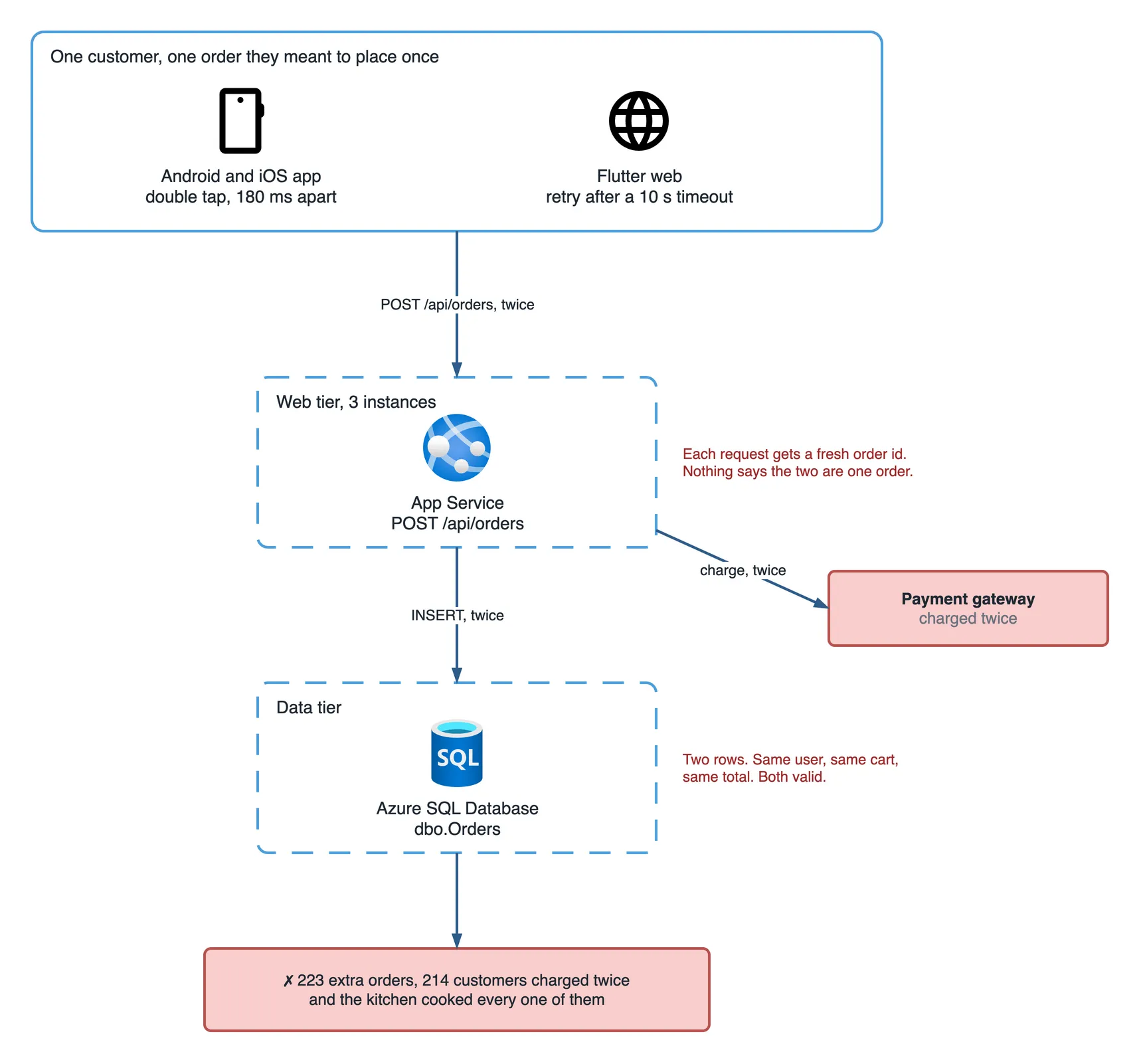
The server couldn’t tell “the same order again” from “another order”. Both requests carried the same cart, the same address and the same user. Neither carried anything that said I am the same attempt.
In the reference app, OrderRepositoryImpl.placeOrder asks the data source for a new order ID on every call. Two calls, two IDs, two orders, by design. And in CheckoutBloc, the submit handler is registered with no transformer:
on<CheckoutSubmitted>(_onSubmitted);flutter_bloc runs events concurrently by default. The button does disable itself while an order is being placed, through canPlaceOrder, but only once the new state has rendered. Two clicks inside that gap both reach _onSubmitted, and both call the API.
So there were three holes lined up:
- The app sent a second request for a double tap, and again for every retry after a timeout.
- Nothing in the request said “same attempt”, so the API had no way to know.
- The database accepted both, because two identical orders are, as far as a table knows, two orders.
Any one of them on its own would have been harmless. All three together, on a slow evening, put the same biryani in two bags.
The slow payment gateway didn’t cause any of this. It only made the timeouts common enough to notice.
The same problem every checkout has
Any system that moves money over a network meets this on day one. A request can fail after the server did the work, and the client can’t tell the difference.
Payment providers solved it first. Stripe, for example, accepts an Idempotency-Key header on every POST, and the IETF has a draft standard for exactly that header. Banks put a unique reference on every transfer for the same reason. When Flipkart or Amazon show “your order is being placed, don’t refresh”, the page is only being polite; the server already refuses to place it twice.
The pattern has a name, and we’ll build it end to end below. If you’d rather watch it first, there’s a one-minute short:
What’s an idempotency key?
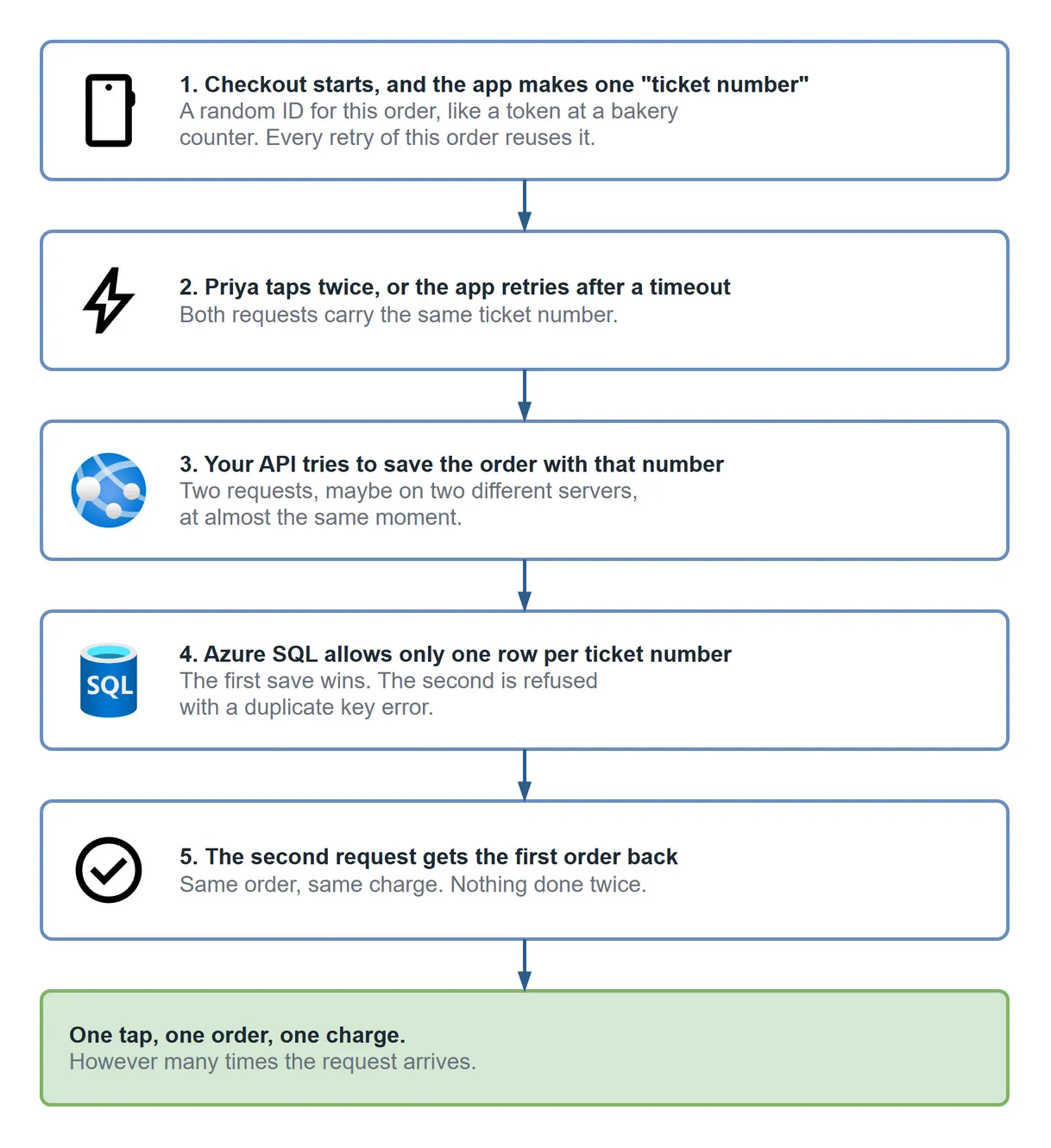
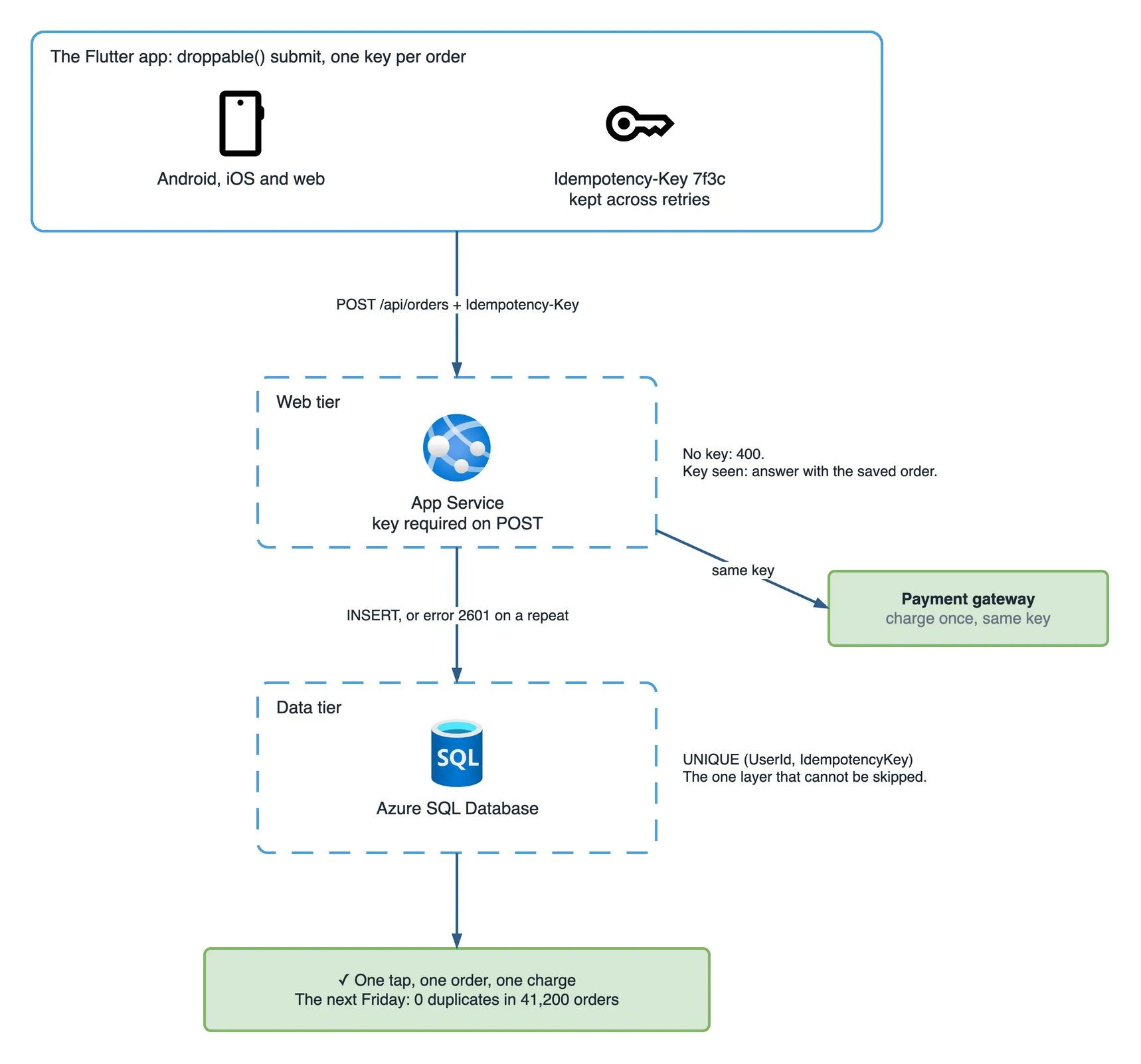
An idempotency key is a unique value, usually a UUID, that the client creates once per operation and sends with every attempt at that operation. The server remembers the key with the result of the first attempt. A second request with the same key gets the first result back, and no new work is done.
“Idempotent” means doing it twice has the same effect as doing it once. GET, PUT and DELETE are idempotent by design: reading twice, setting the same value twice, or deleting twice all leave the system in the same state. POST is not. Two POST /api/orders requests create two orders unless you give the server a way to see they’re one.
Three rules make the key work:
- The client creates it, before the first attempt. The server can’t make one, because the server is the side that can’t tell two requests apart.
- Every retry reuses it. A double tap, a timeout, a network error: same order, same key.
- Only a final answer retires it. A new key only after the order succeeds, or after the server clearly rejects it, like a declined card.
Is disabling the button enough?
No. The button can only stop a second tap on the same screen, and the Friday data shows that was barely more than half of the problem. Everything else reaches the server regardless:
- a retry after a timeout, where the first request actually succeeded
- a second browser tab, or the same account on two phones
- an older version of the app that never had the fix
- a proxy, a load balancer or an HTTP library that resends a request after a dropped connection (and checkout is never cached at the edge, as the CDN half of the flash sale explains, so every one of those reaches the API)
- a user who refreshes the confirmation page, and the browser offers to resubmit
The button never sees any of those five.
The client-side fixes are still worth making. They’re the cheap first layer. The server just can’t rely on them.
The fix in the app: droppable() and one key per order
Two changes in CheckoutBloc. First, drop a submit that arrives while one is already running. bloc_concurrency is already a dependency of the app, and droppable() ignores new events until the current handler finishes:
on<CheckoutSubmitted>(_onSubmitted, transformer: droppable());That closes the double tap, which is the 131 group. Second, give each order a key that survives retries. It’s created when checkout starts, stored in CheckoutState, and sent with every attempt:
// In _onStarted: one key for the order this checkout is about to place.
emit(state.copyWith(orderKey: const Uuid().v4()));

// In _onSubmitted:
final Result<Order> result = await _placeOrder(
  PlaceOrderParams(
    cart: event.cart,
    address: address,
    paymentMethod: state.paymentMethod,
    user: user,
    riderNote: state.riderNote.isEmpty ? null : state.riderNote,
    idempotencyKey: state.orderKey,   // the same key on every retry
  ),
);

result.fold(
  (Failure failure) => emit(
    state.copyWith(
      status: CheckoutStatus.ready,
      errorMessage: failure.message,
      // A timeout is not an answer: the order may already exist, so the next
      // tap must be the same order. Only a rejection earns a fresh key.
      orderKey: failure is ValidationFailure ? const Uuid().v4() : null,
    ),
  ),
  (Order order) => emit(
    state.copyWith(status: CheckoutStatus.placed, placedOrder: order),
  ),
);
The API client sends it as a header, Idempotency-Key: 7f3c9a2e-.... The uuid package is already in pubspec.yaml, so there’s nothing new to install.
The fix in Azure SQL: a unique index decides
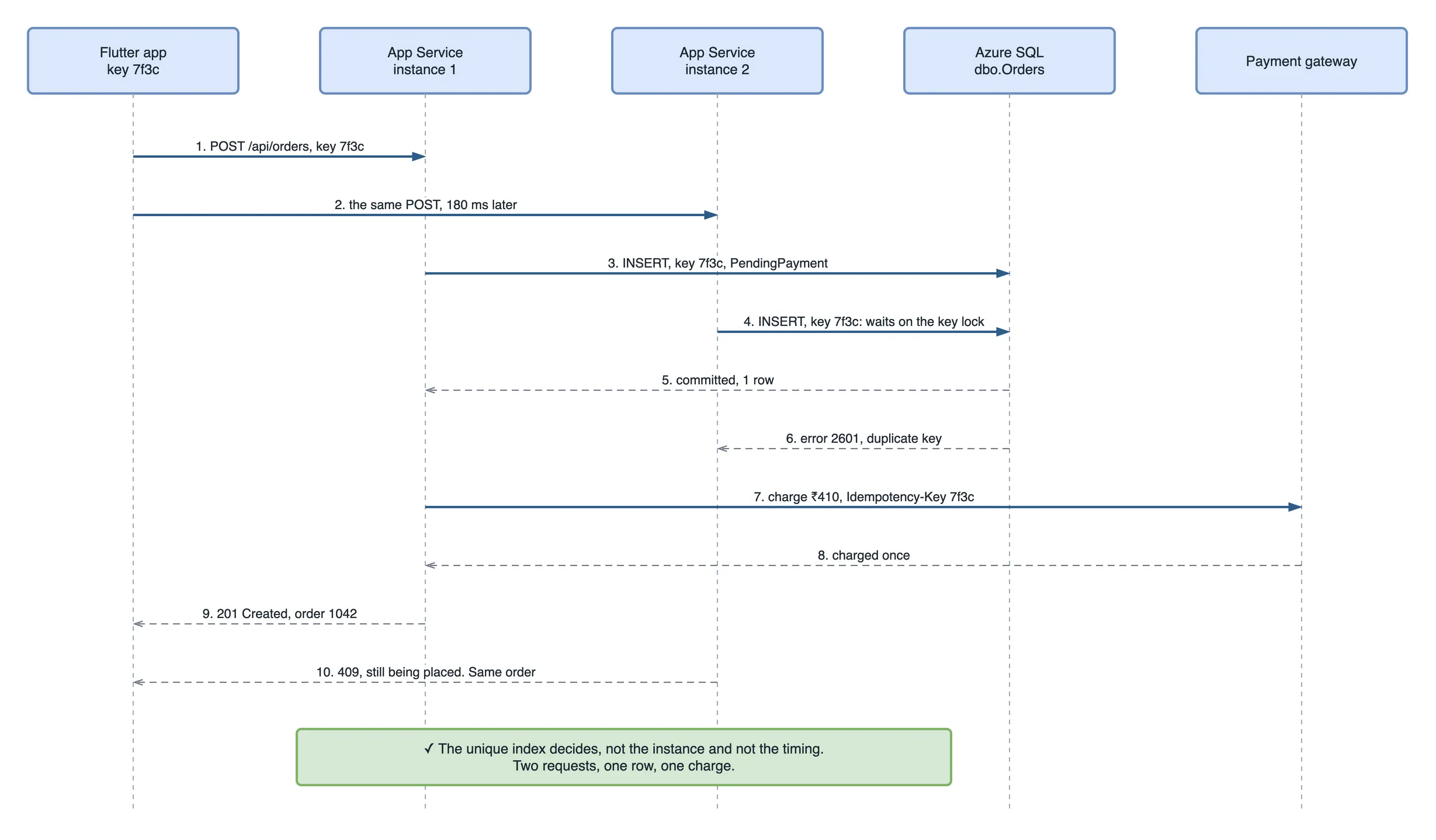
The app can now say “same order”. Something on the server has to act on it. It has to hold when two requests arrive at the same moment on two different App Service instances. An if in C# can’t promise that. A unique index can.
It’s the same lesson as the plates counter in the flash sale that hit the database. Redis could say “probably”, but only UPDATE ... WHERE PlatesLeft > 0 could say “yes”. When money depends on a rule, the rule lives in the database.
The key goes on the order row itself, with a hash of what was ordered:
ALTER TABLE dbo.Orders ADD
    IdempotencyKey uniqueidentifier NULL,
    RequestHash    binary(32)       NULL;   -- SHA-256 of restaurant, lines and total

CREATE UNIQUE INDEX UX_Orders_User_IdempotencyKey
    ON dbo.Orders (UserId, IdempotencyKey)
    WHERE IdempotencyKey IS NOT NULL        -- older orders have no key
    WITH (ONLINE = ON);
Two details matter here. The index is scoped to the user, so one customer can never send another customer’s key and get their order back. And it is filtered, so the millions of orders placed before the fix, which have no key, don’t collide on NULL.
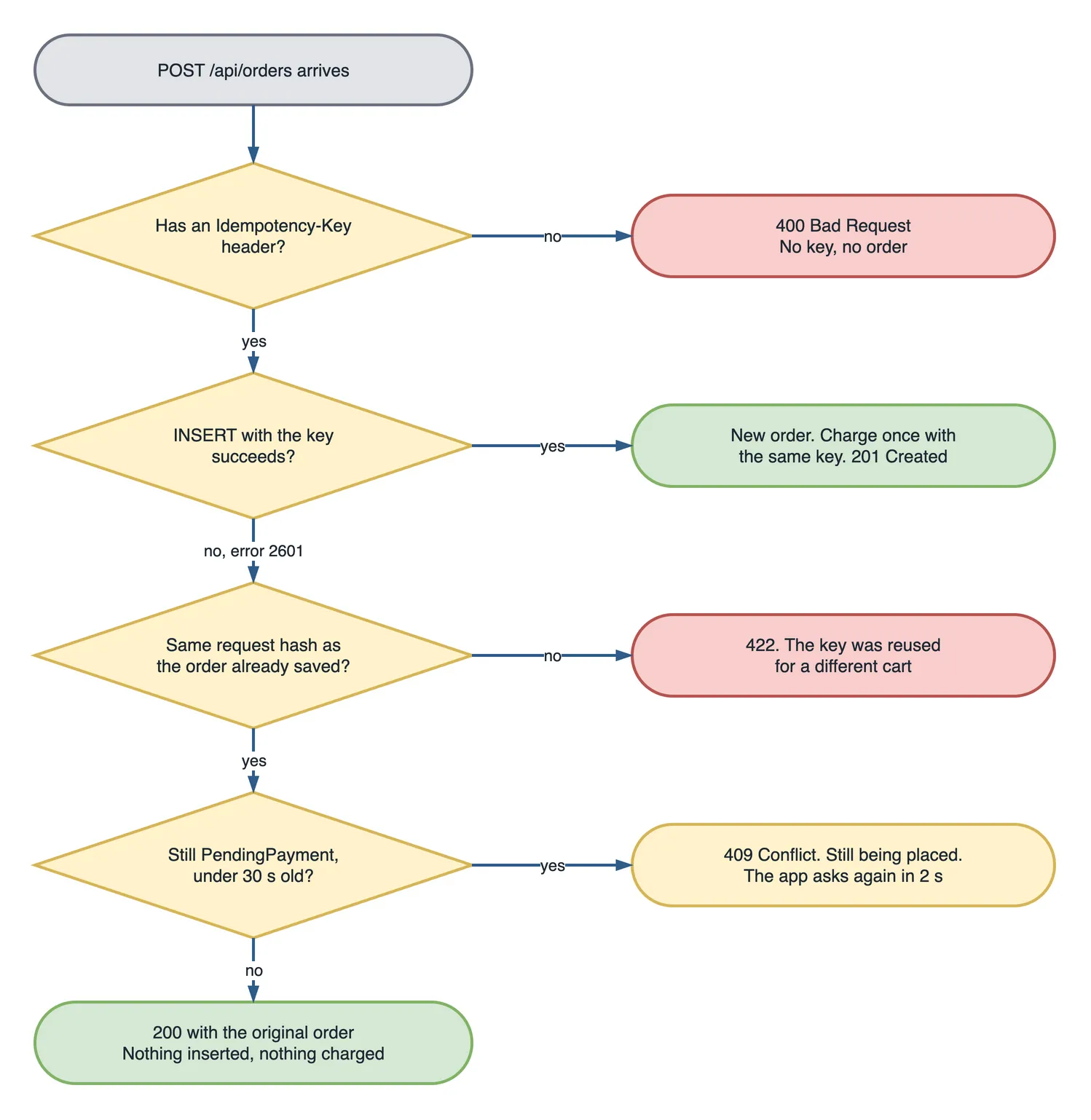
When two inserts with the same key race, SQL Server makes the second one wait for the first transaction’s lock on that key. The moment the first commits, the second fails with error 2601, “Can’t insert duplicate key row”. No timing window, no instance count and no retry policy changes that outcome. One key, one row.
The API catches that error and turns it into an answer:
app.MapPost("/api/orders", async (
    [FromHeader(Name = "Idempotency-Key")] Guid? key,
    PlaceOrderRequest request, ClaimsPrincipal user,
    OrderService orders, CancellationToken ct) =>
{
    if (key is null)
        return Results.Problem("Send an Idempotency-Key header.", statusCode: 400);

    return await orders.PlaceAsync(user.GetUserId(), key.Value, request, ct);
}).RequireAuthorization();
public async Task<IResult> PlaceAsync(string userId, Guid key,
PlaceOrderRequest request, CancellationToken ct)
{
var hash = RequestHash.Of(request); // SHA-256 over restaurant, lines and total
Order order;
try
{
// 1. Claim the key. A short transaction: the order and its lines,
// status PendingPayment. The unique index is the only judge.
order = await _orders.InsertPendingAsync(userId, key, hash, request, ct);
}
catch (SqlException ex) when (ex.Number is 2601 or 2627)
{
// 2. The key is taken, so this is a repeat. Answer it; never redo it.
var existing = await _orders.GetByKeyAsync(userId, key, ct);
if (!existing.RequestHash.AsSpan().SequenceEqual(hash))
return Results.Problem("This Idempotency-Key was used for a different order.",
statusCode: 422);
if (existing.Status != OrderStatus.PendingPayment)
return Results.Ok(existing); // the same order, charged once
if (existing.CreatedAt > DateTime.UtcNow.AddSeconds(-30))
return Results.Problem("This order is still being placed.", statusCode: 409);
order = existing; // stuck mid-payment: resume it
}
// 3. Charge with the same key, so the gateway de-duplicates on its side too.
var charge = await _payments.ChargeAsync(order.Id, order.Total, key.ToString(), ct);
await _orders.MarkPlacedAsync(order.Id, charge.Id, ct);
return Results.Created($"/api/orders/{order.Id}", order with { Status = OrderStatus.Placed });
}Error 2627 is the same violation from a UNIQUE constraint rather than a unique index. Catching both means nobody has to remember which one the table uses.
The payment call sits outside the insert transaction on purpose. Holding a database lock while waiting 11 seconds for a slow gateway would make every retry queue behind it. The row is committed as PendingPayment first, so the key is claimed in milliseconds.
What should the API return for a repeated key?
The original result, with nothing done twice. The rest depends on what the first attempt is doing right now:
| The key has… | Status | The app does |
|---|---|---|
| never been seen | 201 Created | Shows the order |
| a finished order, same request | 200 OK, the saved order | Shows the order, exactly as if the first reply had arrived |
an order still PendingPayment, under 30 seconds old | 409 Conflict | Waits two seconds and asks again, same key |
an order stuck PendingPayment for longer | resumes the charge, 201 | Shows the order |
| a different cart | 422 Unprocessable Content | Reports a bug. This is never the customer’s fault |
| no key at all | 400 Bad Request | Only old app versions hit this; they get an update prompt |
The stuck case is the reason the gateway gets the same key. If the API crashed after charging but before marking the order placed, resuming sends the charge again with the same key, and the gateway returns the first charge instead of taking the money twice.
A declined card is a final answer too. The order is marked PaymentFailed, the app shows the decline, and the next tap starts a new order with a new key.
How efficient is the new design?
Correctness stops depending on timing, instance count or client behaviour, and all it costs is one index seek per order. I’d take that trade every time.
Here is where Friday’s 223 duplicates would have ended up with the fix in place:
| Layer | What it catches | From Friday’s 223 |
|---|---|---|
droppable() in CheckoutBloc | A second tap while the first is still running | the 131 double taps |
| The same key on a retry | A retry after a timeout or a network error | the 92 timeout retries, answered with the saved order |
| Unique index in Azure SQL | Anything the app misses: two tabs, a resent request | the backstop for all of the above |
| Same key at the payment gateway | A charge resent after a crash | the last line, for money |
Side by side, for two Friday dinner rushes:
| That Friday | The next Friday | |
|---|---|---|
| Orders | 38,400 | 41,200 |
| Duplicate orders | 223 | 0 |
| Customers charged more than once | 214 | 0 |
| Refunds | about ₹91,000 | none |
| Work per order in Azure SQL | one insert | one insert, with one extra index seek |
| Extra storage | none | 48 bytes per order, plus the index |
Put simply, duplicates are now zero by construction, whatever the number of taps, retries or instances, because the database allows one row per key. The cost grows with orders, never with retries. A retry is cheaper than an order, in fact: one index seek and one read, no payment call.
When to use an idempotency key, and when not to
Use one on every request that creates something or moves money. Skip it where the operation is already idempotent, and prefer a natural key where the business already has one.
| Endpoint | Key? | Why |
|---|---|---|
POST /api/orders | Yes | Creates an order and takes money |
POST /api/orders/{id}/refund | Yes | Money again, in the other direction |
POST /api/partner/menu-items | Yes, cheap insurance | A duplicate dish on a live menu |
PUT /api/partner/items/{id}/price | No | Setting ₹129 twice leaves it at ₹129 |
DELETE /api/cart/lines/{id} | No | Deleting twice leaves the same cart |
POST /api/orders/{id}/review | Use the natural key | A unique index on (OrderId, UserId) already means one review per order |
Keys stored on the order live as long as the order and cost nothing to keep. If you add a generic IdempotencyKeys table for many endpoints, expire rows after 24 hours; no realistic retry arrives later than that.
Why the obvious fixes were wrong
- “Disable the button.” It already was. It closes the double tap and nothing else.
- “Debounce the button for two seconds.” Same as above, with a slower button.
- “Reject the same total from the same user within 60 seconds.” A check-then-insert race lets both requests through, and it blocks a real second order. You could close the race with
UPDLOCK, HOLDLOCK, and you would still be guessing at intent from the cart instead of being told. - “Lock in the API.” A
lockorSemaphoreSlimholds on one instance. There were three. - “Take a Redis lock on the user.” Closer, but a lock that expires isn’t a guarantee, and it isn’t in the same transaction as the insert. The database row is the record, so the rule belongs there.
- “Increase the timeout.” Fewer retries on a slow evening, but the next network blip brings them back. The retry was never the bug; the missing key was.
The guardrail: one query and one test
With the index in place a duplicate can’t be written, so the query to watch is the one that shows the key doing its job. From Application Insights, per hour:
requests
| where timestamp > ago(1h) and name == "POST /api/orders"
| summarize placed      = countif(resultCode == "201"),
            replayed    = countif(resultCode == "200"),
            stillPlacing = countif(resultCode == "409"),
            keyReused   = countif(resultCode == "422"),
            noKey       = countif(resultCode == "400")
replayed climbing on a slow evening is healthy: those are retries answered without a second order. keyReused above zero pages someone, because it means an app build is reusing keys across different carts. noKey should fall to zero as old app versions age out.
The test that goes into the pipeline fires two requests with one key at the same time and checks the table:
[Fact]
public async Task Two_parallel_posts_with_one_key_create_one_order()
{
    var key = Guid.NewGuid();
    HttpRequestMessage Post() => new(HttpMethod.Post, "/api/orders")
    {
        Headers = { { "Idempotency-Key", key.ToString() } },
        Content = JsonContent.Create(TestCarts.OneBiryani)
    };

    var responses = await Task.WhenAll(_client.SendAsync(Post()), _client.SendAsync(Post()));

    Assert.Single(await _db.OrdersWithKeyAsync(key));
    Assert.Contains(responses, r => r.StatusCode == HttpStatusCode.Created);
}
It runs against a real Azure SQL test database, not an in-memory fake, because the thing under test is the unique index.
System design interview questions from this incident
- A user double-clicks “Pay”. How do you guarantee they’re charged once? A client-created idempotency key, reused on retry, enforced by a unique constraint where the order is written, and passed to the payment provider.
- Why can’t the server generate the idempotency key? Because the server is the side that can’t tell two requests apart. The key has to come from the side that knows they’re the same attempt.
- Two requests with the same key hit two servers at the same millisecond. What happens? The database serialises them on the unique index. One inserts, the other gets a duplicate key error and returns the first result.
- The first request is still running when the retry arrives. What do you return? 409 with a short retry, not a second order and not a hang.
- How is this different from exactly-once delivery in a message queue? It’s the same idea from the receiving side: you can’t stop duplicates arriving, so you make processing one twice harmless.
- When would you not add an idempotency key? On reads, on
PUTandDELETEthat are already idempotent, and where a natural business key already makes the row unique.
What to do on day one, not after the first refund
- Put an
Idempotency-Keyon every endpoint that creates something or moves money, before the first release. - Enforce it with a unique index in the database, not with code that checks first.
- Create the key when the operation starts in the app, keep it across retries, and replace it only on a final answer.
- Pass the same key to the payment provider.
- Run a parallel-request test in the pipeline. Duplicates only show up under concurrency.
Key takeaways
- Disabling the button stops some double taps. It can’t stop retries, tabs or resent requests.
- An idempotency key tells the server “same attempt”. Only the client can create it.
- A unique index on
(UserId, IdempotencyKey)in Azure SQL is the one check that holds across instances and timing. - Return the original result for a repeated key: 200 when done, 409 while running, 422 for a different request.
- Keep the payment call outside the insert transaction, and give the gateway the same key.
The next Friday
A week later the payment gateway has a slow evening again. Its p95 touches nine seconds at 19:50, and the app’s timeout fires for a few hundred customers.
They tap “Place order” again, as they did last week. Application Insights shows the replayed count climbing: 311 by 21:00. Each of those is a retry that got the original order back.
Duplicate orders that night: zero. The support inbox gets one ticket about a late rider, and nobody from the finance team asks about refunds.