A customer opened MSDevBuild Eats and typed “spicy food under RM20” into the search box.
The app returned nothing. Not a weak match, not a wrong price: an empty state, on a catalogue that has seventeen spicy dishes under RM20 sitting in it. Nothing was broken. The search worked exactly as designed, and the design was the problem.
This series puts Azure AI Foundry agents on top of an application that already exists, with all of its roles, endpoints and awkward history intact. No greenfield, no toy chatbot. The app is MSDevBuild Eats, a Flutter food delivery platform with three role experiences shipped from one codebase: customer ordering, restaurant partner dashboard, delivery rider queue.
Part 1 mapped the platform: what Foundry is, which services live inside it, and when you do not need it. This part is the other half of the groundwork, and the last one with no code to copy. It covers why the feature was worth building, what an agent actually is underneath, and the architecture the rest of the series fills in. Skip it and the later parts will read like configuration.
Why does a search box fail the customer who knows what they want?
This is the screen that customer was looking at:
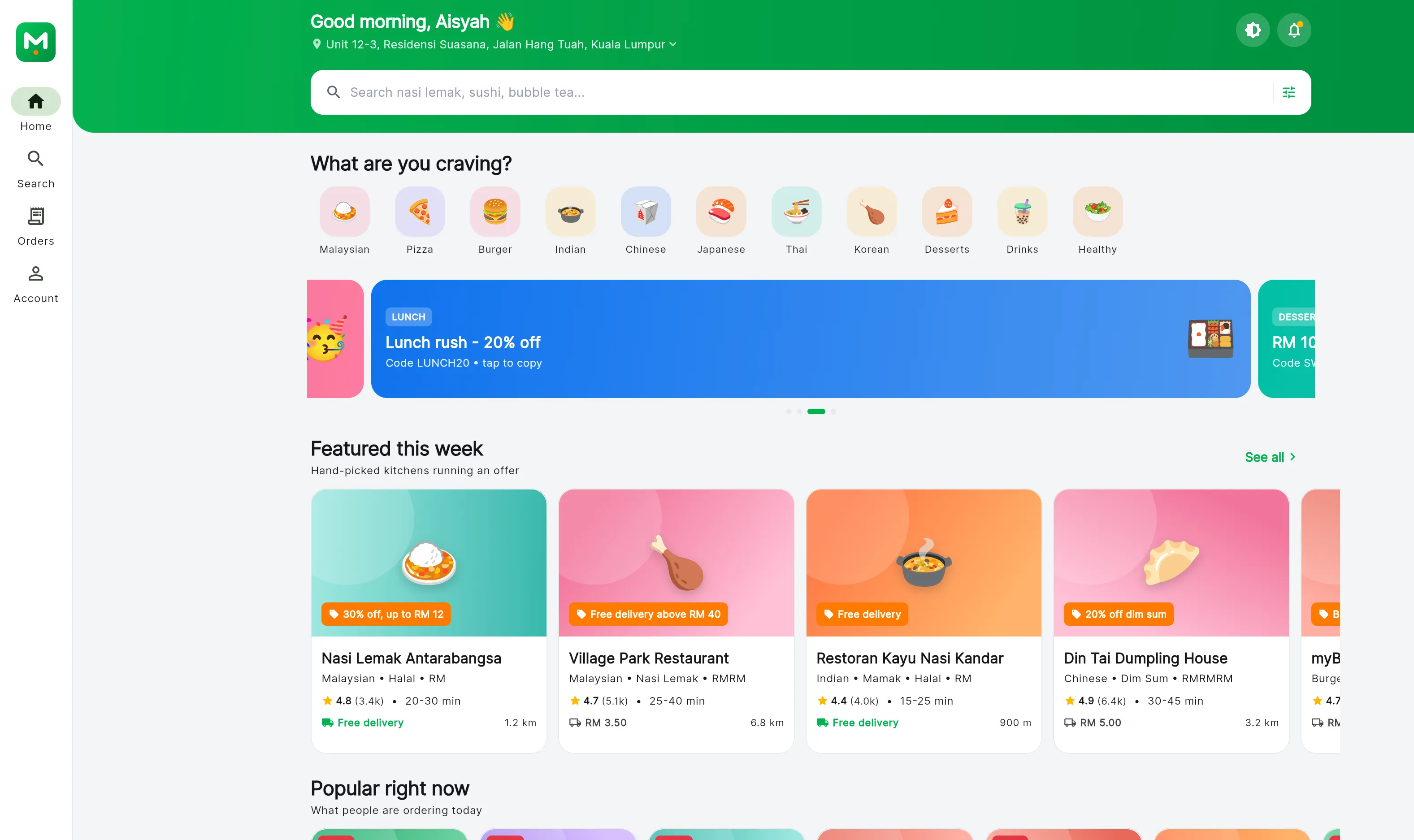
Everything on it is a category or a card. The cuisine chips answer “what kind of food”, the cards answer “which restaurant”, and nowhere on the screen is there a way to say “spicy” or “under RM20”. So the customer used the one control that accepts a sentence, and got this:
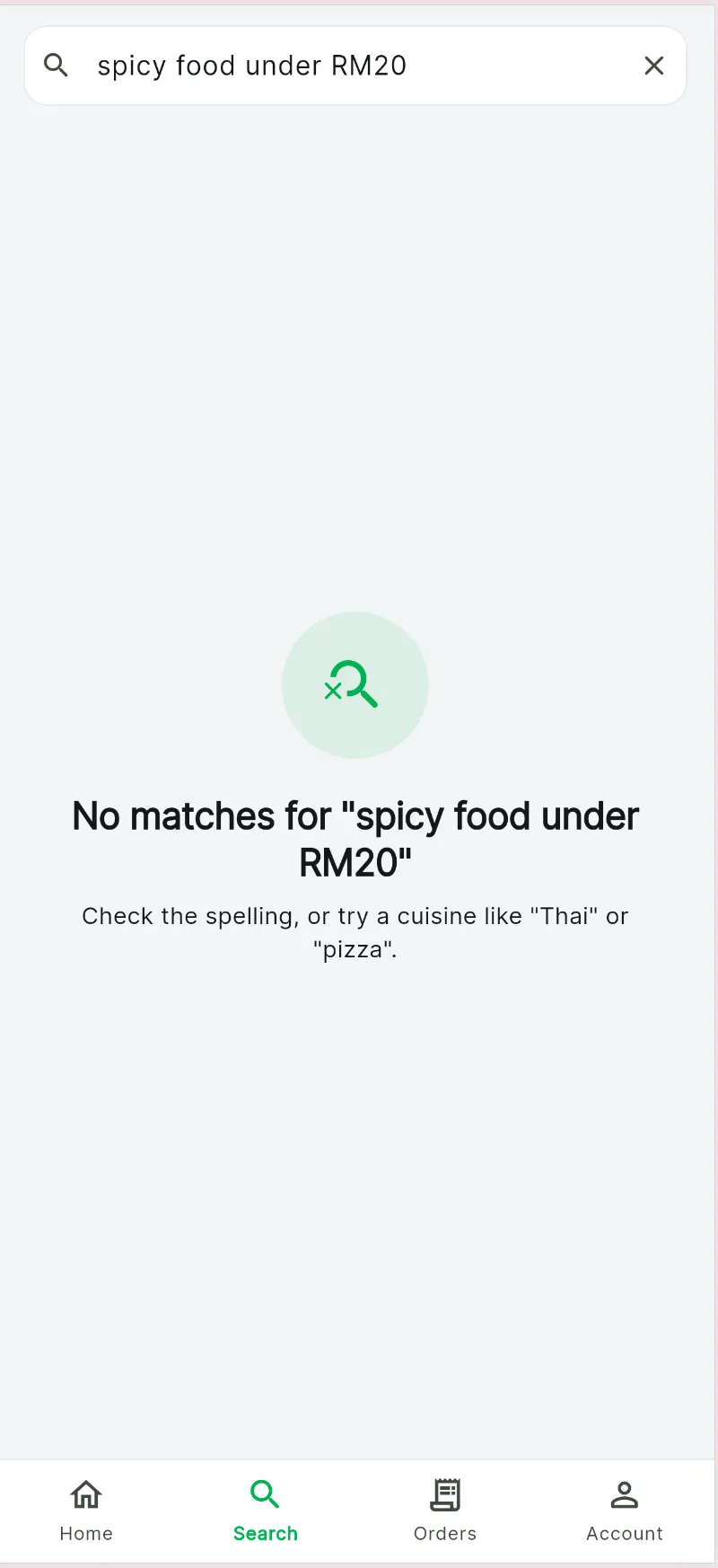
Read the helper text under the icon, because the app is being honest about its own model: check the spelling, or try a cuisine like “Thai” or “pizza”. It is asking the customer to stop describing what they want and name a category instead. That request is the entire gap this series closes.
Open lib/domain/repositories/catalog_repository.dart and the shape of the failure is in the contract:
/// Free-text search across restaurant names, cuisines and dish names.
Future<Result<SearchResults>> search(String query);

Future<Result<List<Restaurant>>> getRestaurants([RestaurantFilter filter]);
One line of intent, and in lib/data/repositories/catalog_repository_impl.dart one line of implementation behind it:
final String needle = query.trim().toLowerCase();

final List<FoodItem> dishHits = foods
    .where(
      (FoodItemModel f) =>
          f.name.toLowerCase().contains(needle) ||
          f.description.toLowerCase().contains(needle) ||
          f.ingredients.any((String i) => i.toLowerCase().contains(needle)),
    )
    .toList(growable: false);
The whole sentence becomes one needle. “spicy food under RM20” is tested verbatim against every dish name, description and ingredient list, and nothing is named that, so the empty state is the correct answer to the question as asked. Shortening the query does not rescue it either: search for “spicy” alone and you reach the five dishes whose description happens to use the word, out of the twenty-nine the catalogue has actually flagged as spicy, and price never enters the question at all.
Filtering is a separate object, RestaurantFilter, offering categoryId, sort, freeDeliveryOnly, openNowOnly, minRating and maxPriceLevel. Now look at what a dish already knows about itself, in lib/domain/entities/food_item.dart:
final double priceMyr;
final double? discountPriceMyr;
final bool isVegetarian;
final bool isSpicy;

/// 0-3 chillies.
final int spiceLevel;
final List<String> allergens;
final int prepMinutes;
The data to answer “spicy food under RM20” has been sitting in the entity the whole time. isSpicy is a boolean on every dish. effectivePrice already accounts for discounts. Run those two conditions over the seed catalogue and seventeen dishes come back, which is seventeen more than the customer saw. What is missing is a path from a sentence a human said to those two fields, and no filter on the screen can stand in for it: maxPriceLevel is a 1-to-3 price tier, not ringgit.
The traditional fix is a product backlog. Add a spice toggle. Add a price slider. Ship it, and next month somebody asks for “vegetarian, no peanuts, ready in 20 minutes, near my office”. That is four more controls on a screen that is already full, and it is the fifth request in a queue that never empties, because natural language has more combinations than a filter panel has room for.
The problems that justified the build
The same shape of gap sits on all three dashboards, and seeing it three times is what turned this from an experiment into a project.
| Role | What they ask | What the app offers today |
|---|---|---|
| Customer | “Find spicy food under RM20” | Whole-phrase string match, so an empty state |
| Customer | “Order my usual dinner” | Order history list, manual re-add to cart |
| Customer | “Where is my delivery?” | A tracking screen, if they can find the order |
| Restaurant partner | “Which menu items are performing well?” | PartnerStats has seven days of total revenue, nothing per item |
| Restaurant partner | “Show today’s pending orders” | pendingOrders as a count, then a list to scroll |
| Delivery rider | “Which delivery should I complete first?” | getOrdersForRider() returns a list sorted by newest first |
Five features, three dashboards, three different teams and three different sprints. Or one agent with access to the APIs that already exist.
The rider row is the one that settled the argument. Nobody had built delivery prioritisation and nobody was going to; it sat below the line every quarter. But the data to rank a queue is already in the Order entity: timeline holds an audit trail of OrderEvent, deliveryAddress carries latitude and longitude, and etaMinutes is right there. The feature was not missing because it was hard. It was missing because it needed a screen, and a prompt is cheaper than a screen.
What an AI agent is, and what it is not
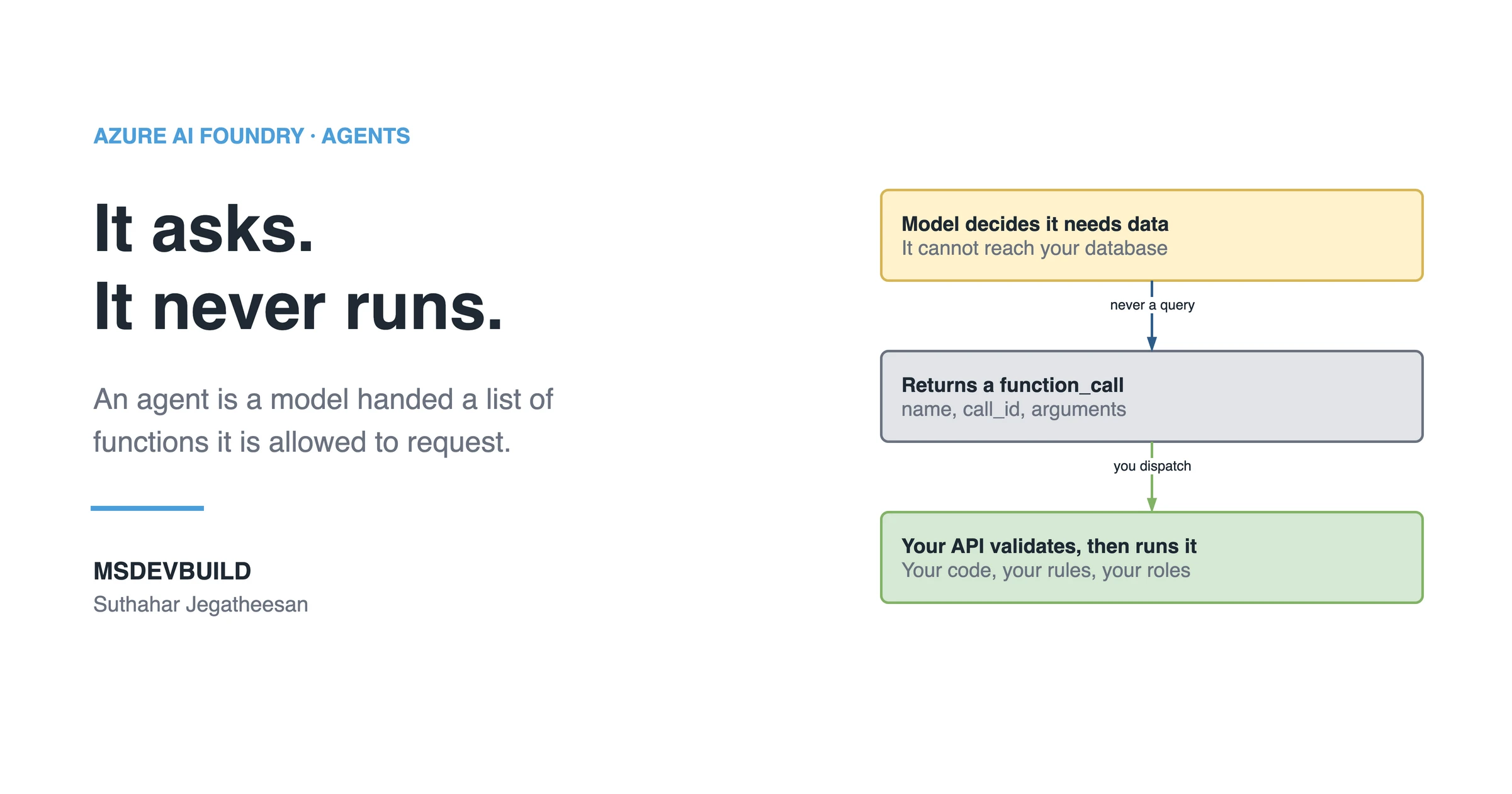
An agent is a model that has been given a set of functions it is allowed to ask you to run.
That is the whole idea, and everything else is plumbing around it. The model does not run your code. It cannot reach your database. What it can do, when it decides the user’s request needs data it does not have, is stop generating text and instead emit a structured request: call search_menu with {"spicy": true, "maxPriceMyr": 20}. Your server sees that request, runs the actual method, hands back the result, and the model continues from there.
Five parts make up an agent in Foundry, and it helps to name them separately because they fail separately.
The model. A deployment from the Foundry catalogue. This is the reasoning. Swapping it changes cost, latency and how reliably tools get picked, and nothing else in your code.
The instructions. The system prompt attached to the agent definition. This is where business rules live: currency is Malaysian Ringgit, never invent a dish, never quote a delivery time you did not get from a tool.
The tools. JSON schemas describing functions the model may request. Name, description, parameters. The description is not documentation, it is the routing logic, because the description is how the model decides which tool a sentence belongs to.
The memory. A conversation, which is a server-side object holding turn history. “And what about vegetarian ones?” only works because the previous turn is still attached.
The action. Your code, running in your API, under your identity rules. This is the only part that touches real data, and it is the only part I fully trust.
What an agent is not: a chatbot with a system prompt. A chatbot converts text to text. The moment a tool call reaches create_order, money moves and a restaurant starts cooking, and the engineering standard has to change accordingly.
How does the agent decide to call your API?
Here is the loop, in order, for one customer sentence.
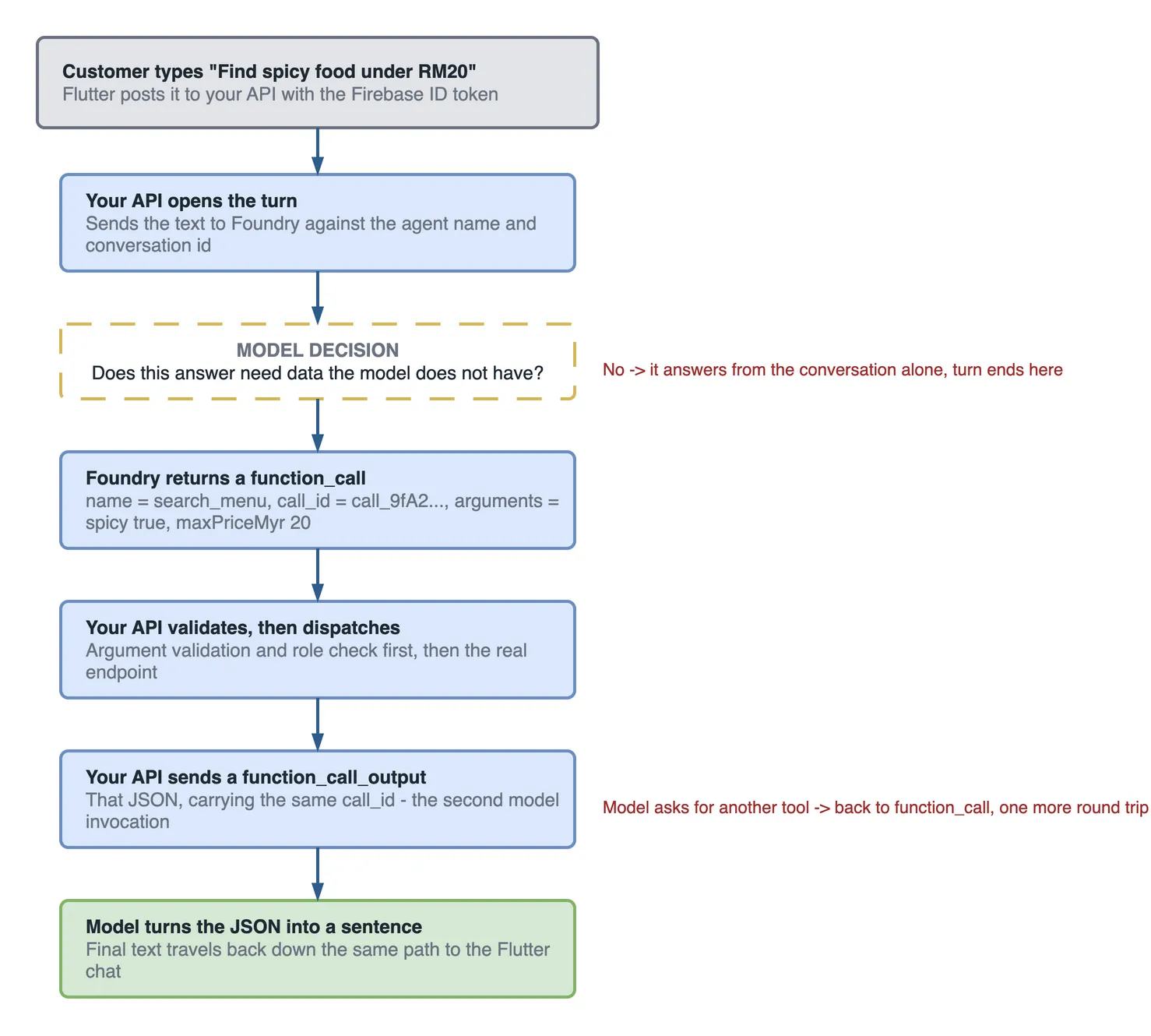
The three middle boxes are a second round trip. That is what people miss when estimating cost and latency: one user turn with one tool call is at least two model invocations, not one, and a turn that needs two tools costs three.
Two properties of this loop matter more than the rest.
The model only ever sees what your tool returns. If your tool returns a dish without its internal cost price, the model cannot leak the cost price. Data minimisation at the tool boundary is real security, not decoration.
The model chooses the arguments, and arguments are user-influenced input. That maxPriceMyr value arrived, indirectly, from a stranger typing into a text box. Validate it exactly as you would validate a query string.
What the architecture looks like end to end
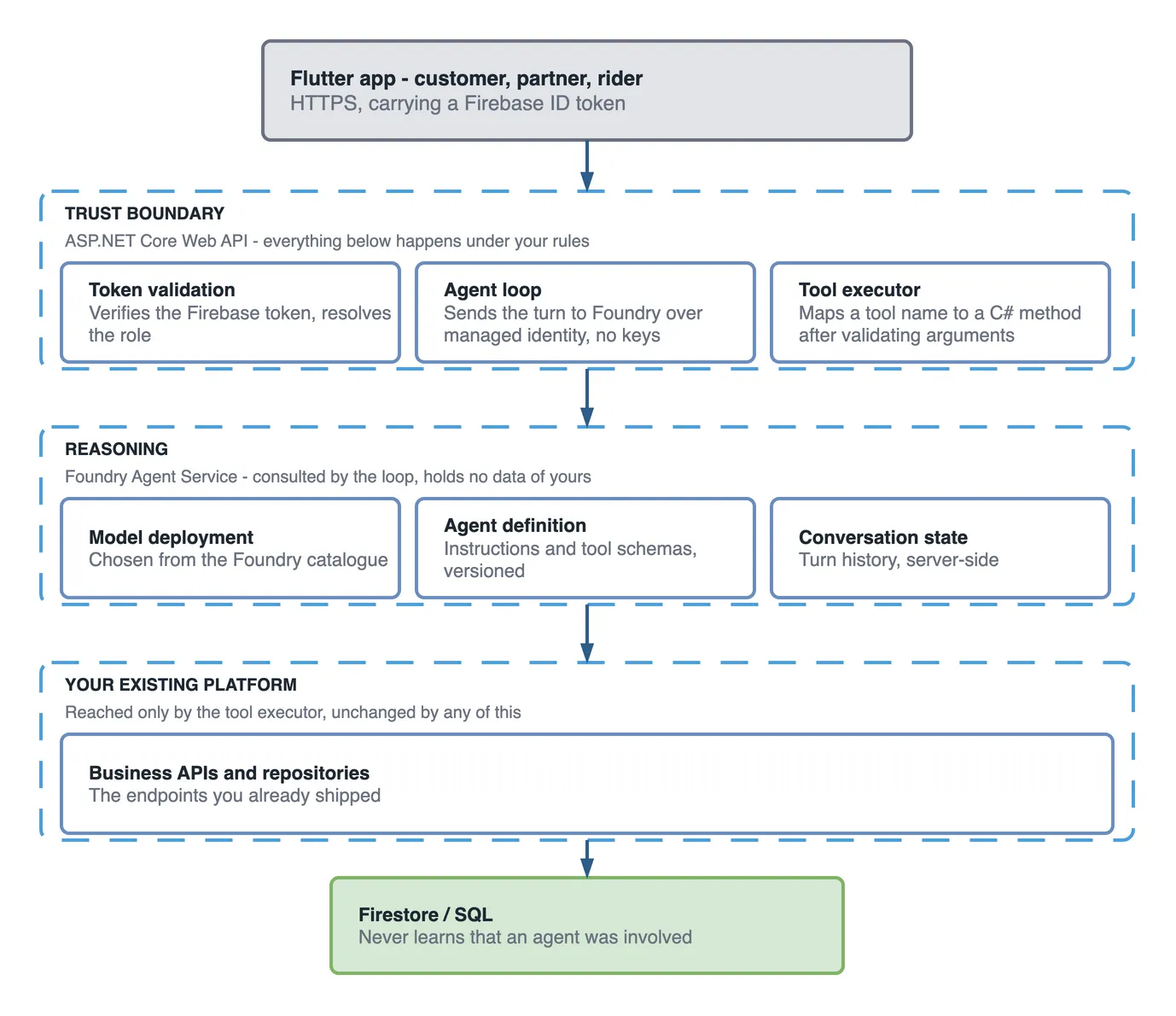
The one thing an ASCII sketch of this always gets wrong is the middle. Foundry is not a stage the request passes through on its way to your data. Your API calls out to it and gets a reply, then carries on to the endpoints itself, which is why a leaked model response cannot become a database read.
The component that earns its place, then, is the ASP.NET Core layer, and it is worth being explicit about why, because the obvious shortcut is to let the Flutter app talk to Foundry directly.
Do not do that. Calling Foundry from the mobile client means shipping a credential that can reach your agent to every device on the internet, and it means tool results get assembled on a machine you do not control. Every meaningful control in this design lives in that API layer: it validates the user’s token, decides which tools that user’s role may even see, injects the user’s identity into tool calls so the model never handles identity, and produces the logs you will want when somebody asks what the agent did last Tuesday.
The other components, briefly. Flutter owns presentation and holds the auth token. Foundry Agent Service owns the model, the agent definition as a versioned resource, and conversation state. The tool executor is a small dispatch layer in your API mapping a tool name to a C# method. Business APIs are the endpoints you already shipped, unchanged. The database never learns that any of this happened.
If you have built a retrieval pipeline before, the grounding instinct carries over from building a RAG pipeline in .NET. The difference is that retrieval reads while an agent acts, and acting is what changes the security model.
What comes before any code
The reference app has no server, and every tool an agent calls should be a thin wrapper over one tested API method. So the work starts with two decisions, not with a prompt: which model each step of the pipeline actually needs, covered in choosing the right model in Microsoft Foundry, and which API methods the agent will be allowed to ask for.
Key takeaways
- An agent is a model plus tool schemas plus instructions. Your API still does all the work.
- Reach for an agent when users ask in sentences that combine constraints your UI cannot hold, not when a filter would do.
- The best agent features are usually the ones already answerable from data you have, that never justified a screen.
- One user turn with one tool call costs at least two model invocations. Plan latency and budget around that.
- Never let a mobile client call Foundry directly. The API in the middle is where identity, authorization and logging live.